
SwiftData Basics — Brews That Survive App Restarts
Until this lesson, every brew you logged disappeared the moment you killed the app. The recentBrews array lived in UserPreferences, and UserPreferences lived in memory. Quit the simulator, brews gone. Real app, no.
SwiftData changes that with three macros and a container. @Model marks a class as persistable. @Query lets a view read from the store. @Environment(\.modelContext) gives a view the handle to insert and delete. The whole stack is wired up by attaching a single .modelContainer(for: Brew.self) modifier to the App.
This is the lesson where BrewLog crosses from “demo” into “real app.” After this, your brews persist. Quit the app, restart, they’re still there.
The model class
Up to this point, Brew was a struct. SwiftData needs classes — and a macro to wire up persistence on them.
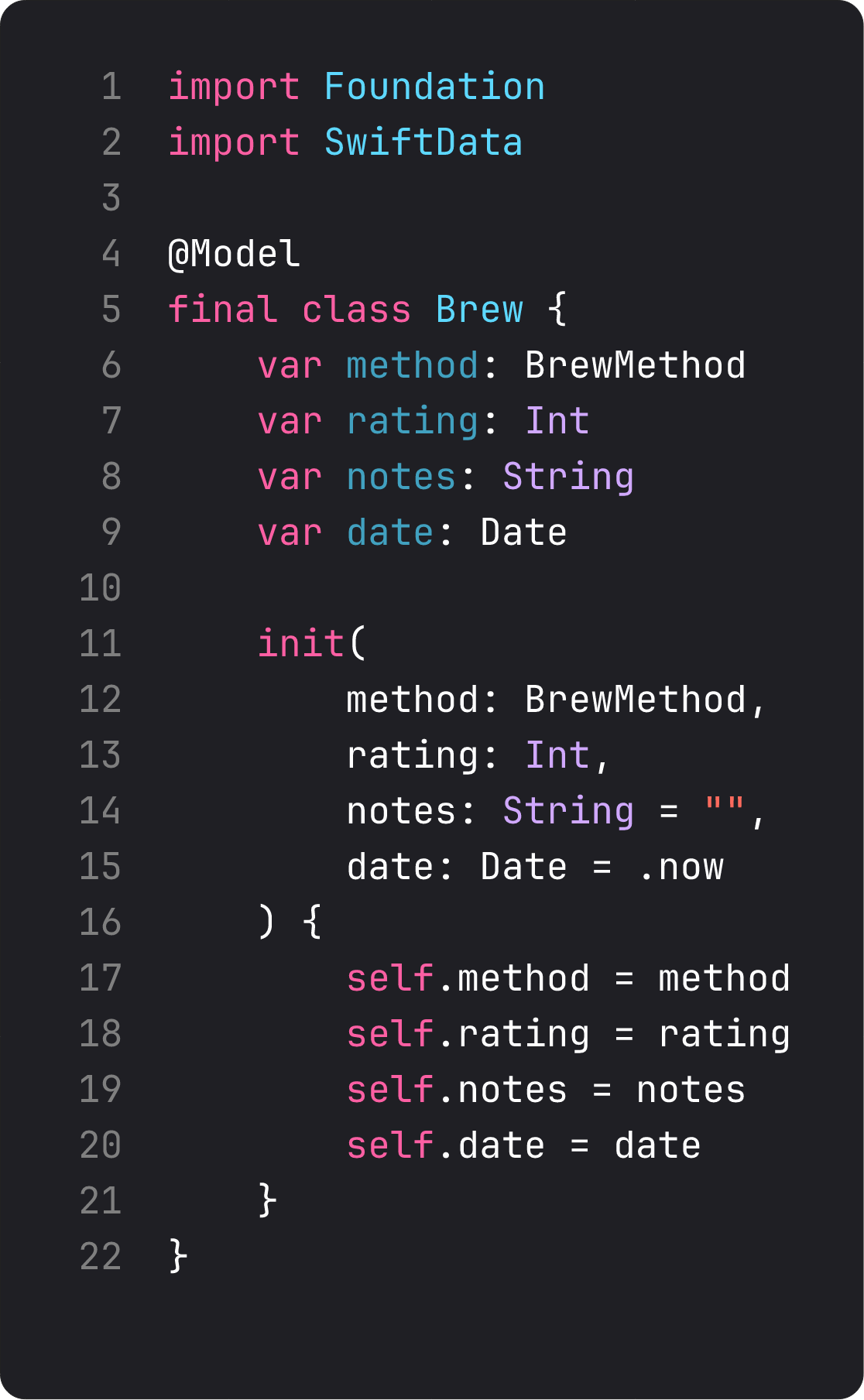
What @Model does for you, behind the scenes:
- Adds storage and observation tracking to every
varproperty. Reads route through SwiftData; writes are persisted on the next save. - Auto-conforms to
Identifiablewith aPersistentIdentifier(used byList,ForEach,NavigationStack). - Auto-conforms to
Hashable, which is what NavigationStack needs for value-based navigation. The destination registration we wrote in lesson 13 (navigationDestination(for: Brew.self)) keeps working unchanged. - Generates
init(...)if you don’t write one. We write our own here for clarity and to provide defaults.
Two important rules:
- Always
final classfor@Modeltypes. Inheritance with SwiftData is fragile. Avoid it. - Persisted property types are limited: primitives (Int, Double, String, Bool, Date, UUID, Data), enums with raw values (Codable), other
@Modeltypes (relationships), and arrays/sets of those. Custom structs need to be Codable.
Our BrewMethod enum gets Codable conformance (added in this lesson) so SwiftData can serialize it. Single line of conformance, free.
The container at the App
SwiftData needs a container — the persistence backbone. You attach one modifier to the WindowGroup and it propagates a ModelContainer and a ModelContext through the environment for every view to use.
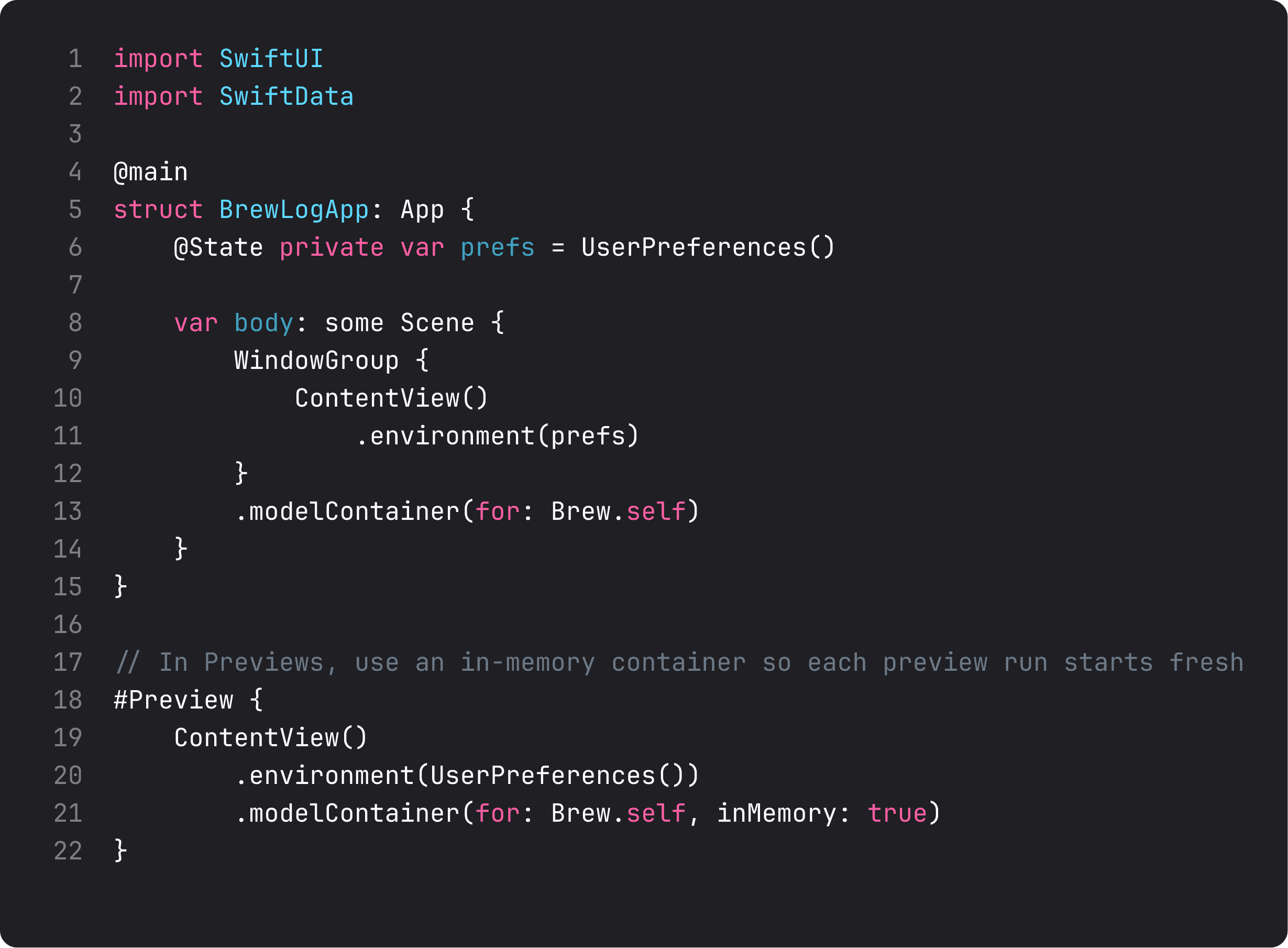
One line — .modelContainer(for: Brew.self) — and SwiftData is fully wired:
- A persistent SQLite store is created in the app’s sandbox on first launch.
- Migrations between schema versions happen automatically (until they don’t — we’ll cover that in Course 2).
- The
ModelContextis injected into the environment for every descendant view to use.
The Preview gets inMemory: true — same wiring, but the store is volatile and resets on every preview run. Always use in-memory containers in previews. Otherwise the preview pollutes your dev simulator’s data.
@Query and ModelContext — read and mutate
Inside views, @Query reads from the store. @Environment(\.modelContext) is the handle to mutate.
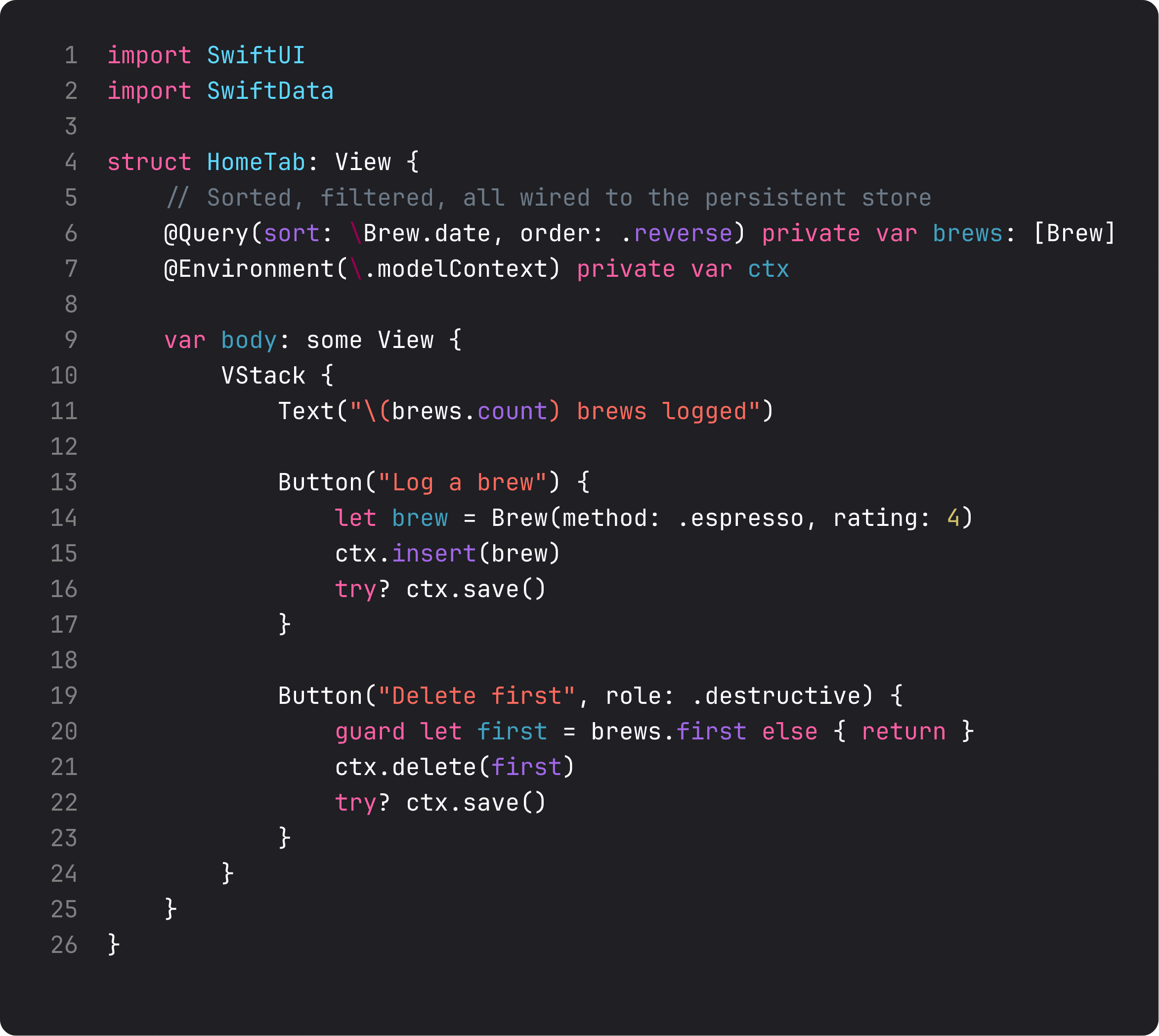
The pattern in three lines:
@Query(sort: \Brew.date, order: .reverse) private var brews: [Brew]— auto-fetches all brews, sorted by date (newest first). The\Brew.dateis a key path; SwiftData uses it to issue an efficient SQL query.@Environment(\.modelContext) private var ctx— pulls the context from the environment. Every view that wants to insert or delete grabs this.ctx.insert(brew)/ctx.delete(brew)— the mutation API. Calltry? ctx.save()after mutations to persist immediately. (SwiftData also auto-saves on backgrounding; explicitsave()is for “make sure this is durable now.”)
@Query can be parameterized further:
predicate:— filter to only matching items (e.g. brews from this week)sort:— multiple sort descriptorsanimation:— animate changes when items insert/delete (sweet for lists)
For BrewLog right now we just want all brews, newest first. Three lines. Done.
What changed in BrewLog this lesson
The structural diff is bigger than usual but mostly mechanical:
Brewwent from struct to @Model class. Its API didn’t change.BrewMethodgotCodableconformance. Required for SwiftData to persist enum values.UserPreferences.recentBrewswas removed. Brews are no longer stored in preferences — they live in SwiftData.UserPreferences.weeklyCountwas removed too. It’s now derived from a query that filters brews by date.HomeTabadopted@Queryand@Environment(\.modelContext). Where it used to readprefs.recentBrews, it now reads the queriedallBrews. Where it calledprefs.logBrew(), it now callsctx.insert(...).NewBrewSheetuses the context to insert. Save flow: build aBrew, insert, save, dismiss.BrewLogAppgot.modelContainer(for: Brew.self). One line.
The simulator demo for this lesson does something we couldn’t show before: log two brews, kill the app, relaunch, brews are still there. That’s the proof persistence works.
A trap I see weekly: in-memory state pretending to be persistence
Common LLM-generated “persistence” pattern:
@Observable
class BrewStore {
    var brews: [Brew] = []  // ← in memory, lost on kill

    func save() {
        // ... empty body, or "TODO: save to disk"
    }
}
The class looks like persistence — has a save() method, holds the data, gets passed via environment. But the data lives in RAM. Kill the app, gone.
The other common variant: encode the array to JSON, save to UserDefaults. Works for tiny apps. Falls over the moment you have:
- More than ~1000 items (UserDefaults isn’t a database)
- Relationships between models (now you’re hand-rolling foreign keys)
- Queries that aren’t “give me everything”
- Multi-table operations
- Migrations
SwiftData solves all of those for you. Per the ThinkBud team’s experience: we built ThinkBud’s brain-map content store on SwiftData from day one and it scaled to thousands of imports per user without us writing migration logic, foreign keys, or batch-update code. The point isn’t “use the new shiny” — it’s “use the right tool” so you don’t end up rewriting persistence three times.
For a 50-brew tracker like BrewLog, you could technically get away with @AppStorage + JSON. We use SwiftData anyway because it scales gracefully when this app inevitably grows.
What it looks like running
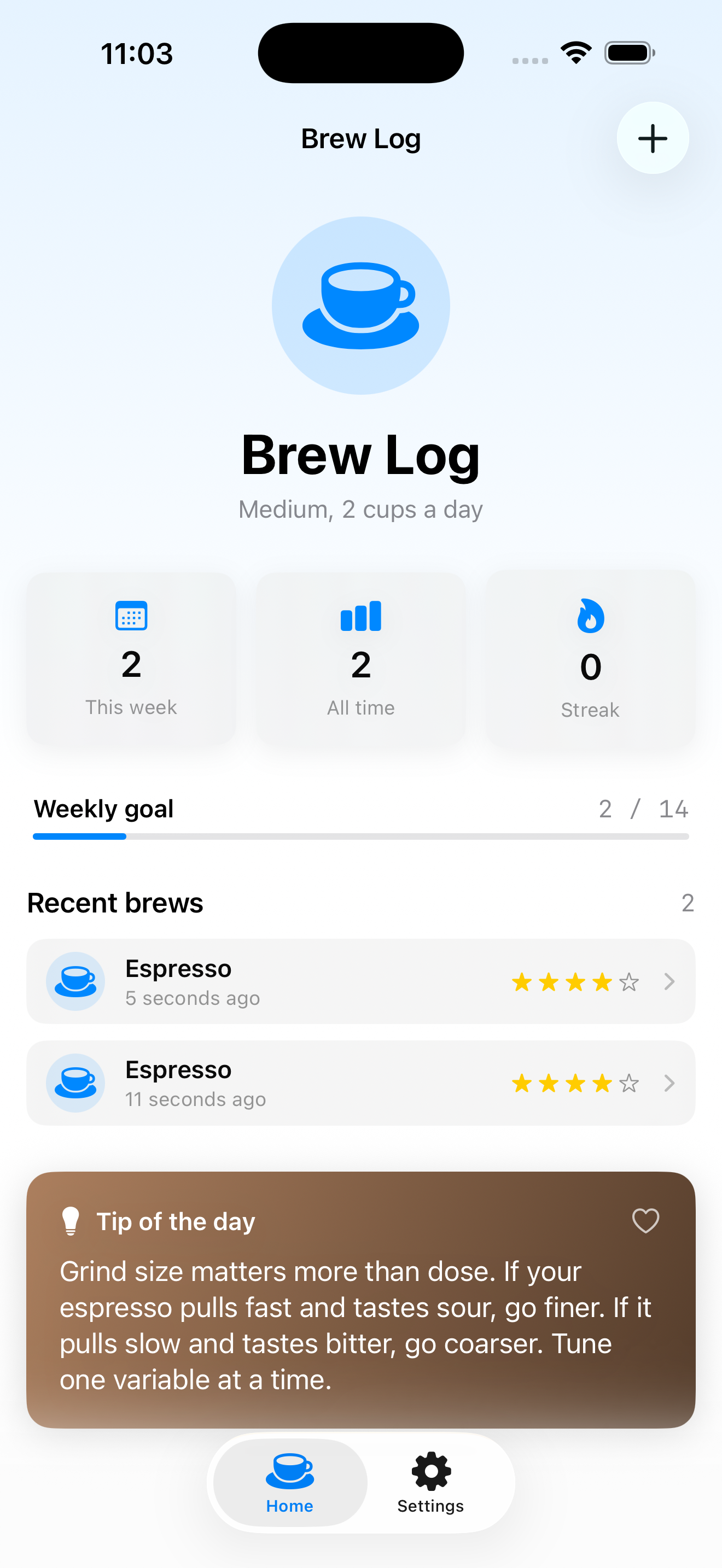
The video logs two brews via the sheet, terminates the app, relaunches, and the recent brews are right where they were. That’s the win — same screen, same data, no in-memory hand-waving.
Takeaway
@Model for the class. .modelContainer(for: …) at the App for the store. @Query to read. @Environment(\.modelContext) to insert/delete. SwiftData handles SQL, migrations, observation, and view invalidation. Use in-memory containers in previews. Always final class your models.
Persistence is the last big technical piece. One more lesson to ship.
Next lesson: dark mode pass, Dynamic Type, VoiceOver, app icon, and the App Store ship checklist. We finalize Brew Log v1 — the MVP this whole course was building toward.
NativeFirst Team
EditorialThe NativeFirst team — engineers and designers building native Apple apps and writing the courses we wish we had when we started.
Comments
Leave a comment