
Lists, Empty States, and AsyncImage — Real Data on Screen
This is the lesson where BrewLog stops faking it. Up to now weeklyCount was just a number — we never tracked which brews. From this lesson on, every tap on Log a brew appends a real Brew to a real list, with method, date, and rating. The home screen grows a “Recent brews” section that shows them. Tap-and-hold to delete one.
Three components do most of the work in iOS apps that show data: List (or ForEach for lighter cases), ContentUnavailableView (the empty state the system styles for you), and AsyncImage (load images from a URL with proper loading/success/error states). We cover all three.
List with sections and swipe actions
List is SwiftUI’s flagship table-style component. Sections, separators, swipe actions, deletion, and the system styling — for free.
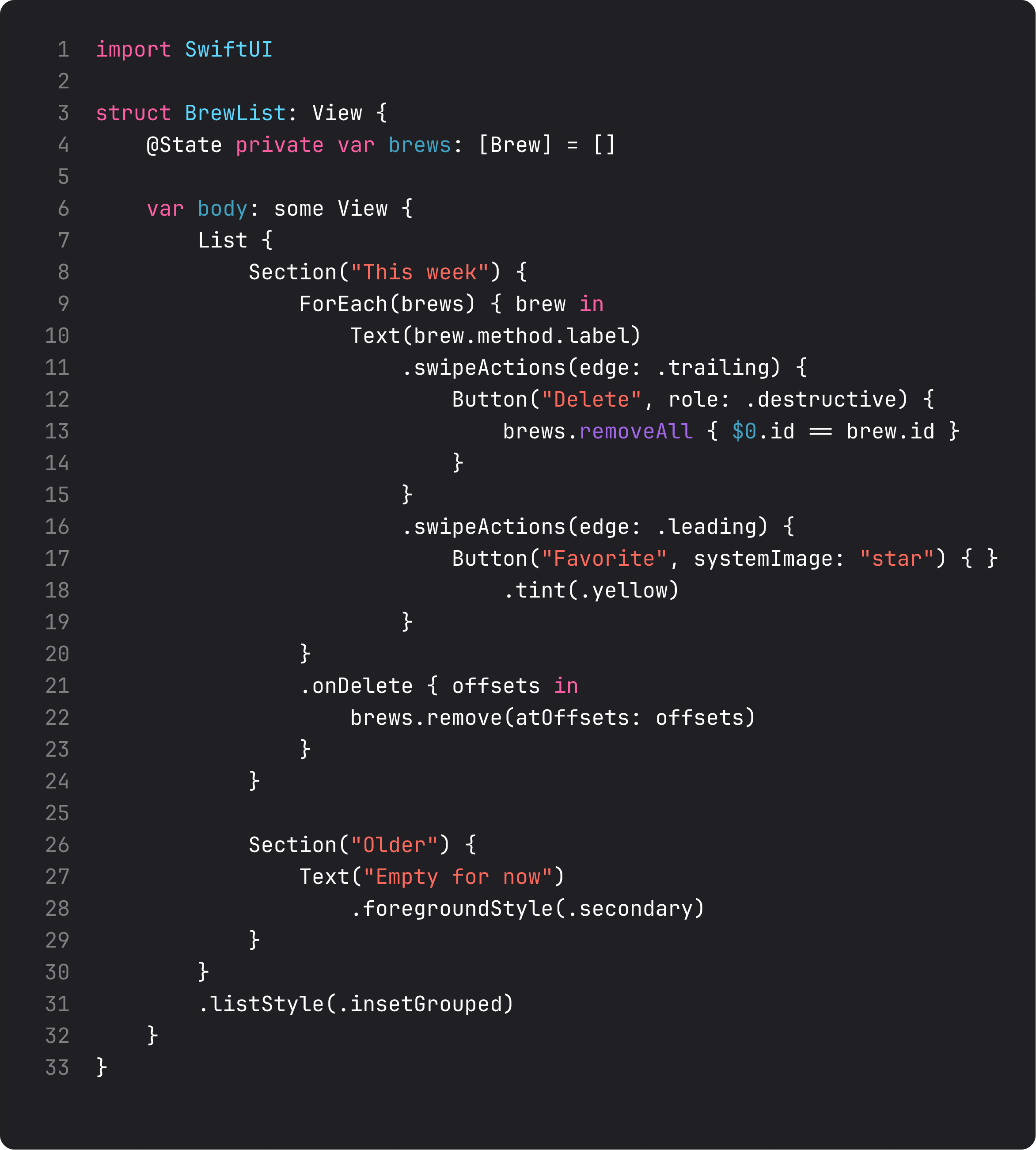
Things to call out:
Section("This week") { ... }— a labeled group. The string becomes the section header. Use sections to chunk a long list into scannable pieces..swipeActions(edge: .trailing)— swipe-from-right buttons. Up to three buttons. The first becomes the “full swipe” action. Addrole: .destructivefor red color and proper VoiceOver semantics..swipeActions(edge: .leading)— swipe-from-left buttons. Same rules. Use for non-destructive actions like favorite, archive, mark-as-read..onDelete— the system bulk-delete behavior, used withEditButtontoolbars. Different code path fromswipeActions. Modern apps lean on swipeActions;onDeleteis mostly for compatibility with the Edit menu pattern..listStyle(.insetGrouped)— gives each section a rounded card. Other styles:.plain,.grouped,.sidebar,.inset.
A word of warning: List brings its own scroll behavior. Don’t put a List inside a ScrollView — they fight, you lose. If you’re already inside a ScrollView (like BrewLog’s home) and need a list-shaped section, use ForEach directly. We’ll do exactly that for the recent-brews section in BrewLog. Lists become natural once we add NavigationStack in lesson 13 and split the home into multiple screens.
ContentUnavailableView — the empty state the system styles for you
Every list eventually has a “nothing here” state. The vibe-coded version is usually a centered Text("No items"). The system has had a proper component for this since iOS 17:
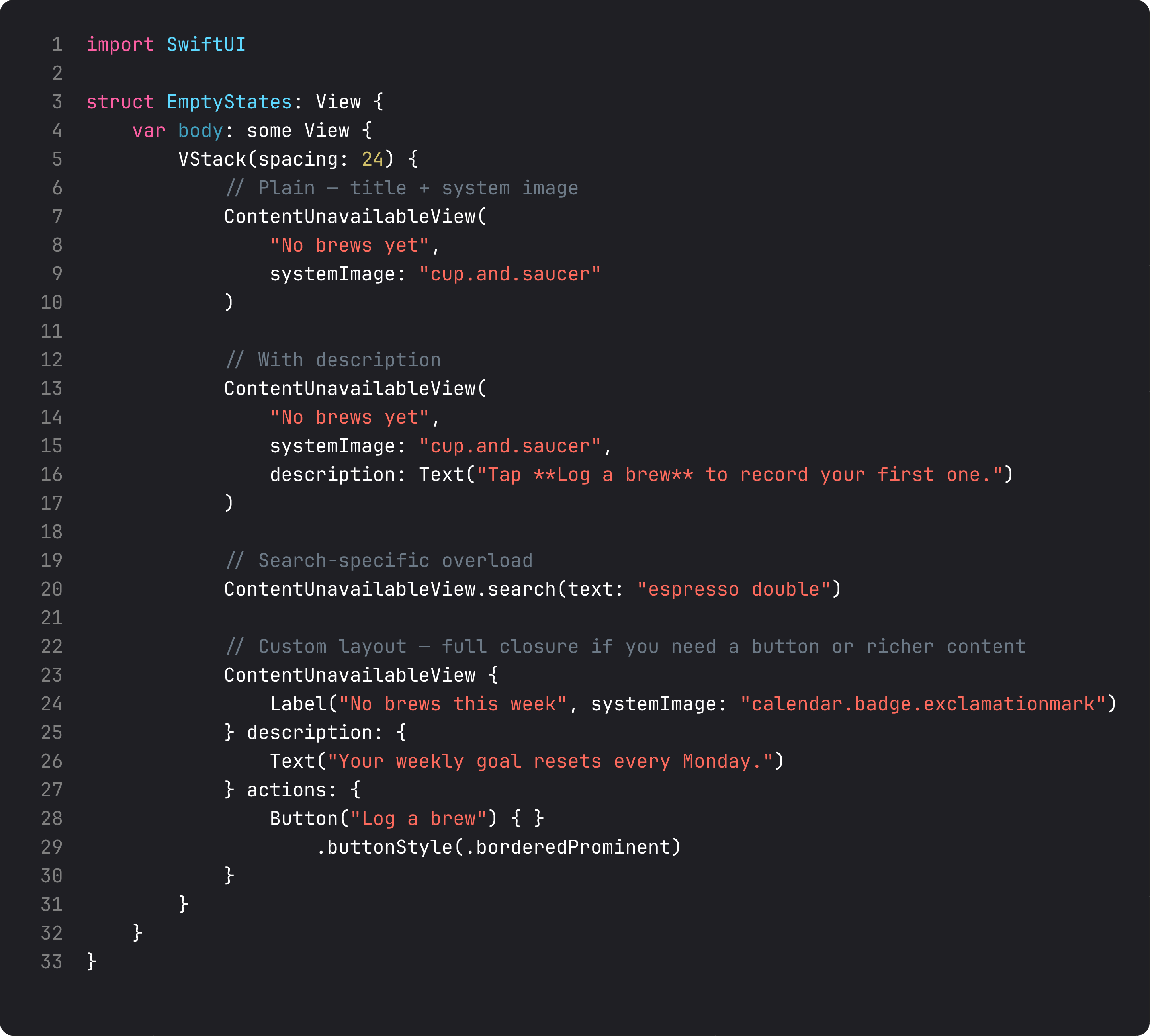
Four shapes ranked by complexity:
- Title + image — the simplest empty state. One line, one icon. Looks like the Apple Music empty library.
- Title + image + description — adds context. Description supports markdown so
**bold**works inline. .search(text:)— purpose-built for “no results” inside.searchable. Pre-styled with a magnifying glass icon and the searched text. Use this exact form when you’re inside a.searchablemodifier.- Custom layout closure — full control over label, description, and actions. Add a button to recover from the empty state (“Log a brew”, “Pick a country,” etc.).
The system handles dark mode, dynamic type, accessibility traits, and centering for you. A custom empty-state Text replacement is almost always worse. ContentUnavailableView is one of the few “use the system component, period” rules in modern iOS.
BrewLog’s empty state is the title-image-description form: “No brews yet · cup-and-saucer icon · Tap Log a brew to record your first one.” The bold-with-asterisks renders correctly because Text parses markdown by default.
AsyncImage — load, succeed, fail
AsyncImage(url:) loads a remote image. Default behavior: a tiny placeholder while loading, fade in when ready. That’s enough for 50% of cases. The other 50% need control.
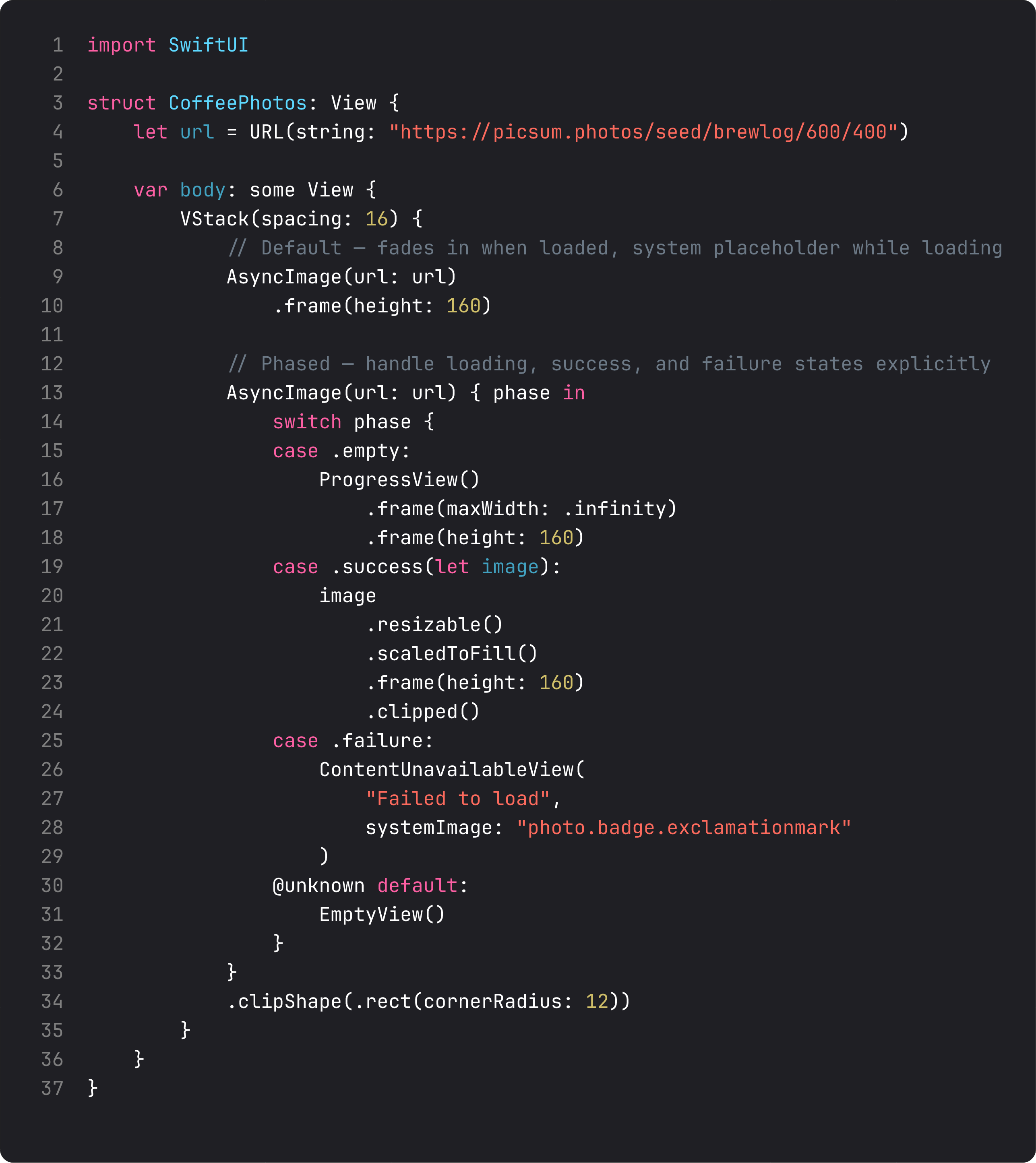
The phased form gives you three states to handle explicitly:
.empty— loading. Show aProgressView, a skeleton shimmer, or a colored placeholder. Don’t leave it blank — the user thinks the screen is broken..success(let image)— loaded. You get anImageyou can chain.resizable().scaledToFill().clipShape(...)on. AsyncImage does NOT make the image resizable by default — you have to opt in..failure— load failed (no network, 404, broken URL). Show an explicit error state. ContentUnavailableView withphoto.badge.exclamationmarkis a great default.
A real production tip: AsyncImage doesn’t cache between view re-renders. If your AsyncImage(url:) is in a list cell that gets recycled, the image reloads. For real apps, look at Kingfisher or Nuke (both popular, both well-maintained). For BrewLog scope, AsyncImage is fine.
ThinkBud — our most-shipped app — initially used AsyncImage everywhere for user-imported PDF cover thumbnails, then hit exactly this caching problem at 200+ items in a list. Switching the thumbnail layer to a real cache cut scroll-jank in half. A real lesson learned the hard way. AsyncImage is great for low-volume cases. Don’t make it your image-loading library.
What anti-vibe-coding looks like for lists
The LLM-generated version of “show a list of brews” usually looks like:
struct BrewListView: View {
    @State var brews: [Brew] = []   // ← bug: var, not @State; or worse, no @State

    var body: some View {
        VStack {
            if brews.isEmpty {
                Text("No brews yet")    // ← rebuilt empty state
            }
            ForEach(brews) { brew in
                Text(brew.method.rawValue)   // ← raw enum string, no nice label
            }
        }
    }
}
Three problems:
- State ownership confusion — the list lives somewhere; this view borrows or owns. The view in BrewLog pulls from
@Environment(UserPreferences.self). The vibe-coded one fakes ownership. - Custom empty state — already covered above. Just use
ContentUnavailableView. - Showing
enum.rawValue—BrewMethodhas a reallabelproperty (computed). Always render the human-readable form, never the snake-case enum case name.
Your model is the place where these decisions live. Once you put var label: String on the enum, every view automatically benefits.
What it looks like running
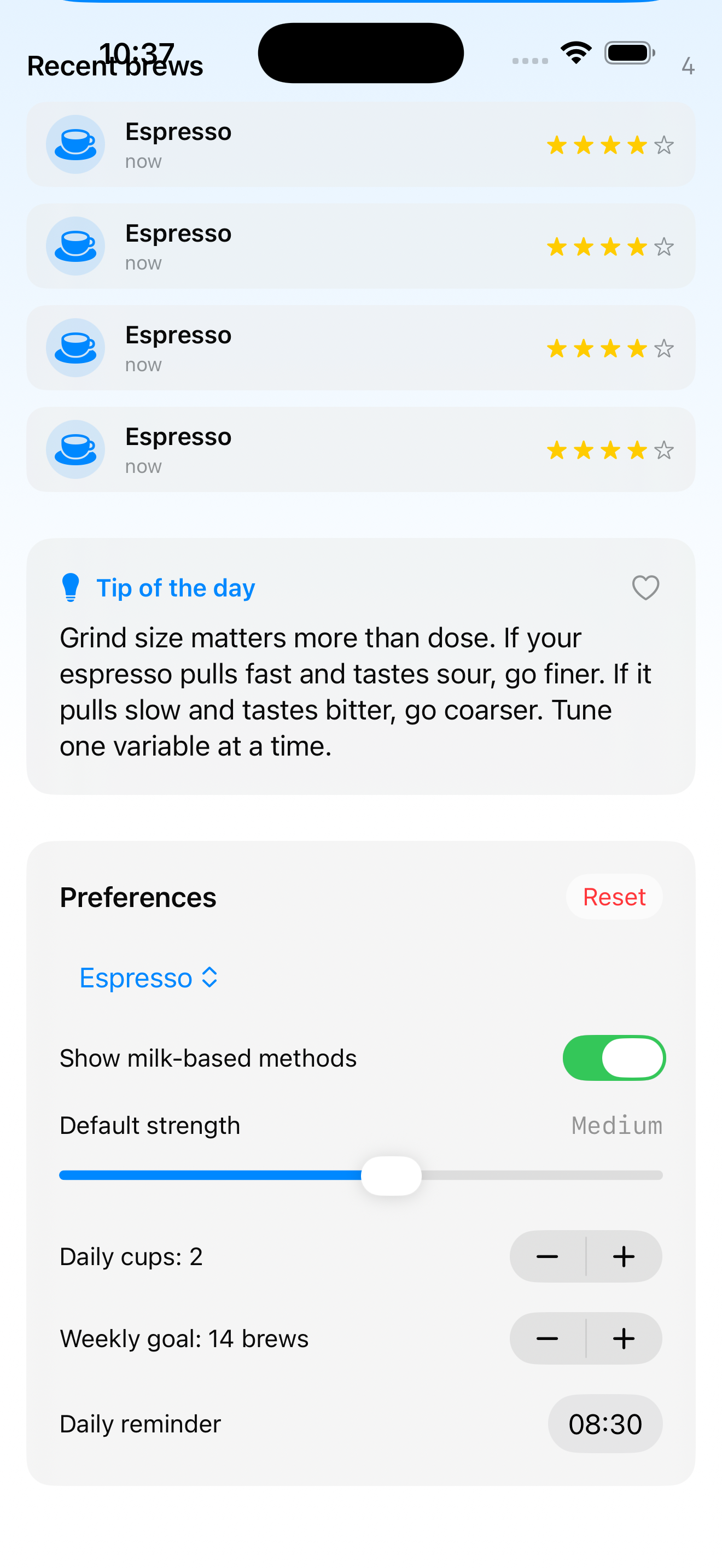
The video starts on the home screen with the empty ContentUnavailableView (“No brews yet”), then logs four brews. The recent-brews section appears, each row showing method icon, method label, relative date (“just now”), and a 4-star rating. Long-press a row and the contextMenu offers “Delete” — which calls prefs.deleteBrew(brew) and the row animates out.
This is the first lesson where BrewLog feels like a real app. Everything before was structure; this is content.
Takeaway
List for full-page collections, ForEach inside other layouts, ContentUnavailableView for empty states, AsyncImage for remote thumbnails (with a real cache for production volume). Sections chunk long lists; swipe actions handle row-level mutations; the system styles all of it for you.
Don’t write a custom empty state when ContentUnavailableView fits. Don’t put a List inside a ScrollView. Don’t render enum.rawValue to users.
Next lesson: Form, TextField, TextEditor, and @FocusState — the input side of the same coin. We add a “Log a brew” sheet with method picker, rating, and notes — and learn what happens when the keyboard shows up.
NativeFirst Team
EditorialThe NativeFirst team — engineers and designers building native Apple apps and writing the courses we wish we had when we started.
Comments
Leave a comment