
Environment — Dependency Injection Without the Ceremony
By lesson 7 BrewLog had a real model, and ContentView passed it down to two children. Two is fine. But picture six children, each passing it to three grandchildren, who each need it in a leaf component. That’s prop drilling — passing a value through layers that don’t even use it just so a great-great-grandchild can read it.
SwiftUI’s Environment is the answer. You inject a value once at any point in the view tree; any descendant pulls it with a single line. No manual passing. No singletons. SOLID’s Dependency Inversion Principle in one Apple API. This lesson moves BrewLog’s UserPreferences from “owned and passed by ContentView” to “injected by the App, pulled wherever needed.”
The bonus: SwiftUI ships with a dozen built-in environment values (color scheme, dynamic type size, locale, dismiss action, scene phase…) that you should be reading every time the system asks you to be a polite citizen. We’ll cover the essentials.
Inject once, at the top
Move ownership of the model up to the app entry point. The app is the natural composition root — the place where the whole graph gets wired together.
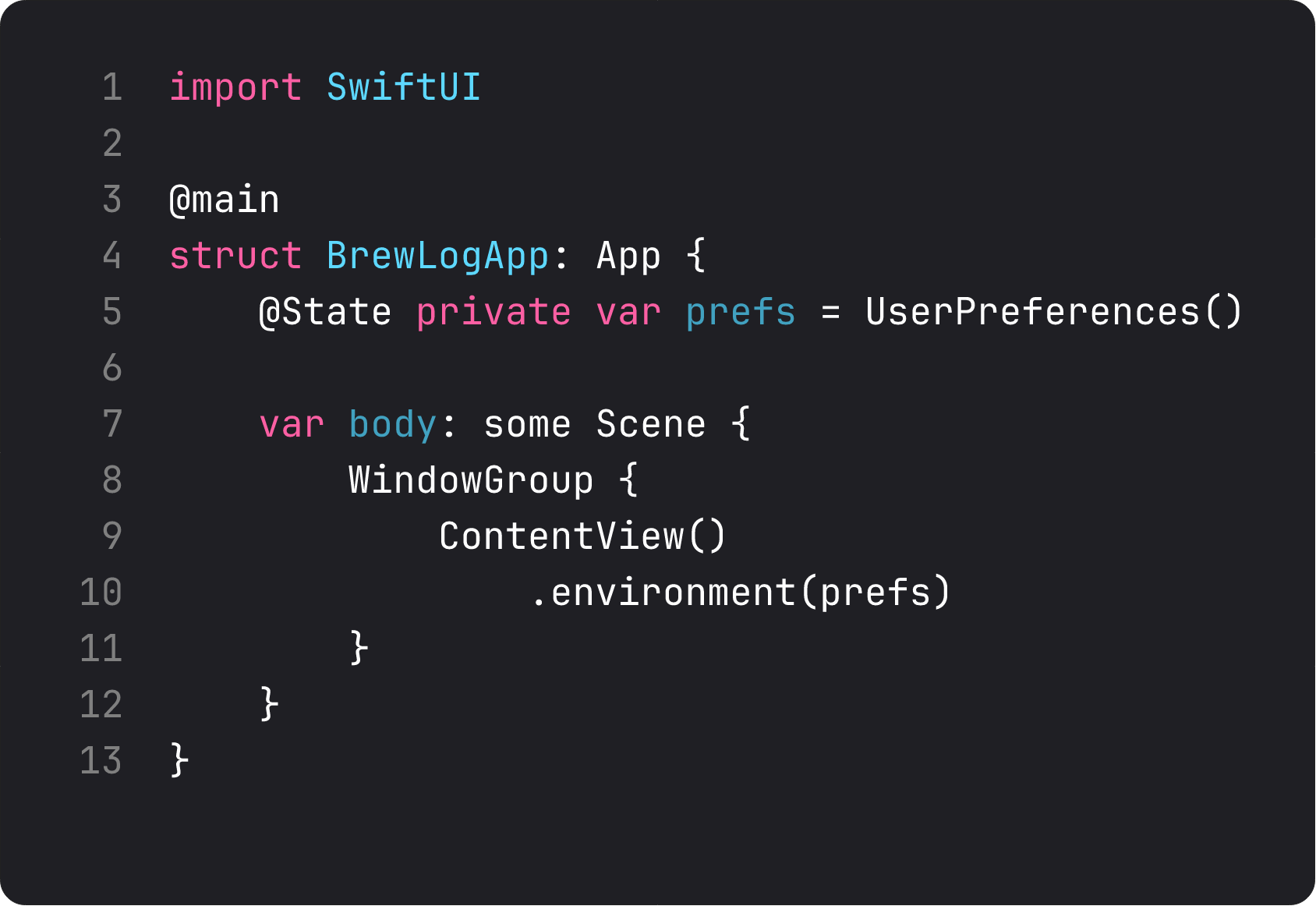
Three bits of new vocabulary in those nine lines:
@State private var prefs = UserPreferences()— the App is now the owner.@Statehere works the same way it does in any view. The model lives for the lifetime of the app process..environment(prefs)— injects the model into the environment of every view insideContentView. Any descendant can pull it. Apple added this overload specifically for@Observabletypes — no key path needed.- No more
@StateObject, no@ObservedObject, noEnvironmentObject. Those are the old-world incantations. With@Observable, you get one ceremony for everything:.environment(value)to inject,@Environment(Type.self)to pull.
The composition root pattern is real architecture, not just a SwiftUI thing. Every dependency should have one obvious place where it’s constructed. For a small app, that place is App.body. For a larger one, you might split into a separate Composer type. Either way: one place, one decision per dependency, the rest of the tree just uses what’s available.
Pull from anywhere
Now the views that used to take prefs as a parameter pull it from the environment instead.
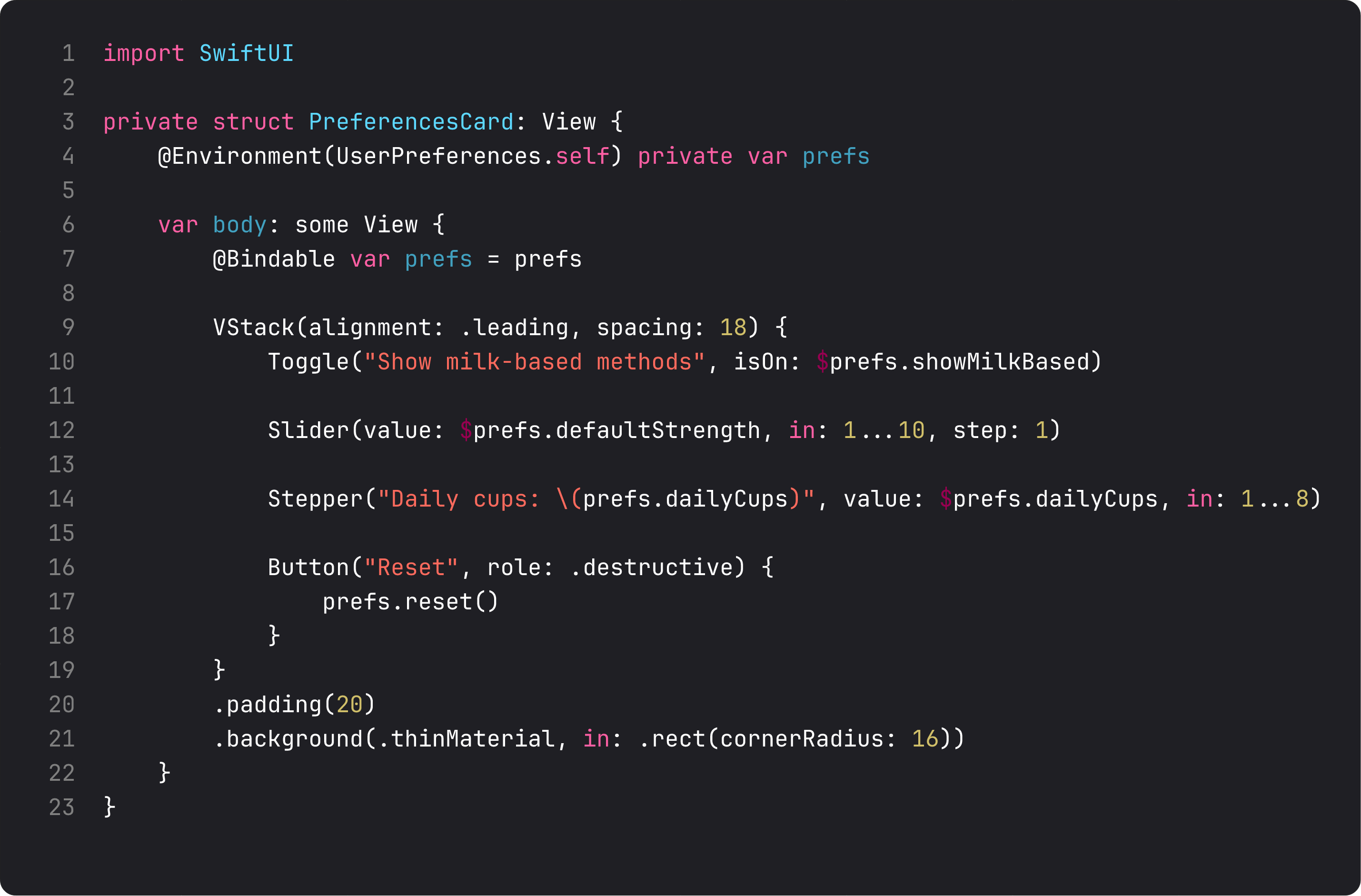
The two-line pattern that’s worth memorizing:
@Environment(UserPreferences.self) private var prefs

var body: some View {
    @Bindable var prefs = prefs   // local Bindable for $-projection
    // ... use prefs.something or $prefs.something
}
That second line is the slightly awkward 2026 ritual. @Environment gives you a regular reference. To use bindings ($prefs.showMilkBased for a Toggle), you need @Bindable. So you re-declare a local prefs as @Bindable, then write your bindings against it. You’ll see this pattern across the entire SwiftUI ecosystem in 2026 — Apple’s own sample code, every WWDC session.
If you don’t need bindings (a view that only reads), drop the second line. Just use prefs.summary, prefs.dailyCups directly. SwiftUI will track whatever you read.
What anti-vibe-coding looks like here
The LLM-generated version of “share state across views” almost always lands on a singleton:
class UserPreferences {
    static let shared = UserPreferences()
    // ...
}

private struct PreferencesCard: View {
    var body: some View {
        Toggle("...", isOn: ???) // can't bind to a non-observable global
    }
}
This works just enough to compile and runs just well enough to demo, then crumbles the moment you:
- Want to write a unit test (you can’t substitute the singleton without static surgery)
- Want to write a SwiftUI Preview with different states (the preview shares the running instance)
- Want to support multiple windows on iPad with different state per window (one global, one state, no scene awareness)
Environment solves all three. Tests instantiate a UserPreferences() and pass .environment(testPrefs) to the view under test. Previews instantiate a fresh one — that’s literally what the #Preview block at the bottom of ContentView.swift does. Multi-window apps inject per-scene.
This is what DIP — Dependency Inversion Principle actually buys you in practice. The PreferencesCard doesn’t depend on a UserPreferences.shared. It depends on “something providing UserPreferences in the environment.” Different concretion, same protocol. Test, preview, and prod all wire it differently. The card doesn’t know or care.
Built-in environment values you’ll use weekly
SwiftUI ships with a long list of system-provided environment values. The handful you’ll reach for constantly:
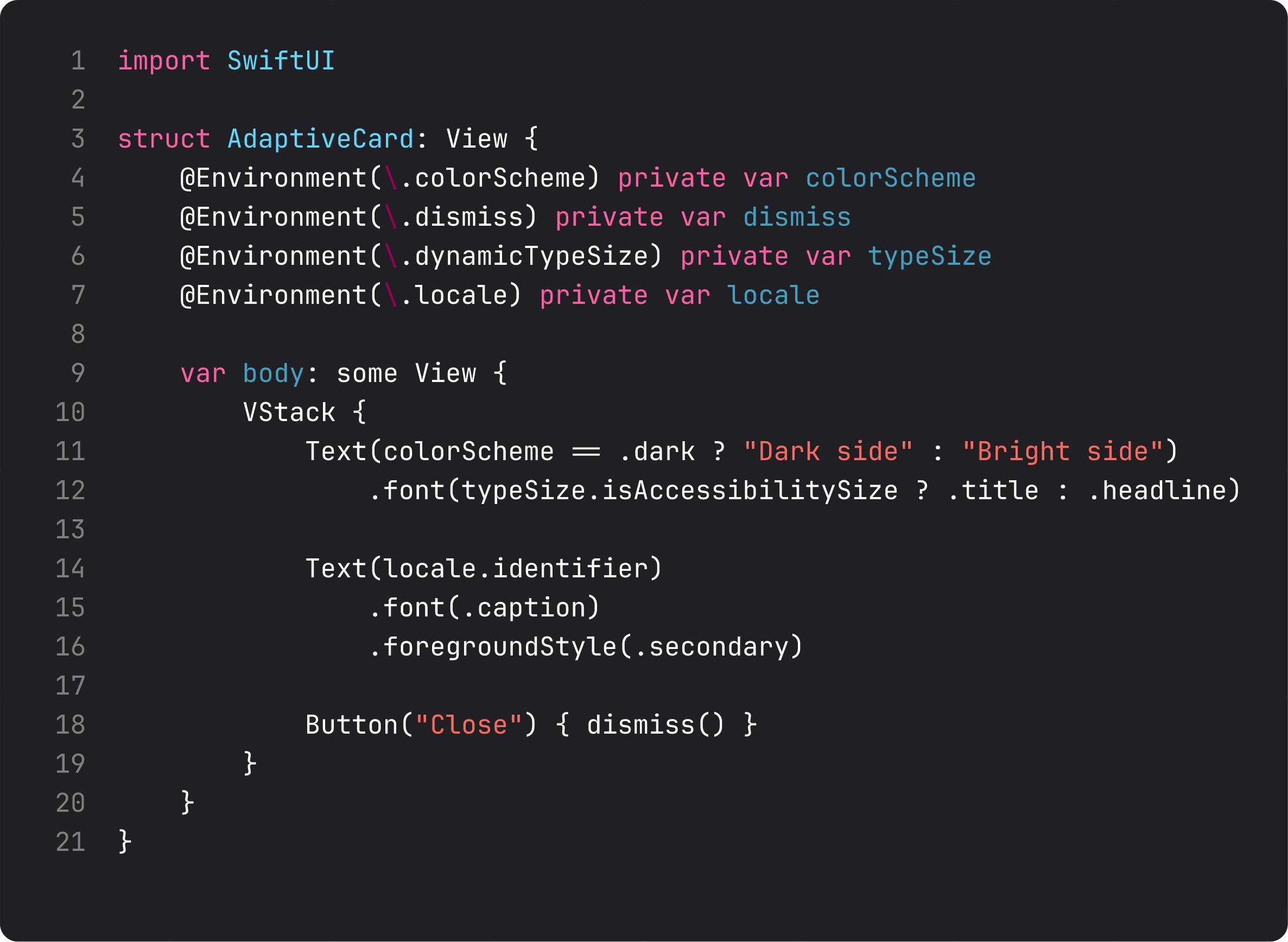
@Environment(\.colorScheme)—.lightor.dark. Use it sparingly. Most colors should adapt automatically through the asset catalog. But sometimes you need to bump opacity differently in dark mode, or swap an SF Symbol variant — that’s where this lives.@Environment(\.dismiss)— the action that closes the current presentation (sheet, fullScreenCover, navigation push). Just calldismiss(). Replaces the oldpresentationMode.wrappedValue.dismiss()ceremony from iOS 14.@Environment(\.dynamicTypeSize)— current text size. Use to adapt layout when the user is at accessibility sizes (.isAccessibilitySize). The day someone reviews your app on an XL Pro Max with Larger Text turned up, this is what saves you.@Environment(\.locale)— current locale. Useful when formatting numbers/dates manually instead of usingformatted()(which already pulls locale).@Environment(\.scenePhase)—.active,.inactive,.background. Listen with.onChange(of: scenePhase)to save state when the app backgrounds.
For a tiny taste of polish: BrewLog’s gradient now reads colorScheme and bumps the tint opacity slightly in dark mode (0.18 vs 0.10). One line, one detail nobody notices unless it’s wrong, looks better in both modes.
What it looks like running
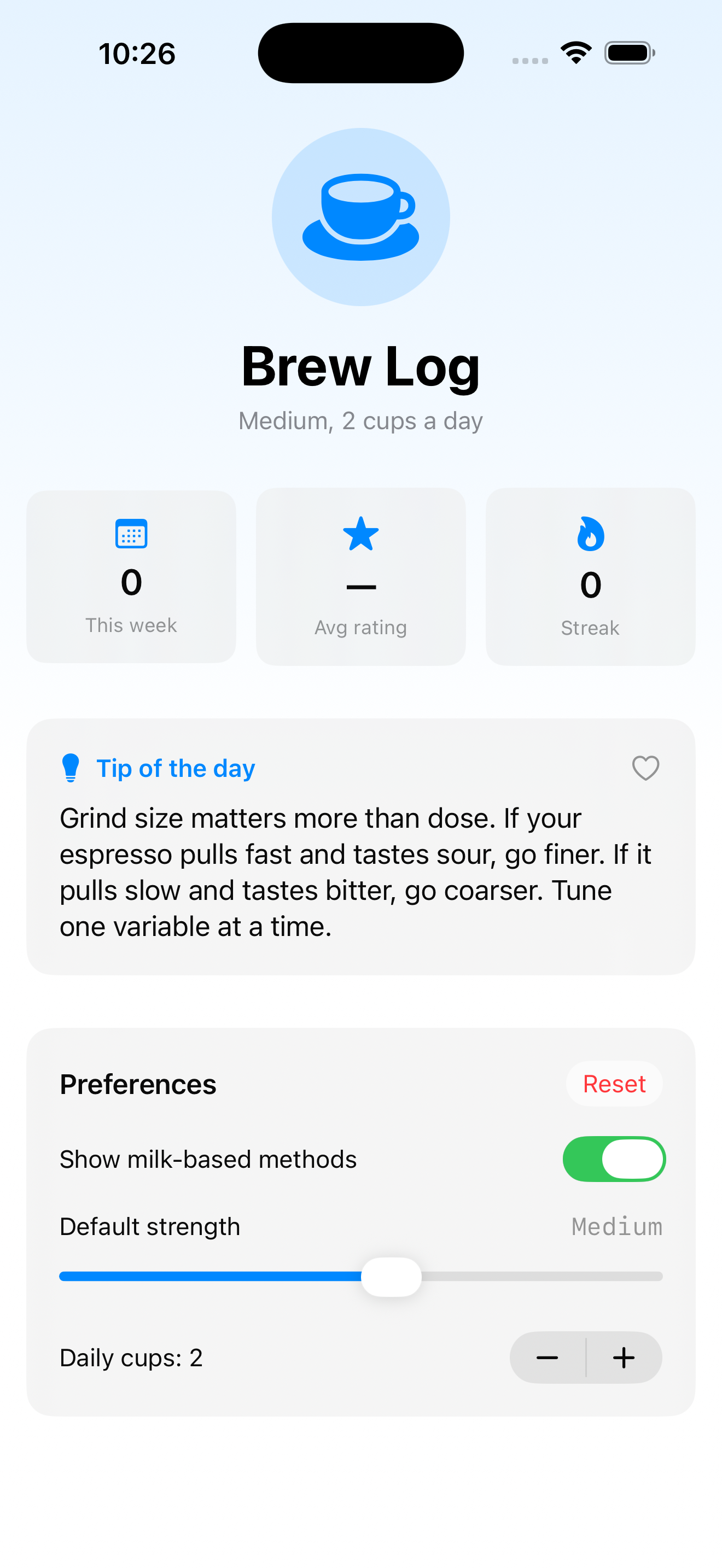
Visually identical to lesson 7 — the architecture changed, the screen didn’t. That’s the point of these refactors. The user never sees them. We see fewer parameters, fewer pass-throughs, and a ContentView that’s now eight lines shorter because it doesn’t have to forward prefs to anyone.
When you ship BrewLog at the end of this course, the polish that makes it feel like a real app comes from a hundred decisions like this — small architectural choices that compound.
Takeaway
Environment is dependency injection without ceremony. Inject at the composition root (the App), pull anywhere with @Environment(Type.self), add @Bindable locally when you need bindings. Use the built-in environment values to be a polite citizen of iOS — color scheme, dynamic type, locale, dismiss, scene phase.
If you ever feel the urge to write a singleton in 2026 SwiftUI, take a deep breath, then write .environment(value) instead. Your future self (and everyone who tests your code) will thank you.
Next lesson: we move from data into controls. Buttons, menus, pickers — the three components that handle 90% of “user does something” interactions in any iOS app.
NativeFirst Team
EditorialThe NativeFirst team — engineers and designers building native Apple apps and writing the courses we wish we had when we started.
Comments
Leave a comment