
@Observable and @Bindable — When State Outgrows the View
@State and @Binding are great for one or two values that live inside a view’s lifetime. They start to creak the moment you have structured state — multiple related properties, derived computed values, methods that mutate several at once. The give-away: a view with five @State declarations and a func reset() that toggles them all by hand.
That’s the @Observable moment. Move the bag of properties into a class. Apple’s macro takes care of the wiring. Views read fields directly. Views that need bindings — for Toggle, Slider, Stepper, etc. — use @Bindable.
This is the 2026 way. @StateObject and @ObservedObject still compile, but they’re the old story (ObservableObject, @Published, Combine). You won’t write them in new code unless you’re maintaining something older than your last vacation.
The model: UserPreferences
We took every @State from last lesson and put it in one class:
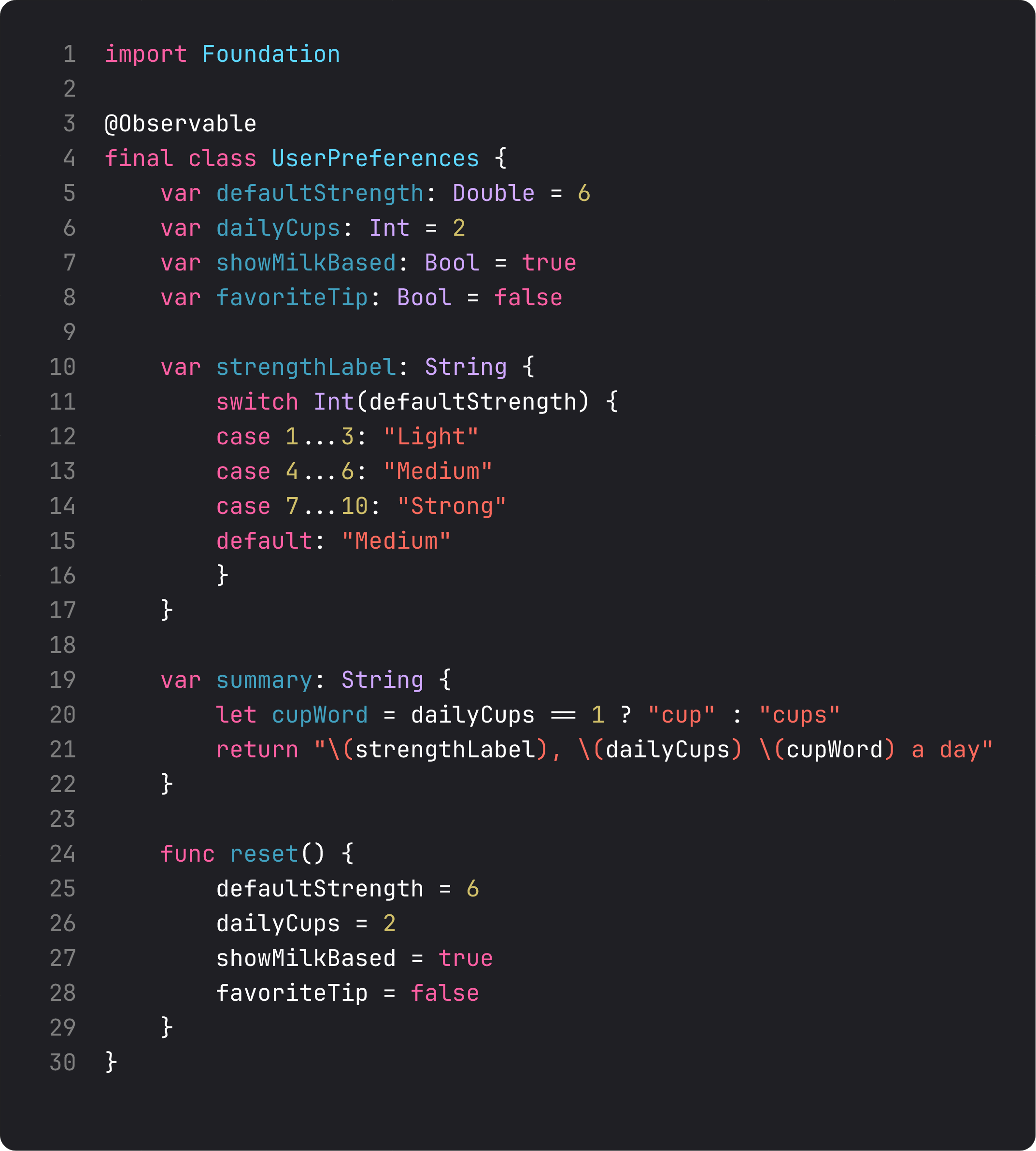
Three things to call out:
@Observableis a macro. At compile time it expands every stored property into something SwiftUI can track for changes — without you writing a single@Published. The class behaves like a regular class. Properties read and write normally. SwiftUI just knows when they change.final class. Always make@Observabletypesfinalunless you have a specific subclassing reason. Better performance, clearer semantics.- Computed properties (
strengthLabel,summary) and methods (reset()) are first-class. This is the killer feature compared to@State-soup: structured behavior on the data, not scattered across views. SOLID’s SRP again —UserPreferencesis responsible for preferences. The views just render and trigger.
Why a class, not a struct? Two reasons. Reference semantics — every view that holds prefs sees the same instance, no copying. And mutation — methods like reset() need to change self, which works cleanly on classes without mutating.
@Bindable — turning model properties into bindings
A view that just reads the model needs nothing special. SwiftUI tracks the read and re-renders when the value changes:
private struct HeroCard: View {
    let summary: String  // plain String — read-only, no observation needed at this level

    var body: some View {
        Text(summary).font(.subheadline)
    }
}
But the moment a view needs a binding to a model property — to feed a Toggle, Slider, Stepper, TextField — that view needs @Bindable:
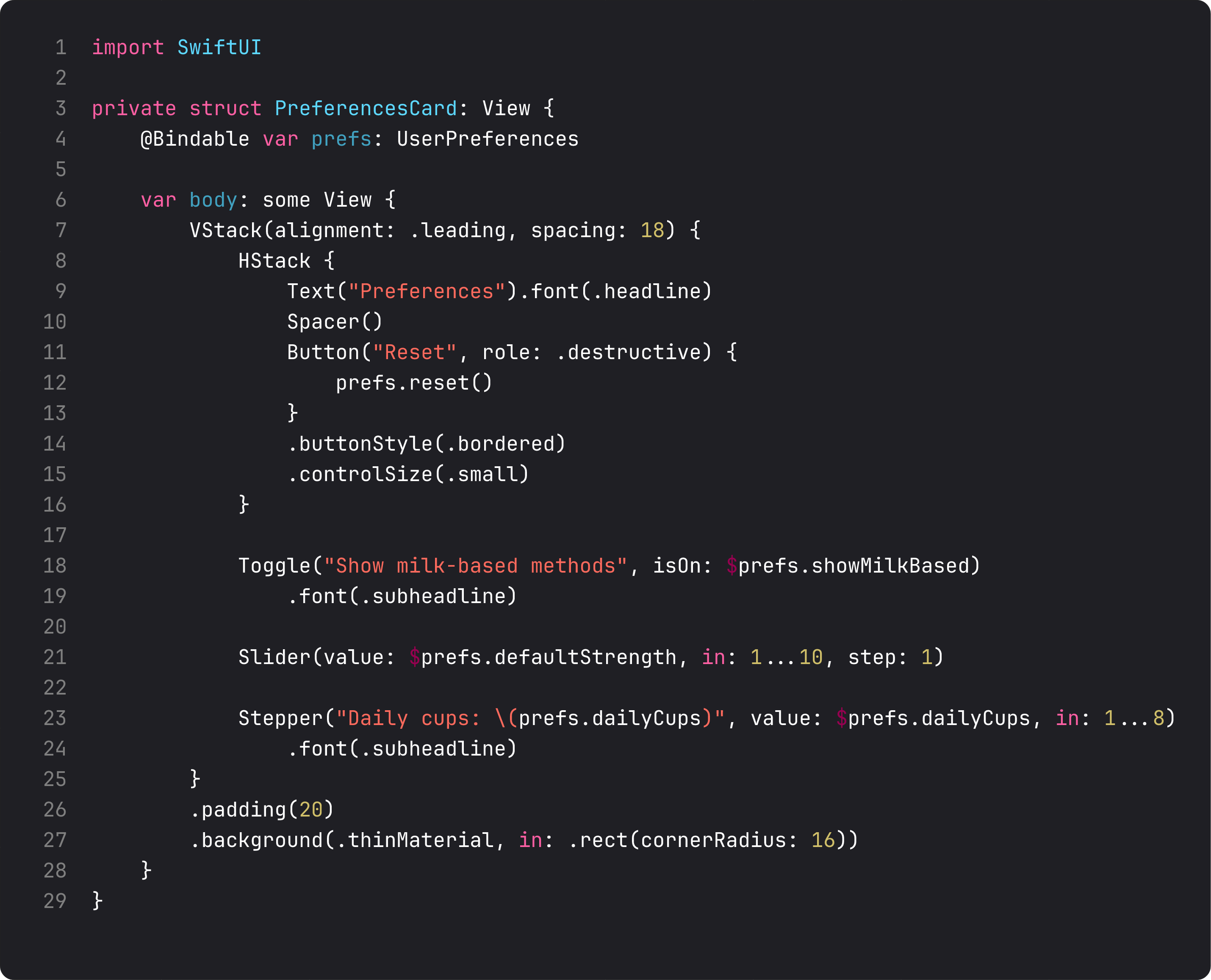
The pattern:
- Declare the property as
@Bindable var prefs: UserPreferencesinstead oflet prefs:or plainvar. - Use
$prefs.showMilkBased,$prefs.defaultStrength,$prefs.dailyCupsin controls that takeBinding<T>.
@Bindable doesn’t create the model — the parent already owns it. It just unlocks the $ projection so this view can produce bindings into the model’s properties. Think of it as a permission flag: “yes, this view is allowed to write back.”
If you forget @Bindable and try to use $prefs.something, the compiler will tell you. But you’ll see a lot of “Generic parameter could not be inferred” errors on the way there if you skip this step. Now you know.
Wiring it up: @State to hold the model, plain reads vs @Bindable
The owner of the model — ContentView here — uses @State to hold the instance:
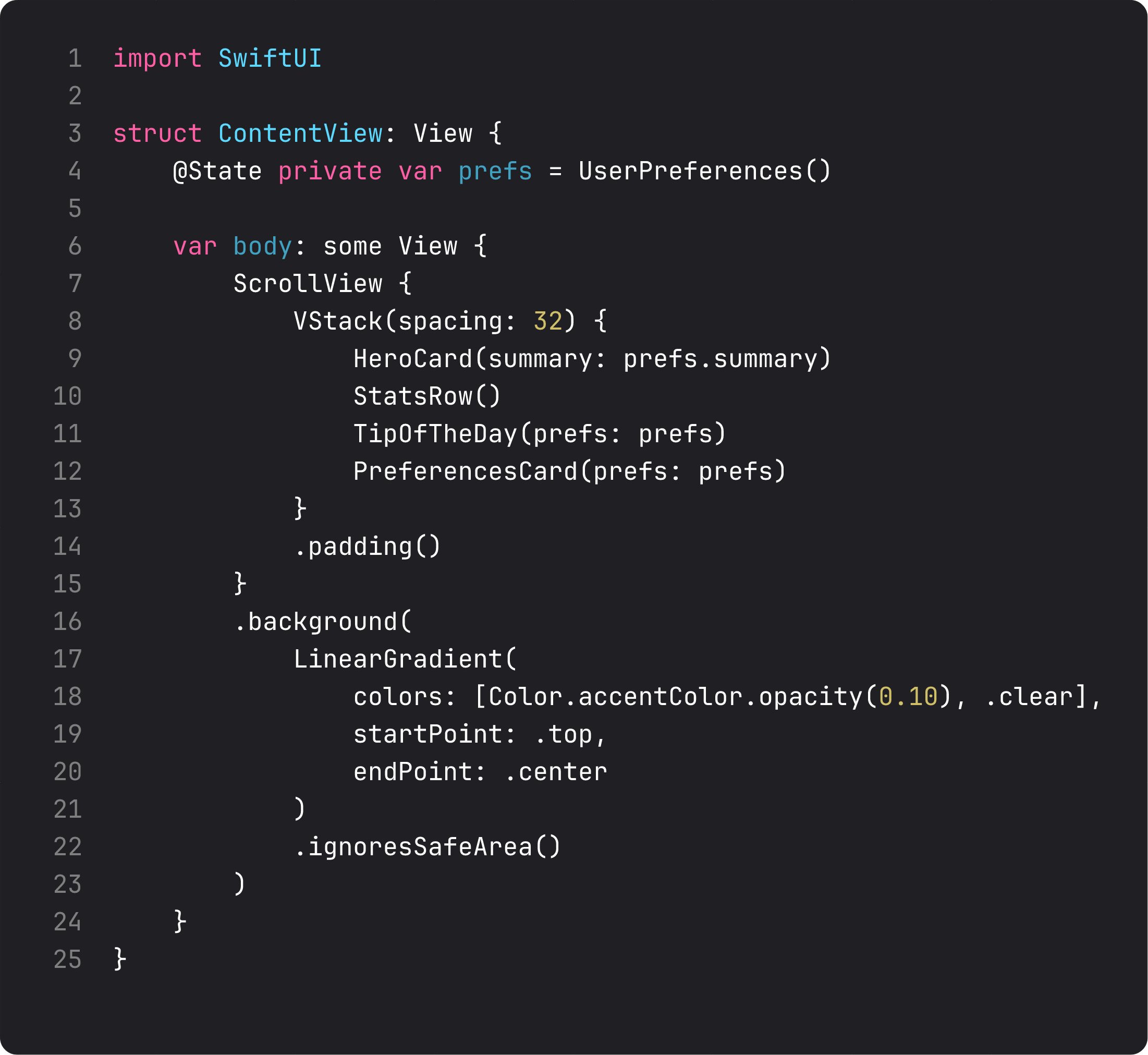
Wait — @State for a class instance? Yes. In the new world, @State is the storage attribute for view-owned values, regardless of whether the value is a struct or a class. SwiftUI persists the instance across re-renders for the lifetime of the view. For an @Observable class, that’s all the storage you need.
The reads in ContentView.body use the model directly: prefs.summary for HeroCard, full prefs passed into TipOfTheDay and PreferencesCard. SwiftUI tracks which properties of prefs each child reads and only re-renders the ones whose dependencies actually changed. Changing prefs.dailyCups re-renders PreferencesCard (which reads it), but not HeroCard (which reads only summary, which depends on dailyCups — so actually it does, in this case, because summary is computed from cups). The point: the dependency graph is automatic.
A trap that bites every team: shared state without ownership
Here’s what an LLM tends to write when asked “share preferences across screens”:
// DO NOT DO THIS
class UserPreferences: ObservableObject {
    static let shared = UserPreferences()
    @Published var defaultStrength: Double = 6
    // ...
}

struct ContentView: View {
    @StateObject var prefs = UserPreferences.shared

    var body: some View { /* ... */ }
}
Two failures stacked on top of each other:
- Singleton +
@StateObject— the old API, plus a global, plus a confusing combo where the view “owns” something that’s actually shared. Tests can’t substitute. Previews fight you. State leaks across screens you don’t expect. @StateObjectis the old story. It pairs withObservableObjectand@Published. New code should be@Observable+@Stateto hold +@Bindablefor child bindings. Period.
The right pattern for genuinely shared state across many screens is the Environment, which is the next lesson. Singletons are how you hide global state from yourself; environment is how you inject it explicitly with one line and still get every screen to see it.
For BrewLog, our preferences are owned by ContentView and reach two children directly. That’s small enough to pass as a parameter. We don’t need environment yet. Don’t reach for solutions before you have the problem.
What it looks like running
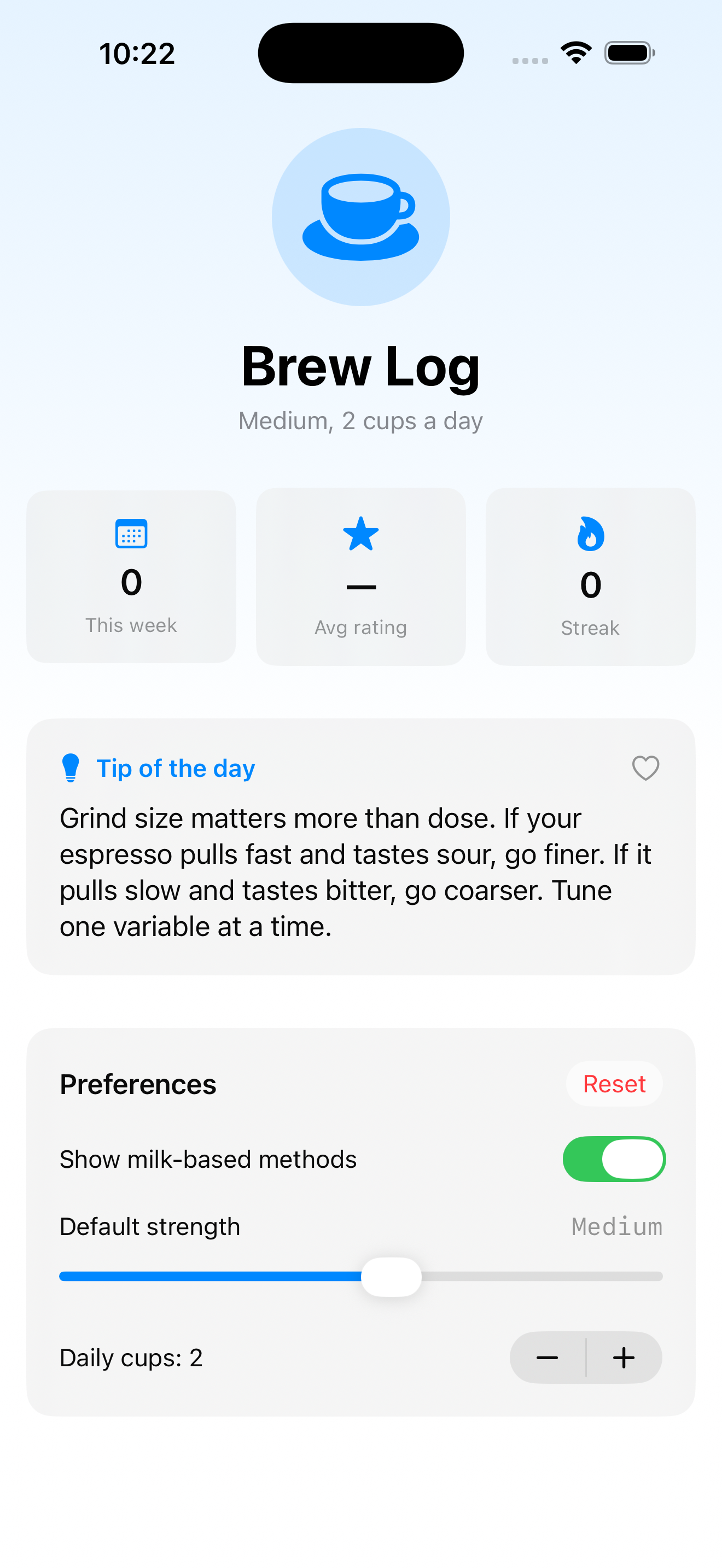
The visible behavior is identical to lesson 6 — favorite the tip, flip the toggle, bump the stepper. What changed is the architecture beneath it. Now the model is one place, every change goes through it, and we have a Reset button that flips four properties at once via a single method call. That’s the kind of small win that compounds across thirty screens.
Takeaway
@Observable is the 2026 way to share structured state. @State to hold it (or @Environment later). @Bindable to bind to its properties from a child view. Plain reads need no annotation — SwiftUI tracks them automatically.
Use it the moment you have more than three related @State properties or a method that mutates several. Don’t use it for one-off toggles where @State is plenty.
Next lesson: @Environment — the dependency injection mechanism that turns “pass this everywhere” into “make this available, anyone in the tree can pull it.”
NativeFirst Team
EditorialThe NativeFirst team — engineers and designers building native Apple apps and writing the courses we wish we had when we started.
Comments
Leave a comment