
SwiftData with Relationships — Favorites that Survive Restarts
Foundations lesson 17 introduced SwiftData on Brew Log: one model, no relationships, end of story. Real apps eventually need more — a favorite has notes, a user has posts, a watchlist has markets. That’s where SwiftData’s relationships come in: declarative, type-safe, with cascade-delete and inverse-keypath support that stops half the “orphan record” bugs at the type level.
Today’s Pulse changes are tiny in code but big in user value: each market row gets a star button that persists. Tap it once, the FavoriteMarket lands in SwiftData. Quit the app, open it again, the star is still filled. The pattern is exactly what every “favorites” feature in iOS uses.
We also cover the one-to-many relationship pattern in a snippet (FavoriteMarket → Notes), since the moment Pulse evolves to support per-favorite notes, that’s the shape we’ll reach for.
The simplest @Model — single entity
The favorite has a unique identity (the symbol), a display name, and a timestamp.
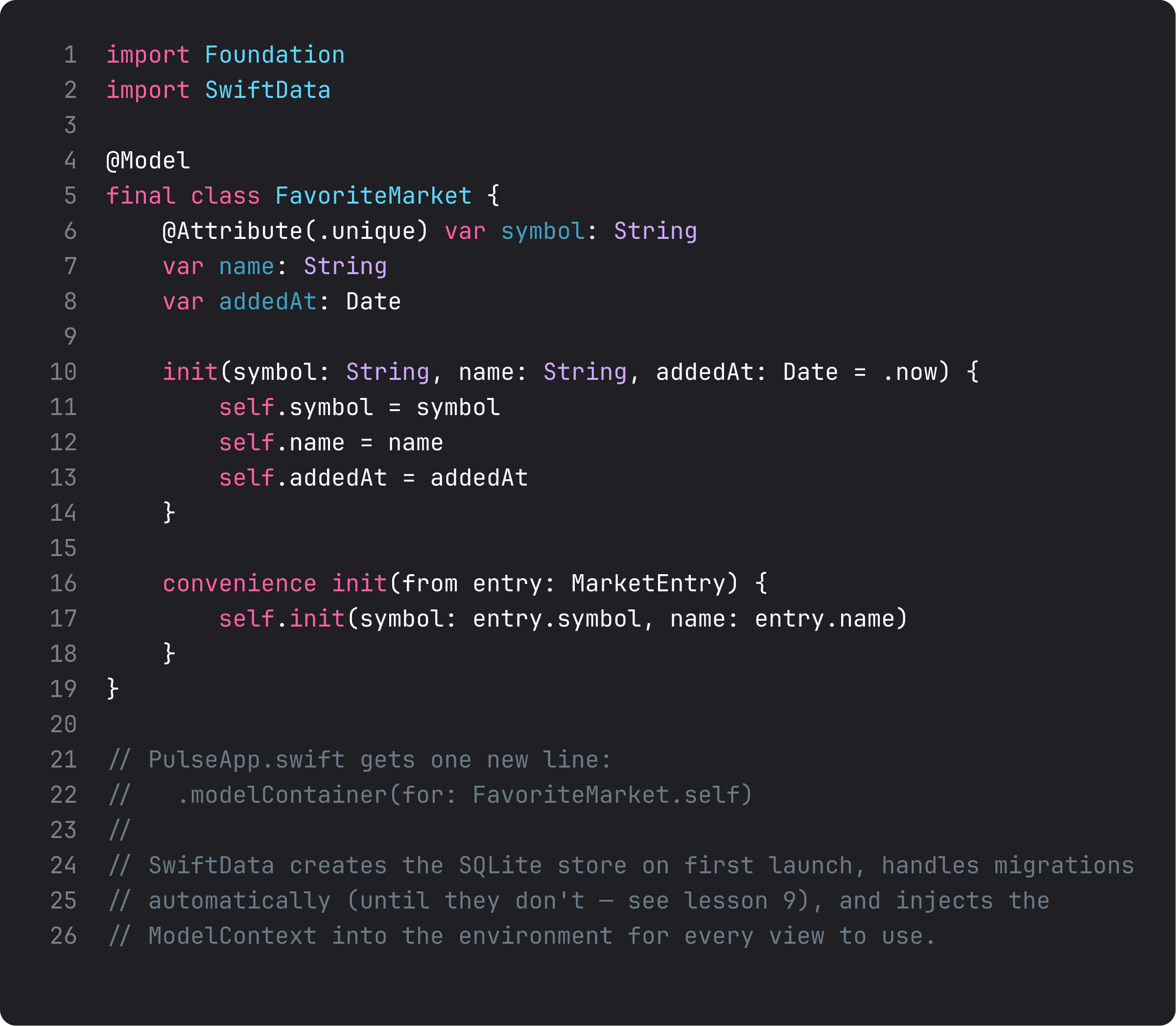
Three details that pull weight:
@Attribute(.unique)onsymbol. SwiftData enforces this at the database level. Trying to insert a secondFavoriteMarket(symbol: "BTC")while one already exists silently overwrites — so we don’t need to dedupe in code. One source of truth, enforced at the right layer.DateforaddedAt— sortable, queryable via#Predicate, formats with system locale. Always store dates asDate, never as String.- A
convenience init(from: MarketEntry)— the seam between the API/domain shape (lesson 4-5) and the persisted shape. The view never has to remember “which fields go into the favorite”; the convenience init does.
The .modelContainer(for: FavoriteMarket.self) modifier on WindowGroup is the only other line — SwiftData creates the SQLite store, handles migrations automatically, injects \.modelContext into the environment for every view.
One-to-many relationships, the right way
Pulse doesn’t ship Notes today. But the moment it does — the moment any model needs children — this is the pattern:
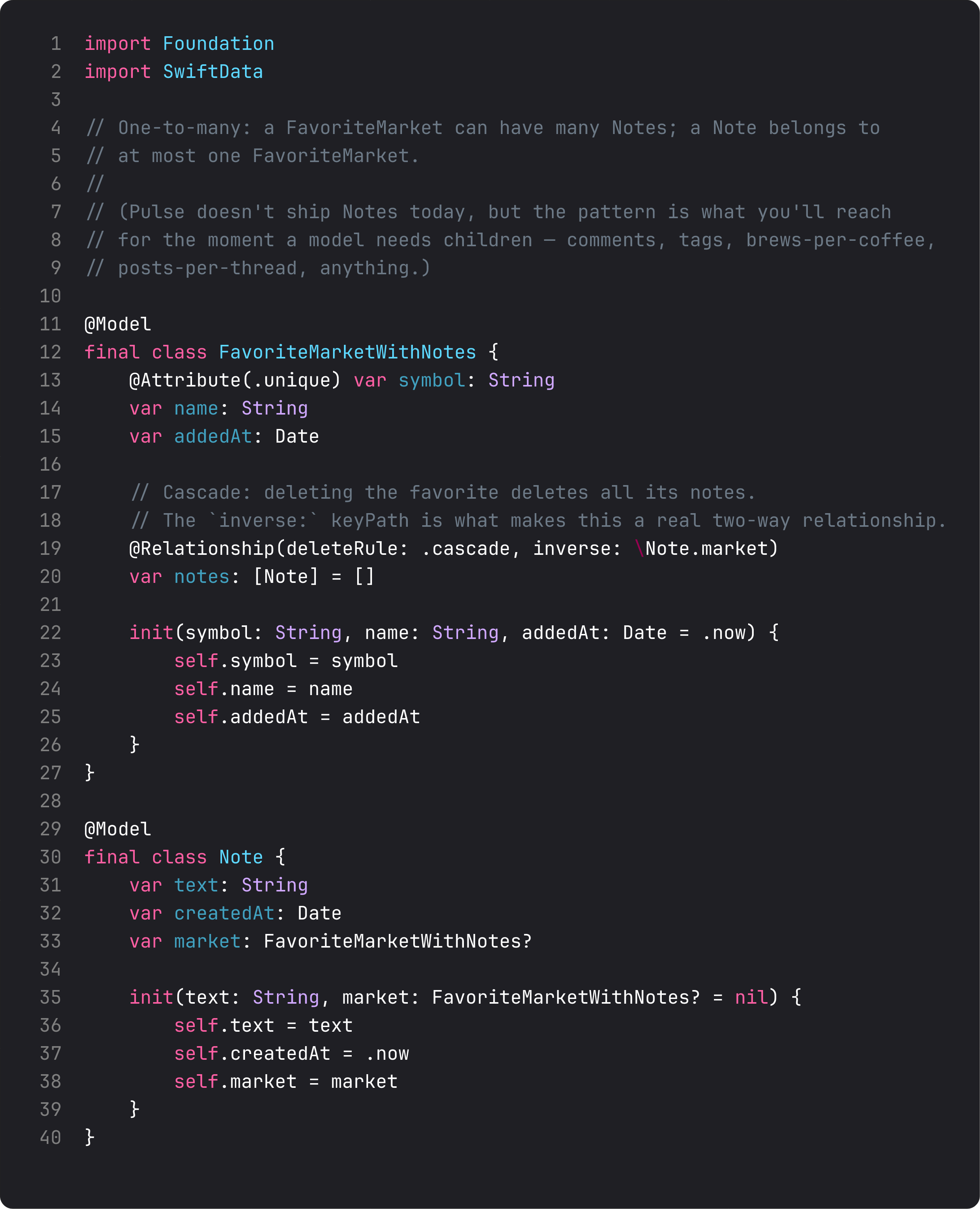
Three pieces matter:
@Relationship(deleteRule: ..., inverse: ...)— both sides of the keypath. Withoutinverse:SwiftData still works but treats the two collections as independent — adding a Note doesn’t make the FavoriteMarket’snotesarray see it. The inverse keypath is what fuses them.deleteRule:—.cascadedeletes children when parent goes (favorite deleted → all its notes vanish)..nullify(default) breaks the link but keeps the child alive — useful when the child can exist independently..denyblocks the parent delete if children exist (rare but useful for “you can’t delete this category, it has 12 items”).var notes: [Note] = []on the parent. Plain Swift array. SwiftData syncs it with the database; you mutate it like any other array (favorite.notes.append(Note(...))).
This pattern scales: many-to-many is just @Relationship on both sides with [Type] arrays both directions; the inverse keypath ties them.
Querying with predicates
@Query got covered in Foundations 17. The advanced version — and what relationships unlock — is filtering with #Predicate.
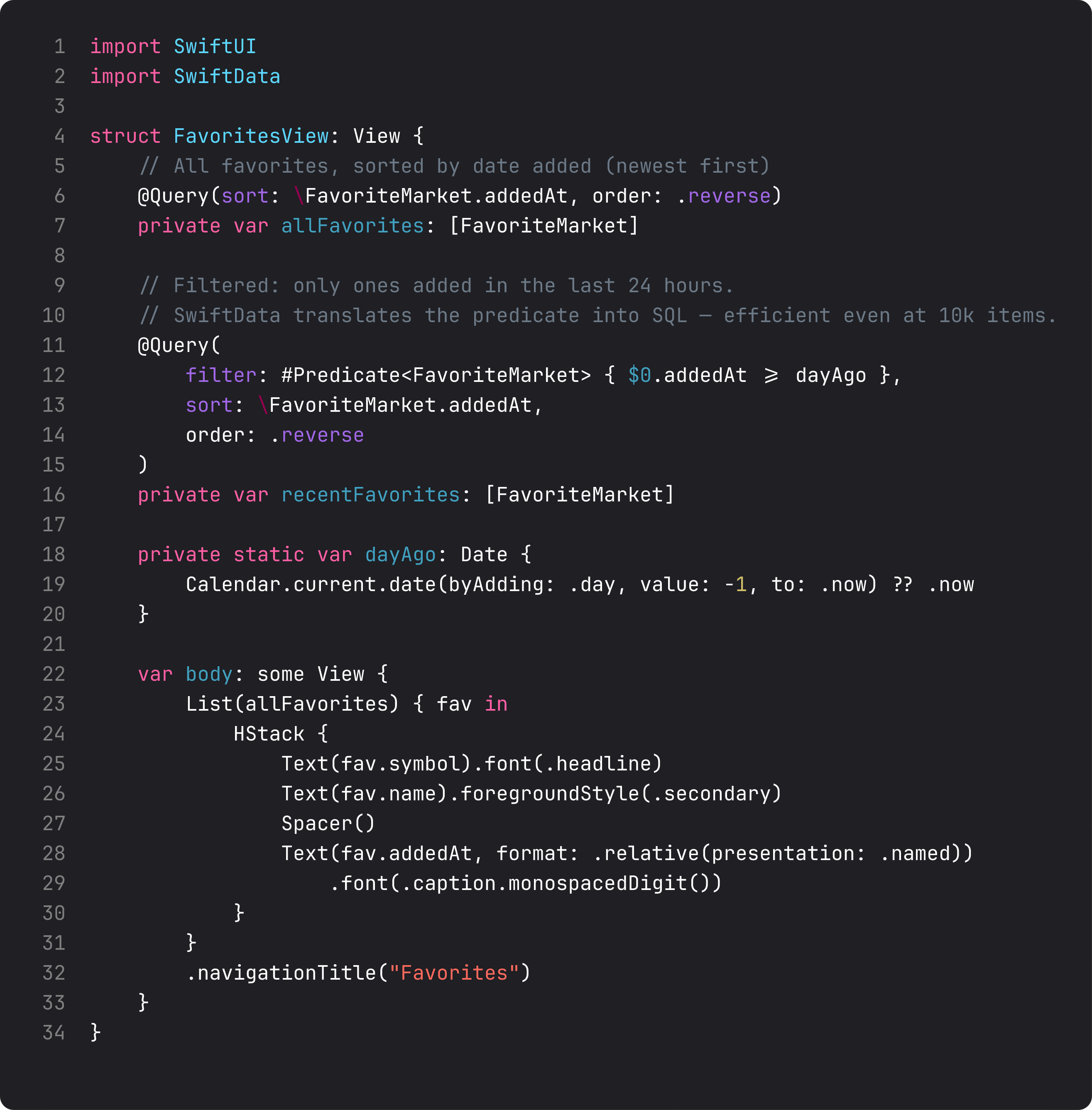
Three things that make @Query powerful in production:
sort: \KeyPath, order: .reverse— pushes sort into SQL. Even with thousands of records, the database returns them ordered without you doing anything.filter: #Predicate<T> { ... }— Swift macro that expands into an NSPredicate. Compile-time type checking for the keypath, so renamingaddedAtupdates every query. Compare to Core Data’s stringly-typed predicates that explode at runtime.- Multiple
@Querydeclarations in one view. Different filters, different sorts, all efficient. Ideal for dashboards that show “all favorites” alongside “favorites added in the last week.”
A predicate runs against the persistent store, not in memory. Filtering 50,000 favorites by date is no slower than filtering 5 — that’s why this matters.
A trap I see weekly: storing relationships as IDs
The hand-rolled-Core-Data version of “favorites with notes”:
class FavoriteMarket {
    var id: UUID
    var noteIDs: [UUID] = []   // ← stringly-typed foreign-key list
}

class Note {
    var id: UUID
    var favoriteID: UUID?       // ← parent ID
}
Hand-rolled foreign keys. Two big problems:
- No cascade delete. Delete a favorite, its notes are still in storage with a dangling
favoriteID. Orphan records, slow growth, eventually a manual cleanup pass. - No type-safe traversal.
favorite.notesrequires a separate query: “give me all notes where favoriteID == favorite.id.” Every screen reimplements this. Forget once → silent bug.
@Relationship solves both at the type level. Cascade enforced at the storage layer. favorite.notes is just a property; SwiftData fetches and updates it transparently.
If you ever see ID arrays simulating relationships in modern SwiftData code, someone copy-pasted from a 2018 Core Data tutorial. Replace it.
What it looks like running
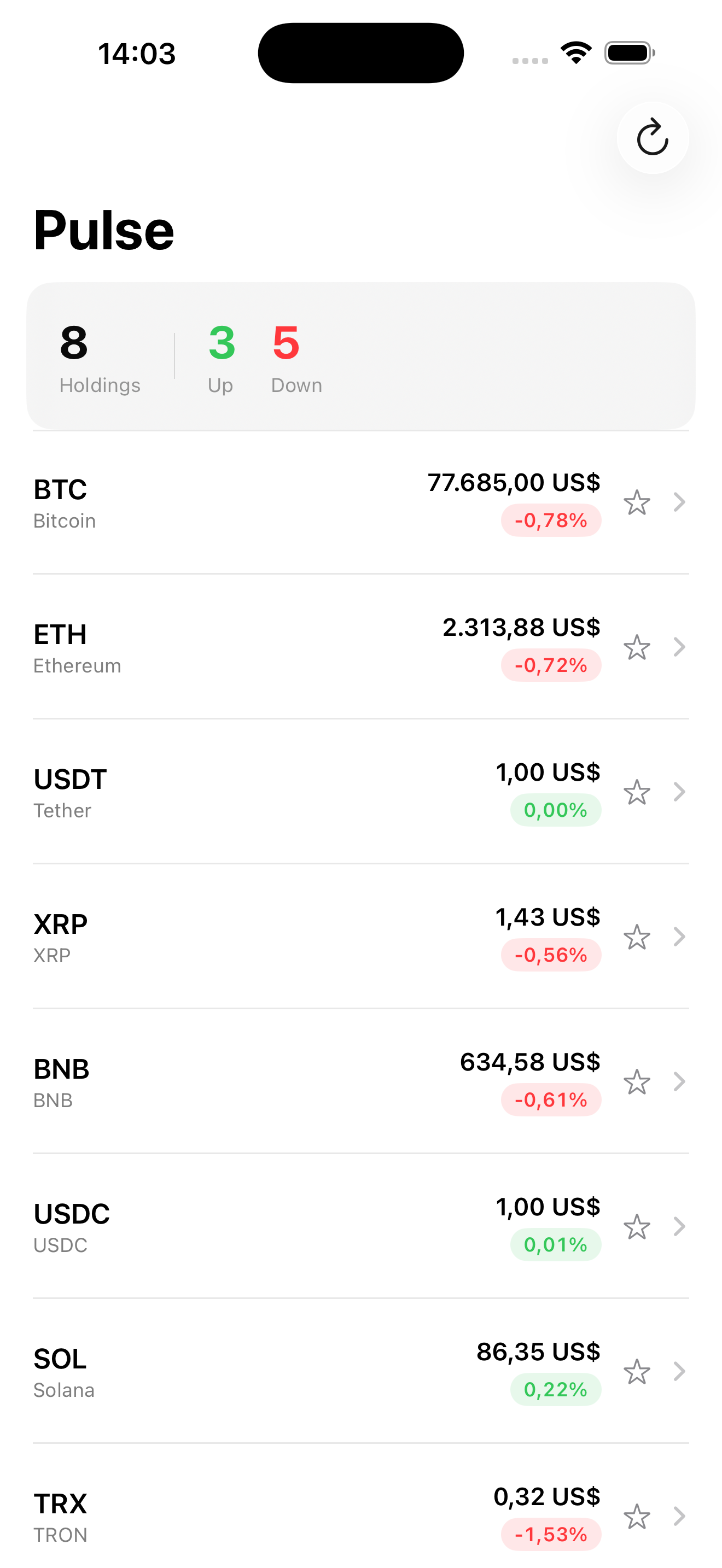
The star button on the right of each row is what’s new. Tap it, the star fills. Kill the app, relaunch, the star is still filled because FavoriteMarket(symbol: "BTC", ...) lives in SwiftData now. No “save state” code, no JSON shenanigans, no UserDefaults. SwiftData handles persistence; we handle UI.
Takeaway
@Model for the entity. @Attribute(.unique) for natural keys. @Relationship(deleteRule:, inverse:) for one-to-many. @Query(filter: #Predicate) for filtered fetching. The whole API is type-safe, declarative, and fast — predicates run as SQL, not in-memory loops.
Don’t simulate relationships with foreign-key arrays. Don’t store dates as String. Don’t dedupe in code when .unique enforces it at the database.
Next lesson: cache strategy. We make Pulse work offline by storing fetched markets in SwiftData and serving them while the network refresh runs — stale-while-revalidate, the pattern that defines how the app feels on a flaky cell connection.
NativeFirst Team
EditorialThe NativeFirst team — engineers and designers building native Apple apps and writing the courses we wish we had when we started.
Comments
Leave a comment