
Small Composable Views — One Job Per File
The home screen we shipped in lesson 1 was 50 lines, all in one file. Fine. By the time Pulse has detail views, settings, charts, and a portfolio screen, those 50 lines turn into 500 unless we have a discipline for splitting up.
This lesson is that discipline. We extract three components — ChangePill, MarketRow, WatchlistHeader — each in its own file, each with one responsibility, each reusable. The visible screen doesn’t change. What changes is what the code looks like — and how easy it is to add the next thing.
Three rules drive the refactor: (1) one role per view, (2) extract when something is repeated or has its own visual identity, (3) leaf components don’t reach into the model — they take values.
ChangePill — the smallest reusable component
The percent-change pill in our market row will appear again — in the detail view, in charts, in a portfolio summary. It’s a textbook reusable component. Extract it first.
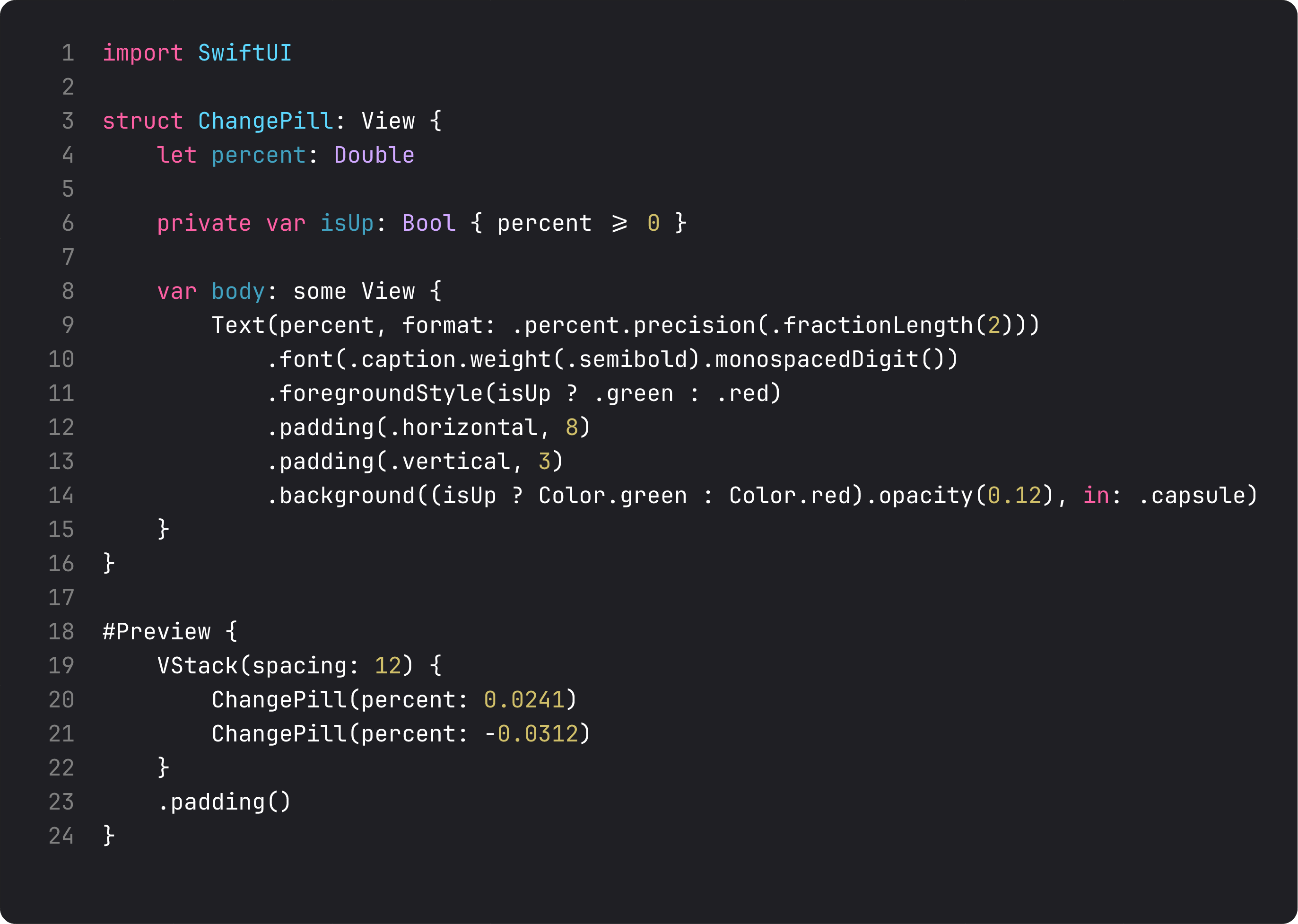
Three things make this a good small component:
- One input, one output. Takes a
Double, renders a pill. No environment, no model, no side effects. That’s ISP — Interface Segregation Principle at the view layer: the smallest possible interface that does the job. - Lives in
Views/Components/. A folder convention that signals “reusable, generic.” We’ll putLoadingDot,EmptyState,Cardhere as we build them. - Has its own
#Preview. Every component file ships with a preview rendering the variants. Designers can pull this file open in Xcode and see all the states without launching the app.
The private var isUp: Bool derived property is a micro-pattern worth noting: named computed properties in views are docs. entry.changePercent24h >= 0 is fine inline, but isUp reads better when it’s used twice.
MarketRow — composing into a row
The row is itself a composition: a leading “what” (symbol + name) and a trailing “how much” (price + change pill). Extract the row into its own file, and split the trailing block into its own private subview.
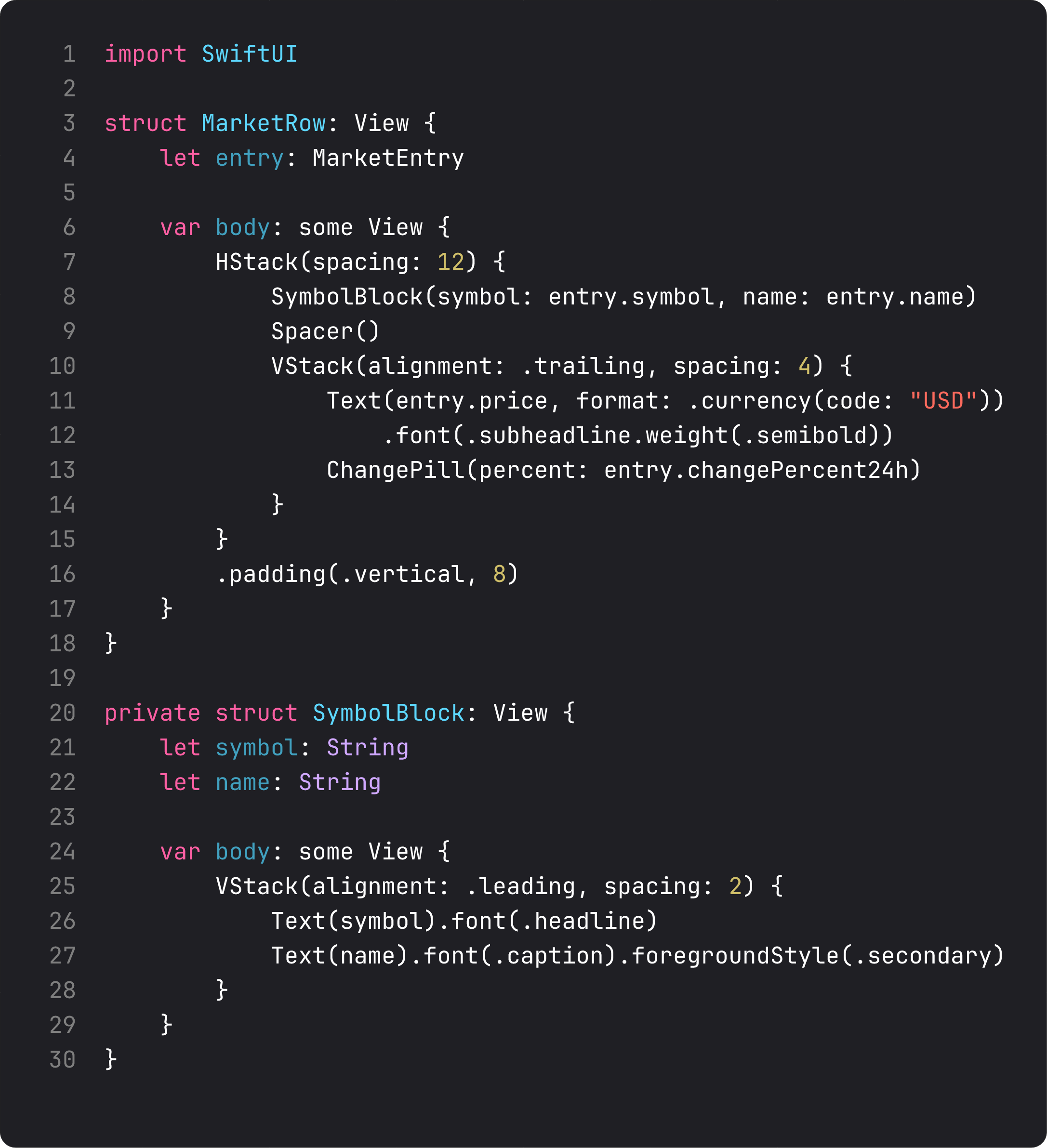
The pattern that saves the file from getting bloated:
MarketRowisinternal(the default in Swift) — accessible fromContentView. That’s a public component.SymbolBlockisprivate— only used insideMarketRow.swift. The compiler enforces the boundary. Future code can’t accidentally start usingSymbolBlocksomewhere it doesn’t belong.- Both take values, not models.
MarketRow.entry: MarketEntry.SymbolBlock.symbol: String, name: String. Noprefs, no view state. Leaf views in lists are pure functions of their input. This makes every row trivial to preview, test, and reason about.
Compare to the lesson 1 version where MarketRow was a private struct inside ContentView.swift. Same code, but now:
- The detail view (lesson 13 territory) can also render
MarketRowfor a “you’re looking at this brew” header — it’s reachable. - Tomorrow’s “compare two stocks” view can render two MarketRows side by side. Reachable.
- Tests against
MarketRowwork without setting up aWatchlistViewState. Pure function.
WatchlistHeader — when to extract a banner
The header above the list shows summary stats: total holdings, count up, count down. It’s its own visual block, with its own logic (counting up vs down). That’s the “extract” trigger — if a chunk has its own visual identity AND its own derived data, it’s a component.
The full ContentView — after extraction — is now this small:
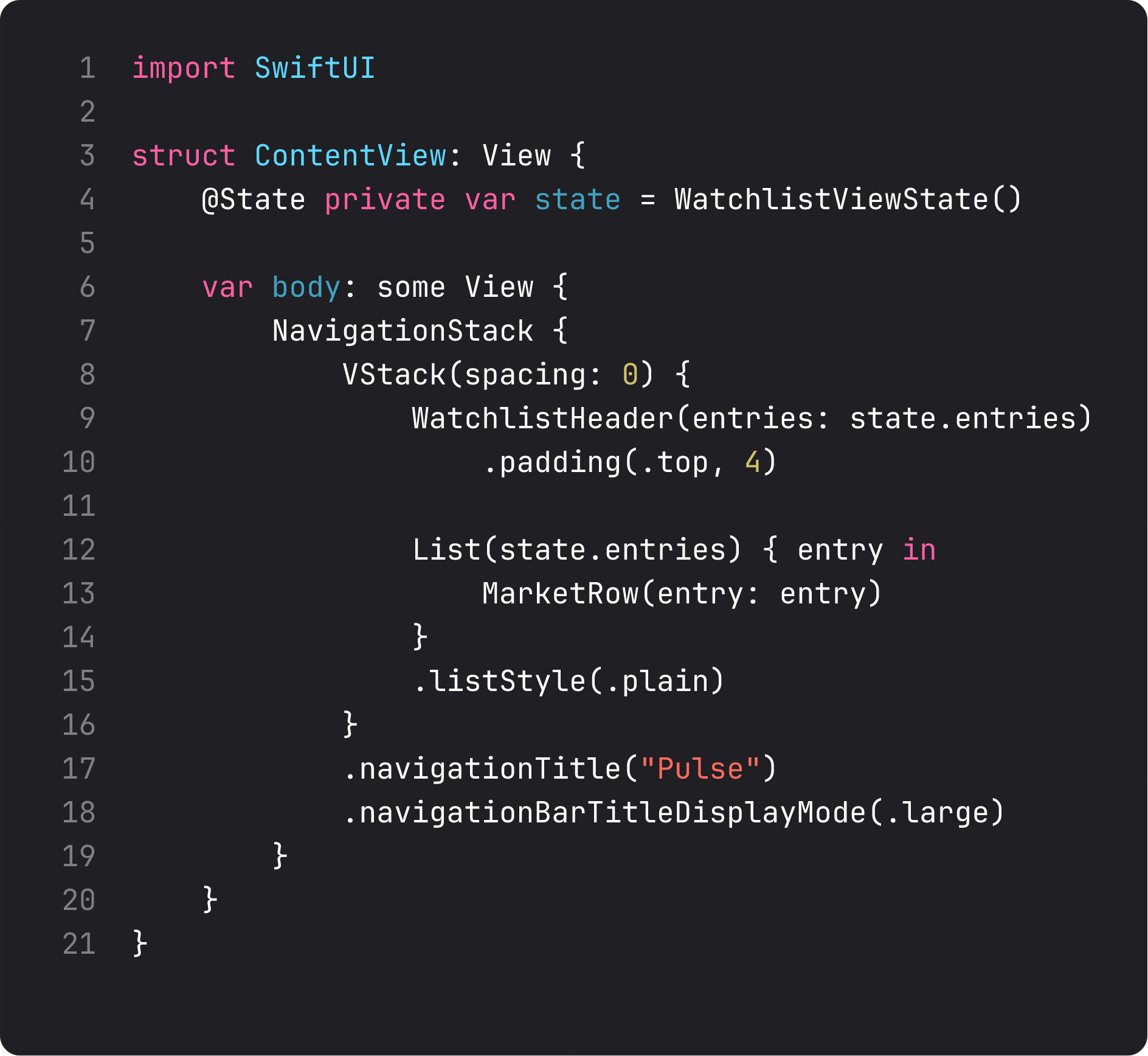
Twenty lines. Reads like a sentence: “in a NavigationStack, lay out a header above a list of market rows, with the title ‘Pulse’.” That’s the level of clarity that makes a codebase navigable.
Notice what ContentView no longer does: it doesn’t know how to render a price, format a percentage, choose green vs red, or count up/down totals. Those are all in their right components. ContentView orchestrates. It does not render details.
This is the pattern that scales. Every screen’s top-level view becomes thin — just a spatial composition of components. The components hold the actual logic. Bugs become easier to locate (“the change pill turned the wrong color”) because there’s exactly one file to open.
When NOT to extract — the discipline of restraint
Extraction has a cost. Every component you make is one more file to navigate, one more import (in our case implicit, but in modular projects explicit). The rules below are what stop “extraction tax” from drowning the codebase.
Don’t extract when:
- The component is used only once AND has no independent visual identity (e.g. a one-off label inside a row).
- The “component” is just two stacked Texts — the inline version reads cleaner than the extracted one.
- Extraction would require passing 6+ parameters — that’s a sign the component doesn’t have a clean responsibility yet. Reshape the data first.
Do extract when:
- The visual will appear in 2+ places (
ChangePillwill). - The component has its own derived data or logic (
WatchlistHeadercounts up/down). - The component has a name a designer would use (“the price card”, “the brew row”). Naming pressure is design pressure.
The most common antipattern is premature extraction — splitting a screen into 30 components on day one. The right rhythm is: build inline, notice repetition or independent identity, then extract. We extracted three components in one go this lesson because the home is the longest-running view in the app — every other view will reuse pieces of it. For a one-off settings screen, you might extract zero.
Anti-vibe-coding callout: the layout-by-extraction trap
LLMs love to over-extract. Ask one to “componentize this view” and you’ll get:
struct ContentView: View {
    var body: some View {
        VStackContainer {
            HeaderTitleSection {
                NavigationTitleText { ... }
            }
            ListContainerSection {
                ForEachLoopWrapper { ... }
            }
        }
    }
}
A made-up wrapper for every native SwiftUI primitive. Looks “modular.” Is in fact a mess — the abstractions don’t match any real responsibility, and the indirection makes simple changes (add padding to the list) require navigating four files.
Native SwiftUI containers are already the right abstraction. VStack, NavigationStack, List are not “things to wrap.” They’re things to use. Wrap your repeated patterns, not the framework’s primitives.
What it looks like running

The screen looks identical to lesson 1, plus the new header showing “6 holdings · 4 up · 2 down”. Every percent change is now a ChangePill instance — same component, six places. The codebase is bigger by three small files but each file does one thing.
That’s the trade-off of small composable views. A few more files, a lot less complexity per file.
Takeaway
One role per view. Extract when there’s repetition OR independent identity. Leaf views take values, not models. Restraint matters — don’t wrap the framework’s own primitives. Build inline first, extract when pressure shows up.
The result: ContentView becomes orchestration. Components hold logic. Files map to designer-visible concepts. That’s the architecture that scales without rewriting.
Next lesson: navigation at scale. We add a market detail screen to Pulse and learn the path-binding patterns that keep deep links and back-stacks sane across an app with five screens or fifty.
NativeFirst Team
EditorialThe NativeFirst team — engineers and designers building native Apple apps and writing the courses we wish we had when we started.
Comments
Leave a comment