
URLSession + async/await — Pulse Loads Real Markets
Up to lesson 3 Pulse showed the same six hardcoded markets every time. Educational, useful, but not a real app. This lesson rips out the sample data and wires Pulse to a public markets API. Real BTC, ETH, SOL prices. Real failure when the network is gone. The architecture from lessons 1–3 holds — view-state owns data, view renders it, no plumbing changes — only the source of the data changes.
Three pieces ship today: a MarketsAPI struct that does one HTTP call with async/await, a Decodable layer that maps the API shape to our domain shape, and a view-state that exposes loading + error state to the UI. Plus the SwiftUI hooks (.task, .refreshable) that drive it.
We use CoinGecko’s free public endpoint — no auth, no key, sensible rate limits, real data. The plumbing we build here works the same against any JSON HTTP API.
URLSession + async/await — the two-line core
The actual networking call is two lines. The rest is paranoia and translation.
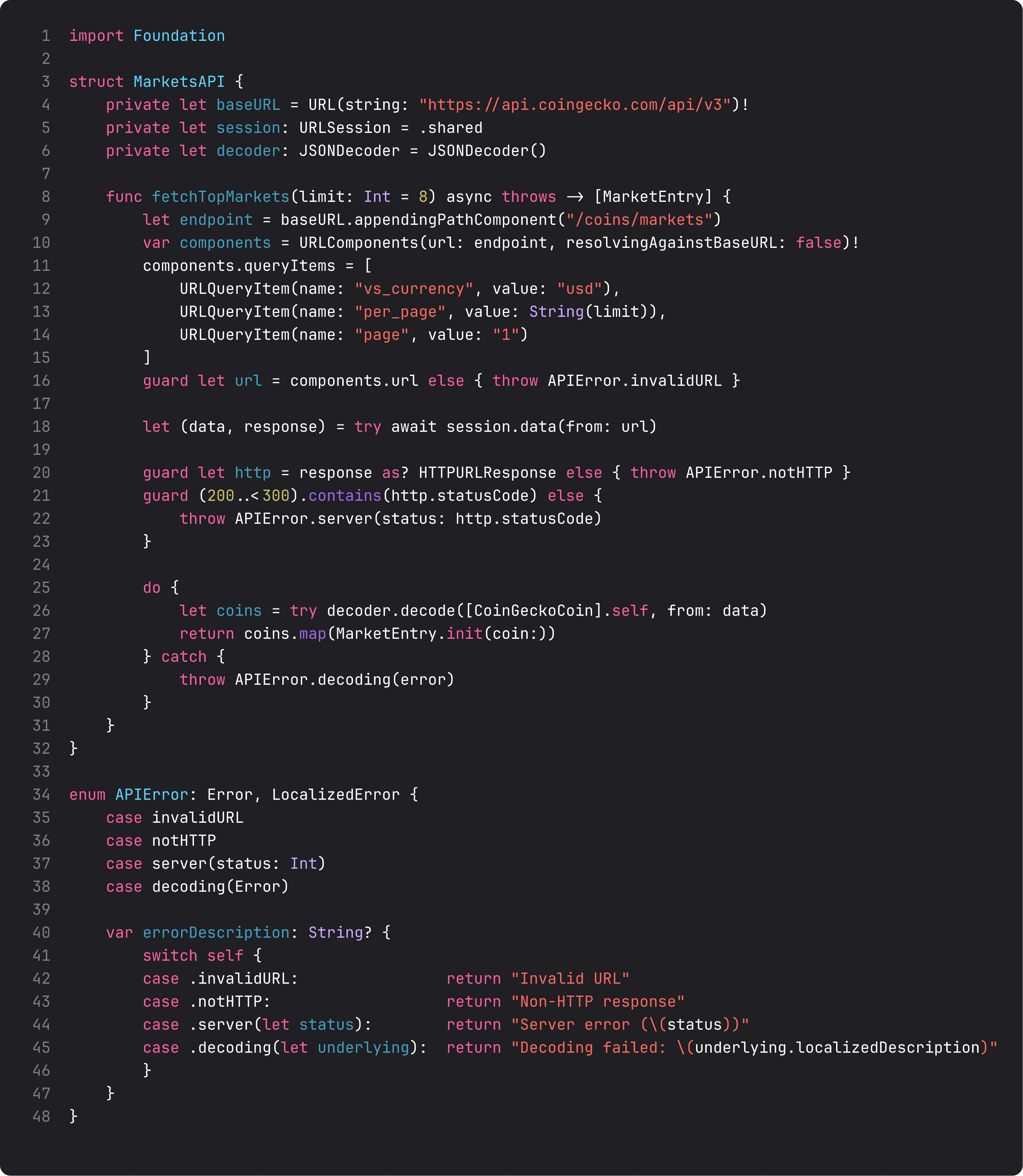
The four ideas worth memorizing:
URLComponentsfor query strings. Don’t string-concat URLs.URLComponentshandles encoding, thevs_currency=usd&per_page=8form, locale-safe symbols. Anti-vibe-coding flag:String(format: "...?per_page=%d", limit)is the LLM-generated version. It works until someone passes an emoji symbol and the URL silently breaks.session.data(from: url)is the modern API. Replaces the closure-baseddataTaskwith completion handler. Returns(Data, URLResponse)directly.response as? HTTPURLResponse—URLResponseis the abstract type; you almost always needHTTPURLResponseto get the status code. Cast and check(200..<300).contains(http.statusCode).- A typed
APIErrorenum — every networking layer ships with one. Each failure mode has a name and a payload.LocalizedErrorconformance makeserror.localizedDescriptionproduce something readable, which the UI can display directly. SOLID’s Open/Closed: add a new error case (rate-limited, unauthorized) without touching the call sites that already handle the existing ones.
The try await chain reads like synchronous code, but each step can throw. The do { ... } catch { throw APIError.decoding(error) } block is the polish detail: we catch the underlying DecodingError and wrap it in our domain error so the rest of the app doesn’t need to know about Foundation.DecodingError.
Decodable — keep the API shape and the domain shape separate
CoinGecko’s response uses snake_case fields and string IDs. Our MarketEntry uses camelCase, Decimal for price, fractional Doubles for percent. Don’t make views consume the raw API shape. Translate at the seam.
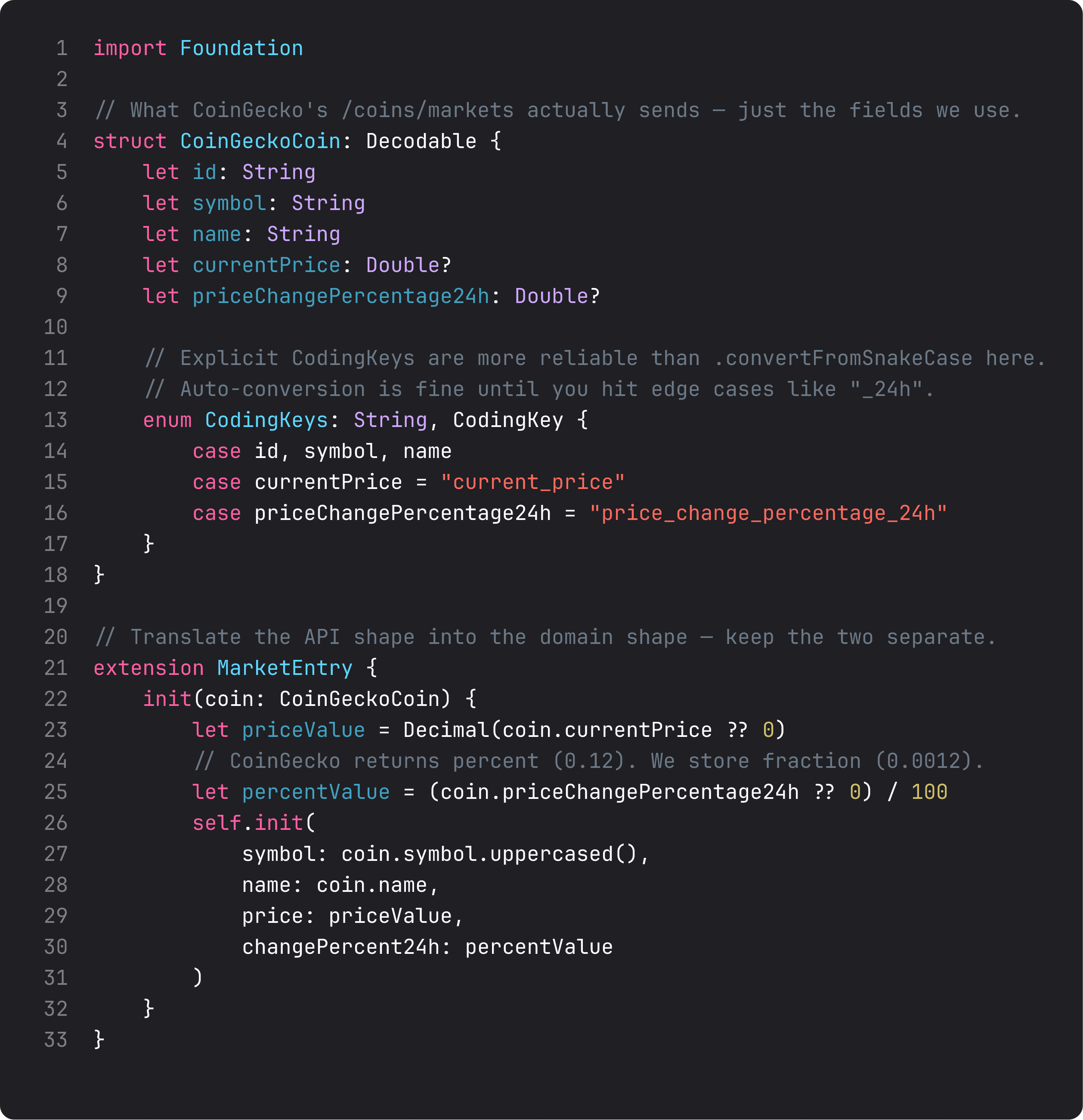
Three details that turn out to matter:
- Explicit
CodingKeys. I trieddecoder.keyDecodingStrategy = .convertFromSnakeCasefirst. It worked forcurrent_pricebut quietly failed onprice_change_percentage_24hbecause of how the converter handles_24h(no letter to capitalize, ambiguous mapping). The whole field decoded tonil, percent values silently became 0%, the screen looked fine but was lying. Explicit CodingKeys took 3 lines and removed the ambiguity. This is one of those bugs that’s invisible until someone looks at the data. Double?andString?for “fields that might be missing”. CoinGecko occasionally omits price for newly-listed coins.?makes the model honest about it. Then the?? 0in the mapping is visible — you’ve consciously decided what missing means.MarketEntry.init(coin:)is the seam. API shape comes in, domain shape comes out. The view never seesCoinGeckoCoin. Tomorrow if we switch to a different API (CoinMarketCap, our own backend), only this initializer changes — no view code touches snake_case strings.
This separation is DIP — Dependency Inversion Principle — at the data layer. Views depend on MarketEntry, an abstraction. The API mapping is the implementation detail that changes when the upstream changes.
View-state — .task and .refreshable are the SwiftUI hooks
The view model gets two new properties (isLoading, errorMessage) and one new method (load). The view binds them via .task and .refreshable.
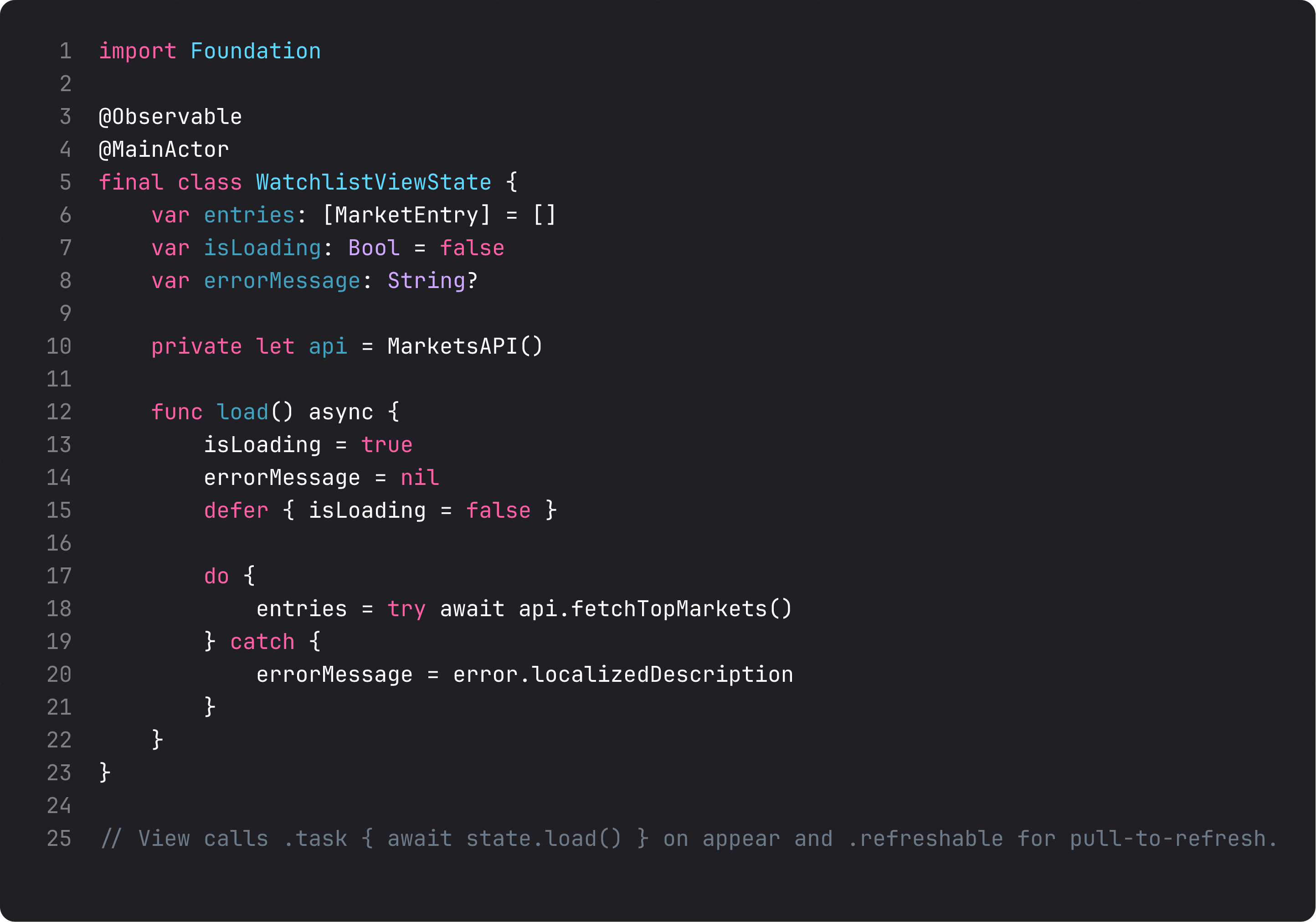
The key SwiftUI APIs:
.task { await state.load() }— fires when the view appears, cancels when it disappears. SwiftUI handles cancellation, so if the user navigates away before the request completes, your view-model’sload()gets aCancellationErrorand exits cleanly. Free lifecycle correctness..refreshable { await state.load() }— adds pull-to-refresh on aListorScrollView. Same call, same cancellation guarantees, system spinner.isLoading: Bool+errorMessage: String?— the simplest possible state shape. Lesson 7 promotes this to a fullLoadStateenum with five cases. For now: two booleans cover loading and “show me a different UI when there’s an error and no data.”
The defer { isLoading = false } is the small detail that separates polished from buggy. Whether load() succeeds, throws, or gets cancelled, the spinner stops. Putting isLoading = false only in the success path is a classic vibe-coded bug — the spinner spins forever after one failed request.
A trap I see weekly: the silent decoding failure
The pattern that bit me on this exact lesson:
let decoder = JSONDecoder()
decoder.keyDecodingStrategy = .convertFromSnakeCase
let coins = try decoder.decode([CoinGeckoCoin].self, from: data)
// Build runs. App runs. UI shows 0.00% change for every coin. ¯\_(ツ)_/¯
convertFromSnakeCase is convenient but silently handles edge cases with no warning. _24h collides with the converter’s casing logic. The optional Double? decoded as nil, the ?? 0 defaulted, and the percent display was always 0.
Three fixes available:
- Explicit
CodingKeys(what we did). Most robust, ships intent. - Disable the strategy and rename Swift properties to match snake_case (e.g.,
let price_change_percentage_24h: Double?). Ugly Swift but unambiguous. - Accept the strategy and verify with a unit test that decodes a fixture and asserts non-nil. The lesson-15 testing module covers this.
Whichever you pick, the meta-lesson is: silent decoding failures are the worst kind. The build passes, the app runs, the data is wrong. Always verify data ends up where you expect — either with explicit CodingKeys or with a test.
What it looks like running
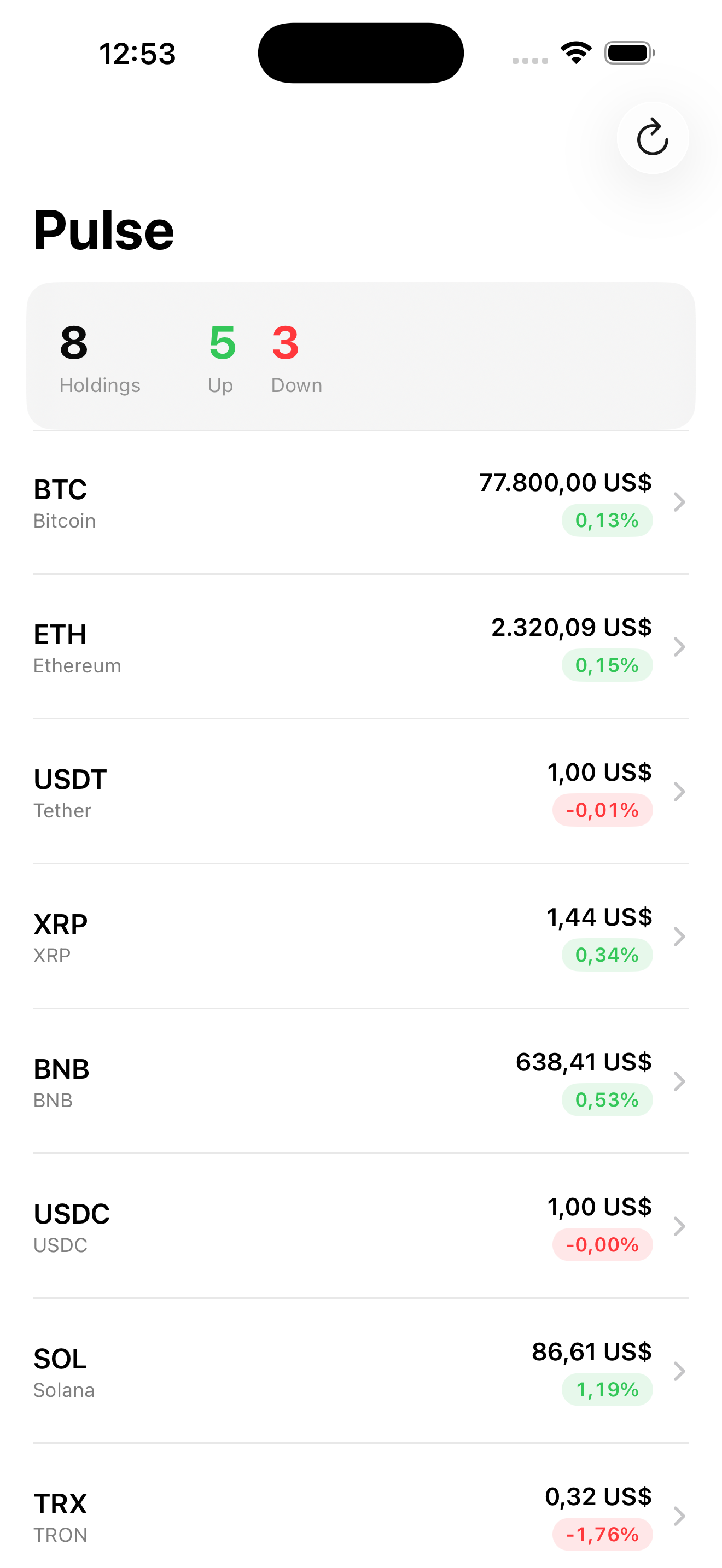
The video shows the load spinner kicking in on launch, then the watchlist filling with eight real markets — BTC at $77k, ETH at $2.3k, USDT at exactly $1, etc. The header summarizes 5 up / 3 down. Pull to refresh re-runs the same load(). Tap the refresh button in the toolbar — same.
That’s the trade-off of a real network call: a few hundred milliseconds of “loading” the user sees. Polish that in lesson 7 (UI state modeling) and lesson 9 (cache strategy). For now: the data is real, the failure path works, the architecture is clean.
Takeaway
URLSession.data(from:) is two lines. The other 30 lines are paranoia and translation. Type the failures with an APIError enum, keep API shape and domain shape on opposite sides of an initializer, and let SwiftUI’s .task and .refreshable drive the call. Always be explicit with CodingKeys for fields you actually depend on.
Next lesson: we wrap MarketsAPI behind a protocol so the view-state can be tested with a fixture and the production app can swap to a different backend without touching view code. DIP done properly.
NativeFirst Team
EditorialThe NativeFirst team — engineers and designers building native Apple apps and writing the courses we wish we had when we started.
Comments
Leave a comment