
ABNetworking — The Networking Layer We Built for Banking Apps
The URLSession layer we wrote in lesson 4 is fine for a course demo. It’s also missing roughly six things you need before shipping to the App Store: automatic retry with exponential backoff, certificate pinning, sane logging, thread-safety guarantees, typed errors with all the cases that actually happen, and a clean mock seam.
You can build all of those. We did. That code became ABNetworking — the open-source networking layer we use across every NativeFirst app, including production banking apps handling thousands of requests per day. Zero external dependencies. Pure Swift on top of URLSession. iOS 12.0+, Swift 5.7+.
This lesson shows what the same Pulse fetch looks like with ABNetworking, why each missing piece matters, and the one-line swap that takes Pulse from “course code” to “ship-ready.” The protocol abstraction from lesson 5 means the view-state, the views, and the mocks all stay exactly the same.
What ABNetworking gives you out of the box
The setup is two lines. The call is one. Everything reusable lives at the type-system level.
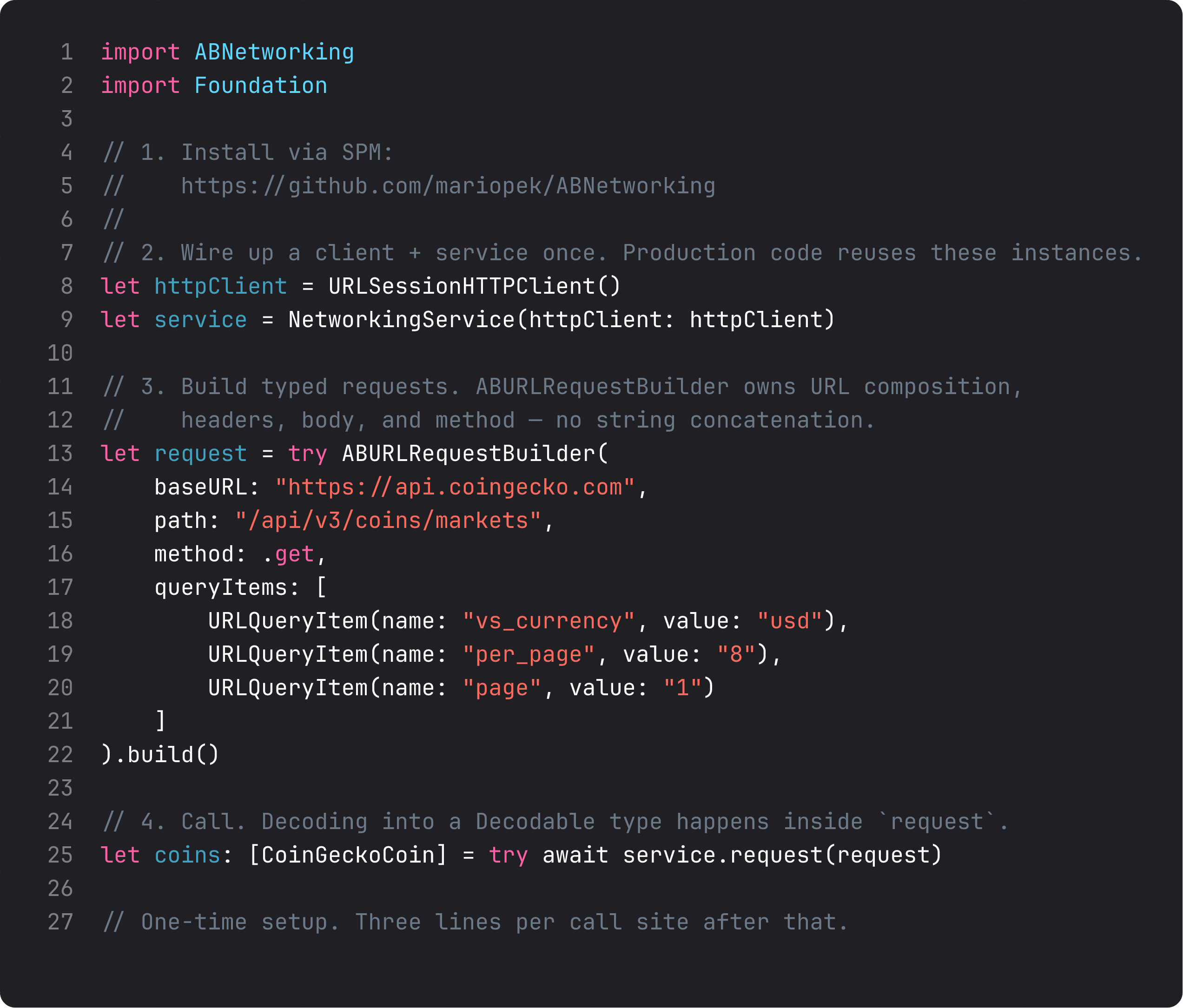
What you don’t see in those eight lines (because ABNetworking handles them):
- Automatic retry on transient failures. A 503 with exponential backoff retry. A timeout retried twice before throwing. A 401 NOT retried because retrying with a bad token is just slower failure. That logic alone is 50 lines if you write it yourself, and it’s one of the most subtle things to get right.
- Certificate pinning in three lines:
URLSessionHTTPClient(pinnedCertificates: [certData]). For finance, health, anything that handles real user data, this is non-negotiable. Without pinning, a corporate proxy or a state-level adversary can MITM your TLS and you’ll never know. - Configurable logging at four levels — debug, info, warning, error. In dev you see every request. In prod you see only the failures. Toggle once, no print statements scattered through the codebase.
- Decoder injection. Pass a custom
JSONDecoderif your API uses ISO-8601 dates, or fragments, or whatever else. ABNetworking doesn’t lock you into one decode strategy.
We open-sourced it because every team builds the same thing from scratch, and most implementations miss at least three of the production requirements above. There’s no business advantage to keeping our networking layer private — there is for shipping it free so the whole iOS community stops writing its 47th URLSession wrapper.
Typed errors that map cleanly to UI
In lesson 4 we modeled errors with our own APIError enum. ABNetworking’s NetworkingError is the same idea, but it’s already done — and it covers the cases we’d otherwise miss.
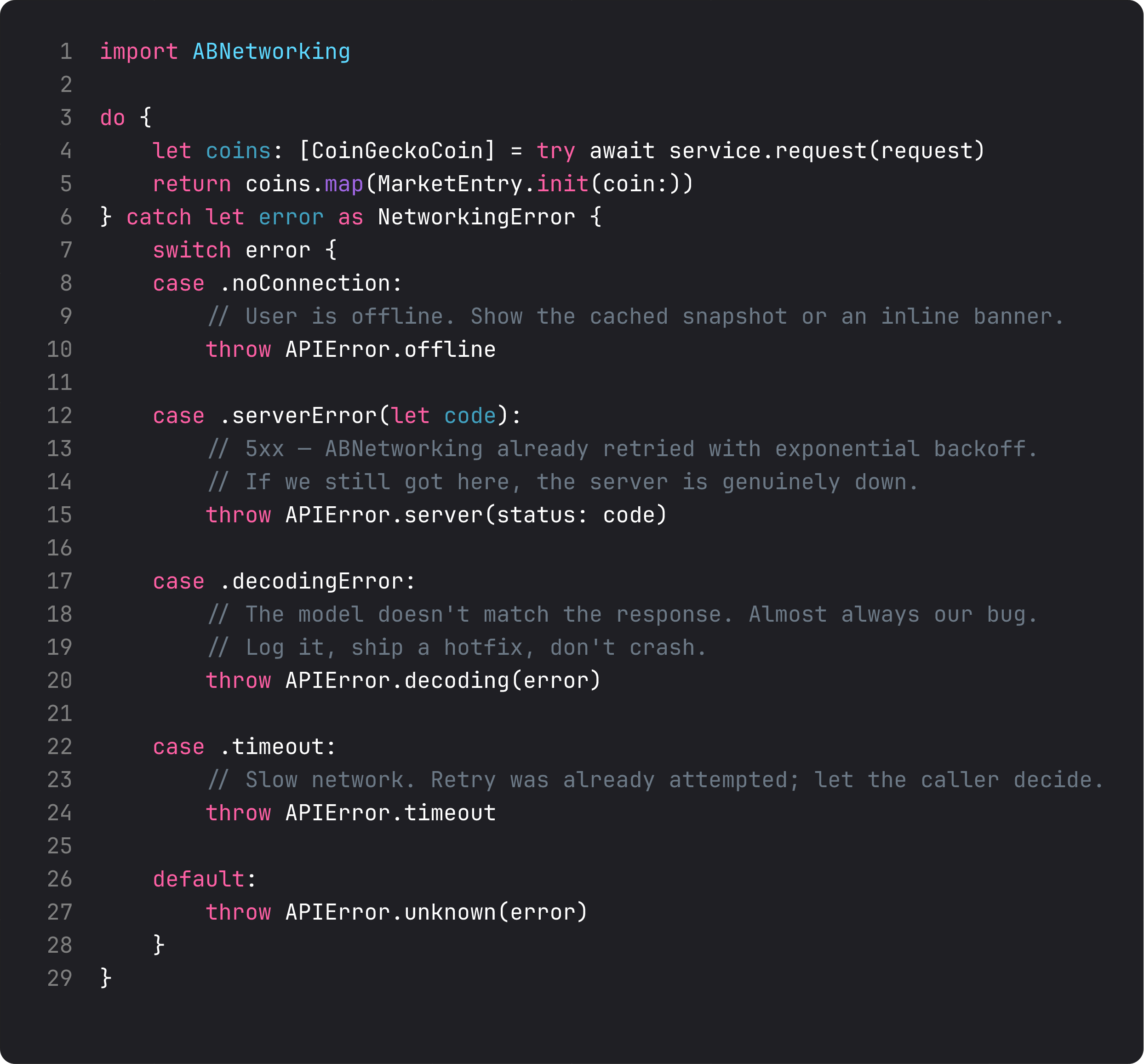
The cases line up with how a UI actually wants to handle errors:
.noConnection— show a “you’re offline” banner OR fall through to cached data. Different UX than a server failure..serverError(let code)— if we got here, retry already failed. Tell the user the server’s down, offer a retry button that fires after backoff..decodingError— a developer bug, not a user bug. The app may still want to show “something went wrong” but the actionable signal is “ship a hotfix.”.timeout— slow network. Different from offline (we got partial data). Different from server error (the server didn’t respond at all).
Every case maps to a different sentence the user sees. Modeling them as exhaustive enum cases means the compiler reminds you to handle each one — no catch { print("error") } swallowing real failures.
The one-line swap
Lesson 5’s LiveMarketsRepository wrapped MarketsAPI. Here’s the same wrapper, this time backed by ABNetworking. Same protocol. Same view-state. Same mock. Same UI. The only thing that changed is the implementation behind the protocol.
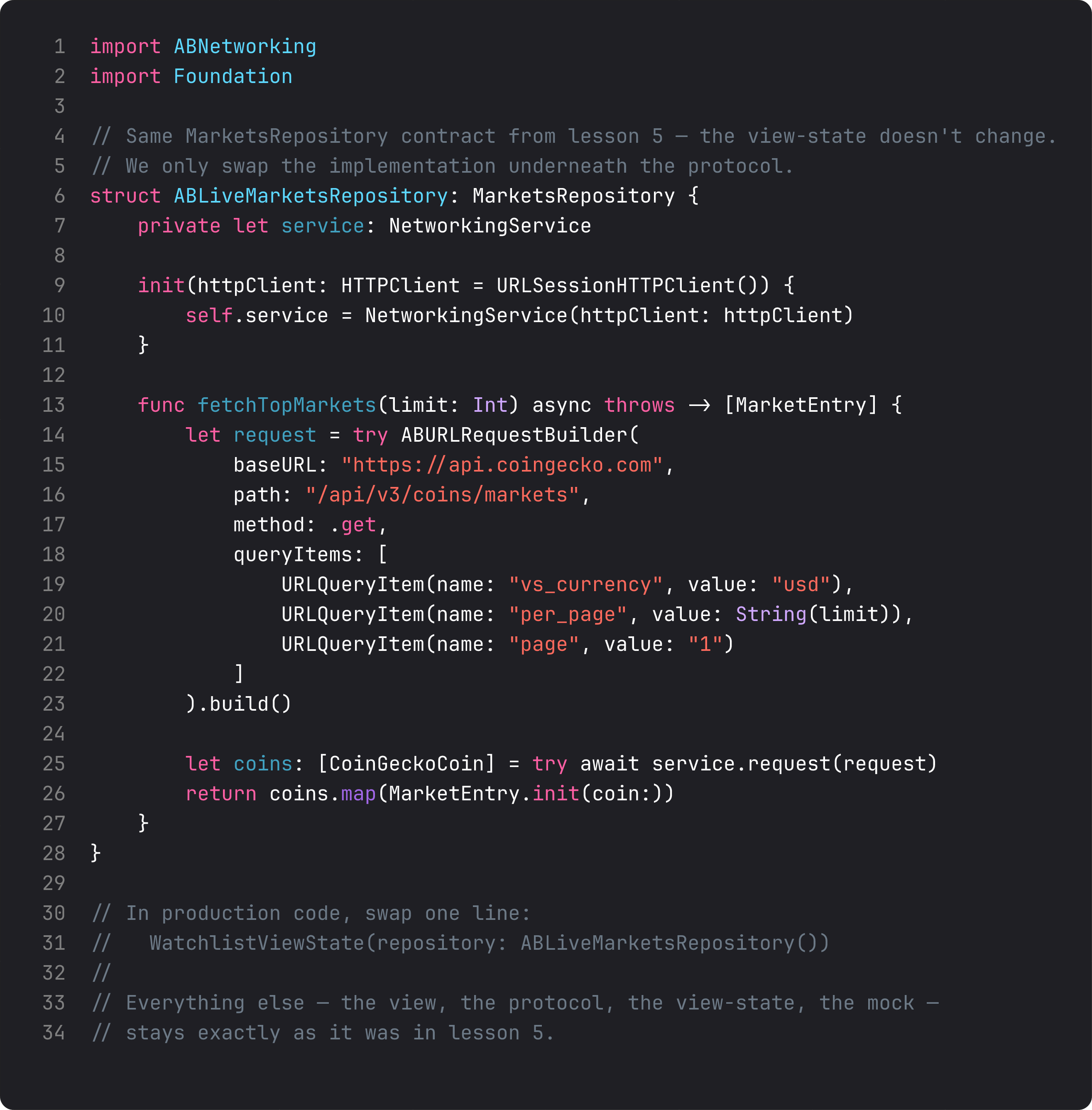
Production wiring becomes:
@main
struct PulseApp: App {
    var body: some Scene {
        WindowGroup {
            // Was: WatchlistViewState() — used the URLSession-backed default.
            // Now: explicit production repository, ABNetworking under the hood.
            ContentView(state: WatchlistViewState(repository: ABLiveMarketsRepository()))
        }
    }
}
That’s the whole production swap. One line. Zero changes elsewhere. The view-state doesn’t know which networking library backs the repository — it depends on the protocol. Tests still inject MockMarketsRepository. Previews still show the failure UI without the simulator. The architecture from lessons 1–5 was designed for exactly this kind of swap.
This is what Dependency Inversion Principle buys you in concrete dollars: you can switch from a 50-line URLSession wrapper to a 50,000-line battle-tested networking library by changing one import and one default.
When to roll your own vs. pull in ABNetworking
The honest take, since this lesson is both a tutorial and a pitch:
Roll your own when:
- You’re learning. Lesson 4 was about understanding what’s under the hood — that knowledge doesn’t go away just because you later use ABNetworking.
- The app has one or two endpoints, no auth, no sensitive data. A 30-line URLSession wrapper is genuinely fine.
- You enjoy reinventing wheels. (No judgment — sometimes that’s how you learn.)
Use ABNetworking (or another production library) when:
- The app handles user data — finance, health, education.
- You need any one of: retry with backoff, cert pinning, structured logging, clean mocking.
- You’re shipping to the App Store and don’t want to debug “the request worked in dev but fails on cellular” three weeks after launch.
- You’d rather spend your time on features than on writing networking infrastructure that’s already been written.
ThinkBud — our most-shipped app — moved off a hand-rolled networking layer to ABNetworking in week six. The conversion took an afternoon. The retry logic alone fixed three issues we’d been seeing in TestFlight that we hadn’t been able to reproduce. Real win, real numbers.
What it looks like running
The screen looks identical because the user can’t see your networking library. What changed: turn off WiFi mid-fetch, ABNetworking retries with backoff and only surfaces .noConnection after the backoff window. Hit a 503, ABNetworking retries up to three times before throwing .serverError(503). The URL paths, the JSON parsing, the SwiftUI views — all unchanged.
Takeaway
ABNetworking is the production networking layer we built so we wouldn’t have to write it again. Open-source. iOS 12+. Zero deps. Drop-in behind the MarketsRepository protocol from lesson 5. Use it (or something like it) for any app that ships. Roll your own when you’re learning or when scope is genuinely tiny.
Repo: https://github.com/mariopek/ABNetworking
Next lesson: UI state modeling. We replace the loose isLoading + errorMessage pair from lesson 4 with an explicit LoadState enum that forces every screen to handle every state — loading, loaded, empty, error — at the type level.
NativeFirst Team
EditorialThe NativeFirst team — engineers and designers building native Apple apps and writing the courses we wish we had when we started.
Comments
Leave a comment