
UI State Modeling — One Enum, Five States, Zero Bugs
In lesson 4 we used two booleans to track network state: isLoading: Bool and errorMessage: String?. It worked. It’s also the pattern that creates roughly half the “stuck spinner” and “no data, no error” bugs you’ll ever debug.
The fix is one of the most-cited patterns in modern app architecture: model UI state as an explicit enum. Every state the screen can be in is a case. Every transition is an assignment. The compiler stops you from forgetting an empty state because the switch-statement won’t compile without it.
Pulse’s WatchlistViewState gets a LoadState enum with five cases — idle, loading, loaded, empty, failed(String) — and the view becomes a switch over it. This pays off three ways: (1) impossible states become unrepresentable, (2) the empty state gets a real treatment instead of “looks like loaded but no rows,” and (3) Xcode previews can render every state with a four-line MockMarketsRepository setup.
The five-case enum
It’s a sealed type — every possible UI state, named.
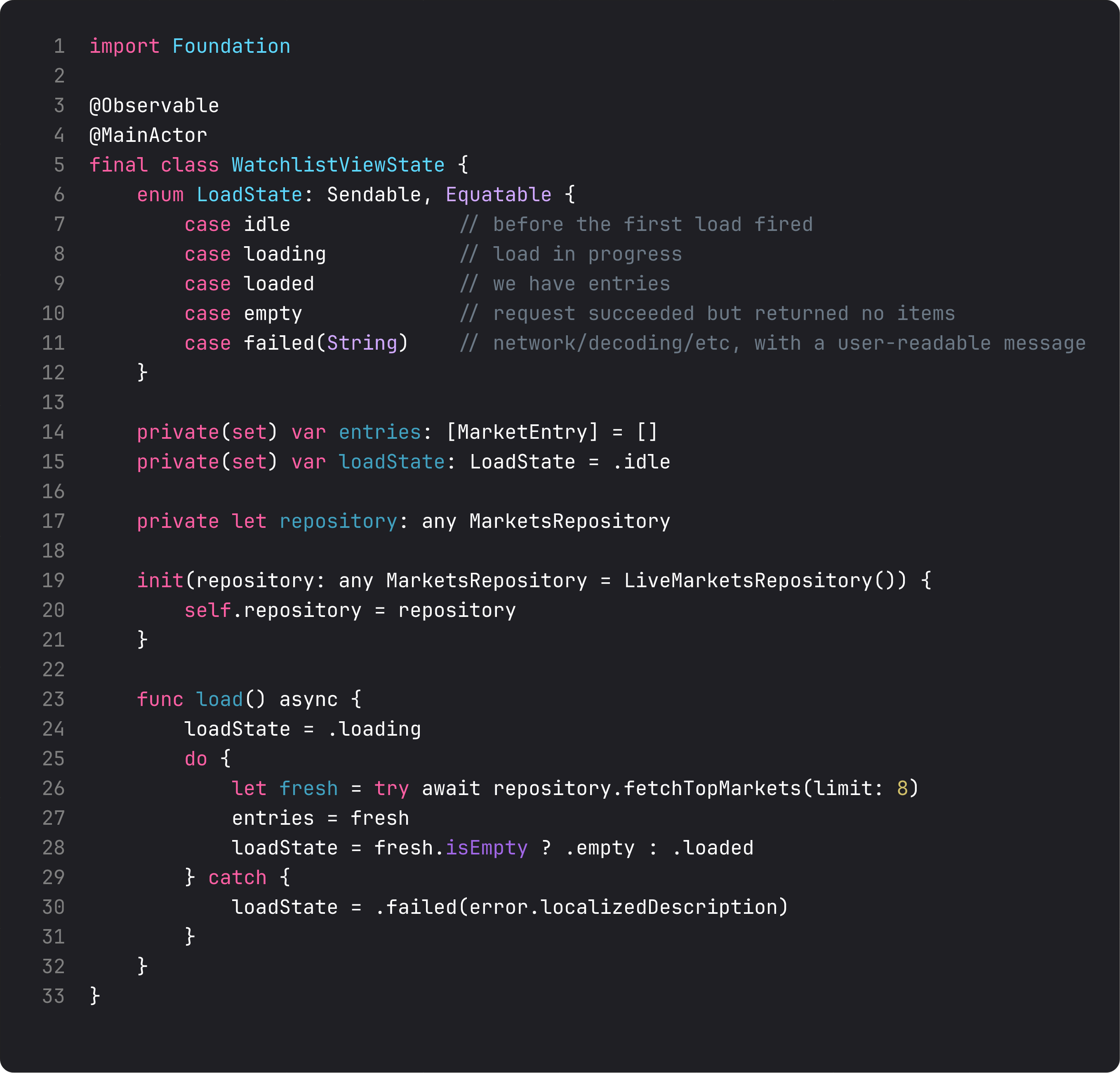
The five cases, what each one means:
.idle— before the first load fired. View shows nothing yet (or a placeholder). Almost invisible because.task { await load() }flips it to.loadingimmediately on appear..loading— load in progress. The view shows a spinner ifentriesis empty (first-time load), or keeps showing the existing list if we have prior data (refresh)..loaded— request succeeded with data. View renders the list..empty— request succeeded with zero items. Different from.loadedbecause the UX is completely different: empty state explanation, maybe a “create your first” CTA, not a blank list..failed(let message)— anything threw. The associated value carries the user-readable message; the view shows it next to a retry button.
Two important design decisions:
entrieslives outside the enum. When loading or refreshing, the previous entries stay around so we can show them while the spinner runs. Puttingentriesinside.loaded([MarketEntry])would erase them on every state transition — UX regression for the common “pull to refresh” case.EquatableandSendable. Equatable lets the view compare states cheaply (e.g.,state.loadState == .loading). Sendable makes the enum safe to ship across actors under Swift 6 strict concurrency.
This is the Open/Closed Principle at the type level: add a new state case (e.g. .unauthorized to surface a “log in to continue” UI) and the compiler walks you through every switch in the codebase. No silent missed branches.
The view switches on the state
The view becomes a single @ViewBuilder switch. Every state has its own branch. The compiler enforces that every branch is handled.
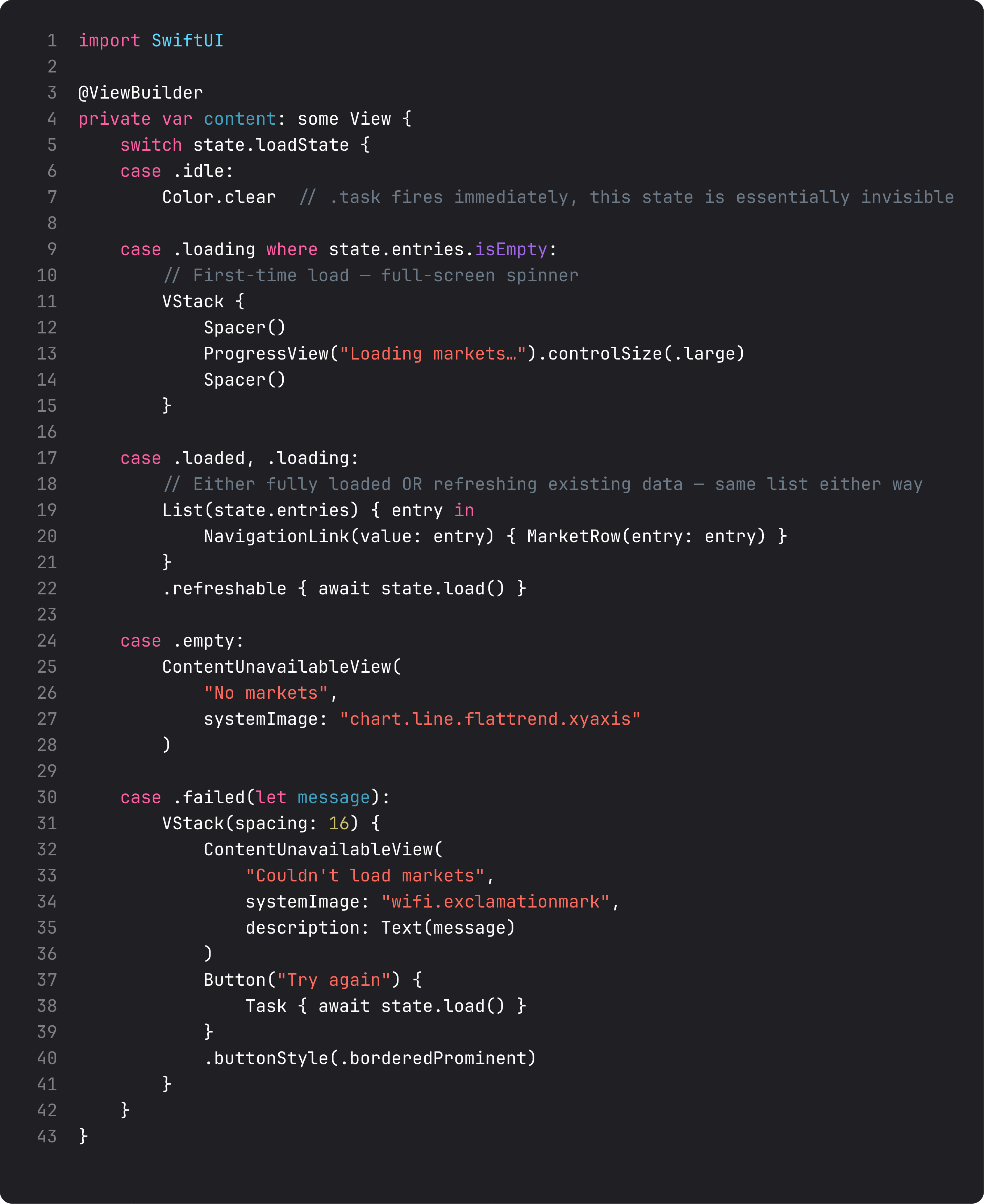
Three patterns embedded in that switch:
case .loading where state.entries.isEmpty:— the first-time loading branch. Full-screen spinner, no list visible because there’s nothing to show. Thewhereclause distinguishes “we have nothing yet” from “we have stale data and are refreshing.”case .loaded, .loading:— combined. Once we have entries, both “fully loaded” and “refreshing” render the same list. The toolbar’s spinner is what signals “refresh in progress” — we don’t need to dim the list or show an overlay.case .failed(let message):— pulls the message out, renders it insideContentUnavailableView, and adds a Try Again button right below. This is the only place in the codebase that knows what to do with the failure state. One source of truth per state.
This pattern looks slightly wordy compared to the lesson 4 version, but it’s also impossible to break. There’s no way to be in .loaded with empty entries (the assignment in load() enforces this). There’s no way to render a spinner when we should be showing an error (the switch can’t fall through).
Previewing every state without the simulator
This is the leverage. Combine the protocol-based mock from lesson 5 with the state enum from this lesson and you get every UI state visible in Xcode’s preview canvas.
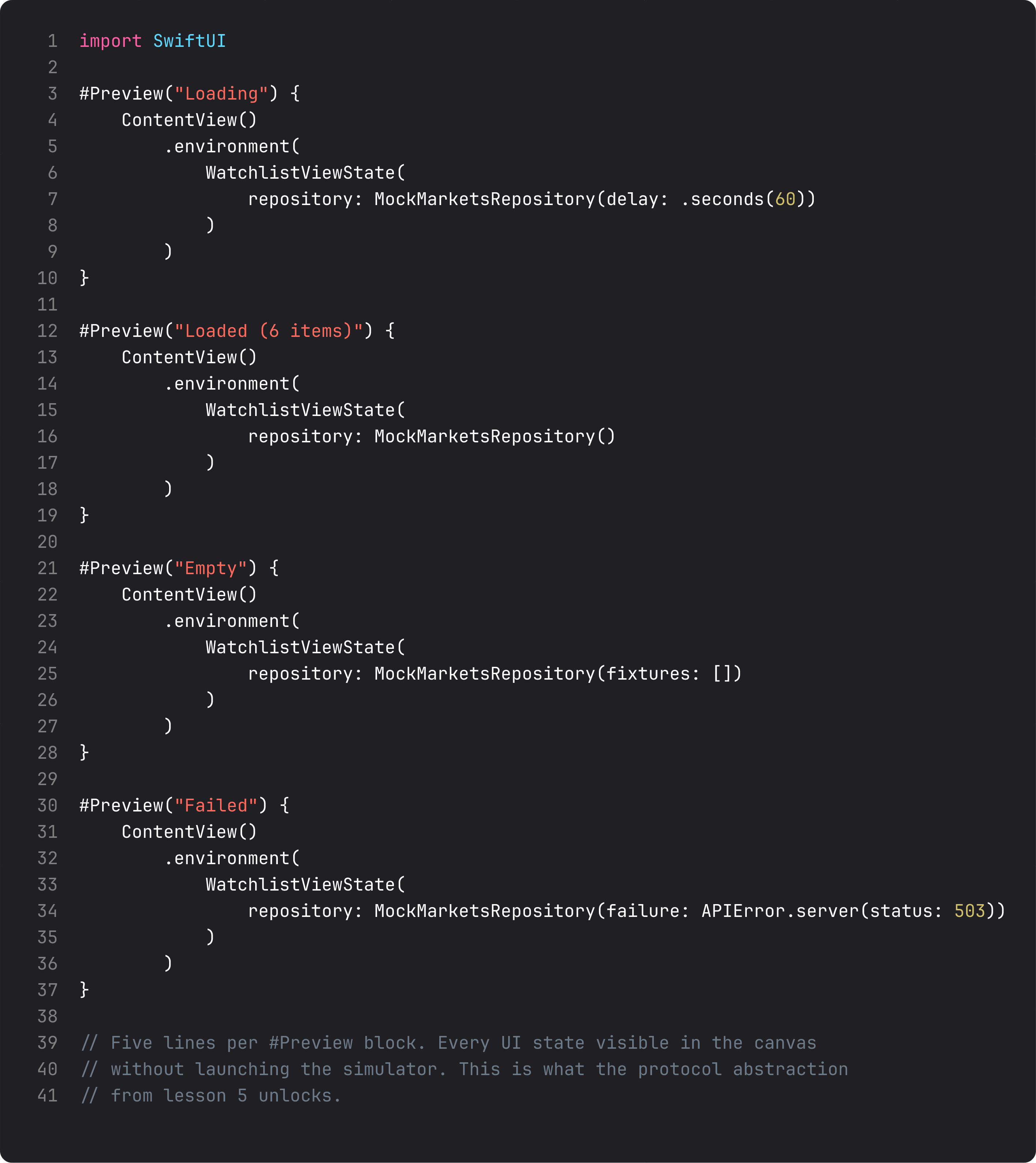
Four #Preview blocks. Every screen state visible without launching the simulator. The patterns:
MockMarketsRepository(delay: .seconds(60))— the mock blocks for a long time, so the preview stays in.loading. Pin this state in the canvas, see the spinner, fix the layout if it’s off.MockMarketsRepository(fixtures: [])— load succeeds with zero items →.empty. Designers can review the empty-state copy, screenshot it, hand back feedback.MockMarketsRepository(failure: APIError.server(status: 503))— load throws →.failed(...). The error message and retry button are visible, copyable, screenshot-able.
This was the missed opportunity in lesson 4’s isLoading: Bool model: previewing the error state required actually breaking the network. Now it’s four characters in a struct initializer. Every state, every render, at edit time.
The ThinkBud team uses this exact pattern across all 14 of its screens. The four mandatory previews per screen — Loaded, Loading, Empty, Failed — caught a class of “we forgot to handle the empty case” bugs that previously showed up only in TestFlight after a friendly user pointed them out.
A trap I see weekly: showing data while in a failure state
The vibe-coded version of “handle errors”:
@State var isLoading = false
@State var entries: [MarketEntry] = []
@State var errorMessage: String?

var body: some View {
    List(entries) { ... }                                  // always shown
        .overlay { if isLoading { ProgressView() } }       // sometimes shown
        .alert(errorMessage ?? "", isPresented: ...)        // sometimes shown
}
What goes wrong: the user pulls to refresh, the network fails, the alert pops up — and behind the alert, the stale list is still there, looking like the new data. They dismiss the alert, see the list, assume the refresh succeeded. Five minutes later they’re trading on yesterday’s prices.
The enum-switch pattern prevents this entirely. Either you’re in .loaded (showing fresh data) or .failed (showing the error UI). You can’t be both. The user can’t misinterpret a stale list as fresh because the screen literally renders the error state when in .failed.
This is Make Illegal States Unrepresentable — the rule from Yaron Minsky’s classic OCaml essay, lifted into Swift via algebraic data types. Eight characters of enum LoadState carry more correctness than fifty lines of “validate that all the fields agree” code.
What it looks like running
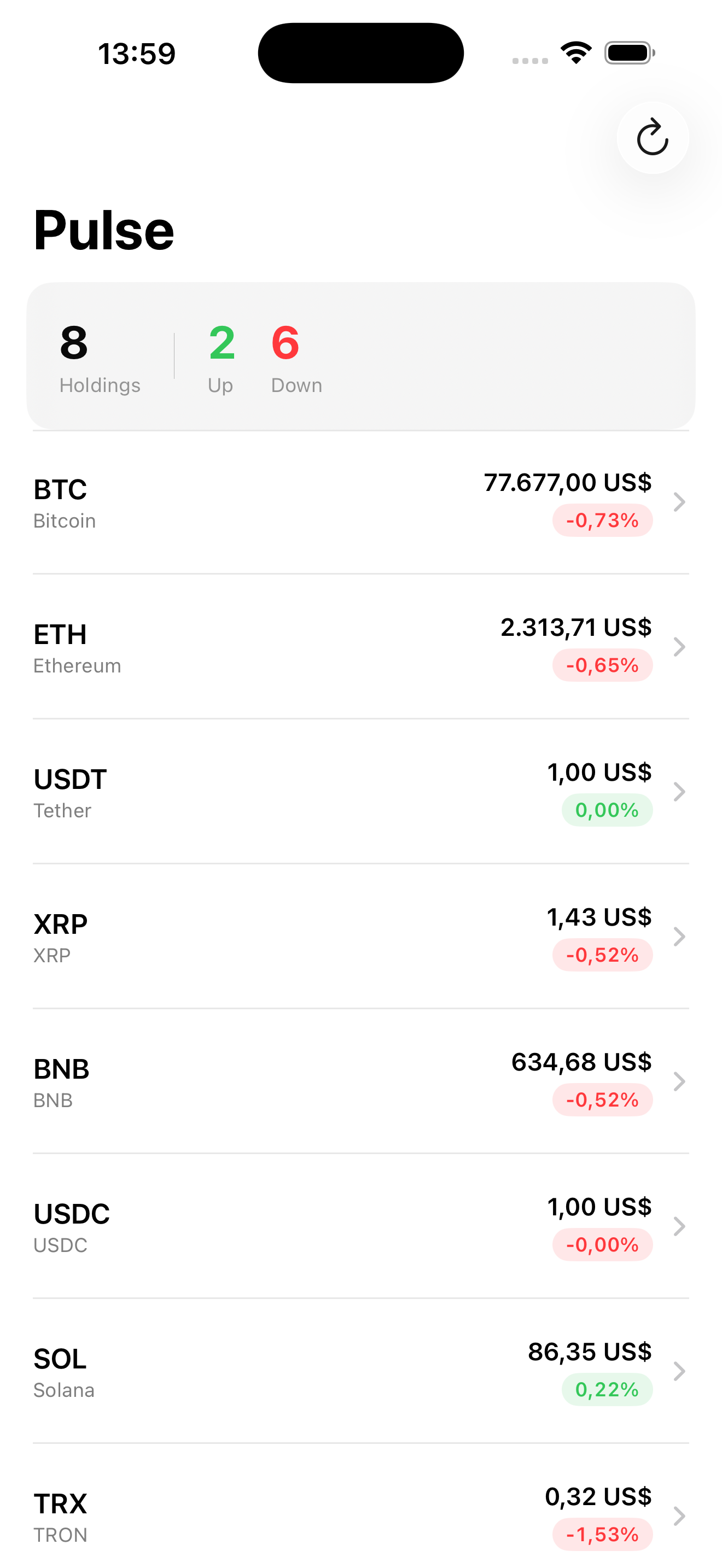
The screen looks the same as lesson 4’s. The point isn’t visual — it’s the four other screens (loading, empty, failed, retry) you’d be writing manually otherwise. With the enum, they’re four cases of one switch. Add a fifth case (.unauthorized?) and the compiler reminds you to handle it everywhere.
Takeaway
Model UI state as an explicit enum. Every state the screen can be in gets a case. The view switches on it. Impossible states become unrepresentable; previews exercise every case in four lines each. This is the highest-leverage refactor you’ll do on any networked screen — half the bugs in this category disappear at the type level.
Next lesson: SwiftData with relationships. We add favorites and search to Pulse, persisting them locally with proper migrations and a real one-to-many relationship.
NativeFirst Team
EditorialThe NativeFirst team — engineers and designers building native Apple apps and writing the courses we wish we had when we started.
Comments
Leave a comment