
MVVM 2026 — What It Actually Means with @Observable
Welcome to SwiftUI in Practice. The course where Brew Log graduates and Pulse — a markets watchlist app pulling real data from a real API — takes its place. By the end of this course, Pulse loads BTC/ETH/AAPL prices over the network, caches them with stale-while-revalidate, animates updates with matchedGeometryEffect, charts a 7-day trend, and ships with a production-quality networking layer (ABNetworking — the open-source one we built for banking apps).
Today’s lesson is the foundational decision the rest of the course depends on: what’s MVVM in SwiftUI in 2026?
The short version: MVVM is a useful pattern that’s been mangled by ten years of articles. In modern SwiftUI it means one view-state class per screen, owned by @State, exposing a clean read-only API plus methods that mutate. No singletons. No protocols-for-the-sake-of-protocols. No layers that exist just to satisfy an architecture diagram. SOLID’s Single Responsibility Principle, applied to a screen.
Pulse v0.1 — what we ship in this lesson — is the smallest working version of that pattern.
The view model — owned, observable, focused
Here’s WatchlistViewState — the view model for our home screen. It owns the watchlist’s data. It has methods to mutate it. The view reads from it and displays.
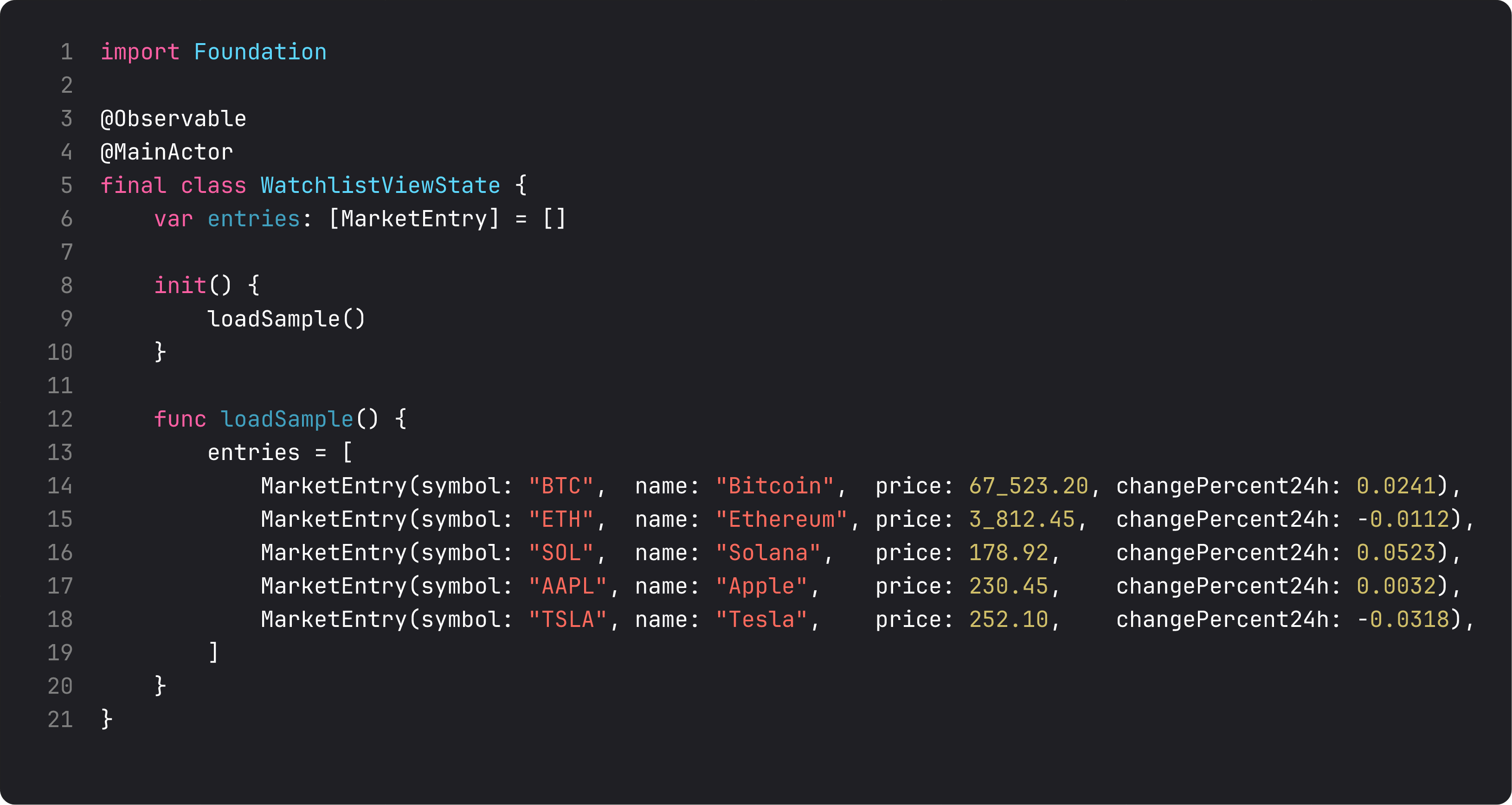
Three deliberate choices in those fifteen lines:
@Observable— same macro from Foundations lesson 7. SwiftUI tracks reads ofentriesand re-renders the view when the array changes. No@Published, noObservableObject.@MainActor— annotates the entire class. Every method, every property access happens on the main actor. SwiftUI’s view rendering runs on the main actor. Any async work the view model does (loading from network later) hops off the main actor for the heavy lifting and back to the main actor when it touchesentries. This single annotation eliminates entire categories of “why isn’t my UI updating” bugs under Swift 6 strict concurrency.final class— same rule as Foundations. No subclassing for view-state types. They’re meant to be replaced as a unit.
We initialize with loadSample() because we don’t have networking yet. Lesson 4 swaps this out for a real URLSession call. Nothing in the view changes — it doesn’t know whether entries came from sample data, network, or a cache.
That decoupling is the whole point of MVVM. The view depends on the view-state’s API, not its implementation. SOLID’s Single Responsibility — WatchlistViewState is responsible for “what does the watchlist screen need to show” — and Dependency Inversion — ContentView depends on the abstraction, not the concretion.
The view — pure presentation
Here’s the matching ContentView. Notice what’s not in it: no init, no networking, no parsing, no formatting beyond what’s needed for display.
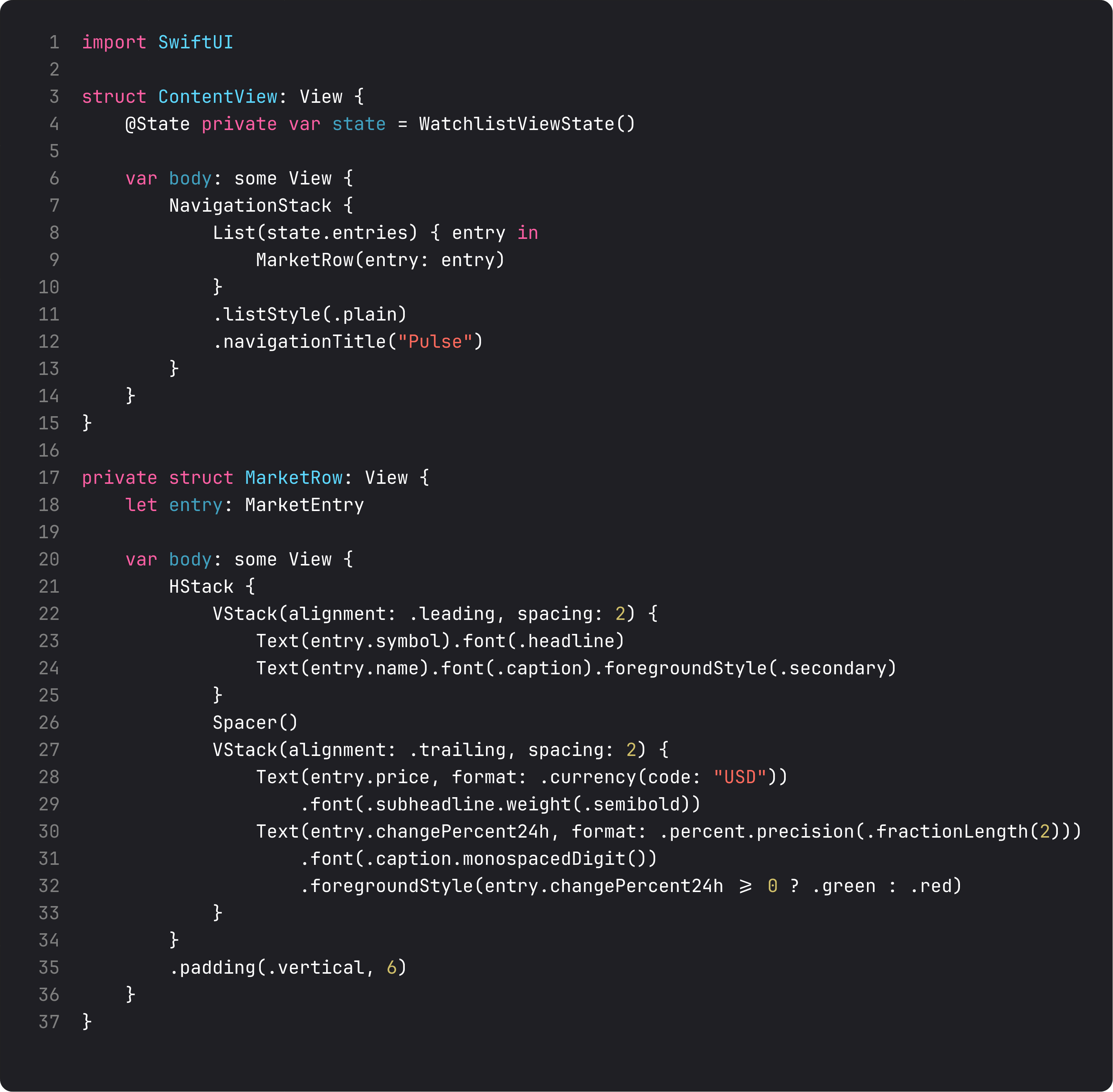
Three details that read like they don’t matter and absolutely do:
@State private var state = WatchlistViewState()— the view owns the view state. It’s a class instance, but the storage attribute is@State. SwiftUI persists it across re-renders for this view’s lifetime. When this view goes away, so does the view state.- The view never mutates
state.entriesdirectly. All mutations happen by calling methods onstate. Reads are fine; writes go through the API. This is the contract MVVM is enforcing. MarketRowis a private nested view. It takes aMarketEntryvalue. It doesn’t reach back into the view state. It doesn’t know about the view state. It’s pure presentation — give it data, get a row. ISP — Interface Segregation Principle — applied to view APIs.
The formatting (format: .currency(code: "USD"), format: .percent) lives at the rendering layer because it’s a presentation concern. The view state stores a Double for changePercent24h because that’s the right data representation. Each layer has the right abstraction.
What about load states?
The version we ship in lesson 1 just shows data. By lesson 7, every screen handles five UI states explicitly:
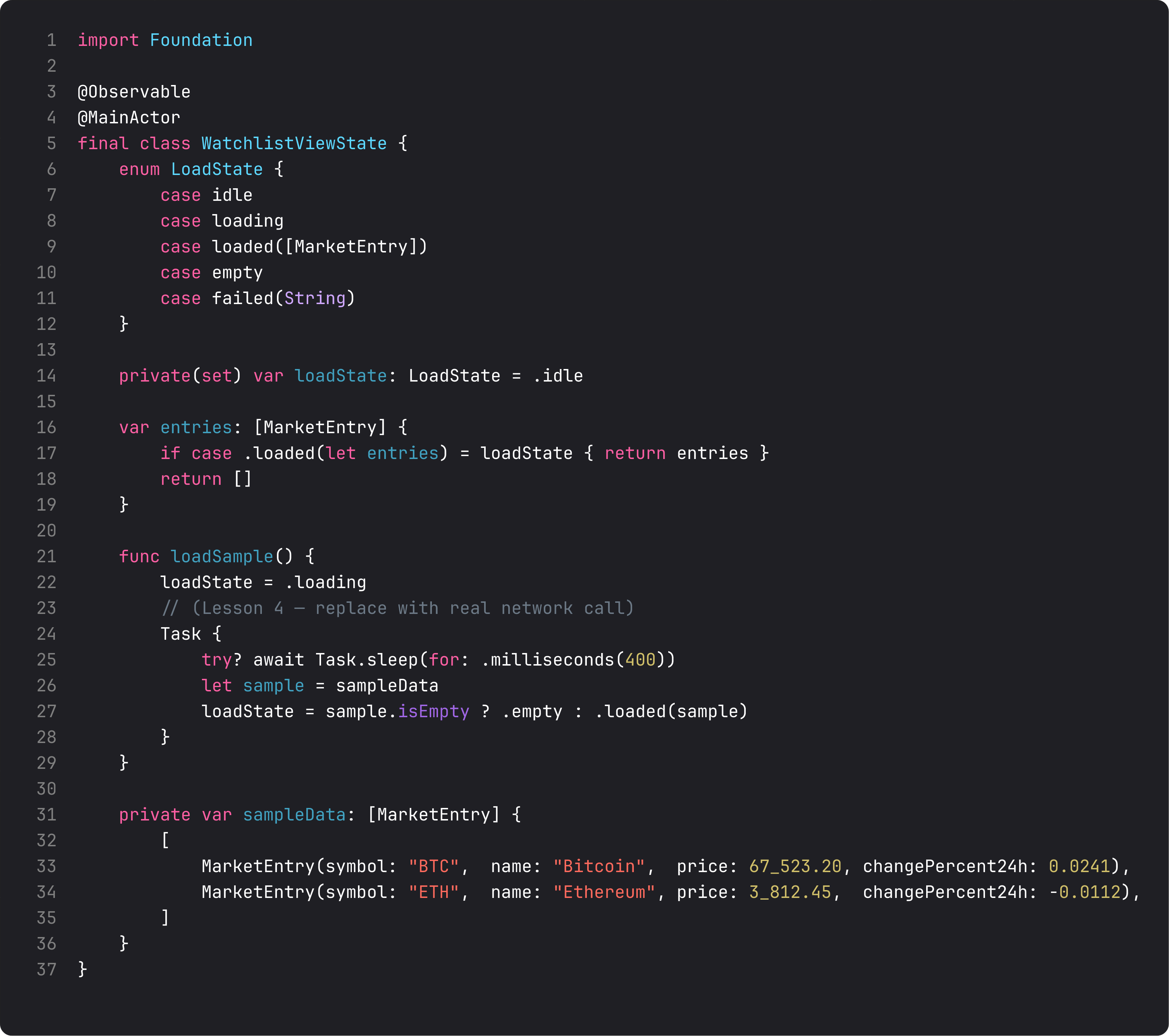
That’s a preview of what WatchlistViewState looks like by the time we have networking. The LoadState enum models every state the screen can be in: idle, loading, loaded([MarketEntry]), empty, failed(String). The view switches on that enum and renders the right thing.
Why this matters: vibe-coded view models forget at least three of those states. They render data when present, blank when not. The user sees a spinner forever (no failure handling), or sees stale data with no indication it failed to refresh. Modeling load state as an enum forces every state to be considered at the type level.
This was ThinkBud’s breakthrough on the import flow: the success path was easy, the four failure modes were what took a week. Once we had them as explicit enum cases, all four UI states became obvious to design and implement.
We’ll fully wire this in lesson 7.
A trap I see weekly: the global store
The vibe-coded version of “set up Pulse with MVVM”:
// AppData.swift — singleton global state
@Observable
final class AppData {
    static let shared = AppData()
    var watchlistEntries: [MarketEntry] = []
    var portfolio: [Position] = []
    var settings: Settings = .default
    // ... 30 more properties
}

struct ContentView: View {
    var body: some View {
        WatchlistView()
            .environment(AppData.shared)
    }
}
The “view model” became a 1,200-line god class holding everything. Every screen pulls from it. Every test has to construct the entire universe to test one detail. SwiftUI’s observation tracking ends up invalidating views that read property A when property B changes — and you can’t easily see which.
One view-state class per screen. When two screens genuinely share data (settings, current user), they share through environment, not by reaching into the same god class. We’ll cover that in lesson 2 (small views) and lesson 3 (navigation at scale).
What it looks like running
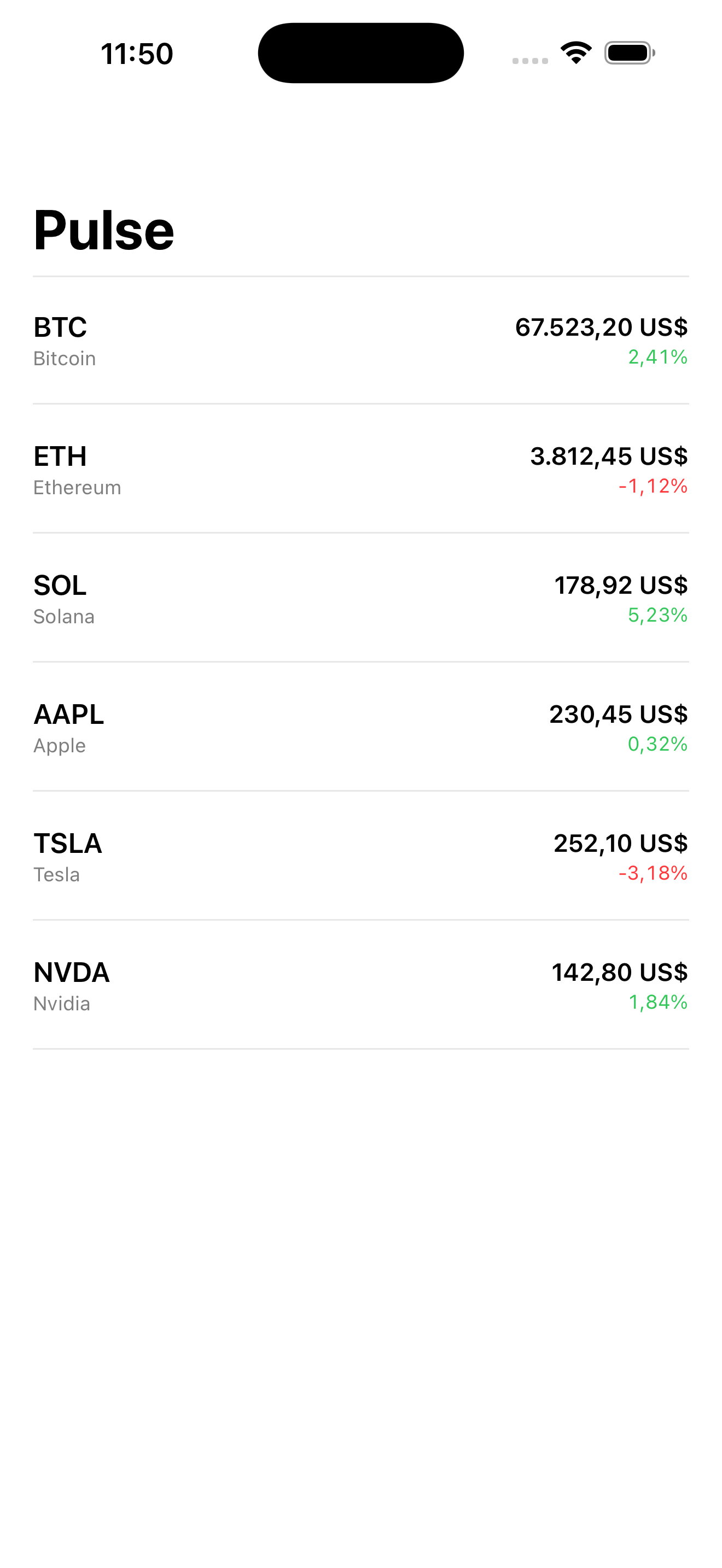
Six entries, six rows, scroll the list. The view model holds the data, the view renders it. Twenty lines of view code, fifteen lines of view-state code. No singletons, no global state, no architecture-by-diagram.
Pulse v0.1 is small but every line is in the right layer. From here we add — small views, then navigation, then networking — and the architecture compounds instead of degrading.
Takeaway
MVVM in 2026 = one @Observable @MainActor final class per screen, owned by the view via @State. Views read state, call methods to mutate, render formatting at the leaf. No singletons. No layers without responsibility.
Get this right at the screen level and you can scale to 30 screens without re-architecting.
Next lesson: composition. We split ContentView into smaller, role-named pieces and learn the rules for sharing state between sibling views without prop-drilling.
NativeFirst Team
EditorialThe NativeFirst team — engineers and designers building native Apple apps and writing the courses we wish we had when we started.
Comments
Leave a comment