

SwiftUI's Purple Warning Isn't Cosmetic. 'Publishing Changes From Within View Updates' Means You Raced Your Own Render.
Xcode's console warns 'Publishing changes from within view updates is not allowed, this will cause undefined behavior' and most developers just scroll past it. Here's what SwiftUI is actually telling you, the three common ways you trigger it, and why ignoring it eventually costs you a view that won't stop re-rendering.
Build Time Optimization for the Solo iOS Developer Running 5+ Apps
Day 30 of the 30-day iOS series. Real numbers, real DerivedData chaos, and the three things that actually move the needle on Xcode build times when you're maintaining multiple apps on one machine.

Custom Swift Macros: When They're Actually Worth the Build-Time Cost
Day 29 of the 30-day iOS series. The difference between @freestanding and @attached macros, why most macro ideas are over-engineering traps, and a real #URL macro — built TDD-first as a standalone Swift package — that catches BrewLog's force-unwrapped base URL at compile time instead of runtime.

UIKit Tricks SwiftUI Still Can't Do (Yet): Back to UIViewRepresentable
Day 28 of the 30-day iOS series. SwiftUI has no PDF viewer, no custom keyboard primitive, and no waterfall grid — five real gaps where you still reach for UIViewRepresentable, anchored by a real PDFKit-backed brew history export built TDD-first for BrewLog.

Combine in 2026: The Three Cases Where It's Still Better Than async/await
Day 27 of the 30-day iOS series. A real searchable brew history for BrewLog, built with Combine instead of async/await, and the three reasons it was the right call: debounce, independent multiple subscribers, and a four-way CombineLatest pipeline.
Live Activities and the Dynamic Island: A Decision Matrix, Not a Demo
Day 26 of the 30-day iOS series. A real ActivityKit countdown for BrewLog's pour-over timer, the one-function decision matrix that decides which brew methods even get one, and the exact reason it still won't show up on a Lock Screen.

WidgetKit and App Intents: Logging a Brew Without Opening the App
Day 25 of the 30-day iOS series. A real App Intent that logs a brew from Spotlight or a widget button, the @Dependency crash that nearly cost me an evening, and the honest line between what's tested and what's still a mechanical Xcode step.

SOLID Principles in Swift: One Bad Class, Five Real Fixes
Day 24 of the 30-day iOS series. Skip the acronym slide — here's the 70-line class I'd have shipped on day one of BrewLog, broken against all five SOLID principles, and the five already-tested files in this same repo that actually fix it.

Retry, Token Refresh, and Request Deduplication in Swift
Day 23 of the 30-day iOS series. The three production concerns every 'build your own networking layer' tutorial skips, built as composable actors on top of Day 22's client — plus a real concurrency bug I found writing the test, not the code.

A Custom Networking Layer in 100 Lines of Swift — No Alamofire
Day 22 of the 30-day iOS series. URLSession, async/await, a generic Endpoint, and one typed error enum — the entire networking layer is 85 real lines, tested with a URLProtocol stub, and wired into a real BrewLog feature with a real local server.

TDD for SwiftUI: A Red-Green-Refactor Workflow That Isn't Academic
Day 21 of the 30-day iOS series. I went looking for a BrewLog feature to drive test-first and found a real bug already shipped: the Streak stat has been hardcoded to zero since day one. Here's the actual red-green-refactor session that fixed it.

Swift Testing Framework: Why You Should Migrate from XCTest
Day 20 of the 30-day iOS series. @Test, #expect, parametrized tests, traits, and a side-by-side comparison on a real BrewLog test file. Plus: the one thing XCTest still does that Swift Testing doesn't.

Dependency Injection in Swift Without a Framework
Day 19 of the 30-day iOS series. Protocol-based DI, @Environment as a SwiftUI-native container, and the factory pattern — all without Resolver, Swinject, or any third-party glue. Includes a TDD example that shows why DI and testability are the same conversation.

Modular Architecture With SPM: When to Split (And When to Absolutely Not)
Day 18 of the 30-day iOS series, opening Week 4 on architecture. Modularization with Swift Package Manager has a real cost in build time, package graph complexity, and maintenance overhead. I show the threshold rule I use across five apps — below which you don't split, above which you must — with a real Package.swift example from BrewLog and a pure Swift Testing suite that proves the point.
StoreKit 2, Part 3: Server-Side Receipt Validation in 2026 (App Store Server API)
Day 17 of the 30-day iOS series, the finale of three on monetization. You can't trust the client — here's the minimal App Store Server API workflow for BrewLog: Server Notifications V2, JWSTransaction decoding, a Cloudflare Worker, and three pure Swift tests that prove the entitlement logic without ever calling Apple.
StoreKit 2, Part 2: Free Trials, Win-Back Offers, and Promo Codes That Actually Convert
Day 16 of the 30-day iOS series. I add a 7-day free trial, a win-back banner for lapsed subscribers, and offer-code redemption to BrewLog's paywall — concrete App Store Connect configuration plus the Swift code, all covered by Swift Testing.

A StoreKit 2 Paywall From Scratch: Subscriptions, a Transaction Listener, and a Restore Button That Works
Day 15 of the 30-day iOS series, first of a three-part run on monetization. I built BrewLog's real paywall with StoreKit 2 — two subscription products, a transaction listener, and a restore flow — with zero third-party SDKs. Every number the paywall shows comes from one pure, tested function.

SwiftData Two Years Later: What's Solid, What Still Bites, and the Migration Test You're Not Writing
Day 14 of the 30-day iOS series. SwiftData is about two years old now, and the honest verdict is mixed. I already wrote the long field report on where it broke in production — this post is the part that report didn't have room for: a VersionedSchema + SchemaMigrationPlan test that proves a schema change is safe BEFORE TestFlight finds out for you.
@Observable vs ObservableObject: What 1,000 Rows and a Redraw Counter Actually Showed Me
Day 13 of the 30-day iOS series. I built a redraw counter into BrewLog, put 1,000 rows in two identical lists side by side — one backed by @Observable, one by ObservableObject — and toggled a single favorite ten times. The row counts tied 10-10. The list counts didn't. Here's the real number, and exactly where it comes from.

@State, @Bindable, @Environment: The Complete Map for @Observable (and the Question You're Actually Asking)
Day 12 of the 30-day iOS series. With @Observable, SwiftUI lets you slap @State, @Bindable, @Environment, or a plain let on the same class — and compiles all of them. Here's the question that actually decides which one is correct, one map that resolves 95% of the confusion, and three real BrewLog bugs (one silent, one a compile error, one a runtime crash) that come from picking wrong.

ObservableObject → @Observable: The Migration Guide That Skips the Marketing (and the Autoclosure Gotcha Apple Forgot to Mention)
Day 11 of the 30-day iOS series. Apple's migration guide makes ObservableObject → @Observable look like a find-and-replace. It mostly is — except for one quiet behavioral change: @StateObject only ran your initializer once, and @State runs it on every render. Here's the multiple-init bug that causes, why it's worst in exactly the init you were proud of, and how to fix it with a test that turns 'no side effects in init' into a hard, green invariant.

ThinkBud + Foundation Models: What I Shipped On-Device, and the Wall That Sent Me Back to the Server
Day 10 of the 30-day iOS series, the build-in-public finale of AI week. I took the on-device Foundation Models stack from Days 8 and 9 and bolted it into ThinkBud, an app I actually ship. Here's the honest field report: the bounded tasks the on-device model nailed for free and offline, the context-window wall a 100K-character textbook import smashed into, and the exact line of code where I gave up and routed to a server. Plus the one decision that's pure Swift — so it gets a real test.

@Generable: Make Apple's On-Device Model Hand You a Swift Struct, Not a String to Parse
Day 9 of the 30-day iOS series, part 2 of AI week. Yesterday Foundation Models gave us a String. Today we make it give us a typed Swift value — BrewSummary(flavor:, advice:, rating:) instead of a paragraph you regex your way through. @Generable, @Guide constraints, session.respond(to:generating:), and the sleeper-within-the-sleeper: tool calling, where the on-device model calls your own Swift code mid-answer. With the TDD seam, because typed output changes what you test.

Foundation Models: Your First On-Device AI Feature With No Backend, No API Key, No Bill
Day 8 of the 30-day iOS series, and the start of AI week. The Foundation Models framework runs a real language model entirely on the phone — free, private, offline. We build the smallest thing that works: summarize a block of text in three lines, handle the availability cases that bite in production, wire it into a real app, and put a TDD seam around the part that isn't the model. Code-along, with tests.

UIDesignRequiresCompatibility: When (and Why) Opting Out of Liquid Glass Is the Pro Move
Apple hands you one Info.plist key that freezes the old design for a full year. It's not a cop-out — for banking, enterprise, and apps caught mid-redesign, opting out of Liquid Glass is the responsible call. The exact flag, a real before/after from my own app, the deadline, and a decision matrix you can actually defend in a standup. Plus the per-screen rollout gate you should be testing instead.

Icon Composer and the New App-Icon Era: One Document Instead of Three Exported PNGs
iOS 26 wants your app icon in light, dark, clear, and tinted. The old way was three flat 1024px PNGs that quietly drifted apart. Icon Composer turns it into one layered .icon document the system relights for you. The real workflow from a single SVG to a full set — plus the one decision around icons you can actually unit-test.

Custom Liquid Glass Components: When to Leave the Defaults (and the Three Mistakes That Kill Your Frame Rate)
glassEffect(.regular, in:) with a custom shape, two glass blobs that morph into each other with glassEffectID, and the three things that turn buttery Liquid Glass into a stutter machine. Built on a real iPhone 17 Pro simulator, with the TDD seam that keeps the decision testable even though the render isn't.

Liquid Glass for an App You Already Shipped: What You Get From a Recompile vs. Five Lines of Tuning
I rebuilt a real SwiftUI app against the iOS 26 SDK and took two screenshots of the exact same screen — one with zero code changes, one with five lines of glassEffect. Here's the honest split between what the recompile hands you for free and what's worth your custom-tuning time, plus the TDD seam that makes a visual feature testable.
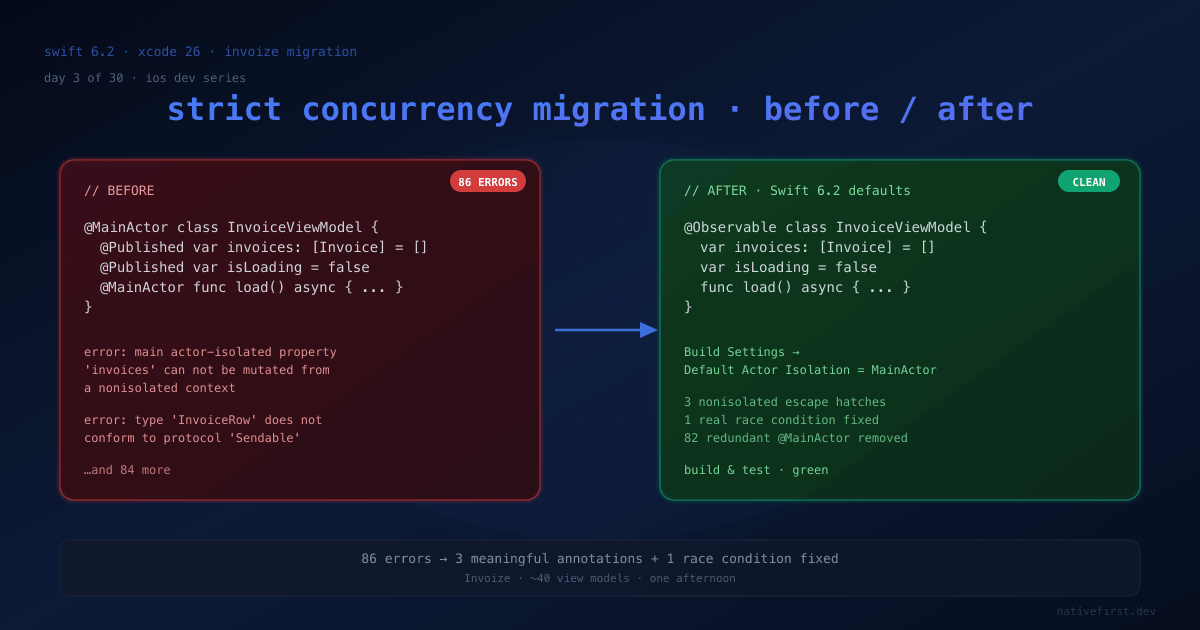
Migrating a Real App to Swift 6.2 Strict Concurrency: 86 Errors, One Afternoon, One Race Condition I Didn't Know I Had
I migrated Invoize from Swift 6.0 strict mode to Swift 6.2 approachable concurrency on a Sunday afternoon. Every warning, every fix, the one real race condition the compiler finally surfaced — and the TDD seams I leaned on so the migration wasn't just compiler-driven guessing.

@concurrent vs nonisolated vs @MainActor: The Swift 6.2 Decision Tree That Fits on a Napkin
Four real scenarios — UI update, network call, image decode, file IO — and exactly which Swift 6.2 isolation keyword each one needs. A TDD walk-through with Swift Testing, no whiteboard ceremony required.
MainActor by Default: Why Apple Just Reversed Swift's Concurrency Story
Xcode 26 flips the default — your code now runs on the main actor unless you say otherwise. Here's why Apple changed direction, what it actually means for your existing project, and a TDD walk-through showing the migration in real Swift.