
UIDesignRequiresCompatibility: When (and Why) Opting Out of Liquid Glass Is the Pro Move

For four days this series sold you on Liquid Glass. What you get for free on recompile. When to build custom glass. How the new icon era works. Today I’m going to tell you when to say “no thanks, not yet” — and mean it professionally.
Because there’s exactly one Info.plist key that turns the whole thing off:
<key>UIDesignRequiresCompatibility</key>
<true/>
Set that, build against the iOS 26 SDK, run on an iOS 26 device, and your app keeps the old look. No floating glass tab bar. No relit toolbars. The pre-glass design, frozen, for one more year.
Most blog posts treat this like a confession — “here’s the shameful escape hatch, but you really shouldn’t.” I’m going to argue the opposite. For a specific and very real set of apps, flipping this flag is the adult decision. Let me show you what it actually does first, with my own app.
What the flag actually changes
I took BrewLog — the little coffee-tracking app I use as a guinea pig all through this series — and ran it twice on the same iPhone 17 Pro simulator. Same code. The only difference is that one build has UIDesignRequiresCompatibility set to true.
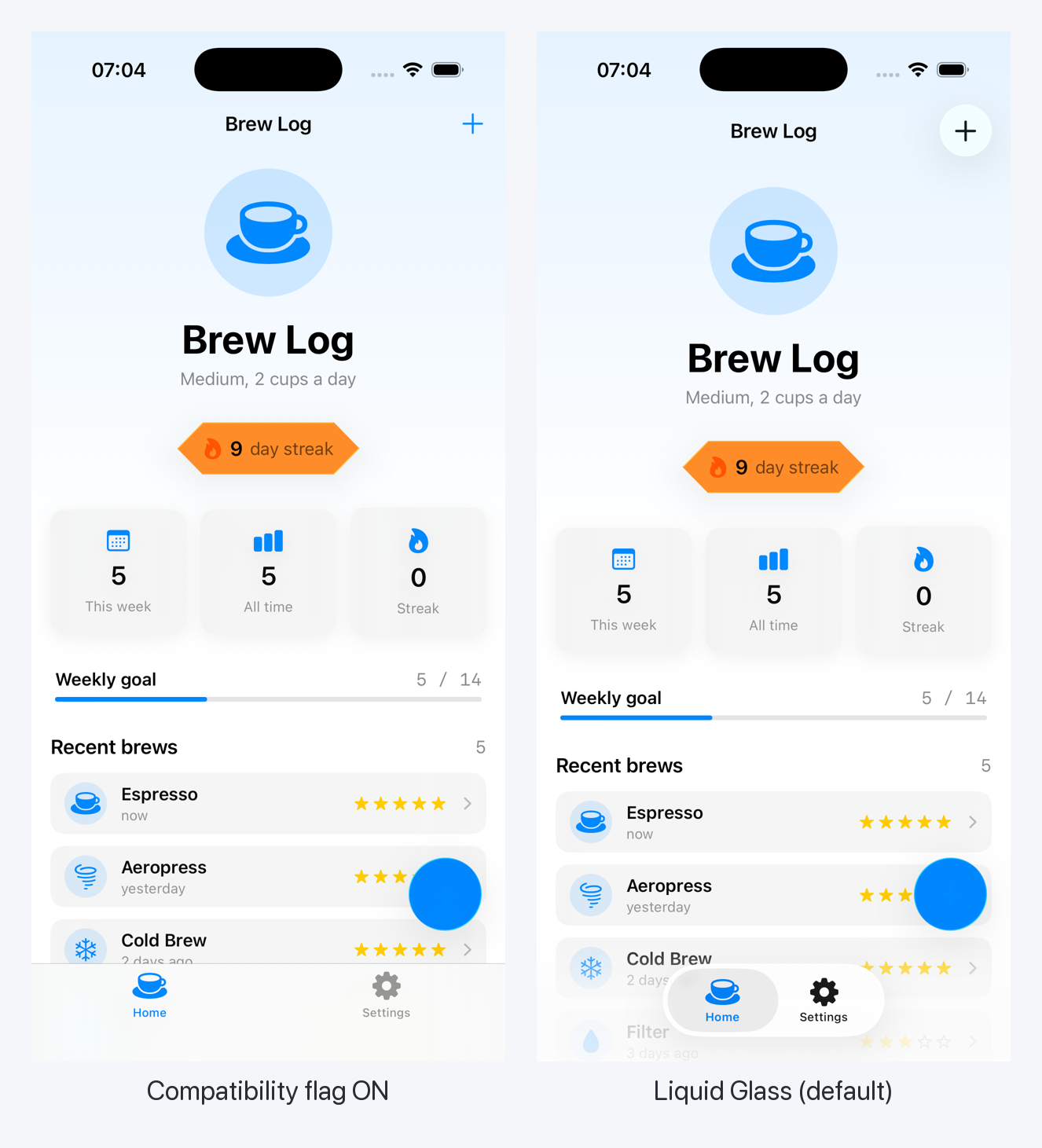
Look at the bottom and the top-right and you’ve got the whole story.
Left (flag on): the tab bar is the iOS 18 thing — opaque, edge-to-edge, welded to the bottom of the screen. The ”+” in the nav bar is a flat blue glyph. It’s the design you already shipped. Nothing moved.
Right (Liquid Glass default): the tab bar lifts off the bottom and becomes a translucent capsule that the content scrolls under. The ”+” gets its own little circular glass well. This is the free chrome from Day 4 — I didn’t write a line for it, the recompile did it.
That’s the key thing to internalize: the flag is app-wide and it’s binary. It governs system-rendered chrome — bars, toolbars, tab bars, sheets, the works. You can’t opt one screen out. You can’t keep glass on the tab bar but legacy on the toolbar. It’s a single switch for the whole app’s relationship to the new material. Either you’re in the renovation or the scaffolding stays up over the entire building.
The deadline, because there’s always a deadline
This is not a permanent setting. Say it with me: not permanent.
Apple’s pattern with compatibility flags is brutally consistent — they live for exactly one major release and then they’re gone. UIDesignRequiresCompatibility works when you build with Xcode 26. The expectation, and everything Apple has said about it, points to Xcode 27 removing it entirely. That lines up with the eviction notice I wrote about when Liquid Glass goes mandatory in iOS 27.
So the real shape of this is a grace period, not an exemption. You get roughly a year. One WWDC cycle. The flag buys you time to do the migration right; it does not buy you the option to never do it. If you set it and forget it, next summer’s SDK update turns into a fire drill, because the day you’re forced to recompile with Xcode 27, every glass surface snaps on at once with zero runway.
Treat the flag like a calendar reminder with a UI attached. The clock starts the moment you flip it.
So when is opting out the right call?
Here’s the part nobody wants to say out loud: shipping the new design badly is worse than shipping the old design on purpose.
Liquid Glass isn’t free of risk. It changes contrast, it changes where things float, it changes how your custom backgrounds interact with translucent bars. If your app has heavy custom chrome, the recompile can leave you with text that’s suddenly hard to read over a glass bar, or a brand color that looks muddy through frost. Day 4 and Day 5 were about doing that work well. The work is real and it takes time.
There are three situations where I’d flip the flag without losing a minute of sleep:
1. Regulated apps under design freeze. Banking, healthcare, insurance, anything where the UI went through a compliance review. Your “Transfer $4,000” button was signed off in its exact current form. You do not get to make it translucent and floating on a Tuesday because Apple shipped a new material. Those reviews take months. Freeze the design, schedule the redesign through the proper channel, ship it deliberately.
2. Enterprise and internal apps with zero upside. The warehouse-scanner app. The field-tech work-order app. Nobody installed it because it looked cool; they were handed a phone with it pre-loaded. The redesign budget for that app is correctly zero. Flip the flag, keep it boring, spend the hours where they move the business.
3. You’re caught mid-redesign. You’re already three sprints into a design-system overhaul that doesn’t account for glass. Bolting Liquid Glass on now means doing the work twice and merging two redesigns into one giant conflict. Set the flag, finish the redesign you’re already paying for, fold glass into the next planned cycle. That’s the scaffolding on the cover — you don’t slap a new facade over half-finished work.
And the flip side — when I would not touch the flag:
- Consumer apps competing on feel. If your app lives or dies on looking current, the recompile is the cheapest glow-up you’ll ever get. Take it.
- Apps that already look right after recompile. Boot the simulator, look at it. If glass made it better and nothing broke, you have no reason to opt out. Don’t add a flag to solve a problem you don’t have.
- “I just don’t like it.” Not a reason. The clock is still running. You’re buying a year of debt for an aesthetic preference, and you’ll pay it back with interest next June.
The honest decision, in one table
Because this series keeps trying to make the decision for you instead of vibing about it:
| Your situation | Opt out? | Why |
|---|---|---|
| Regulated UI, signed-off screens | Yes | Redesign needs a review cycle, not a recompile |
| Internal / enterprise tool | Yes | No conversion upside, redesign budget is zero |
| Mid-flight design-system rewrite | Yes | Don’t do the redesign twice; fold glass into the next cycle |
| Consumer app, recompile looks great | No | Cheapest visual upgrade you’ll ever ship |
| Consumer app, recompile looks rough | Short-term | Flag it, fix the contrast/chrome, then turn it off this cycle |
| ”I don’t like the trend” | No | Not a reason. Clock’s running either way |
The honest framing: opting out is a deferral, and a deferral is only responsible if it’s funding a plan. No plan, no flag.
”This is a TDD series. What do I even test about a build flag?”
Fair. The flag itself is a static Info.plist key — there’s nothing to #expect. You can’t unit-test a value Apple reads at launch.
But the flag is almost never the interesting decision. The interesting decision is what you do during the grace period. Smart teams don’t sit frozen for a year and then flip everything on in a panic. They keep UIDesignRequiresCompatibility on as the safety net for system chrome, and they roll the new look onto their own custom components one screen at a time, behind a gate, as each screen gets migrated and QA’d.
That gate is a pure function. And pure functions are exactly the Essential Developer seam this series keeps coming back to — push the decision out of the view, leave the call site dumb, test the policy.
So the thing worth testing isn’t “is glass on.” It’s “should this screen get the new treatment yet,” given what’s been migrated and whether someone’s pulled the kill switch.
/// How far along the Liquid Glass migration is, app-wide.
enum GlassRollout: Equatable {
    case frozen                       // kill switch: everyone gets legacy, no exceptions
    case rolling(migrated: Set<String>)  // only QA'd screens get the new look
    case complete                     // migration done, glass everywhere
}

/// The one decision a screen asks before choosing its look.
func usesGlass(screen: String, rollout: GlassRollout) -> Bool {
    switch rollout {
    case .frozen:                  return false
    case .complete:                return true
    case .rolling(let migrated):   return migrated.contains(screen)
    }
}
Three states, one function, zero opinions about SwiftUI. Now the test pins down every boundary that would otherwise become a production surprise — the half-migrated screen, the kill switch that has to beat everything, the screen nobody added to the list:
import Testing
@testable import BrewLog

@Suite("Per-screen Liquid Glass rollout")
struct GlassRolloutTests {

    @Test("kill switch wins: a frozen rollout gives every screen the legacy look")
    func frozenBeatsEverything() {
        #expect(usesGlass(screen: "Home", rollout: .frozen) == false)
        #expect(usesGlass(screen: "Settings", rollout: .frozen) == false)
    }

    @Test("a migrated, QA'd screen gets the new treatment")
    func migratedScreenOptsIn() {
        let rollout = GlassRollout.rolling(migrated: ["Home"])
        #expect(usesGlass(screen: "Home", rollout: rollout) == true)
    }

    @Test("a screen nobody migrated yet stays on the old look")
    func unmigratedScreenStaysLegacy() {
        let rollout = GlassRollout.rolling(migrated: ["Home"])
        #expect(usesGlass(screen: "Settings", rollout: rollout) == false)
    }

    @Test("once the migration is complete, every screen gets glass")
    func completeTurnsEverythingOn() {
        #expect(usesGlass(screen: "Settings", rollout: .complete) == true)
    }
}
That unmigratedScreenStaysLegacy test is the one that earns its rent. The classic phased-rollout bug is the screen that quietly defaults to on because someone forgot to gate it — the user hits an un-QA’d screen with broken contrast and files the one-star review. The test forces the default to be “legacy until proven migrated,” before any pixel renders.
And the call site stays boring. It maps a tested value onto a style and does nothing else worth breaking:
struct StatCard: View {
    let label: String
    let rollout: GlassRollout

    var body: some View {
        content
            .background {
                if usesGlass(screen: "Home", rollout: rollout) {
                    Color.clear.glassEffect(.regular, in: .rect(cornerRadius: 12))
                } else {
                    Color(.secondarySystemBackground)  // the look from the left screenshot
                }
            }
    }
}
You don’t test the build flag. You test the rule that decides who gets the new look while the flag holds the system chrome steady — and the rule is the part that actually breaks during a year-long migration. Same seam as lesson 18 of the SwiftUI at Scale course, where the feature gate is a value you can hold in one hand and the view just renders the answer.
The takeaway
UIDesignRequiresCompatibility is not the coward’s flag. It’s a one-year loan against a redesign you intend to ship. The mistake isn’t using it — the mistake is using it without a payoff date.
If you’re a bank, an enterprise tool, or three sprints deep into a design rewrite: flip it, breathe, and put “adopt Liquid Glass” on the next cycle’s roadmap with an actual date. If you’re a consumer app that looks great on recompile: don’t touch it, you’re leaving free polish on the table.
And whatever you do during the grace period, don’t freeze and pray. Roll the new look onto your own components screen by screen, behind a gate, and test the gate — because the screen that defaults to “on” before anyone QA’d it is the one your users will find first.
Tomorrow
Day 8 of the series opens a whole new week and a meatier topic: the Foundation Models framework — your first on-device AI feature with no backend, no API key, and no per-token bill. We’ll build the smallest possible thing that works — summarize a block of text, entirely on the phone, entirely private — with the code-along feel and a TDD seam around the part that isn’t the model. Glass week is done. AI week starts.
Opt out on purpose, with a date. Never by accident, and never forever.
Share this post
Comments
Leave a comment
Mario
Founder & CEOFounder of NativeFirst. Building native Apple apps with SwiftUI and a passion for great user experiences.