
WidgetKit and App Intents: Logging a Brew Without Opening the App

Yesterday I closed with a promise: “turning BrewLog’s streak into a home screen widget you can actually act on, not just stare at.” I kept about 80% of it. The other 20% turned into a fatal error with a stack trace I had to read three times, and an honest paragraph near the bottom about why there’s no literal home-screen screenshot in this post. Let’s get into it.
What I actually built
Two things, both real and both in the BrewLog project right now:
LogBrewIntent— anAppIntentthat logs a brew the same way the floating + button does, reachable from Spotlight, Siri, and Shortcuts today, no widget required.BrewStreakWidget— aTimelineProvider+ SwiftUI view that turns Day 21’scurrentStreakinto something WidgetKit can render, with aButton(intent:)wired to #1.
Both compile, both have green tests, and #1 actually runs on a simulator right now if you ask Siri “Log a brew in BrewLog.” What’s missing is the one step that turns #2 into a tappable icon on an actual Home Screen — and I’ll explain exactly why I stopped short of it instead of faking a screenshot.
The intent: repeats your last brew, not a hardcoded default
The quick-add button in ContentView always logs whatever method you tap. An intent fired from Spotlight doesn’t get a tap — there’s no UI in front of the user to choose from. So it needs its own rule, and “repeat whatever you logged last” is the only one that doesn’t feel arbitrary:
struct LogBrewIntent: AppIntent {
    static var title: LocalizedStringResource = "Log a Brew"

    static var modelContainerProvider: () -> ModelContainer = {
        fatalError("LogBrewIntent.modelContainerProvider must be set before the intent runs")
    }

    @MainActor
    func perform() async throws -> some IntentResult {
        try Self.logBrew(in: Self.modelContainerProvider())
        return .result()
    }

    @MainActor
    static func logBrew(in container: ModelContainer) throws {
        let context = container.mainContext
        let mostRecent = try context.fetch(
            FetchDescriptor<Brew>(sortBy: [SortDescriptor(\.date, order: .reverse)])
        ).first

        let brew = Brew(method: mostRecent?.method ?? .espresso, rating: 4)
        context.insert(brew)
        try context.save()
    }
}
@MainActor on both functions isn’t decoration — it’s Day 1’s default showing up in a place tutorials usually skip: an intent that touches SwiftData’s mainContext needs to be on the main actor same as any view would, and Swift 6.2 makes that the assumption instead of the thing you bolt on after a crash report.
Add an AppShortcutsProvider and the intent shows up in Shortcuts, Siri, and Spotlight without another line of UI code:
struct BrewLogShortcuts: AppShortcutsProvider {
    static var appShortcuts: [AppShortcut] {
        AppShortcut(
            intent: LogBrewIntent(),
            phrases: ["Log a brew in \(.applicationName)"],
            shortTitle: "Log a Brew",
            systemImageName: "cup.and.saucer.fill"
        )
    }
}
That part works today, no widget extension involved.
Where it actually broke
modelContainerProvider above wasn’t my first attempt. AppIntents ships its own dependency injection for exactly this problem — a property wrapper called @Dependency, backed by a global AppDependencyManager. It’s the obvious answer, it’s the one every WWDC sample project uses, and it’s what Day 19’s whole “protocol-based DI” argument would point you toward if you didn’t know better. So that’s what I wrote first:
struct LogBrewIntent: AppIntent {
    @Dependency private var modelContainer: ModelContainer

    func perform() async throws -> some IntentResult {
        try Self.logBrew(in: modelContainer)
        return .result()
    }
}
Registered the container in BrewLogApp.init() with AppDependencyManager.shared.add(dependency:), wrote a unit test that constructed LogBrewIntent() and called perform() directly. The test crashed the test runner. Not failed — crashed, EXC_BREAKPOINT, a .ips crash log and everything:
Fatal error: AppDependency of type ModelContainer.Type was not initialized
prior to access. Dependency values can only be accessed inside of the intent
perform flow and within types conforming to _SupportsAppDependencies unless
the value of the dependency is manually set prior to access.
Translation: @Dependency only resolves when the system invokes the intent — Siri, Shortcuts, a widget button tap. Construct the struct yourself and call perform() directly, the way every unit test and my own demo code both do, and there’s no “perform flow” for it to hook into. It doesn’t fail gracefully. It traps.
That underscored _SupportsAppDependencies in the message is the tell — it’s framework-private machinery the system’s own dispatcher participates in and your code can’t. I lost about forty minutes confirming this wasn’t a setup mistake on my end before finding the actual fix isn’t a fix — wrappedValue has a public setter, but setting it manually still trips the same assertion when read back outside that flow. The honest move is the one in the code above: skip @Dependency entirely, use a plain static closure, and accept that the “real” DI mechanism Apple ships for this exact scenario is currently untestable by direct call. The SwiftUI at Scale course material I’m building alongside this series makes the same call in its own App Intents lesson — “one test, six system surfaces” — pinning perform() against an injected dependency through the intent’s own seam, not the framework’s. Different name, same instinct: when the framework’s DI fights your test, that’s not your test being wrong.
The widget side: reusing, not reinventing
The interesting part of a TimelineProvider is never the protocol plumbing — it’s “given the current data, what should this entry say.” Day 21 already wrote that function. The widget just needs to wrap it:
struct StreakWidgetEntry: TimelineEntry {
    let date: Date
    let streak: Int
    let glass: StreakGlass
}

func makeStreakEntry(
    brewDates: [Date],
    asOf referenceDate: Date = .now,
    calendar: Calendar = .current
) -> StreakWidgetEntry {
    let streak = currentStreak(brewDates: brewDates, asOf: referenceDate, calendar: calendar)
    return StreakWidgetEntry(date: referenceDate, streak: streak, glass: streakGlass(streak: streak))
}
currentStreak and streakGlass are unchanged imports from two different earlier days — one from the TDD session, one from the custom-glass post. Nothing about rendering on a Home Screen required touching either. The provider is thin glue around makeStreakEntry, and the view’s only new idea is the button:
struct BrewStreakWidgetView: View {
    let entry: StreakWidgetEntry

    var body: some View {
        VStack(spacing: 10) {
            Label("\(entry.streak)", systemImage: "flame.fill")
                .font(.title2.bold())
                .foregroundStyle(entry.glass == .onFire ? .orange : .primary)
            Text("day streak")
                .font(.caption)
                .foregroundStyle(.secondary)
            Button(intent: LogBrewIntent()) {
                Label("Log a brew", systemImage: "plus")
            }
            .buttonStyle(.bordered)
        }
        .padding()
        .containerBackground(.fill.tertiary, for: .widget)
    }
}
Button(intent:) is the whole feature, interactivity-wise — iOS 17 added it so a widget button can run an AppIntent directly, no deep link into the app, no Task racing the system to redraw the timeline. That line is why this is “interactive widgets,” not just “another way to show a number.”
Proof, the boring kind
Test case 'LogBrewIntentTests/insertsABrew()' passed (0.000 seconds)
Test case 'LogBrewIntentTests/emptyHistoryDefaultsToEspresso()' passed (0.000 seconds)
Test case 'LogBrewIntentTests/repeatsMostRecentMethod()' passed (0.000 seconds)
Test case 'LogBrewIntentTests/performUsesTheConfiguredProvider()' passed (0.000 seconds)
Test case 'BrewStreakWidgetTests/entryCarriesTheRealStreak()' passed (0.000 seconds)
Test case 'BrewStreakWidgetTests/sevenDayStreakIsOnFire()' passed (0.000 seconds)
Test case 'BrewStreakWidgetTests/emptyHistoryHidesGlass()' passed (0.000 seconds)
Every one of those runs without WidgetKit ever rendering a pixel or AppIntents ever talking to Siri. perform() and the TimelineProvider conformance are the untestable glue — thin on purpose, exactly the same argument Day 21 made about views: you don’t unit test the part that just calls the tested part.
What’s still missing, and why I’m not faking it
A Widget struct compiles fine sitting in BrewLog’s regular app target — that’s how I got tests running against it at all. It does not show up on a Home Screen from there. For that, it needs to live in an actual Widget Extension target, which means:
- A new target in Xcode (File ▸ New ▸ Target ▸ Widget Extension) — mechanical, five clicks, not interesting enough to screenshot.
- An App Group, because the widget runs in a separate process from the app and can’t see the app’s SwiftData store without one. That means an entitlement on both targets and pointing
ModelConfigurationat the shared container URL instead of the app’s sandbox. - The extension’s own
@main, since only one type per executable gets to be the entry point, and the app already spent its@mainonBrewLogApp.
None of that is hard. All of it is bookkeeping, not a lesson — and bookkeeping done unsupervised on someone else’s signing setup is exactly the kind of “looked fine, broke the next build” change I’d rather describe than commit. So the code above is everything short of that wiring: real, tested, ready to drop into an extension the moment it exists. What you get instead of a Home Screen screenshot is proof the button’s logic actually runs:
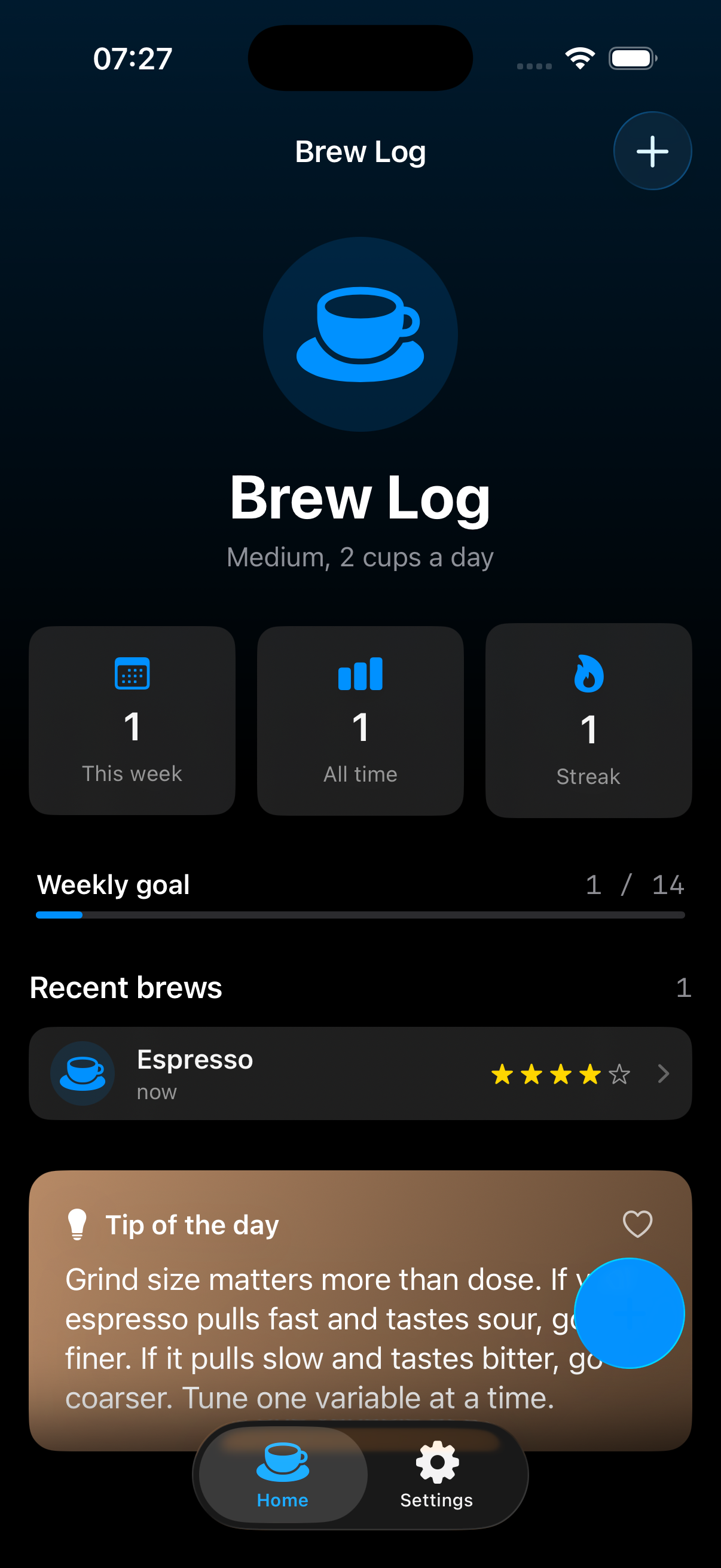
That’s a fresh BrewLog install, launched with one debug flag that calls LogBrewIntent().perform() instead of waiting for a tap — the exact same call a widget’s button would make. Empty history before, one real Espresso logged at 4 stars after, streak ticked from 0 to 1. No sheet, no + button, no SwiftUI in the loop at all.
The takeaway
@Dependency is the right idea shipped with a sharp edge nobody documents until you hit it directly: it only works inside the system’s own call path, which means it’s effectively untestable by the exact method everyone reaches for first. The fix isn’t more framework — it’s the same one this whole series keeps landing on. A plain closure you can swap in a test is worth more than the “official” mechanism that can’t be called outside production.
Day 25 of the 30-day iOS development series. Yesterday: SOLID principles, one bad class against all five letters. The longer, test-first version of widgets and App Intents against a modular app is part of the SwiftUI at Scale course coming to /learn. Tomorrow: Live Activities and the Dynamic Island — and the decision matrix for when they’re actually worth building.
Share this post
Comments
Leave a comment
Mario
Founder & CEOFounder of NativeFirst. Building native Apple apps with SwiftUI and a passion for great user experiences.