
UIKit Tricks SwiftUI Still Can't Do (Yet): Back to UIViewRepresentable

Every WWDC since 2019 has shipped another slide about SwiftUI closing the gap with UIKit. Most of the gap is closed. But BrewLog’s brew history — the one Day 27 just gave a real search sheet — has had zero way to get your data out since the project’s first commit. No export, no share, nothing. Building that feature properly meant generating a real PDF and previewing it before the user shares it, and SwiftUI flatly does not have a PDF viewer. Not a partial one, not an awkward one — none. PDFKit.PDFView is UIKit-only, and UIViewRepresentable is still the only door in. Here’s that door, plus four more places it’s still the only door.
The lie: BrewLog has never let you take your data with you
Open BrewDetailView or the new BrewHistoryView from yesterday and look for a way out — share, export, print, anything:
.navigationTitle("All brews")
.navigationBarTitleDisplayMode(.inline)
.toolbar {
    ToolbarItem(placement: .cancellationAction) {
        Button("Done") { dismiss() }
    }
}
One button. Dismiss. Twenty-eight days of features and the only way your brew history leaves the app is by reading it off the screen yourself. That’s not a crash, not a bug — it’s the same shape of gap this series keeps finding: nothing’s technically wrong, the app just never grew the feature you’d expect a logging app to have on day two.
The fix: an “Export PDF” button that turns your filtered brew history into a real PDF, lets you preview it inline, and hands it to ShareLink from there. The generation part is plain Foundation-adjacent drawing code — no SwiftUI gap there. The preview part is where this post actually starts.
Why the preview is a UIKit problem, not a SwiftUI problem
Generating PDF data needs no bridge at all. UIGraphicsPDFRenderer is a UIKit class, but you call it once, get back Data, and you’re done — no view, no SwiftUI conflict. That part is a pure function: brews in, bytes out, fully unit-testable.
Showing that PDF to the user before they commit to sharing it is the part with no SwiftUI answer. There is no PDFView equivalent in the SwiftUI framework — not a scrollable one, not a zoomable one, nothing that renders a multi-page PDFDocument natively. Your actual options are: ship the file blind via ShareLink and hope it looks right, drop into QLPreviewController (UIKit, via UIViewControllerRepresentable), or use PDFKit’s PDFView (UIKit, via UIViewRepresentable). PDFView wins here because it gives you page navigation and zoom for free and doesn’t need a temp file just to render — QLPreviewController does.
Same split as Day 22’s networking layer: the testable logic lives in plain Swift, the untestable UIKit glue is as thin as possible and proven by a real run instead of an assertion.
RED — a pagination rule with nothing behind it yet
Started the same way every feature in this series has: write the test against a type that doesn’t exist.
@Test("more than one page's worth of brews paginates at ten per page")
func paginatesTenBrewsPerPage() throws {
    let brews = (0..<25).map { Brew(method: .filter, rating: 4, notes: "Brew #\($0)") }
    let data = BrewHistoryPDFExporter.makePDF(for: brews)
    let document = try #require(PDFDocument(data: data))

    #expect(document.pageCount == 3)
}
Cannot find 'BrewHistoryPDFExporter' in scopeThe only kind of red worth trusting — the type genuinely doesn’t exist, so the compiler is telling the truth, not a typo in an assertion.
GREEN — drawing real text into a real PDF
import UIKit

struct BrewHistoryPDFExporter {
    static let brewsPerPage = 10

    static func makePDF(for brews: [Brew], title: String = "BrewLog — Brew History") -> Data {
        let pageBounds = CGRect(x: 0, y: 0, width: 612, height: 792) // US Letter, points
        let renderer = UIGraphicsPDFRenderer(bounds: pageBounds)
        let pages = brews.chunked(into: brewsPerPage)

        return renderer.pdfData { context in
            for pageBrews in pages.isEmpty ? [[]] : pages {
                context.beginPage()
                draw(pageBrews, title: title, in: pageBounds)
            }
        }
    }

    private static func draw(_ brews: [Brew], title: String, in bounds: CGRect) {
        let margin: CGFloat = 36
        title.draw(at: CGPoint(x: margin, y: margin), withAttributes: [.font: UIFont.boldSystemFont(ofSize: 20)])

        var y = margin + 44
        for brew in brews {
            let headline = "\(brew.method.label) — \(brew.rating)/5 — \(brew.date.formatted(date: .abbreviated, time: .shortened))"
            headline.draw(at: CGPoint(x: margin, y: y), withAttributes: [.font: UIFont.systemFont(ofSize: 14, weight: .semibold)])
            y += 20

            if !brew.notes.isEmpty {
                brew.notes.draw(
                    in: CGRect(x: margin + 14, y: y, width: bounds.width - margin * 2 - 14, height: 36),
                    withAttributes: [.font: UIFont.italicSystemFont(ofSize: 12), .foregroundColor: UIColor.darkGray]
                )
                y += 40
            } else {
                y += 8
            }
            y += 8
        }
    }
}
pdfData { context in ... } hands you a graphics context and calls your closure once per context.beginPage(). Every .draw(at:withAttributes:) call goes through Core Text under the hood — which matters more than it sounds like, because of the next test.
The detail every “generate a PDF in Swift” tutorial skips: is it actually text?
It would have been easy to flatten each page into an image and call it done — visually identical, nobody would notice from a screenshot. The difference shows up the moment someone tries to select or search the text in the exported file, which is the entire point of exporting to PDF instead of just sharing a screenshot.
@Test("brew details land as real selectable text, not a flattened image")
func firstPageContainsRealExtractableText() throws {
    let brews = [Brew(method: .aeropress, rating: 5, notes: "Citrusy, clean, the good batch")]
    let data = BrewHistoryPDFExporter.makePDF(for: brews)
    let document = try #require(PDFDocument(data: data))
    let pageText = document.page(at: 0)?.string ?? ""

    #expect(pageText.contains("Aeropress"))
    #expect(pageText.contains("Citrusy, clean, the good batch"))
}
PDFPage.string only returns anything if the page has a real text layer. Draw your content as a rasterized image instead and this comes back empty — a regression this test would actually catch, unlike a screenshot diff. All three tests, run for real:
Test case 'BrewHistoryPDFExporterTests/emptyHistoryStillProducesOnePage()' passed (0.000 seconds)
Test case 'BrewHistoryPDFExporterTests/paginatesTenBrewsPerPage()' passed (0.000 seconds)
Test case 'BrewHistoryPDFExporterTests/firstPageContainsRealExtractableText()' passed (0.000 seconds)
The actual UIKit bridge: PDFView wrapped for SwiftUI
This is the one piece of this feature with no SwiftUI-native alternative, and it’s small on purpose:
import SwiftUI
import PDFKit

/// SwiftUI has no native PDF viewer — `PDFView` is UIKit-only, so this is the bridge.
struct PDFKitPreviewView: UIViewRepresentable {
    let document: PDFDocument

    func makeUIView(context: Context) -> PDFView {
        let view = PDFView()
        view.autoScales = true
        view.displayMode = .singlePageContinuous
        view.document = document
        return view
    }

    func updateUIView(_ uiView: PDFView, context: Context) {
        if uiView.document !== document {
            uiView.document = document
        }
    }
}
makeUIView runs once, updateUIView runs every time SwiftUI re-renders the parent — the same lifecycle every UIViewRepresentable has, whether it’s wrapping PDFView, UITextView, or a third-party UIKit component nobody’s bothered to port. The identity check in updateUIView matters: without it, SwiftUI re-assigning the same document on every body re-evaluation would reset scroll position and zoom on every parent state change, which is the single most common bug in hand-written UIViewRepresentable wrappers.
Wiring it into BrewHistoryView is the boring part — a toolbar button that calls the exporter, and a sheet that hands the result to the wrapper:
ToolbarItem(placement: .topBarTrailing) {
    Button {
        exportedPDFData = BrewHistoryPDFExporter.makePDF(for: search.filteredBrews)
    } label: {
        Label("Export PDF", systemImage: "doc.richtext")
    }
}
The export respects whatever the search sheet is currently filtered to — export ten brews or export the one you just searched for, same button.
What it looks like for real
** TEST SUCCEEDED **All 74 tests across the suite — Day 1 through Day 28 — still green on the same run. Tapping “Export PDF” on a filtered history opens a real PDFView, rendering a real multi-page PDF with a real text layer:
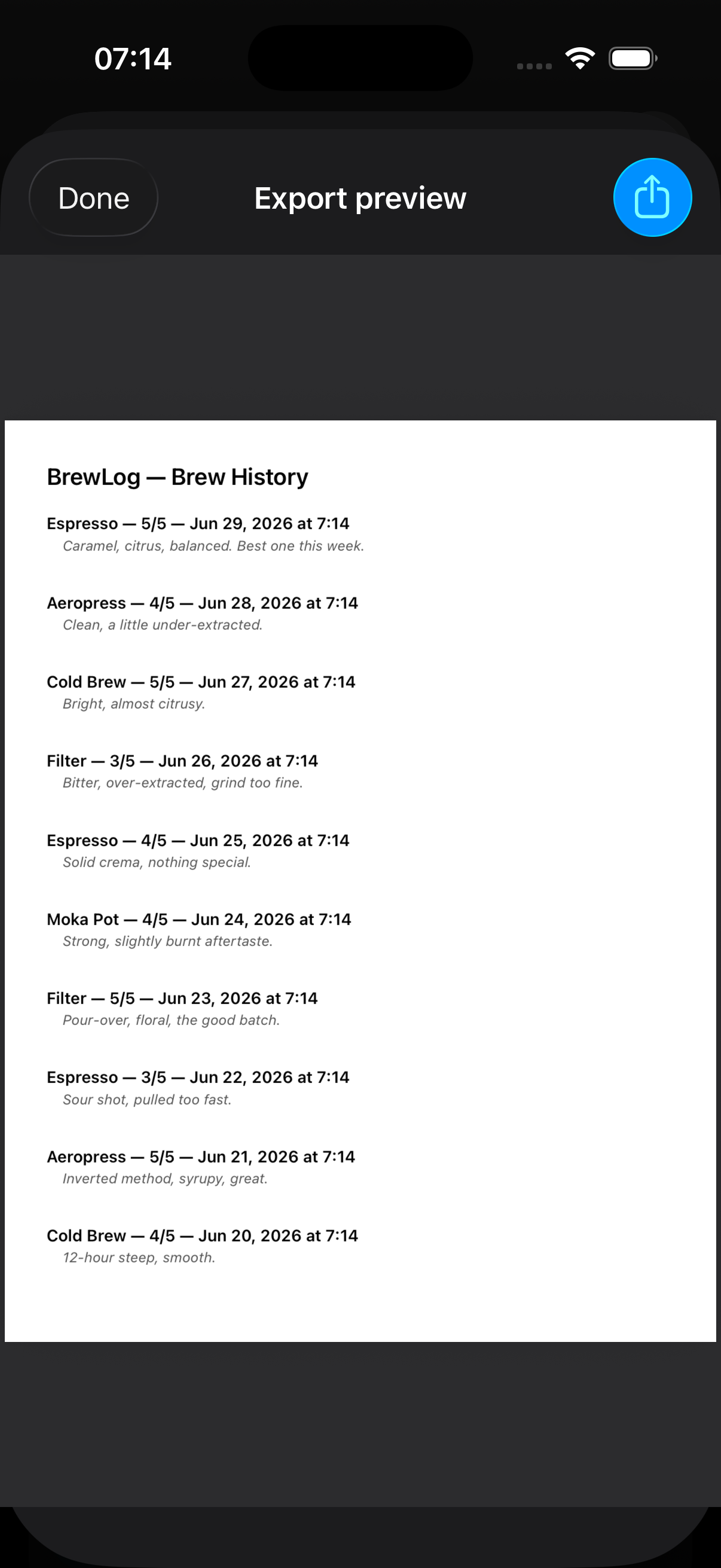
Pinch to zoom, scroll between pages, tap Share top-right — all PDFView behavior, none of it hand-rolled. That toolbar button only exists in the screenshot because UIViewRepresentable exists; without it, the alternative was shipping the file blind and hoping it rendered the way you expected.
Four more places SwiftUI still hands you the keys back
PDF preview isn’t a one-off. These come up often enough to know the seam before you need it:
A genuinely custom keyboard. .keyboardType(.decimalPad) and friends cover most input needs, but a real custom input view — a brew-ratio keypad with non-standard key layout, or a calculator-style accessory above the system keyboard — still means conforming to UITextInput/UIKeyInput and wiring it through UIViewRepresentable. SwiftUI’s TextField has no public hook for swapping in an arbitrary input view.
Gesture composition with failure requirements. SwiftUI’s .simultaneously, .exclusively, and .sequenced cover a lot, but they don’t expose UIGestureRecognizer’s require(toFail:) — the thing that lets a single-tap recognizer wait to see if a double-tap is coming before firing. If you need that specific kind of “don’t fire yet, something else might claim this” logic, or fine-grained shouldRecognizeSimultaneously(with:) delegate control against a scroll view’s own built-in pan gesture, you’re back to UIGestureRecognizer subclasses behind a representable.
Cell-reuse-grade scroll performance at real scale. SwiftUI’s LazyVStack and List got dramatically better, and scrollPosition (iOS 17+) closed the “programmatic offset control” gap that used to force UIKit. What’s left is the genuinely large case — thousands of complex, mixed-height cells where UICollectionView’s actual cell-reuse pooling still measurably outperforms SwiftUI’s diffing. Most apps never hit this. Some do.
Pinterest-style waterfall layouts. Grid and LazyVGrid lay out in fixed rows or columns — they can’t pack variable-height items so a short item in column two fills the gap left by a tall item in column one. UICollectionViewCompositionalLayout with a custom layout (or a UICollectionViewFlowLayout subclass overriding layoutAttributesForElements) does this natively. SwiftUI has nothing that replicates true waterfall packing as of this writing.
None of these need the full custom-UIViewController treatment BrewLog’s PDF preview avoided needing — UIViewRepresentable for a leaf view, the same shape every time, is usually enough.
The takeaway
SwiftUI didn’t fail to replace UIKit — it replaced about 90% of it, which is a genuinely different number than 100%. The honest rule for 2026: reach for UIViewRepresentable when you hit a named UIKit capability with no SwiftUI equivalent — PDFView, UITextInput, gesture failure requirements, compositional layout — not as a fallback every time SwiftUI feels unfamiliar. BrewLog needed exactly one bridge to ship a feature it should have had since day one, and the bridge was barely twenty lines long.
Day 28 of the 30-day iOS development series. Yesterday: Combine in 2026. The full UIKit-interop deep dive — custom input views, compositional layouts, and where UIViewControllerRepresentable fits in — is part of the SwiftUI at Scale course coming to /learn. Tomorrow: custom Swift macros, and when they’re actually worth the build-time cost.
Share this post
Comments
Leave a comment
Mario
Founder & CEOFounder of NativeFirst. Building native Apple apps with SwiftUI and a passion for great user experiences.