
@Observable vs ObservableObject: What 1,000 Rows and a Redraw Counter Actually Showed Me
Yesterday I ended with a promise: “Numbers, not vibes — how many frames you actually save, and exactly which property reads are responsible.” Today I’m cashing that check.
I built two identical worlds into BrewLog. Same data, same row layout, same toggle button. One side runs on @Observable. The other runs on the ObservableObject + @Published setup most of us shipped for years. Then I wired up a counter that tells me, precisely, how many times each body actually ran.
The result wasn’t the result I expected. And the part that did match my expectations turned out to be less interesting than the part that didn’t.
Why not just open Instruments?
I could have. Instruments has a SwiftUI instrument with a “Cause & Effect” graph — it’ll show you a timeline, name the property that changed, and draw an arrow to every view that redrew because of it. It’s a great GUI and it makes a gorgeous screenshot.
It also makes a useless number. A screenshot of a trace is a snapshot of one run, on one machine, that you can’t put in CI, can’t diff against next week’s run, and can’t hand to a teammate as anything other than “trust me, look at this picture.”
So instead, I built the same signal Instruments shows you — which body ran, how many times — directly into the app, as a plain integer you can read off the screen and assert on in a test. It’s the on-device equivalent of Self._printChanges(), just totalled instead of logged line by line:
@MainActor
final class RedrawTally {
    static let shared = RedrawTally()

    private(set) var legacyRowBodies = 0
    private(set) var modernRowBodies = 0
    private(set) var legacyListBodies = 0
    private(set) var modernListBodies = 0

    private init() {}

    func bumpLegacyRow() { legacyRowBodies += 1 }
    func bumpModernRow() { modernRowBodies += 1 }
    func bumpLegacyList() { legacyListBodies += 1 }
    func bumpModernList() { modernListBodies += 1 }

    func reset() {
        legacyRowBodies = 0
        modernRowBodies = 0
        legacyListBodies = 0
        modernListBodies = 0
    }
}
Deliberately not @Observable. If reading these counts created its own observation dependency, the act of displaying the counter would pollute the experiment. RedrawTally is just a box of integers that a Timer polls every 0.2 seconds to refresh the UI — it’s an instrument, not a participant.
The setup: two stores, two lists, one screen
Side A is the world most of us grew up on:
struct LegacyItem: Identifiable {
    let id: Int
    let title: String
    var isFavorite = false
}

final class LegacyStore: ObservableObject {
    @Published var items: [LegacyItem]

    init(count: Int) {
        items = (0..<count).map { LegacyItem(id: $0, title: "Brew #\($0)") }
    }

    func toggleFavorite(at index: Int) {
        items[index].isFavorite.toggle()
    }
}
Side B is the same shape, rebuilt on @Observable:
@Observable
final class ModernItem: Identifiable {
    let id: Int
    let title: String
    var isFavorite = false

    init(id: Int, title: String) {
        self.id = id
        self.title = title
    }
}

@Observable
final class ModernStore {
    var items: [ModernItem]

    init(count: Int) {
        items = (0..<count).map { ModernItem(id: $0, title: "Brew #\($0)") }
    }

    func toggleFavorite(at index: Int) {
        items[index].isFavorite.toggle()
    }
}
Same count, same toggleFavorite(at:), same naming. The only structural difference: LegacyItem is a plain struct inside an @Published array, while ModernItem is its own @Observable reference type.
The rows are identical on purpose — copy-pasted, not just similar:
struct LegacyRow: View {
    let item: LegacyItem

    var body: some View {
        let _ = RedrawTally.shared.bumpLegacyRow()
        HStack {
            Text(item.title)
            Spacer()
            Image(systemName: item.isFavorite ? "star.fill" : "star")
                .foregroundStyle(item.isFavorite ? .yellow : .secondary)
        }
    }
}

struct ModernRow: View {
    let item: ModernItem

    var body: some View {
        let _ = RedrawTally.shared.bumpModernRow()
        HStack {
            Text(item.title)
            Spacer()
            Image(systemName: item.isFavorite ? "star.fill" : "star")
                .foregroundStyle(item.isFavorite ? .yellow : .secondary)
        }
    }
}
And the two list containers lean straight on Day 12’s map: LegacyListView reads its store via @ObservedObject (object-level, the only option ObservableObject gives you), ModernListView gets its store as a plain let — the row most often forgotten:
struct LegacyListView: View {
    @ObservedObject var store: LegacyStore

    var body: some View {
        let _ = RedrawTally.shared.bumpLegacyList()
        List(store.items) { item in
            LegacyRow(item: item)
        }
        .listStyle(.plain)
    }
}

struct ModernListView: View {
    let store: ModernStore

    var body: some View {
        let _ = RedrawTally.shared.bumpModernList()
        List(store.items) { item in
            ModernRow(item: item)
        }
        .listStyle(.plain)
    }
}
1,000 items in each list. One button: toggle Brew #0’s star, on both sides, at the same time. A counts table up top shows all four numbers live.
What I expected
If you’ve read any “why @Observable is faster” thread, you know the story: @Published var items fires objectWillChange for the whole array on any mutation, so SwiftUI has no idea which of the 1,000 rows actually changed — surely it has to re-run all 1,000 row bodies. @Observable, with its per-property tracking, surely only re-runs the one row that changed.
10 toggles, 1,000 rows: I expected something like 10,000 vs 10 on the row counter. A massacre.
That’s not what happened.
The actual numbers
Here’s the screen after resetting the counters and tapping “Toggle Brew #0” ten times:
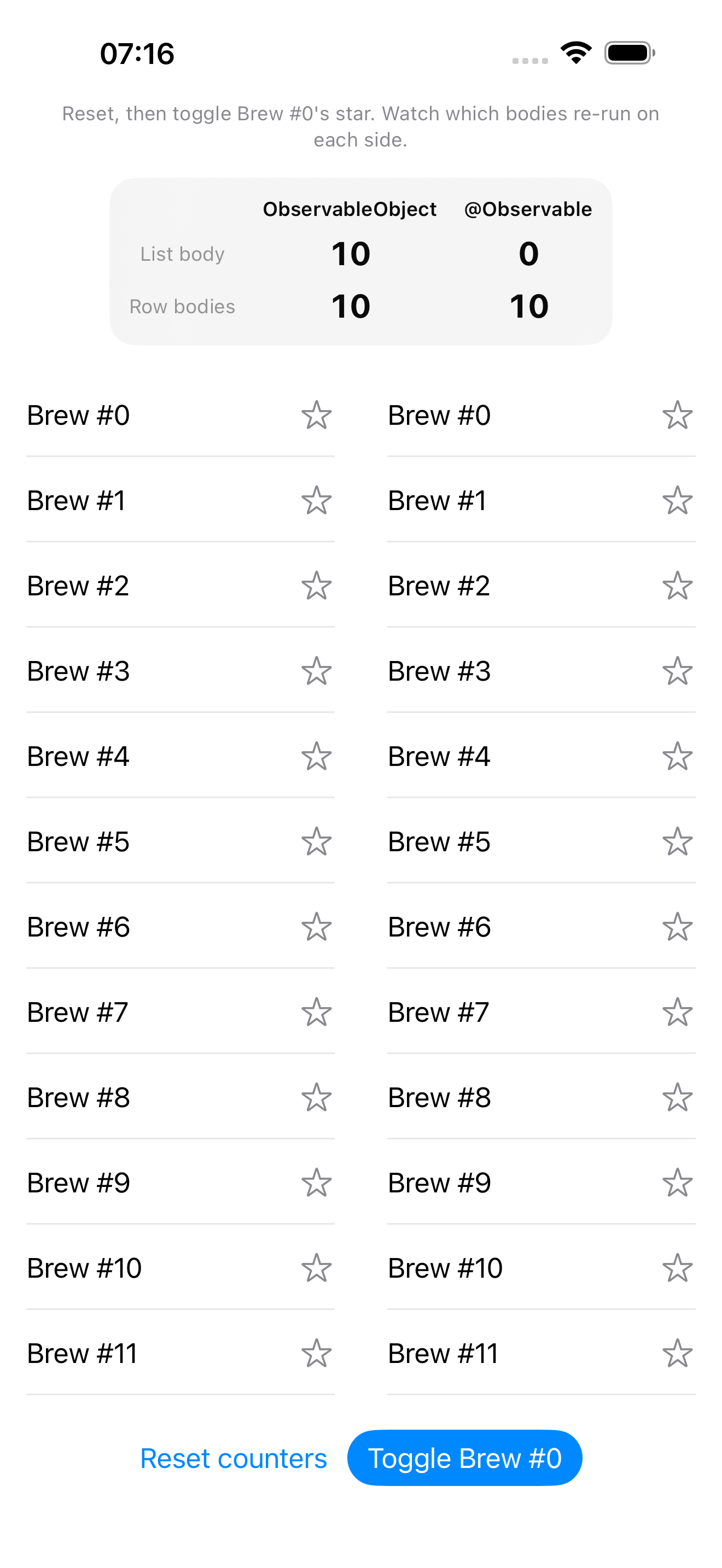
(Brew #0’s star looks unfavorited in both lists in this screenshot — ten toggles is an even number, so it’s back where it started. The counters don’t reset on toggle, only the “Reset counters” button does, so the totals above are real.)
| ObservableObject | @Observable | |
|---|---|---|
| List body | 10 | 0 |
| Row bodies | 10 | 10 |
Row bodies: tied. Ten toggles, ten row-body evaluations, on both sides — not 10,000 on the legacy side. The “@Published nukes all 1,000 rows” story is wrong, at least for this shape of view. SwiftUI’s List/ForEach diffing for Identifiable value-type rows is good enough that even a whole-store objectWillChange doesn’t blow up every row’s body. Both wrappers correctly land on “re-run the one row whose isFavorite actually changed, leave the other 999 alone.”
List body: 10 vs 0. This is the number Day 12’s teaser was actually pointing at, and I almost missed it because I was staring at the row counter expecting that to be the story.
Why the row counts tied (and why that’s good news)
@Observable’s per-row win here is exactly what the framework promises: reading item.isFavorite inside ModernRow.body registers that one property, on that one instance as a dependency. Toggle item 0, and only ModernRow for item 0 re-runs. Ten toggles, ten row bodies. The withObservationTracking test further down proves this directly, with no view in sight.
The interesting half is the ObservableObject side. @Published var items really does fire one notification for the entire array, regardless of which index changed — I’ll prove that one too. And yet LegacyRow for items 1 through 999 didn’t re-run. Why?
Because List doesn’t blindly re-invoke every row’s body just because its container re-ran. For value-type rows, SwiftUI’s rendering still checks whether the input to each row actually changed before re-running that row’s body. LegacyItem for index 1–999 is bit-for-bit identical before and after the toggle — same id, same title, same isFavorite — so those 999 row bodies get skipped. Only the row whose item value actually differs (index 0) re-runs.
In other words: List’s own diffing is quietly doing for ObservableObject what @Observable’s property tracking does explicitly. For this access pattern — one Text, one conditional Image, reading properties of a row that’s handed to you as a value — both systems land in the same place at the row level. That’s not a bug in either approach. It’s List having had a decade to get good at exactly this.
Where the real cost lives: the container, not the row
So if rows tie, where does the objectWillChange-for-the-whole-store cost actually go? Into the view that holds the store.
LegacyListView reads store via @ObservedObject. That’s an object-level subscription — the only kind ObservableObject offers. Every objectWillChange from LegacyStore, for any reason, tells SwiftUI “this view’s body might be stale, re-run it.” So LegacyListView.body re-runs. Every. Single. Time. Ten toggles, ten container re-evaluations — even though nothing about the List(...) call itself, its modifiers, or its structure changed even slightly.
ModernListView holds store as a plain let. Its body never reads store.items[0].isFavorite directly — it just hands store.items to List, which hands each item to ModernRow. ModernListView.body has no dependency on isFavorite at all, so it has zero reason to re-run when it changes. Zero, forever, no matter how many toggles. That’s the 0 in the table.
This is the same lesson as Day 11’s @StateObject autoclosure gotcha wearing a different hat: the cost isn’t really about what changed, it’s about who’s listening, and at what granularity. ObservableObject only offers one granularity — the whole object. @Observable lets the container opt out entirely just by not reading the property that’s changing.
What changes at scale
Ten toggles on a demo screen is nothing — SwiftUI eats ten extra body evaluations of a List builder without blinking. So why does a 10-vs-0 gap matter?
It scales with mutations, not with list size. Whether the list holds 10 rows or 100,000, the container-body cost for ObservableObject is one re-evaluation per objectWillChange. Swap “10 toggles” for “every brew you log in a session, every preference you flip, every sync tick from CloudKit” and that counter keeps climbing — linearly, forever — while the @Observable side stays at zero unless the container’s own body actually reads something that changed.
The container body is rarely just a List call. In a real screen it’s also computing toolbar items, conditional empty/error states, navigation titles, sheet bindings — all of which re-run on every spurious re-evaluation, even though none of their inputs changed.
This is Bug 1 from Day 12, generalized. The “Lonely Twin” bug was about which instance you’re observing. This benchmark is about how much work happens once you’re observing the right one. A root BrewLogStore as ObservableObject, held via @EnvironmentObject by ten different screens, means every one of those ten screens re-evaluates its body on any property change anywhere in that store — a new brew, a renamed tag, a toggled preference, all funnel through the same firehose. With @Observable, each of those ten screens only re-evaluates if it actually read the specific property that changed. Same store, same ten screens, ten independent firehoses replaced with ten independent taps.
The TDD seam: prove the tracking, not the pixels
None of the numbers above are testable as pixels — you can’t assert on a screenshot. But the mechanism behind them is just two notification systems, and Swift Testing can poke both without SwiftUI in the room:
import Testing
import Observation
import Combine
@testable import BrewLog

@Suite("LegacyStore: one @Published array, one notification for any change")
struct LegacyStoreTests {

    @Test("but objectWillChange fires once for the WHOLE store, regardless of which index changed")
    func toggleFiresWholeStoreNotification() {
        let store = LegacyStore(count: 1000)
        var fireCount = 0
        let cancellable = store.objectWillChange.sink { _ in fireCount += 1 }

        store.toggleFavorite(at: 500)

        #expect(fireCount == 1)
        cancellable.cancel()
    }
}

@Suite("ModernStore: @Observable, per-property tracking")
struct ModernStoreTests {

    @Test("withObservationTracking only fires for the item that actually changed")
    func observationTrackingIsPerItem() {
        let store = ModernStore(count: 10)
        var changedItemFired = false
        var untouchedItemFired = false

        withObservationTracking {
            _ = store.items[0].isFavorite
        } onChange: {
            changedItemFired = true
        }

        withObservationTracking {
            _ = store.items[1].isFavorite
        } onChange: {
            untouchedItemFired = true
        }

        store.toggleFavorite(at: 0)

        #expect(changedItemFired == true)
        #expect(untouchedItemFired == false)
    }
}
The first test is the receipt for the “10 vs 0” row in the table: a 1,000-item store, one mutation at index 500, one objectWillChange — there’s no way for a subscriber to know which index changed, so any view depending on this object has to assume it might need to redo everything it reads from it.
The second test is the receipt for @Observable’s side of that same row: register a dependency on items[0].isFavorite, register a separate dependency on items[1].isFavorite, toggle index 0, and only the first fires. That’s the entire mechanism — no view, no list, no rendering — and it’s exactly what made ModernListView’s body stay at zero.
This is the habit this series keeps coming back to: the wrappers and the views are plumbing over something that’s already true (or already false) about the model underneath. Test the model, and the plumbing’s behavior is no longer a mystery you have to screenshot to believe.
The takeaway
If you remember one row from that table, make it the first one. List body: 10 vs 0. Not because row-level redraws don’t matter — they do, and it’s genuinely reassuring that List’s diffing already handles the naive “1,000 rows redraw on any change” fear for both observation systems. But the number that scales without bound, the one that’s still climbing after your list has long since stopped changing, is the container that’s subscribed to everything versus the container that’s subscribed to exactly what it reads.
@Observable doesn’t make your rows faster. Your rows were probably fine. It makes the views around your rows stop paying rent on changes they never looked at.
Tomorrow
We’ve spent four days deep in @Observable — what it is, how to migrate to it, who should hold it, and now what it actually costs. Day 14 zooms out: it’s been about two years since SwiftData shipped, and the honest verdict is mixed. What’s genuinely production-ready, where migrations still go sideways, what CloudKit sync gotchas haven’t been fixed, and when “just use Core Data” is still the right call in 2026.
Share this post
Comments
Leave a comment
Mario
Founder & CEOFounder of NativeFirst. Building native Apple apps with SwiftUI and a passion for great user experiences.