
ThinkBud + Foundation Models: What I Shipped On-Device, and the Wall That Sent Me Back to the Server

For the last two days I taught Foundation Models on BrewLog, a tidy little teaching app where everything works because I built the example to make it work. Today I’m taking the training wheels off.
This is the build-in-public one. I took the exact same stack — the protocol seam from Day 8, the @Generable typed output from Day 9 — and bolted it into ThinkBud, an app real people pay for. ThinkBud takes anything you throw at it — a link, a PDF, a photo of a textbook page, a recorded lecture — and spits out a study kit: mind map, summary, flashcards, quizzes, a two-host podcast. The AI work has always run on hosted models behind a privacy proxy. Which means every study kit costs me money and every free user gets exactly one per day.
So when Apple put a free language model on the phone, I did the math out loud in a café and got excited. Free inference. Works on a plane. Never leaves the device. I went in expecting to move half the app on-device.
Here’s what actually happened.
Why I even tried
Four reasons, in the order they mattered to me:
- Cost. Every hosted call is a few cents of someone else’s GPU. At scale, “a few cents” is a rent payment.
- The free-tier limit. Free users get one study kit a day because each one costs me. On-device inference is free, so anything I move on-device, I can give away without flinching.
- Offline. “Creating new materials requires an internet connection” is a real line in my own FAQ. Students study on trains.
- Privacy. “Your notes never leave the phone” is a better sentence than any privacy policy I could write.
Four good reasons. None of them survive contact with a 100,000-character textbook import. But some of them survived just fine, and that split is the whole post.
What worked: small, bounded, boring
The on-device model is genuinely great at small tasks with small inputs and small outputs. So that’s where I started, and that’s where it stayed.
The first thing I shipped on-device was almost embarrassingly modest: when you paste a chunk of text to import, ThinkBud now generates a title and a one-line “what is this” locally, instantly, before any network call. Tiny input, tiny output. It fits the context window with room to spare, it returns in a beat, and it’s free.
Straight out of the Day 9 playbook — describe the shape, get a typed value back:
import FoundationModels

@Generable
struct ImportHeadline {
    @Guide(description: "A short, specific title for this study material. Max 6 words. No quotes.")
    let title: String

    @Guide(description: "One plain sentence describing what this material is about.")
    let blurb: String
}
And the same one-file quarantine from Day 8 — FoundationModels is imported in exactly one place, behind a protocol the rest of the app can fake:
protocol HeadlineMaker {
    func headline(for text: String) async throws -> ImportHeadline
}

import FoundationModels

struct OnDeviceHeadlineMaker: HeadlineMaker {
    func headline(for text: String) async throws -> ImportHeadline {
        let session = LanguageModelSession(
            instructions: "Read study material and produce a short title and a one-line description."
        )
        return try await session.respond(to: text, generating: ImportHeadline.self).content
    }
}
That shipped. It works on a plane. It costs nothing. Nobody’s daily limit gets touched for it. The same pattern now also powers quick Feynman feedback — when you explain a concept back in a sentence or two and the model nudges you on what you missed. Short in, short out. The on-device model is a perfectly good intern for jobs that fit on a Post-it.
The honest summary of “what worked”: anything where the input is a paragraph, not a chapter.
What broke: the context-window wall
Then I got greedy and tried to move the main event on-device — the full study kit from a real import.
Here’s the screen that broke my optimism. This is a normal ThinkBud summary, generated from a normal import:
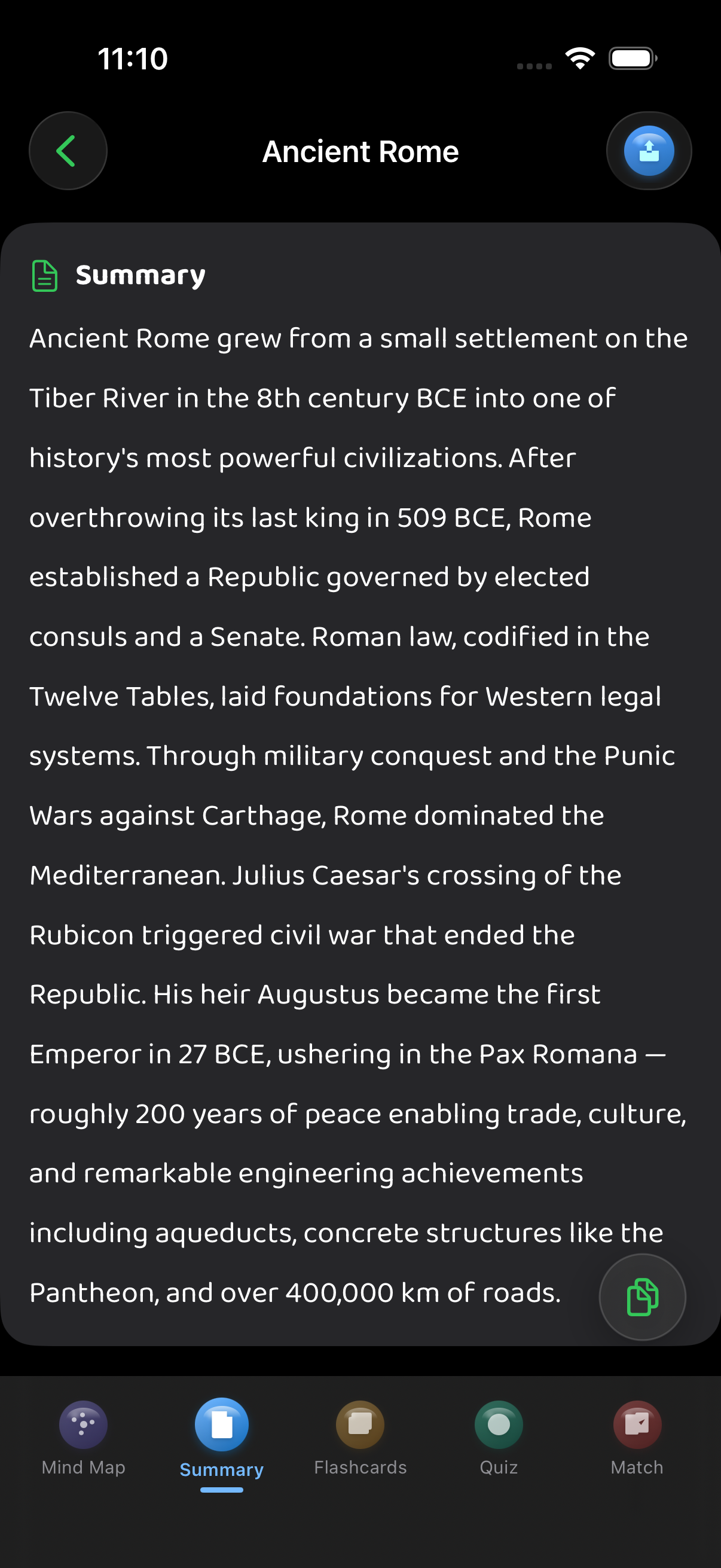
That summary came from a document that, in characters, is bigger than the on-device model can even read. The free tier alone allows imports many times larger than the model’s context window, and Pro goes up to 100,000 characters, 100 PDF pages, or 30 minutes of transcribed audio. The on-device model’s context window is measured in a few thousand tokens — call it a few thousand words, total, input plus output combined.
So the math isn’t close. It’s not “a bit tight.” A 100K-character textbook is roughly twenty-five times more text than the model can hold in its head at once. You can’t summarize a book you can’t finish reading.
And before you say “just chunk it” — yes, and I tried. Chunk the document, summarize each chunk, summarize the summaries. It works, technically. But now you’re running the model a dozen times on a thermally-throttled phone, the quality of a summary-of-summaries is visibly worse than one good pass on a real server, and the whole thing takes longer than the network call you were trying to avoid. I burned a Saturday proving that the clever workaround is worse than the boring server.
The mind map was the same story with extra steps. A good ThinkBud mind map has a dozen branches with real structure. Asking the on-device model for that much organized output, from that much input, is asking it to do the one thing it’s smallest at. It wandered. It dropped branches. It occasionally invented a topic that wasn’t in the source — and “confidently wrong” is the worst failure mode for a study app, because the whole promise is that you can trust what you’re memorizing.
The wall is real and it’s not going away with a clever prompt. Small model, small context, on purpose. That’s the trade for free and private and offline.
The engineering answer: route, don’t choose
So I stopped thinking of it as on-device versus server, and started thinking of it as a routing problem. Both are just implementations of the same protocol — the exact same seam from Day 8, now with two real backends instead of one real and one fake:
enum StudyTask {
    case headline          // tiny in, tiny out
    case shortFeynback     // a sentence in, a sentence out
    case fullStudyKit      // a chapter in, a structured kit out
    case mindMap           // a chapter in, a dozen branches out
}

protocol StudyEngine {
    func run(_ task: StudyTask, on text: String) async throws -> StudyOutput
}
OnDeviceEngine wraps Foundation Models. RemoteEngine wraps the hosted call behind the proxy. Neither one decides when it’s used. That decision lives in a third thing — and the decision is pure Swift, which, if you’ve been reading this series, is exactly where your ears should perk up.
enum Backend { case onDevice, remote }

/// The whole on-device-vs-server policy, as one pure function.
/// On-device is free/private/offline — but only safe when the input
/// fits the small context window AND the task is bounded.
func backend(for task: StudyTask, characterCount: Int) -> Backend {
    // A conservative budget. The model's window is small; leave headroom
    // for instructions and output. Past this, on-device is a coin flip.
    let onDeviceCharBudget = 2_000

    switch task {
    case .headline, .shortFeynback:
        return characterCount <= onDeviceCharBudget ? .onDevice : .remote
    case .fullStudyKit, .mindMap:
        return .remote   // structured, long output — server every time
    }
}
That’s it. That’s the wall, turned into nine lines you can reason about. Bounded tasks with small input go on-device; everything ambitious goes to the server. No vibes — a rule.
And — because constraints are guidance, not law — a real fallback
There’s one more layer, and it’s the same paranoia from Day 9’s rating clamp. Even when the router says “on-device,” the model can still throw — the input was a little bigger than I estimated, the device is thermally throttled, whatever. So the routing engine tries on-device and quietly falls back to the server if it can’t deliver:
struct RoutingEngine: StudyEngine {
    let onDevice: StudyEngine
    let remote: StudyEngine

    func run(_ task: StudyTask, on text: String) async throws -> StudyOutput {
        switch backend(for: task, characterCount: text.count) {
        case .remote:
            return try await remote.run(task, on: text)
        case .onDevice:
            do {
                return try await onDevice.run(task, on: text)   // free, private, offline
            } catch {
                return try await remote.run(task, on: text)     // …but never at the cost of a result
            }
        }
    }
}
The user never sees the detour. They asked for a study kit; they get a study kit. Whether it came from the Neural Engine or a GPU in a data center is my problem, not theirs.
The part you can actually test
Here’s why I keep dragging every one of these posts back to a seam: you cannot unit-test what the model writes, but you can unit-test every decision around it — and I just turned the entire on-device-vs-server policy into a decision.
backend(for:characterCount:) is a pure function. No model, no network, no simulator. It runs in microseconds on any CI box. So it gets the tests it deserves, in Swift Testing:
import Testing
@testable import ThinkBud

@Suite("Engine routing policy")
struct BackendRoutingTests {

    @Test("a short headline stays on-device — free and offline")
    func smallHeadlineGoesOnDevice() {
        #expect(backend(for: .headline, characterCount: 800) == .onDevice)
    }

    @Test("a headline for a huge paste still routes to the server")
    func bigHeadlineFallsBack() {
        #expect(backend(for: .headline, characterCount: 50_000) == .remote)
    }

    @Test("a full study kit is always the server's job, even when tiny")
    func studyKitIsAlwaysRemote() {
        #expect(backend(for: .fullStudyKit, characterCount: 100) == .remote)
    }

    @Test("the on-device char budget boundary is exact", arguments: [
        (1_999, Backend.onDevice), (2_000, .onDevice), (2_001, .remote),
    ])
    func budgetBoundary(count: Int, expected: Backend) {
        #expect(backend(for: .shortFeynback, characterCount: count) == expected)
    }
}
That last one is a parameterized test pinning the exact boundary — the moment a request crosses from “free on the phone” to “costs me money on a server.” That boundary is a business decision, and a business decision with a 2_001 in it deserves a test that screams if someone fat-fingers it to 20_001.
The fallback gets a test too, and it’s the satisfying one. Two fakes — one that always throws, one that records it was called — and you assert the detour happened:
@Test("when on-device throws, the engine quietly reroutes to the server")
func fallsBackToRemoteOnFailure() async throws {
    let remote = SpyEngine()                       // records calls, returns a canned kit
    let engine = RoutingEngine(onDevice: FailingEngine(), remote: remote)

    _ = try await engine.run(.headline, on: "short text")   // routes on-device, on-device throws

    #expect(remote.runCallCount == 1)              // …and the server caught the user
}
No Apple Intelligence in sight. The fakes are four lines each — same StubSummarizer/FailingSummarizer trick from Day 8, just wearing the new protocol. The model’s quality I verify by hand, with real imports, like a grown-up. The model’s plumbing — when it runs, what happens when it fails, who pays — is ordinary Swift, and ordinary Swift gets covered. This is the exact swappable-collaborator design that’s the spine of the SwiftUI at Scale course in /learn: every dependency, from the network to the model, hiding behind a protocol so the policy that wires them together is pure and tested.
The honest scorecard
Build-in-public means I tell you the part that didn’t go in the keynote.
On-device won: import headlines, one-line blurbs, short Feynman feedback. Anything paragraph-sized. These are now free, offline, and private, and I’m genuinely happy about it. It also shaved real latency — a title that used to wait on a round-trip now appears instantly.
On-device lost: full study-kit generation, mind maps, the podcast script, anything from a large import. The context window isn’t a tuning problem, it’s a ceiling. Chunking made the quality worse and the speed slower than the server I was avoiding. For a study app, a confidently-wrong mind map is worse than a two-second wait.
The thing nobody tells you: the win wasn’t “replace the server.” It was “stop hitting the server for the cheap stuff.” Most apps don’t need on-device AI to do the hardest thing. They need it to do the frequent, small, boring thing for free, and let the server keep the heavy lifting. ThinkBud got cheaper and faster without getting dumber, and the user can’t tell which engine answered — which is the whole point.
So: reach for the on-device model when the input is small and bounded and you’d love it to be free or offline or private. Reach for a server when the input is a chapter, the output is structured and long, or being wrong is expensive. And when you’re not sure at the boundary — make it a pure function and write the test, so future-you doesn’t have to guess.
The takeaway
Three days, one stack. Day 8 said get a string from the phone, behind a protocol, and test everything around it. Day 9 said get a typed struct instead, and let it call your code. Day 10 says now that you can do it on the phone — know when not to.
The on-device model is a real tool with a real edge, and the edge is sharp: small context, small model, by design. The senior move isn’t picking a side. It’s routing — on-device for the cheap and frequent, server for the heavy and high-stakes — behind a protocol seam so clean that the policy deciding between them is a pure function you can prove correct in a test that runs in a millisecond.
That’s the whole series in one sentence, really. Push the AI to the edge of your app, keep the rules in the middle, and make the middle testable. The model is just another collaborator. You’re still the one holding the design.
Tomorrow
AI week’s over. Day 11 starts the @Observable stretch — and we open with the migration guide Apple’s own docs gently skip over: the @StateObject autoclosure gotcha that @State doesn’t have, the multiple-init bug it causes, and how to fix it without a marketing slide in sight.
The model’s on the phone, it knows when to phone home, and it’s fully tested. Now let’s go fix how your views hold state.
Share this post
Comments
Leave a comment
Mario
Founder & CEOFounder of NativeFirst. Building native Apple apps with SwiftUI and a passion for great user experiences.