
Your Prompts Are Not Skills. Yet.
The best prompt I ever wrote took 45 minutes to get right.
It generates App Store release notes from a git log. Pulls the commit messages, groups them by feature/fix/improvement, rewrites each one in user-friendly language, adds a witty intro line, and formats everything for Apple’s character limit. It’s beautiful. It saves me an hour every release cycle.
And for three months, it sat in a Google Doc on page 14, between a grocery list and a cover letter from 2024, doing absolutely nothing.
I wrote about this in part one of this series — the prompt graveyard problem. 73% of AI users lose prompts regularly. We surveyed 2,847 people and the data was brutal.
But here’s what I didn’t say in that post: saving your prompts doesn’t fix the real problem. It fixes the finding problem. The real problem is deeper.
The Prompt Spectrum
Most people think about prompts in two categories: the ones they type once and forget, and the ones they save somewhere. That’s like saying there are two types of cooking: microwaving and everything else. There’s a whole spectrum in between.
Here’s how I think about it now:
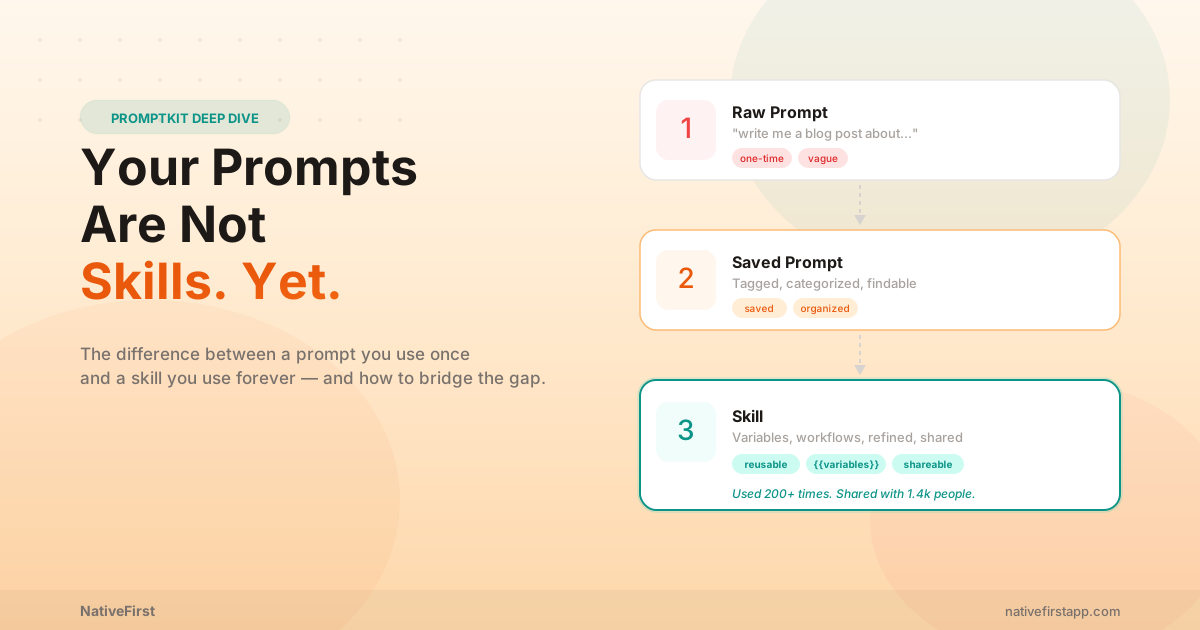
Level 1: Raw Prompt. You type “write me a blog post about productivity” into ChatGPT. You get something back. You use it or you don’t. The prompt disappears into your chat history, never to be seen again. This is where 90% of AI interactions live.
Level 2: Saved Prompt. You wrote a good prompt, you recognized it was good, and you saved it somewhere. A note. A doc. A bookmark. PromptKit’s library. You can find it again. This is progress — but it’s only the halfway point.
Level 3: Skill. The prompt has variables. It’s been refined through dozens of uses. It works reliably across different inputs. Other people have used it and confirmed it works. It has a clear purpose, a clear structure, and it produces consistently good results.
A saved prompt is a recipe you bookmarked. A skill is a recipe you’ve cooked 50 times, adjusted the seasoning, and can now make with your eyes closed while your kid is screaming about dinosaurs.
Most people stop at Level 2 and think they’re done. They’re not.
What Makes a Prompt Become a Skill
I’ve been obsessing over this distinction for weeks. After looking at my own prompt library (174 prompts, some used once, some used 200+ times) and talking to heavy AI users in our community, three things separate a prompt from a skill.
1. Variables
A prompt without variables is a single-use tool. A prompt with variables is a template that handles infinite scenarios.
Here’s my code review prompt, version 1 (the one I typed raw into Claude):
“Review this Swift code for bugs, security issues, and performance problems. Be thorough but concise.”
Fine. Works. But I use three languages. And sometimes I want a quick scan, not a thorough review. And sometimes I care about style, not security.
Version 12 (the skill):
“Review this {{language}} code. Focus on {{focus_areas}}. Depth: {{depth}}. Flag severity as critical/warning/info. For each issue, suggest a one-line fix.”
Same core idea. But now language can be Swift, Python, or TypeScript. focus_areas can be “security” or “performance” or “readability” or all three. depth can be “quick scan” or “deep audit.”
One prompt. Infinite uses. That’s the difference.
I talked about this idea in the context of Claude Code custom slash commands — developers already get this. A /project:review command with $ARGUMENTS is exactly a skill. The insight is that everyone deserves this, not just people who live in a terminal.
2. Iteration
The first version of any prompt is bad. I don’t care how good you are at prompt engineering. Version 1 is a guess. Version 5 is better. Version 12 is a skill.
My release notes prompt went through these phases:
- v1: Produced a wall of text with no formatting. Useless.
- v3: Added “format as bullet points under Feature/Fix/Improvement headers.” Better.
- v5: Added “keep each bullet under 80 characters and write in present tense.” Getting close.
- v8: Added “start with a one-line summary that’s slightly funny but professional.” Now we’re talking.
- v12: Added the {{tone}} variable because our consumer app needs casual language but our B2B tool needs corporate-speak. Same prompt, different voice.
Each iteration came from a real failure. v3 happened because Apple rejected our update for a description that was too long. v8 happened because I got tired of writing the intro line myself. v12 happened because I tried using the consumer prompt for Invoize and it sounded ridiculous.
You can’t iterate on a prompt you can’t find. And you can’t iterate effectively without seeing your usage history — which version you used last, how many times you’ve launched it, when it last failed. This is why prompt management matters. Not because saving is hard, but because the feedback loop is everything.
3. Community Validation
Here’s the thing nobody talks about: you don’t know if your prompt is good until someone else uses it.
I thought my blog outline prompt was incredible. It produced detailed outlines with sections, subsections, word count targets, and SEO considerations. I used it for every blog post.
Then I shared it in our PromptKit community beta. Three people tried it and all came back with the same feedback: “It produces great outlines but they’re so rigid that the final post feels formulaic.” One person said, “It feels like every blog post was written by the same consulting firm.”
Damn. They were right. The prompt was over-specifying. I was so focused on structure that I’d squeezed out all the personality. My posts were well-organized but boring.
I rewrote it. Removed the word count targets. Changed “write 3 subsections per section” to “break this into natural sections — some might have two paragraphs, some might have six.” Added a line: “surprise the reader at least once.”
Version 2 of the shared prompt was better than version 12 of my private prompt. Community feedback in two days accomplished what personal iteration hadn’t in two months.
A skill isn’t just refined by you. It’s validated by others.
The Skill Stack
Once you have individual skills, something magical happens: they compose.
My blog post workflow isn’t four separate prompts anymore. It’s a skill stack — four skills that run in sequence, each one feeding the next:
- Research Skill → Send topic to Perplexity. Variables: {{topic}}, {{depth}}, {{sources_count}}. Returns structured research with citations.
- Outline Skill → Send research to Claude. Variables: {{tone}}, {{audience}}. Returns a flexible outline.
- Draft Skill → Send outline to Claude. Variables: {{word_count_target}}, {{style_reference}}. Returns a full draft.
- Polish Skill → Send draft to ChatGPT. Variables: {{reading_level}}, {{final_checks}}. Returns a publication-ready piece.
Each skill was refined independently. Each one works on its own. But together, they form a workflow that takes me from “I have an idea” to “here’s a draft ready for my editor” in about 20 minutes. Manually, this used to take me three hours.
We wrote about how automation layers work — skill stacks are the first layer. No code required. No terminal. Just prompts that have been promoted to skills, chained in the right order.
Real Skills From Real Users
During our PromptKit beta, I’ve been collecting the best prompt-to-skill transformations. These aren’t theoretical. Real people, real prompts, real evolution.
The Email Decoder
Sarah, marketing manager. Started with: “Summarize this email thread.”
Evolved into: “Read this email thread. Extract: (1) the actual ask buried in the pleasantries, (2) the deadline if any, (3) the political subtext — who’s CYA-ing, who’s volunteering someone else, who’s quietly blocking. Respond with what I should actually reply, in {{my_tone}}.”
She calls it her “corporate translator.” Uses it 4-5 times a day. The {{my_tone}} variable toggles between “diplomatic” (for leadership emails) and “direct” (for her team).
The Bug Report Whisperer
James, senior developer. Started with: “Help me debug this error.”
Evolved into: “I have a {{language}} error in {{framework}}. Here’s the stack trace: {{stack_trace}}. Before suggesting fixes: (1) explain what’s actually failing and why, (2) list the three most likely root causes ranked by probability, (3) for each cause, give me a diagnostic command I can run to confirm or rule it out. Only after I confirm which cause it is should you suggest a fix.”
He said the original prompt would give him five possible solutions and he’d try all five. The skill version diagnoses first, then fixes. “It’s the difference between a doctor who guesses and a doctor who runs tests.”
The Meeting Killer
Priya, product manager. Started with: “Write an agenda for my meeting about the Q2 roadmap.”
Evolved into: “I have a {{meeting_type}} meeting with {{attendees}}. The goal is {{desired_outcome}}. Time limit: {{duration}} minutes. Create an agenda that: (1) starts with a 2-minute context-setter so nobody asks ‘wait, why are we here?’, (2) allocates time per item proportional to its importance, (3) includes a specific decision to be made for each item — no ‘discuss X’ items, only ‘decide X’ items, (4) ends 5 minutes early because no meeting ever ends on time.”
“Every meeting I run now has a decision at the end. My boss noticed. She thought I took a management course.”
How PromptKit Turns Prompts Into Skills
This is why we built PromptKit the way we did. Not as a notes app with AI labels. As a skill development environment.
Variables are first-class. Not a hack. Not a “paste here” workaround. Real {{variables}} with types, defaults, and dropdown options. When you launch a skill, a clean form pops up. Fill in the blanks. Go.
Usage tracking shows you which prompts you actually use. The ones you launch twice a month are prompts. The ones you launch twice a day are skills. PromptKit shows you the difference with hard numbers — launch count, last used date, streak.
Version history is coming in v2. Every edit to a prompt is saved. You can roll back to version 3 when version 7 turns out worse. You can see how a prompt evolved from raw text to polished skill. This is the iteration layer that no other tool has.
Workflows let you chain skills into stacks. Each step references a saved skill. Each step can override the target AI. Run the whole stack with one tap and step through each skill in sequence.
Community is the validation layer. Publish a skill. See if others use it. Read feedback. Iterate. The best skills surface naturally — not because of marketing, but because 300 people saved them to their libraries and the usage count proves they work.
This isn’t an accident. It’s the architecture. PromptKit was designed around the skill lifecycle: create → save → parameterize → iterate → share → validate → improve.
The Skill Mindset
Here’s what changed for me once I started thinking in skills instead of prompts.
I stopped treating AI interactions as conversations. They’re function calls. The prompt is the function. The variables are the parameters. The output is the return value. And like any good function, it should be named, documented, tested, and reusable.
I stopped writing prompts from scratch. When I need something new, I check the community first. Someone has probably built a v5 of what I’m about to write a v1 of. I save their skill, customize it with my variables, and I’m running in minutes instead of hours.
I stopped copy-pasting between AI apps. My research skill goes to Perplexity. My code skill goes to Claude. My copy skill goes to ChatGPT. Each skill knows where it belongs. One tap to launch, variables filled in, sent to the right AI. No tabs. No clipboard gymnastics.
The prompt era was about writing. The skill era is about building.
Start Building Your First Skill
Here’s a practical exercise. Pick your most-used prompt — the one you’ve typed or pasted at least 10 times.
- Write it down properly. Full text. Not the shorthand version you type from memory. The complete, well-structured version that actually works.
- Identify the variables. What changes every time you use it? The language? The tone? The audience? The input data? Make each one a {{variable}}.
- Add constraints. What should the output look like? What format? What length? What should it definitely NOT include? The constraints are what make the output reliable.
- Use it 10 more times. With the variables. Note what fails. What’s missing. What you always edit after. Fix the prompt, not the output.
- Share it. Get feedback from someone who does similar work. Their perspective will reveal blind spots you can’t see.
After step 5, you don’t have a prompt anymore. You have a skill.
What’s Next
This is part two of what’s becoming a series. Part one was about the problem — where prompts go to die. This post is about the solution — turning prompts into skills.
Part three will be about skill stacks in production — real workflows from power users who’ve chained 5-8 skills into automated pipelines that run their entire content, development, and marketing operations. Some of these workflows are replacing what used to be a full-time assistant.
PromptKit is still in final testing. iOS and macOS. If you want in, visit the PromptKit page or reach out to us for beta access.
In the meantime, go look at your most-used prompt. Ask yourself: is this a prompt, or is this a skill?
If it’s still a prompt, you’ve got work to do.
Related Reading
If this resonated, here’s more from us:
- Where Do Your AI Prompts Go to Die? — Part one. The survey, the problem, the PromptKit announcement.
- 12 Claude Code Commands I Actually Use Every Day — Custom slash commands are skills for developers. Same concept, terminal-native.
- The Untapped Power of Claude Nobody Talks About — From single skills to automation layers to full agent orchestration.
- Programmers vs Vibe Coders in 2026 — Why prompt quality (skill quality) separates good AI users from great ones.
Share this post
Comments
Leave a comment
Mario
Founder & CEOFounder of NativeFirst. Building native Apple apps with SwiftUI and a passion for great user experiences.