
Iterative Prompting
Here is a truth about AI-assisted development that separates beginners from experts: the first response is a draft, not a deliverable.
Beginners write one prompt, accept whatever comes back, and wonder why the result is mediocre. Experts treat the first response as a starting point and iterate — sometimes two rounds, sometimes five. The feature gets better with each pass.
This lesson teaches you the techniques for effective iteration.
The “Yes, But…” Technique
The simplest and most powerful iterative technique is what I call “Yes, but…” You accept the general direction of the AI’s output but redirect specific aspects.
Here is what it looks like in practice. Let us say we asked Claude Code to build a settings screen and it returned something functional but basic. Instead of rewriting the entire prompt:
Round 1 — Initial:
Create a SettingsView with user preferences for our app.Round 2 — “Yes, but…” #1:
This is good, but the sections need icons. Add SF Symbol icons
next to each setting label — use contextually appropriate symbols.
Round 3 — “Yes, but…” #2:
Better. But the "Account" section should show the user's avatar
and name at the top, like the iOS Settings app does for Apple ID.
Round 4 — “Yes, but…” #3:
Almost there. Add haptic feedback when toggles are switched,
and animate the destructive actions (delete account, sign out)
with a confirmation dialog.
Each “yes, but…” takes 10 seconds to type and produces a meaningful improvement. In four rounds — maybe two minutes total — you go from a basic list to a polished, production-quality settings screen with icons, profile display, haptics, and confirmation dialogs.
The key insight: each iteration builds on the previous one. Claude Code remembers the entire conversation. It does not regenerate from scratch — it modifies the existing code. This means your refinements are cumulative.
Chain-of-Thought Prompting
For complex features, you want the AI to think before it codes. This is called chain-of-thought prompting, and it dramatically improves output quality for non-trivial tasks.
Instead of:
Add a shopping cart to the app.Try:
I need to add a shopping cart feature. Before writing any code,
think through:

1. What data model do we need? Consider items, quantities, prices,
   and discounts.
2. How should the cart state be managed across the app?
3. What views are needed? List them with their responsibilities.
4. What edge cases should we handle? (empty cart, max quantities,
   item removal, price changes)

Then implement it step by step, starting with the data model.
Notice what happens: Claude Code first outlines its thinking — the data model it will create, the state management approach, the views needed, the edge cases. Then it writes the code informed by that reasoning.
This works because you are forcing the AI to plan before executing. Without this, the AI jumps straight to code and often paints itself into architectural corners that are hard to fix later.
When to use chain-of-thought:
- Features that touch 3+ files
- Anything involving data model design
- Navigation flows with multiple screens
- Features with complex business logic
When it is overkill:
- Simple UI adjustments
- Adding a button or modifier
- Straightforward CRUD operations
The Refinement Ladder
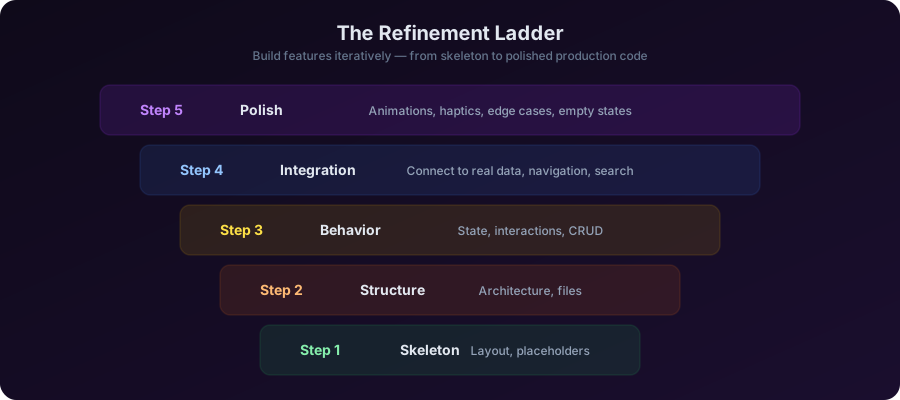
The refinement ladder is a systematic approach to building features iteratively. You start at the bottom with the simplest possible version and climb up.
Let me demonstrate with a real example.
Building a Feature in 5 Iterations
We are going to build an expense tracking feature — a list where users can add expenses with a category, amount, and date. Watch the progression.
Iteration 1 — Skeleton
Create a basic ExpenseListView that shows a list of expenses.
Use placeholder data for now — just the structure and layout.
Each row should show an expense name, amount, and date.
We get a basic list. Hardcoded data, no real functionality, but the layout is established. This is our foundation.
Iteration 2 — Structure
Now add proper architecture:
- Create an Expense model using SwiftData (@Model)
- Create an ExpenseListViewModel with @Observable
- Move the hardcoded data into the ViewModel
- The view should read from the ViewModel
Now we have real architecture. Model, ViewModel, View — all separate. The data is still mock, but the structure is production-ready.
Iteration 3 — Behavior
Add real functionality:
- An "Add Expense" button in the toolbar that presents a sheet
- The sheet should have a form with name, amount (numeric keyboard),
  category (picker with Food, Transport, Entertainment, Bills, Other),
  and date (DatePicker)
- Save the expense to SwiftData on submit
- The list should auto-update when a new expense is added
- Support swipe-to-delete on list rows
Now it is functional. Users can add expenses, see them in the list, and delete them. This is already a usable feature.
Iteration 4 — Integration
Add these integrations:
- Group expenses by month with section headers
- Show a total amount at the top of each section
- Format amounts as currency using the device locale
- Sort expenses newest first within each section
- Add a search bar to filter expenses by name
This is starting to look like a real app. Grouped sections, currency formatting, search — these are the details that make a feature feel finished.
Iteration 5 — Polish
Final polish:
- Add a subtle scale animation when a new expense is added
- Show an empty state with an illustration when there are no expenses
  (use ContentUnavailableView with an SF Symbol)
- Add haptic feedback (UIImpactFeedbackGenerator, .light) when
  deleting an expense
- The amount in each row should be right-aligned and use .monospacedDigit
  font design for proper alignment
Five iterations. Maybe 10 minutes total. We went from nothing to a polished, production-quality expense tracking feature with proper architecture, SwiftData persistence, search, grouping, animations, and haptics.
Could you have written all of this in one giant prompt? Maybe. But the result would be worse — the AI would have to make too many decisions at once, and some of them would be wrong. By building incrementally, each iteration has a clear, focused goal, and the AI nails it.
When To Accept, Push Back, or Start Over
AI generates code
       │
       ▼
Is the overall approach right?
       │
   ┌───┴───┐
   Yes      No
   │        │
   ▼        ▼
Are there    START OVER
specific     with a new prompt
issues?      that specifies the
   │         approach you want
   ▼
"Yes, but..."
iterate on
specific issues
Accept when:
- The code compiles and runs correctly
- It follows your CLAUDE.md rules
- The architecture is sound
- You would write it similarly by hand
Push back (“Yes, but…”) when:
- The general approach is right but details are wrong
- Missing edge cases or error handling
- UI does not match your vision
- Performance could be better
Start over when:
- The AI chose the wrong architectural approach entirely
- It used deprecated APIs or wrong frameworks
- The code is so tangled that iterating would take longer than restarting
- You realize your original prompt was fundamentally unclear
Starting over is not failure. Sometimes the fastest path is a fresh prompt with better context. Do not sink-cost yourself into iterating on a bad foundation.
Closing
Iterative prompting is the difference between “AI wrote some code” and “AI helped me build a polished feature.” Use “Yes, but…” for quick refinements, chain-of-thought for complex features, and the refinement ladder for systematic builds.
In the next lesson — the final one in this module — we are going to flip the script and talk about what NOT to do. The anti-patterns that waste your time and produce terrible output.
Key Takeaways
- First response = draft, not deliverable — always plan to iterate
- “Yes, but…” is the simplest technique — accept the direction, redirect the details
- Chain-of-thought forces AI to plan before coding — essential for complex features
- The refinement ladder: Skeleton → Structure → Behavior → Integration → Polish
- Know when to start over — do not iterate on a fundamentally wrong foundation
- Iterations are fast — 10 seconds per prompt, cumulative improvements
Homework
Iterative build exercise (30 minutes):
Build a “Contacts” feature using only iterative prompting:
- Iteration 1: Basic list of contacts (name only)
- Iteration 2: Add a proper Contact model with name, phone, email, photo placeholder
- Iteration 3: Add “New Contact” form in a sheet
- Iteration 4: Add search, sort by name, section headers (A, B, C…)
- Iteration 5: Add swipe actions (call, message, delete) and empty state
Time yourself. Compare with how long the feature would take to build without AI.
Mario
Founder & CEOFounder of NativeFirst. Building native Apple apps with SwiftUI and a passion for great user experiences.
Comments
Leave a comment