
AI Tools for iOS Development
Welcome back. In the last lesson, we defined vibe coding and where this course sits on the spectrum. Now let us talk about the tools — because choosing the right AI tool for iOS development is probably the single most impactful decision you will make.
I am going to be direct: I have spent months testing every major AI model and every major AI coding tool against real Swift and SwiftUI tasks. Not toy examples — real features for production apps. And the differences are enormous.
Two Categories
First, understand that there are two separate things we are evaluating:
Category 1: The Model — this is the AI brain. Claude Opus 4.6, GPT-4.1, Gemini 2.5 Pro, and others. The model determines how well the AI understands Swift, how correct the generated code is, and how well it reasons about your architecture.
Category 2: The Tool — this is how you interact with the model. Claude Code (terminal-based), Cursor (VS Code fork), GitHub Copilot (editor extension), Xcode’s built-in Swift Assist. The tool determines your workflow, how much context the AI gets, and how seamlessly it integrates into your development process.
The best outcome is the best model inside the best tool. Let us figure out what that is.
The Models
Let me walk you through the models I tested and what I found. If you want the full deep-dive, we have a comprehensive blog post on nativefirstapp.com that goes into extreme detail. Here is the summary.
Claude Opus 4.6 — The Best for Swift
Claude Opus 4.6 from Anthropic is, in my testing, the best AI model for iOS development, and it is not particularly close. Here is why:
SwiftUI accuracy. When you ask Opus 4.6 to generate a SwiftUI view, it does not just write syntactically correct code — it writes idiomatic code. It uses @Observable instead of the old ObservableObject protocol. It reaches for SwiftData instead of Core Data when appropriate. It follows Apple’s Human Interface Guidelines for spacing, typography, and interaction patterns.
Architecture awareness. Ask it to add a feature to an MVVM app, and it creates a proper ViewModel, keeps the View declarative, and handles data flow correctly. Other models routinely mix business logic into views or create circular dependencies.
Error recovery. When you give Opus 4.6 a compiler error, it does not just guess — it reasons about why the error occurred. If a type conformance is missing, it traces through the protocol chain. If a view is not updating, it understands SwiftUI’s state management rules.
Modern API knowledge. This model knows about APIs introduced in iOS 17 and iOS 18. SwiftData, TipKit, Interactive Widgets, App Intents — it generates code using current frameworks, not deprecated ones.
GPT-4.1 — Strong But Inconsistent
OpenAI’s GPT-4.1 is a capable model. It handles Swift reasonably well and can generate functional SwiftUI code. But in my testing, it has a consistency problem. The same prompt will produce excellent code one time and mediocre code the next. It also has a tendency to fall back to UIKit patterns wrapped in SwiftUI, which creates code that works but does not feel native.
For general-purpose coding? GPT-4.1 is strong. For Swift-specific work? It is clearly behind Opus 4.6.
Gemini 2.5 Pro — The Surprising Contender
Google’s Gemini 2.5 Pro surprised me. It has improved dramatically for Swift code generation. Its long context window (1 million tokens) means it can process enormous codebases. And for certain tasks — particularly data transformation and algorithm implementation — it performs on par with or even above Opus.
Where it falls short is SwiftUI-specific patterns. It generates functional but verbose UI code, often missing the elegant, declarative style that makes SwiftUI powerful. And its suggestions for architecture tend to be more Android-influenced (MVVM, but with repository patterns that feel like they belong in Kotlin).
Others — Quick Notes
- Claude Sonnet 4.5: Great value. 90% of Opus quality at much lower cost. Excellent for routine tasks.
- GPT-4o: Good for quick questions, not ideal for complex Swift generation.
- Llama 4 Maverick: Impressive for an open-source model, but not ready for production iOS work.
- Grok: Interesting personality, mediocre Swift output.
The Tools
Now let us talk about the tools — how you actually interact with these models.
Claude Code — Our Primary Tool
Claude Code is a terminal-based AI coding assistant from Anthropic. You run it in your project directory, and it gets full access to your codebase. Here is what makes it special for iOS development:
Full project context. Claude Code reads your entire Xcode project — not just the file you have open. When you say “add a settings screen,” it knows your existing navigation structure, your data models, your color scheme, and your architectural patterns.
The CLAUDE.md file. This is a game-changer. You write a markdown file that tells Claude Code your project’s rules: “Use MVVM,” “Use SwiftData, not Core Data,” “Follow Apple HIG,” “Error messages should be user-friendly.” Every prompt Claude Code processes respects these rules. We will dedicate an entire lesson to this in Module 2.
File creation and modification. Claude Code does not just suggest code — it creates files, modifies existing ones, and can even run build commands. You describe a feature, it writes the code, creates the files, and you review the diff.
Git integration. It understands your git history, can create commits with proper messages, and helps manage branches. The workflow is seamless.
Cursor — The Visual Alternative
Cursor is a VS Code fork with deep AI integration. It is excellent — arguably the best general-purpose AI coding tool. It supports multiple models (including Claude and GPT), has inline editing, chat, and a “Composer” mode for multi-file changes.
For iOS development specifically, Cursor has two limitations:
First, it is not Xcode. You lose Interface Builder (if you still use it), the Simulator integration, Instruments, the asset catalog viewer, and the build system integration. You can use Cursor alongside Xcode, but the workflow has friction.
Second, its context window management for large Swift projects can be inconsistent. It is optimized for web development file structures, and Xcode projects (with their .xcodeproj bundles, plist files, and entitlements) sometimes confuse it.
That said, Cursor is a strong choice if you prefer a visual editor over the terminal. And with Opus 4.6 as the model, it produces excellent results.
GitHub Copilot — The Autocomplete King
GitHub Copilot works inside Xcode now. It provides inline suggestions as you type — autocomplete on steroids. For individual line completion and small function generation, it is fast and useful.
But Copilot fundamentally operates at the line or function level. It does not understand your project architecture the way Claude Code does. It cannot create multi-file features. It cannot refactor across your codebase. Think of Copilot as a very smart autocomplete, not as a pair programmer.
My recommendation: Use Copilot inside Xcode for inline suggestions AND Claude Code in a terminal for feature-level work. They complement each other.
Xcode Swift Assist — Apple’s Entry
Apple introduced Swift Assist at WWDC. It is built into Xcode and can generate SwiftUI code from natural language descriptions, directly in the preview canvas.
The promise is compelling: AI that truly understands Apple’s frameworks, integrated into Apple’s IDE. The reality, as of early 2026, is that Swift Assist is limited. It handles simple UI generation well but struggles with complex logic, has no project-wide context, and cannot modify existing code — only generate new snippets.
Watch this space. Apple will improve it. But today, it is not a primary tool for serious development.
OpenClaw — The Open-Source Wildcard
I want to highlight a tool that deserves your attention: OpenClaw. And there is a beautiful piece of iOS community history behind it.
OpenClaw was created by Peter Steinberger — and if that name sounds familiar, it should. Steinberger is the creator of PSPDFKit, one of the most respected iOS SDKs ever built. The man has deep Apple platform expertise. So when he builds an AI tool, it is worth paying attention.
OpenClaw started as a weekend project in November 2025 — originally called Clawdbot, then briefly Moltbot, before the community voted on the OpenClaw name. The concept: an open-source, self-hosted AI agent that runs locally on your machine, connects to your messaging apps (WhatsApp, Telegram), and can actually perform tasks on your system. It hit 60,000 GitHub stars in 72 hours. That is not hype — that is developers recognizing real utility.
What makes OpenClaw relevant for iOS developers:
Developer workflow automation. OpenClaw can integrate with GitHub for automated issue triage, PR reviews, and CI pipeline management. If you maintain open-source Swift packages, this is immediately useful — it can monitor issues, suggest fixes, and even draft responses.
Personal productivity layer. It connects to Apple Notes, Apple Reminders, Things 3, and other native apps. You can ask it to organize your sprint tasks, summarize meeting notes, or set up a development schedule — all through a chat interface you already use.
Smart home and hardware integration. This one surprised me. OpenClaw can control Philips Hue, Elgato devices, and Home Assistant setups. For developers building IoT-connected iOS apps, this opens up real testing and automation possibilities.
Web automation. Form filling, data scraping, website navigation — useful for market research, competitive analysis, or automated App Store monitoring.
A word of caution: OpenClaw runs with deep system access. Misconfigurations can expose credentials and files. The community skill marketplace (ClawHub) has had issues with unsafe extensions. Use it, but understand what you are granting access to. Self-hosted means self-responsible.
In February 2026, Steinberger announced he is joining OpenAI to work on “smart agents” — but OpenClaw remains fully open-source under MIT license, managed by an independent foundation. The project is actively developed and the community is growing rapidly.
We believe OpenClaw is significant enough that we are planning a dedicated, comprehensive course on it. There is a lot to cover — from initial setup and configuration, to building custom skills, to integrating it into a full iOS development workflow. Stay tuned for that.
For now, think of OpenClaw as the “Swiss Army knife” in your toolbox. It is not your primary coding tool (Claude Code fills that role), but it is the automation layer that handles everything around the code — project management, research, communication, and system-level tasks.
The Recommendation
I want to be clear about something before I give you the recommendation. The AI tools landscape is enormous and changing fast. There are tools I have not mentioned here — Windsurf, Codeium, Tabnine, Continue.dev, Aider, and dozens more. Some are excellent. Some are overhyped. All of them will tell you they are the best.
What I am recommending below is the setup I have personally tested and verified to deliver the best results for native iOS development relative to its cost. It is not the only valid setup, and in a year it might not be the best anymore. But right now, in early 2026, this is what I trust with real production apps.
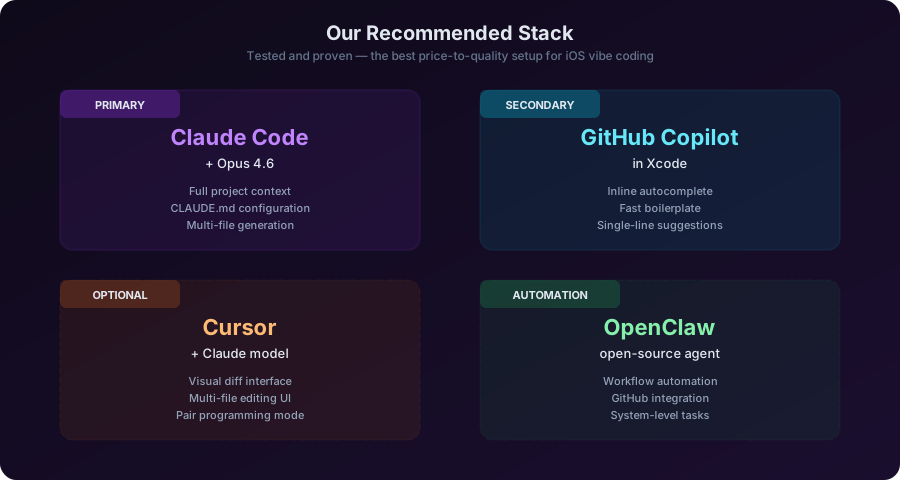
Here is the setup we will use throughout this course:
Primary: Claude Code + Claude Opus 4.6
- For all feature development, refactoring, and architecture work
- Terminal-based, full project context, CLAUDE.md configuration
Secondary: GitHub Copilot in Xcode
- For inline suggestions while editing
- Fast autocomplete for boilerplate
Occasional: Cursor + Claude
- When you want a visual diff or multi-file editing UI
- For pair programming sessions where you want to see changes in real-time
Why this combination? Claude Code gives you the deepest project understanding and the most powerful model for Swift. Copilot handles the micro-level completions. And Cursor is there when you want a GUI. Together, they cover the entire spectrum of AI-assisted development.
Proof it works: I mentioned BetAway in the previous lesson — the gambling addiction recovery app we built in 48 hours. That app was built entirely with this exact stack. Claude Code with Opus 4.6 for all feature development, CLAUDE.md enforcing MVVM and SwiftData patterns, and Copilot in Xcode for quick inline edits during review. The result was a multi-screen native app with proper architecture, accessibility support, and a polished UI. Not a hack. Not a prototype. A real app that helps real people. This stack made that timeline possible.
Honest Limitations
Let me be honest about what none of these tools do well yet:
Storyboards and XIBs. If your project uses Interface Builder files, AI tools struggle. They are binary-ish formats that AI cannot reliably modify. This is another reason to go pure SwiftUI.
Complex CoreData migrations. AI can set up CoreData stacks, but complex migration mappings still need human expertise.
Performance profiling. AI can suggest optimizations, but actually diagnosing performance issues still requires Instruments and human analysis. We will cover how AI can help in Module 7.
App Store submission edge cases. Review guidelines, entitlement configurations, provisioning profiles — the non-code parts of iOS development are still mostly manual.
These limitations are real, and pretending they do not exist would be dishonest. But they are shrinking every month. And the tasks where AI excels — writing views, building data models, implementing business logic, writing tests — make up the vast majority of development time.
Closing
One more thing before we move on. I mentioned OpenClaw earlier — the open-source AI agent built by Peter Steinberger. We believe it is significant enough that we are planning a dedicated, in-depth course on OpenClaw — covering everything from initial setup and configuration, to building custom skills, to integrating it into a full iOS development workflow with automation, GitHub integration, and smart home control. If you are interested, keep an eye on our Learn page. That course is coming soon.
Now — in the next lesson, we are going to install Claude Code, configure it for an Xcode project, and write your first AI-assisted SwiftUI view. Hands on keyboard. Let us go.
Key Takeaways
- Two categories: AI models (the brains) and AI tools (the interface) — evaluate both separately
- Claude Opus 4.6 is the strongest model for Swift/SwiftUI — idiomatic code, architecture awareness, modern API knowledge
- Claude Code is our primary tool — full project context, CLAUDE.md configuration, file creation/modification
- Copilot is great as a complement for inline suggestions inside Xcode
- OpenClaw is the open-source automation wildcard — developer workflows, productivity, web automation, smart home. Built by PSPDFKit creator Peter Steinberger. A dedicated OpenClaw course is coming soon.
- No tool is perfect — storyboards, complex migrations, profiling, and App Store submission still need human expertise
- The recommended stack: Claude Code (primary) + Copilot (inline) + Cursor (optional visual) + OpenClaw (automation)
Homework
Tool exploration (15 minutes):
- Visit Claude Code documentation and read the overview
- If you already use an AI coding tool, write down three things it does well and three things it does poorly for Swift development
- Install Claude Code if you have not already — we will need it for Lesson 1.3
Mario
Founder & CEOFounder of NativeFirst. Building native Apple apps with SwiftUI and a passion for great user experiences.
Comments
Leave a comment