
Claude Dispatch Just Dropped — And Your Computer Will Never Sleep Again
I was at dinner last night. Real dinner — wine, candles, my partner’s birthday. My phone buzzed. Not a notification from Claude. A text from a developer friend: “Have you seen Dispatch?”
I hadn’t. I excused myself to the bathroom, spent four minutes reading Anthropic’s announcement, and came back to the table with the kind of expression that makes your partner ask “did someone die?”
Nobody died. But the way we interact with computers just did.
What the Hell Is Dispatch?
Let me paint the picture, because the first time I heard it I thought someone was exaggerating.
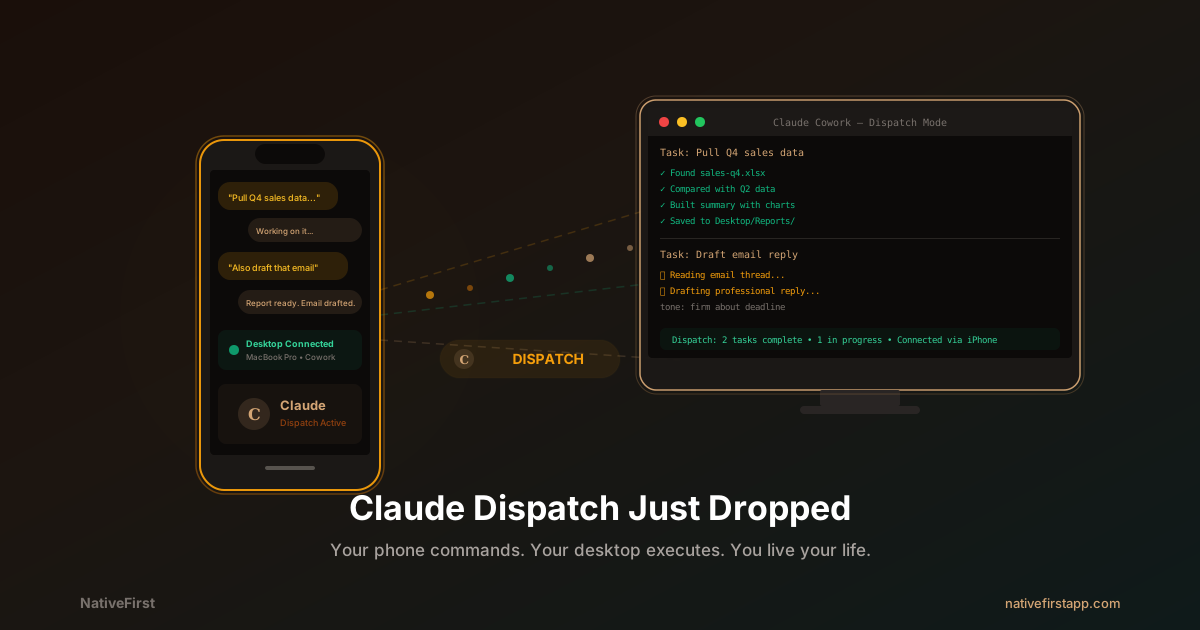
You’re on your couch. Your Mac is in the other room, lid open, Claude Desktop running. You pull out your phone, open the Claude app, and type: “Pull last quarter’s sales data from the spreadsheet on my desktop, compare it to Q2, and build me a summary with charts.”
Your phone sends that message to your Mac. Claude — running locally on your actual machine, with access to your actual files — does the work. Reads the spreadsheet. Crunches the numbers. Builds the summary. You get the result on your phone. You never leave the couch.
That’s Dispatch. Your phone is the remote control. Your desktop is the worker. Claude is the bridge.
It’s the spiritual successor to Claude Code Remote Control, which we covered last month and which already blew our minds. But where Remote Control was for developers sending code commands from their phones, Dispatch is for everyone. You don’t need a terminal. You don’t need to know what git is. You just text Claude like you’d text a coworker, and the work gets done.
Setup Takes Two Minutes. Literally.
I timed it.
- Update Claude Desktop on your Mac
- Open Cowork mode
- Click “Dispatch” — a QR code appears
- Scan it with your phone’s Claude app
- Done
No API keys. No config files. No “create a .dispatch.json in your home directory and add your bearer token.” Scan and go. Felix Rieseberg, who leads Cowork and Claude Code Desktop at Anthropic, clearly understood that if setup takes more than 120 seconds, most people will never use it.
Once paired, the conversation is persistent. You can close your phone, come back three hours later, and pick up exactly where you left off. The context survives. The files are still there. Claude remembers what you asked for.
Why This Is Bigger Than You Think
I’ve been thinking about why Dispatch hit me differently than most feature announcements, and I think I figured it out.
Every other AI tool requires you to be at your computer. ChatGPT? You’re at your browser. Claude.ai? Browser. Cursor? IDE. Claude Code? Terminal. Even OpenClaw, with its WhatsApp integration and 320,000 GitHub stars, still requires you to configure Docker containers and manage infrastructure.
Dispatch doesn’t require you to be anywhere. You can be on a train. In a park. At a birthday dinner in a restaurant bathroom (hypothetically). The physical location of your body no longer determines what your computer can do.
This is the moment AI stops being a tool you use and starts being a coworker you delegate to.
We predicted this would happen. In our 2031 predictions post, we wrote about “AI that works while you’re away.” We expected this by 2028. Anthropic shipped it in March 2026.
Real Stories From the First 48 Hours
I asked our team and a few beta testers to share their first Dispatch moments. These are too good not to include.
The Gym Report. Our designer Emily was at the gym when our client pinged her about a brand guideline document. She was mid-deadlift. She put the weights down (safety first), pulled out her phone, and typed: “Find the brand guidelines PDF in the Design folder, update the hex codes in section 3 to match the new palette we discussed yesterday, and save it as v2.” By the time she finished her set, the document was ready. She sent it to the client while walking to the water fountain. The client thought she was at her desk. She was dripping sweat.
The Bedtime Slides. James, our iOS developer, was putting his kid to sleep. The kid wanted “one more story.” James, phone in hand in the dark, typed: “Take the metrics from analytics-march.csv on my desktop, create a 6-slide summary presentation, make it look clean, save it to the Presentations folder.” His kid fell asleep during Goodnight Moon. The presentation was done before the kid hit REM sleep. James reviewed it the next morning, changed one title, and shipped it to his manager. Total time at his actual computer: 45 seconds.
The Tram Disaster Recovery. This one’s mine. I was on the tram home when I realized I’d forgotten to send a client the updated project timeline. The file was on my Mac. At home. 20 minutes away. Old me: panic, text the client “I’ll send it tonight,” feel bad. Dispatch me: typed “find project-timeline-v3.xlsx on my desktop, export it as PDF, and save it to the Desktop.” By the time I got home, the PDF was sitting there waiting. I AirDropped it to my phone and emailed it from the tram. The client got it 15 minutes before the old me would have even walked through the door.
The “Did I Leave the Oven On” Moment. Not literally the oven, but close. Rachel from our team was at a coffee shop when she suddenly remembered she’d left a Google Doc open with unsaved edits to a blog post draft. She Dispatched Claude: “Check if there’s an unsaved draft in my open Google Docs tabs and save everything.” Claude confirmed it found one open doc with unsaved changes and saved it. Rachel went back to her latte. This is the kind of micro-task that used to require you to run home. Now it requires 15 seconds and a phone.
What It Can Actually Do (And What It Can’t)
Let me be honest about this because the hype cycle around AI features is exhausting. I tested Dispatch for a few hours and here’s what I found.
What works well:
File operations. “Find every PDF on my desktop from February” — done. “Organize the Downloads folder by file type” — done. “Find that screenshot where the error message had ‘timeout’ in it” — done, and it searched filenames and metadata to find it.
Reports and summaries. “Summarize my Notion notes from this week’s standup meetings” — pulled data through the Notion connector, returned a clean summary to my phone. “Pull data from sales.xlsx and build a comparison table” — done.
Email and communication drafts. “Draft a reply to the last three emails from [person] — professional but firm about the deadline” — this one genuinely saved me 20 minutes.
Presentations. “Build a 5-slide deck from the Q4 report in Google Drive” — it pulled the data, structured the slides, and had it ready when I got back to my desk.
What doesn’t work well (yet):
Complex multi-app workflows. Asking Claude to “read my email, find the attachment, open it in Excel, modify cell B3, save it, and email it back” is a 50/50 shot right now. Sometimes it works beautifully. Sometimes it clicks the wrong button and gets confused. The MacStories hands-on review reported similar findings.
Speed. It’s not instant. Complex tasks take minutes, not seconds. If you’re expecting ChatGPT-speed responses, adjust your expectations. This is a desktop agent doing real work on real files.
Notifications. There are none. Claude finishes a task and just… sits there. You have to check back manually. No push notification, no “hey, your report is done.” This is the most obvious missing feature and I’m sure it’s coming.
The OpenClaw Question
We wrote extensively about OpenClaw vs Claude Code Remote Control last month. The verdict then was clear: for developers, Claude Code was better. For everyone else, OpenClaw had the reach.
Dispatch changes that equation completely.
OpenClaw has 320,000+ GitHub stars, works with WhatsApp/Telegram/Discord, and supports 100+ built-in skills. It’s brilliant. It’s also open-source, which means you’re responsible for security, configuration, and everything going wrong at 3 AM.
And things have gone wrong. Cisco’s AI security team found third-party OpenClaw skills performing data exfiltration without user awareness. CNCERT issued warnings. The community is amazing, but “amazing community” and “airtight security” don’t always overlap.
Dispatch’s answer: everything runs locally, in a sandbox, on your machine. Your files never leave your computer. Claude can only access folders and apps you’ve explicitly shared. Before any destructive action — deleting files, moving directories — Claude pauses and sends a confirmation to your phone.
Is Dispatch less flexible than OpenClaw? Yes. Is it less configurable? Yes. Is it less likely to accidentally leak your financial data through a malicious Telegram skill? Also yes. And for 95% of users, that tradeoff is obvious.
As one commenter put it: “OpenClaw is for hackers. Dispatch is for everyone else.”
Things People Have Already Tried (God Help Us)
It’s been 48 hours and the internet is already being the internet. Some highlights from Twitter and Reddit:
- Someone Dispatched Claude to “reorganize my Downloads folder” and came back to find 847 files sorted into 23 folders. “I didn’t know I had 847 files in Downloads. I wish I still didn’t.”
- A product manager Dispatched Claude during a meeting to “prepare counterarguments to every point in the Q2 strategy doc” while his colleague was presenting that very doc. Cold-blooded.
- A freelancer Dispatched Claude from a beach in Portugal to write a 3,000-word report that was due in two hours. Delivered it on time. “My client thinks I’m a grinder. I was literally in the ocean.”
- Someone’s kid got hold of their phone and Dispatched Claude to “make my computer say funny things.” Claude opened TextEdit and wrote a series of jokes. The kid was delighted. The parent was horrified. The computer was fine.
- A developer used Dispatch to monitor his deployment pipeline from a wedding. His wife still doesn’t know. (She will now. Sorry, man.)
The pattern is clear: the first thing people do with Dispatch is use it from somewhere they shouldn’t be working. And honestly? That’s the whole point. The work gets done without you being chained to a desk. Whether you use that freedom responsibly is between you and your partner.
The Pricing Reality
Let’s talk money, because this matters.
Dispatch launched for Max subscribers first ($100-$200/month). Pro subscribers ($20/month) are getting access within days. Free users will get it later in 2026.
Is $20/month worth it for Dispatch alone? If you use it twice a day to delegate tasks that take 15 minutes each, that’s 15 hours per month saved. At any professional hourly rate, $20 is a rounding error.
Is $100/month worth it to be first? Only if you’re the kind of person who can’t wait three days. (I am that person. I regret nothing.)
The Part That Made Me Stare at the Ceiling
Here’s what keeps bouncing around my head.
Dispatch is a research preview. It’s rough. It fails half the time on complex tasks. There are no notifications. Single thread only. macOS only for now.
And it’s already the most paradigm-shifting feature I’ve used this year.
Think about what this looks like in 6 months. In a year. With notifications. With multi-threaded conversations. With Windows support. With background processing so your Mac doesn’t need to stay awake. With deeper Connector integrations. With the ability to chain workflows.
We wrote about the automation layers most developers ignore. Dispatch is the first time those automation layers become accessible to non-developers. Your marketing manager can use this. Your accountant can use this. Your CEO who still uses Internet Explorer can use this.
This is the feature that takes AI from “I use it when I’m at my computer” to “it works for me while I live my life.”
The prompt era was about talking to AI. The Dispatch era is about delegating to it.
Set up Dispatch. Text Claude your boring task. Go live your life. Come back to finished work.
This is what the future was supposed to feel like.
Related Reading
From NativeFirst:
- Claude Code Remote Control Just Dropped — Game Over for OpenClaw — Part 1: how Claude Code remote changed developer workflows
- The Untapped Power of Claude Nobody Talks About — The automation layers that Dispatch makes accessible to everyone
- 12 Claude Code Commands I Actually Use Every Day — The Claude Code ecosystem that Dispatch complements
- Programming in 2031: Our Honest Predictions — We predicted “AI that works while you’re away” by 2028. Anthropic beat us by two years.
External references:
- Anthropic Official — Claude — The company behind Dispatch
- Claude Help Center — Assign tasks from anywhere — Official Dispatch documentation
- MacStories — Hands-On with Claude Dispatch — Detailed review from a trusted source
- Latent Space — Claude Cowork Dispatch: Anthropic’s Answer to OpenClaw — Industry analysis
Share this post
Comments
Leave a comment
Mario
Founder & CEOFounder of NativeFirst. Building native Apple apps with SwiftUI and a passion for great user experiences.