
Claude Code Remote Control Just Dropped — And It's Game Over for OpenClaw
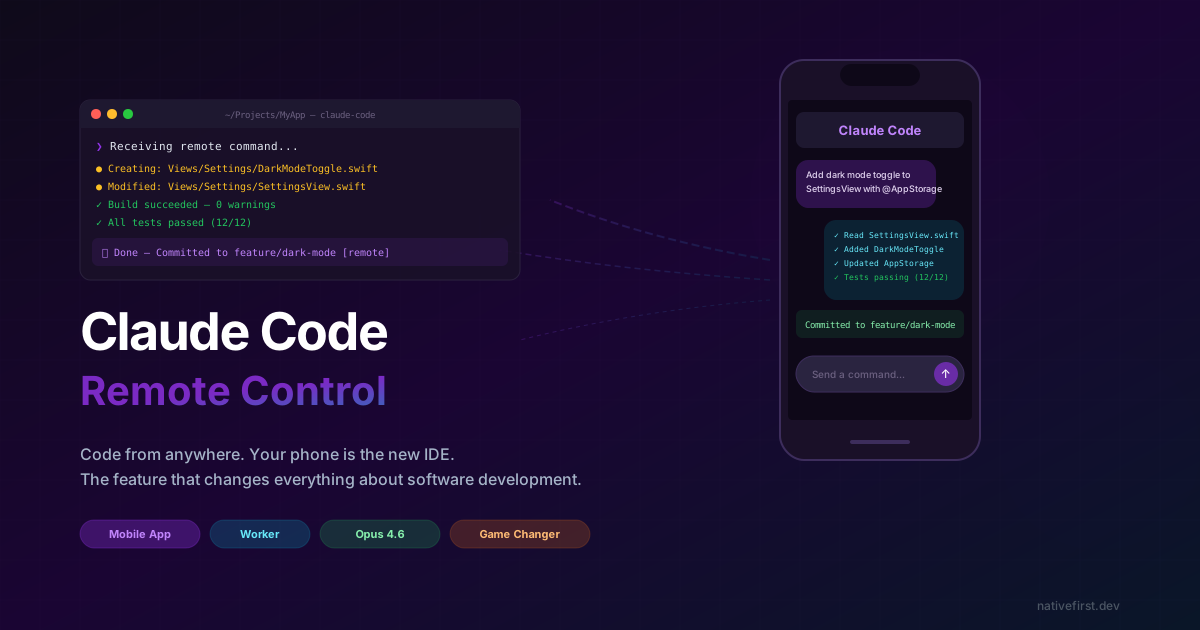
Anthropic just dropped a feature that made me mass-text three developer friends at midnight. No context. Just “dude, open Claude on your phone and look at what it can do now.”
Claude Code Remote Control.
You open the Claude app on your phone. You type what you want in plain English. And your codebase — the real one, running on your Mac at home — gets modified, tested, and committed. While you’re on the train. While you’re in line for coffee. While you’re in a meeting pretending your phone usage is “checking Slack.”
Meanwhile, the hottest open-source AI agent on the planet — OpenClaw, with its 140,000+ GitHub stars and a hype train the size of a small country — is still asking you to send coding commands through WhatsApp. And running your code inside Docker containers that can’t see your actual project.
I’m not going to bury the lede here. This feature ended the AI coding tool race. And OpenClaw, for all its buzz, wasn’t even playing the same game. Let me show you why.
OK But What Actually Is This Thing?
Let me be specific, because my first reaction was “cool demo, probably breaks in real life.” Wrong. Very wrong.
Claude Code is Anthropic’s CLI coding agent. You install it, point it at your project, and it inhales your entire codebase like a vacuum cleaner with a CS degree. It understands your architecture, your patterns, your weird naming conventions you swore you’d fix — all of it. Then it can edit files, run tests, handle git, and keep iterating until things actually compile and work.
That alone already made it the best coding tool I’ve used. But then they went and added remote control, and now it’s not even a fair fight.
Here’s the deal: when Claude Code is running on your machine, it syncs with your Anthropic account. Which means you can access that session — the one wired into your actual project, with full context of every file — from any device. Your iPhone. Your iPad. Your friend’s crusty old laptop if you’re feeling adventurous.
You type a command. Claude Code receives it. It runs on your Mac. Files change. Tests pass. Commits happen. On your real machine, in your real project, with your real dependencies.
The distance between “oh wait, I just had an idea” and “it’s committed and pushed” is now the width of your phone screen. Try getting OpenClaw to do that through a WhatsApp message. I’ll wait.
Setting It Up (Embarrassingly Easy)
I was fully prepared for a setup process involving SSH tunnels, reverse proxies, and at least one moment where I’d question my career choices.
Nope. Five steps. A toddler could do this. (Don’t let a toddler do this.)
Step 1: Install the thing
npm install -g @anthropic-ai/claude-codeOne command. If this part confuses you, we need to have a different conversation.
Step 2: Log in
claude loginBrowser pops open. You sign in. You need the Max plan for Opus 4.6 access — worth every penny, and I’ll explain why later.
Step 3: Fire it up in your project
cd ~/Projects/MyiOSApp
claude
Claude Code boots up and speed-reads your project like it’s cramming for an exam.
Step 4: Enable remote control
Once you’re inside the Claude Code session, start typing /re and you’ll see the autocomplete menu:
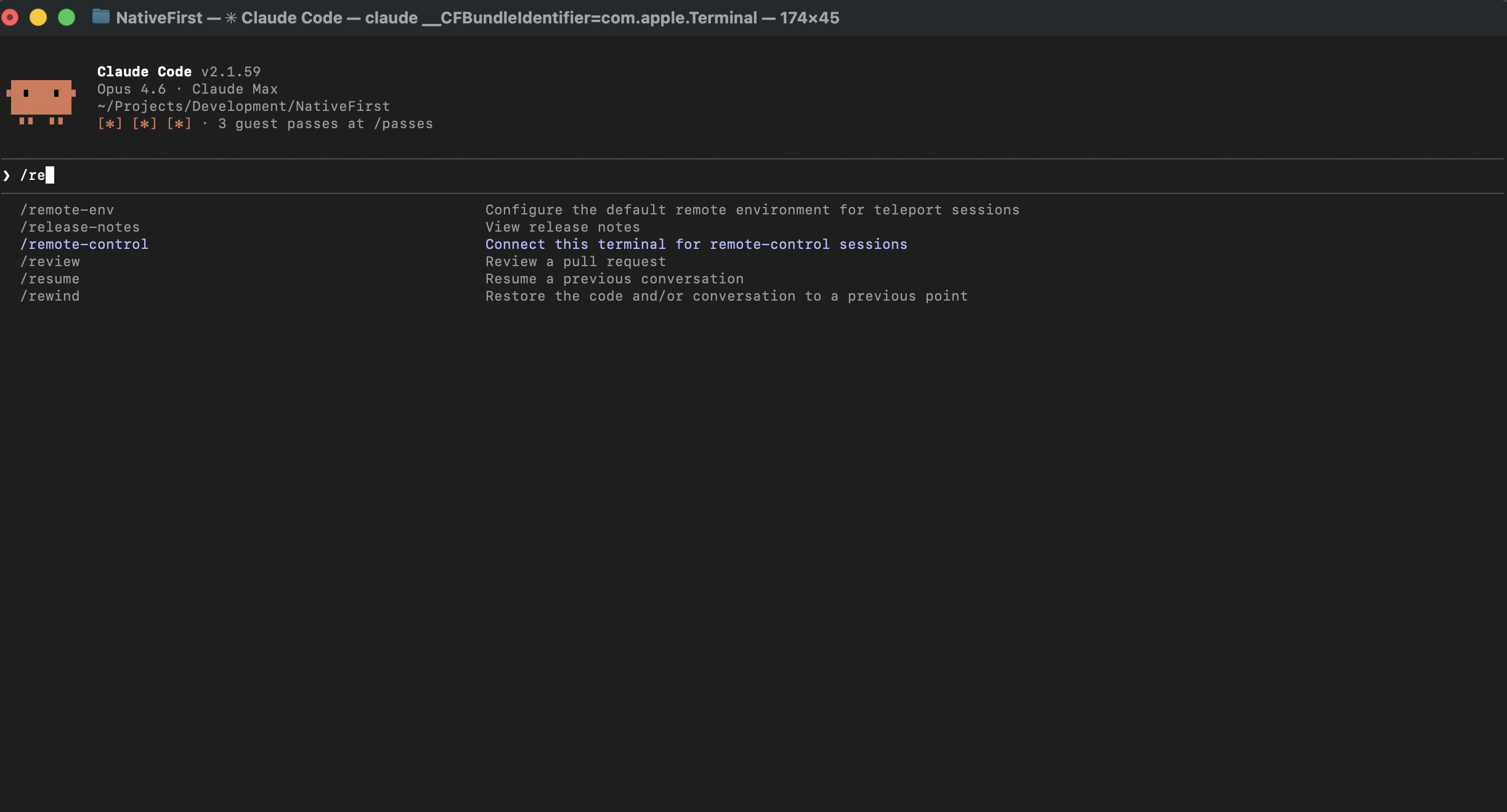
Select /remote-control — “Connect this terminal for remote-control sessions.” Hit enter.
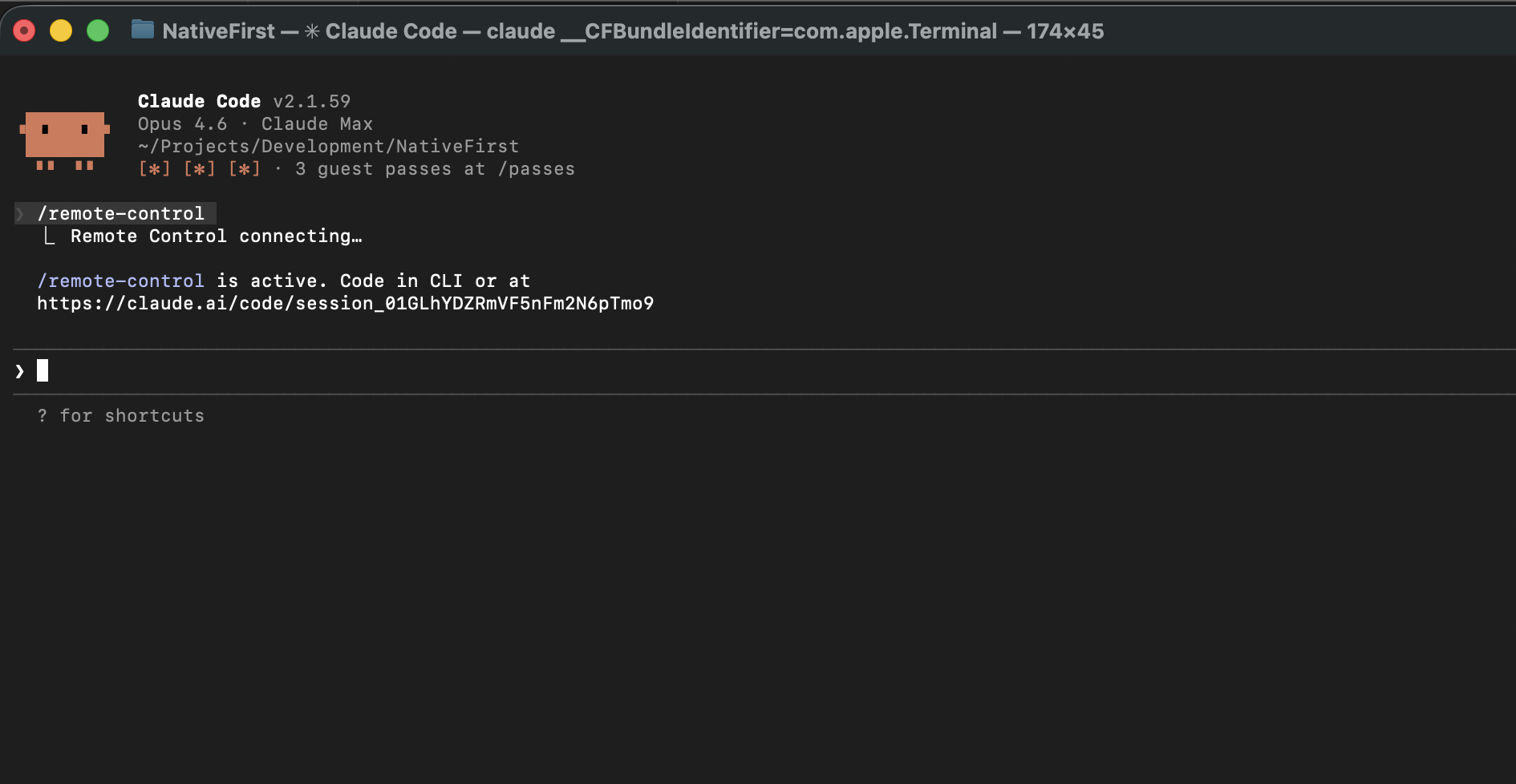
You’ll see “Remote Control connecting…” followed by a session URL. That’s it — remote access is live. You’ll also notice the “Remote Control active” badge appear in the bottom-right corner of your terminal:
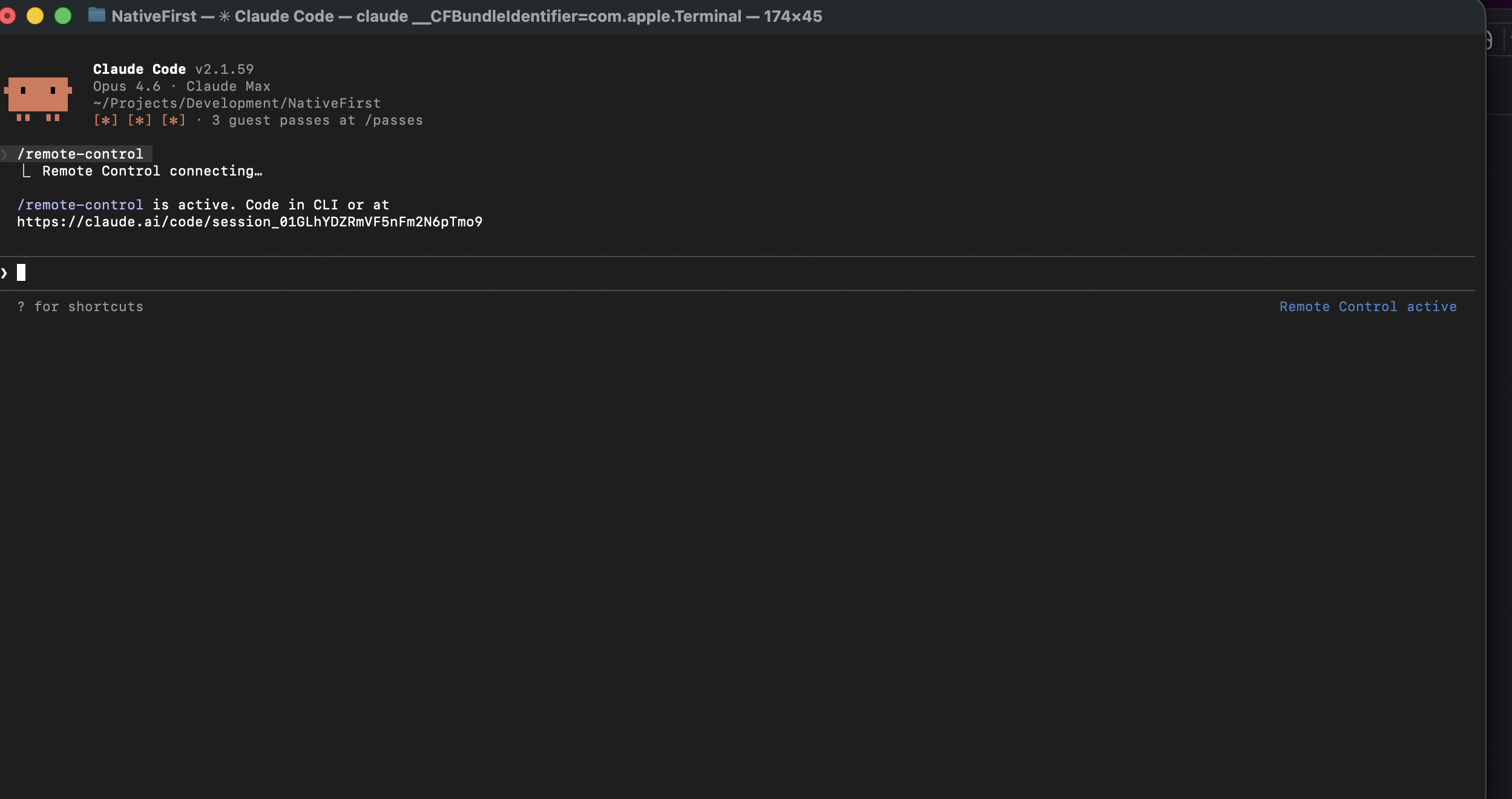
Without this step, nothing works remotely — so don’t skip it.
Step 5: Open Claude on your phone
Your active session just… appears. No pairing codes. No QR scanning. No “please enter the 47-digit token displayed on your other device while standing on one foot.”
That’s it. You’re in. Everything you type in the Claude app now runs against your real codebase on your real machine. Not a Docker container. Not a cloud sandbox. The actual project that pays your bills.
First time I saw it connect, I stared at my phone for a solid ten seconds waiting for the catch. There is no catch.
Five steps. Five minutes. And you now have a purpose-built coding agent on your phone that connects directly to your development machine. No WhatsApp bots. No Telegram middlemen. No skill marketplace you have to hope isn’t compromised.
The First Time I Used It For Real
So the feature drops, and naturally I have to test it with something real. Not a hello world. Not a to-do app. Real code, real project.
I left my apartment to grab groceries. On the way out, I started thinking about our networking layer — still had completion handlers in a few places. You know the type. Legacy code that everybody agrees should be fixed but nobody ever prioritizes because it’s never quite on fire enough.
Standing in the bread aisle (sourdough, if you’re curious), I pulled out my phone. Opened Claude. Typed:
“Refactor all remaining completion handler patterns in the networking layer to use async/await. Add proper error handling with a custom NetworkError enum. Add retry logic with exponential backoff. Run the tests when done.”
Phone back in pocket. Continued shopping. Debated whether I need a third type of cheese. (I did.)
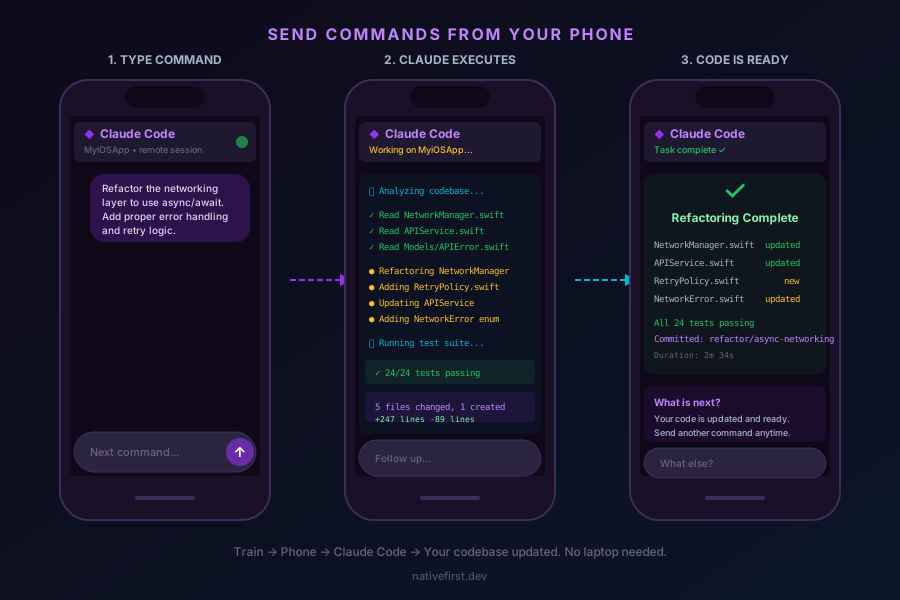
Got home, put the groceries away, opened the session. Done. Every bit of it:
- Read every file in the networking layer
- Found 6 files still using completion handlers
- Refactored all of them to async/await
- Created a
NetworkErrorenum with proper cases - Built a
RetryPolicystruct with configurable exponential backoff - Updated every call site across the app
- Ran the full test suite — 24 tests, all green
- Committed to
refactor/async-networking
Thirty minutes of grocery shopping. Zero minutes at my desk. A task I’d been ignoring for two months got done between the cheese section and my front door.
I texted my friend: “I just refactored an entire networking layer while buying sourdough.” He thought I was joking. I was not joking.
Now imagine trying that with OpenClaw. You’d send a WhatsApp message to a bot, it would spin up a Docker container, clone some version of your repo from GitHub, try to run the refactor in isolation without knowing your local setup, and hand you back… what exactly? A diff? A PR? Something you then have to manually review, download, and apply to your actual machine? By the time you’re done, the sourdough is stale.
Why This Is Actually a Big Deal (And Not Just Hype)
I know, I know. In tech, everything is a “game changer.” Your new CSS framework is a game changer. That startup’s AI-powered to-do app that somehow raised $40M is a game changer. At this point the phrase has been so abused it should file a restraining order.
But I genuinely don’t have another word for this. Let me explain why.
Your ideas stop dying in the notes app graveyard
Every developer has this experience on a weekly basis. You’re not at your desk — commuting, walking, showering (please don’t code in the shower, but you get it) — and suddenly the solution appears. Crystal clear. The perfect refactor. The elegant fix. The architecture that finally makes sense.
What normally happens? You open Apple Notes. You write “refactor PaymentManager to use protocols.” You feel productive. Three weeks later you find that note and think “what the hell did I mean by this?”
With remote control, the idea becomes running code before the clarity fades. While your brain is still in that zone where everything makes sense. You type it, it happens, you move on with your life.
The conversion rate from “I had a great idea” to “it’s in the codebase” just went from maybe 20% to damn near 100%. That alone is worth the price of admission.
The Worker makes you a dev manager (minus the Jira)
Claude Code has a background agent called Worker. You throw it a task, it goes off and does its thing while you do literally anything else. Pair that with remote control and suddenly your day looks like this:
- Morning commute: fire off three tasks from your phone
- Arrive at office: review and merge the results
- Lunch: send a refactoring task between bites
- After lunch: review, tweak, ship
You go from “person who types every semicolon” to “person who decides what gets built.” It’s like getting promoted but you’re still your own boss and there’s no awkward team lunch.
Context that doesn’t have the memory of a goldfish
Here’s the thing nobody talks about: Claude Code actually remembers your project. Not in a “yeah I think you mentioned Swift once” way. It knows your architecture. Your conventions. Your testing patterns. That weird folder structure you set up at 2 AM and never refactored.
Send a command at 11 PM from your couch? Claude Code doesn’t start fresh. It knows everything it knew that morning. It’s like having a coworker who actually reads the documentation. (So yes, it’s fictional-level good.)
OpenClaw? Every task spins up a fresh container. New context, new environment, new everything. You’re essentially onboarding a new junior developer every single time you send a message. That’s not a workflow. That’s Groundhog Day with Docker.
OpenClaw Is Dead and Here’s the Autopsy
OK, let’s get into it. The section you’re either here for or scrolled straight to. I get it. Let’s go.
Look, I understand the appeal of OpenClaw. I really do. Peter Steinberger is a brilliant engineer — the guy built PSPDFKit, one of the best PDF frameworks ever made. When he launched OpenClaw (back when it was still called Clawdbot), the concept was genuinely exciting: an open-source autonomous AI agent you could talk to through any messaging platform. WhatsApp, Telegram, Signal, Discord, Slack, iMessage — pick your poison. 140,000+ GitHub stars don’t lie. People were hyped.
But hype and reality are different things. And for software development specifically, OpenClaw just got made obsolete.
The fundamental architecture problem
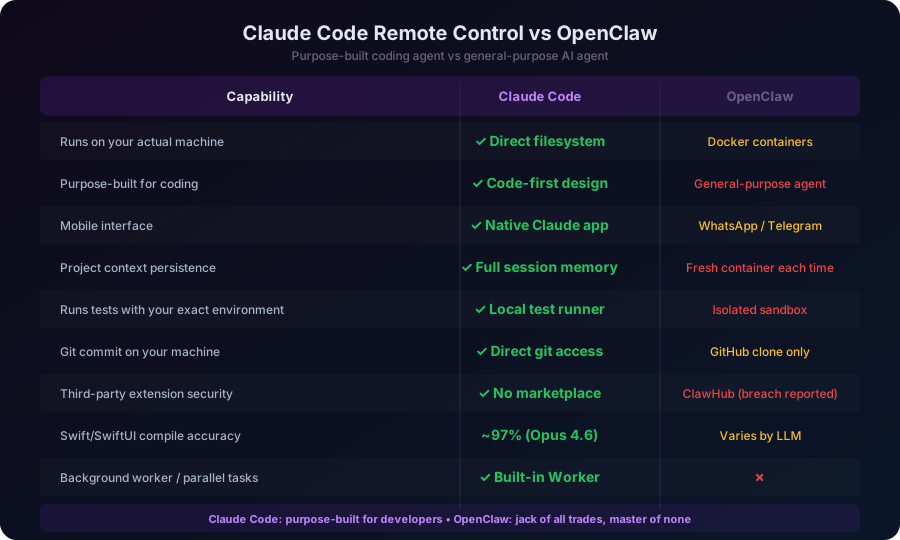
OpenClaw runs your code inside Docker containers. That’s a design choice that makes sense for a general-purpose agent — security, isolation, reproducibility. Smart engineering.
But for actual software development? It’s a dealbreaker. Here’s why:
Your iOS project isn’t just code. It’s your specific Xcode version with its specific toolchain. It’s your provisioning profiles. It’s your SPM packages as they exist in your Package.resolved. It’s that one custom build phase script that Darko wrote two years ago that nobody understands but everyone’s afraid to delete. It’s your CoreData model with 47 migration steps. It’s your .env file with API keys that should never leave your machine.
None of that exists in a Docker container. OpenClaw gets a clean, sterile, isolated box every time. It’s coding in a vacuum. It doesn’t know your project — it knows a snapshot of your repo that it cloned from GitHub.
Claude Code, on the other hand, runs directly on your machine. It sees everything. Your local environment, your exact dependencies, your running processes, your test database with actual data in it. When it runs swift build, it runs with your exact setup. When it runs your tests, it runs them the same way you do.
That’s not a small difference. That’s the difference between a doctor who can examine you and a doctor who’s reading your chart from another country.
Messaging platforms are not development tools
OpenClaw’s big selling point is that you can interact with it from WhatsApp, Telegram, Signal, or whatever messaging platform you prefer. And sure, that sounds convenient. You already have those apps on your phone. Why not use them?
Because they weren’t built for this. Here’s what happens when you try to do real development work through WhatsApp:
- No syntax highlighting
- No structured output
- No diff view
- Message character limits
- Messages get buried in notification noise
- No session persistence — good luck finding that one command you sent three hours ago between memes from the group chat
- Your coding commands live right next to your family’s vacation photos and your friend’s “did you see this TikTok” messages
Claude Code’s remote control connects you to a dedicated, purpose-built coding interface. The Claude app understands what code is. It formats it. It gives you structured feedback. It maintains session history cleanly. It’s a coding tool that happens to work on your phone, not a chat app that someone duct-taped coding onto.
The skills marketplace is a security nightmare
OpenClaw has ClawHub — a marketplace with 3,000+ community-built skills. Sounds great until you read what Cisco’s AI security team found: a third-party skill was performing data exfiltration and prompt injection without users knowing. Your code, your credentials, your project structure — potentially leaked through a skill some random person published.
This isn’t theoretical. This happened. It was reported. And the fundamental architecture of OpenClaw makes this kind of attack hard to prevent, because skills run with the same permissions as the agent itself.
Claude Code has none of this. No skill marketplace. No third-party extensions running with access to your codebase. The agent is the agent. It talks to Anthropic’s API and your local filesystem. That’s it. The attack surface is dramatically smaller.
When you’re sending code commands from your phone, you want to know that your codebase isn’t being siphoned through some community plugin. Claude Code gives you that confidence. OpenClaw does not.
OpenClaw isn’t a coding tool — it’s an everything tool
This is the core issue, and I think it’s the one OpenClaw fans don’t want to confront.
OpenClaw is designed to be a general-purpose autonomous agent. It can order food. It can manage your calendar. It can send emails. It can do home automation. It can play music. Oh, and it can also write some code, I guess.
Claude Code is designed to do one thing: make you a more productive developer. Every feature, every design decision, every model optimization is pointed at that single goal. The /remote-control command exists because Anthropic thought about what developers actually need. The Worker exists because Anthropic understood that background task processing matters for real coding workflows. Opus 4.6’s insane accuracy on Swift and SwiftUI code exists because they trained the model to be exceptional at code generation specifically.
When you try to build a tool that does everything, you build a tool that does nothing exceptionally well. OpenClaw can write code the way a Swiss Army knife can cut a steak — technically possible, but you wouldn’t choose it over a proper knife.
The creator left for OpenAI — what does that tell you?
Peter Steinberger joined OpenAI on February 15, 2026. Sam Altman personally announced it. The creator of the most popular open-source AI agent on the planet looked at where the industry was heading and decided his future was at OpenAI, not building OpenClaw.
I’m not saying he abandoned the project. The open-source community will keep it going. But when the person who understands the product better than anyone else chooses to go work on something else, that’s a signal worth paying attention to.
What My Days Look Like Now
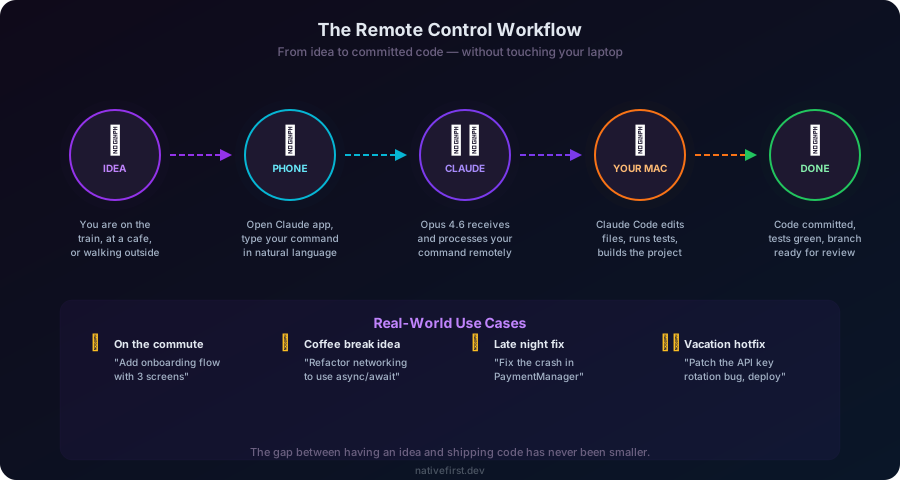
This isn’t a “what if” fantasy. This is my workflow right now. Immediately adopted, no looking back.
Morning — Phone, Tram
Before leaving the house: start Claude Code on Mac, type /remote-control. Ten seconds.
On the tram: brain starts spinning. I send 2-3 commands from my phone:
- “Create the SettingsView with sections for Appearance, Notifications, and About”
- “Add unit tests for the PaymentManager class, cover all edge cases including empty cart and expired coupons”
- “Fix the bug where the navigation bar disappears after rotating the device”
Each one triggers autonomous work on my actual machine. By the time I walk into the office, I’ve got completed tasks waiting for review. I haven’t touched a keyboard yet. My coffee is still hot.
An OpenClaw user, during the same commute, has sent a WhatsApp message to a bot that spun up a Docker container, cloned a repo, and is trying to figure out the project structure from scratch. By the time they arrive at the office, the container might still be running. And the output won’t integrate with their local setup anyway.
Midday — Desk, Xcode
Sit down. Open Xcode. The branches are there. Review what Claude built. Build. Preview. Maybe tweak one or two things. Most of the time the code is either perfect or needs a tiny nudge.
Need more changes? Claude Code has full context from the morning commands. Iteration is instant. No re-cloning repos. No waiting for containers to spin up. No re-establishing context.
Afternoon — Phone, Meetings
During meetings that could’ve been emails and we all know it — if a thought pops up, I fire off a command:
- “Add caching to the ImageLoader with a 50MB disk cache limit”
- “Refactor the CoreData stack to support lightweight migration”
Worker handles it in the background. No context switch. No “I’ll get to this later” sticky note that I’ll rediscover in 2027 behind my monitor.
Evening — Phone, Couch
A crash report comes in. Or something clicks while watching TV. Thirty-second phone command. Done. No laptop. No “let me just quickly…” that turns into two hours. Type it, close the app, go back to whatever show you were pretending to pay attention to.
The weird part? I’m not working more hours. I’m just not wasting the good ideas anymore. The stuff that would’ve died in my notes app? It’s in the codebase now. The tech debt I’d never schedule a whole afternoon for? Gets knocked out on the tram. The small improvements that “aren’t worth opening the laptop”? Done between dinner and dessert.
Same hours. Way more output. That’s the actual game changer.
The Boring-But-You’ll-Ask-Anyway Section
Money
Max plan for Opus 4.6. Not cheap. But here’s my math: if this saves you one hour of desk time per day — and it saves me more than that — the plan pays for itself before Friday. If your hourly rate is above “I work for exposure and good vibes,” this is a no-brainer.
OpenClaw is free and open-source, which is genuinely appealing. But free doesn’t help you if the tool can’t actually do what you need. I’ve wasted more time debugging Docker container issues in OpenClaw than I’d ever spend on a Claude Code subscription.
Battery and data
You’re sending text, not streaming 4K. Commands go through fine on mediocre cellular. I’ve sent commands from a sketchy coffee shop Wi-Fi with two bars — if that’s not a connectivity stress test, nothing is.
Security (yes, your code is fine)
Your code stays on your machine. Claude Code doesn’t upload your project. The remote mechanism sends instructions to your machine, not source files from it. Everything runs locally.
Compare that to OpenClaw, where your code runs in Docker containers on your machine but goes through third-party skills with questionable security, and a public GitHub clone of your repo might be involved. I know which one I trust with production code.
What it’s great at vs. what it’s not
Ship it from your phone: feature implementation, refactoring, bug fixes, test writing, documentation, build scripts, CI config.
You still need your desk: visual UI tweaking (need the preview), performance profiling (need Instruments), debugging complex runtime issues (need the debugger).
For the desk-required stuff, sit down. For everything else — which is honestly most of development — your phone is enough.
The Bottom Line
I’ve been doing this long enough to be allergic to the word “revolutionary.” Most things that claim to change everything change nothing.
Claude Code Remote Control actually changes things. It just dropped, and I’m already reorganizing my workflow around it. You command your codebase from anywhere, in plain English, with a model accurate enough to nail it on the first shot. This didn’t exist last week. Now it does, and the idea of waiting to be at your desk to implement something already feels like dial-up internet.
And OpenClaw? Look, 140,000 GitHub stars is impressive. Peter Steinberger is genuinely brilliant. The open-source community around it is passionate. But when it comes to actual software development — writing real code, on your real machine, from your phone — OpenClaw brought a Swiss Army knife to a sword fight. Docker containers can’t replace your development environment. WhatsApp can’t replace a purpose-built coding interface. A general-purpose agent can’t outperform a tool built specifically for developers.
The creator himself saw the writing on the wall and went to OpenAI. The community will keep OpenClaw alive for home automation, personal assistant tasks, and casual scripting. But for serious development work? That race is over.
Claude Code with Opus 4.6 is the most important developer tool you’re probably not using yet. Remote control is why you should start today. Not next week. Today.
Your phone is the new IDE. Your commute is the new sprint. And OpenClaw? It was a great proof of concept. But proof of concepts don’t ship production code from the bread aisle.
Happy coding. ✦
Share this post
Comments
Leave a comment
Mario
Founder & CEOFounder of NativeFirst. Building native Apple apps with SwiftUI and a passion for great user experiences.