
I Built the Same App Twice: Once With Vibes, Once With Code. Here's What Happened.
I’ve been arguing for months that knowing code gives you an unfair advantage over pure vibe coders. That programmers who use AI build better stuff than people who let AI build for them. I’ve thrown around studies, quoted Reddit comments, linked to security horror stories.
But I never actually tested it myself. Side by side. Same app, same AI, same developer. So last weekend, I settled it the only way I know how: I built the same damn app twice.
The Rules
The app: An expense tracker with user authentication, categories, monthly budgets, spending charts, CSV export, and a shared household mode where multiple users see the same data.
Why this app? Because it’s complex enough to surface real problems — auth, multi-user data access, financial data handling — but simple enough that I could build it twice in one weekend without my girlfriend questioning my life choices. (She questioned them anyway.)
Round 1: Pure vibes. I opened Cursor, connected Claude Sonnet 4.6, and went full Karpathy. Accept all. Don’t read the diffs. Just describe what I want and let it rip. If something breaks, paste the error and move on. Zero code review. Zero tests. Just vibes.
Round 2: Code + AI. Same Cursor, same Claude, but now I’m using my full Claude Code setup — CLAUDE.md with conventions, custom slash commands, PreToolUse hooks blocking dangerous writes, TDD workflow, and I actually read every line before accepting. I wrote some code myself where it mattered.
The judge: After each build, I ran the same security scan (npm audit, Snyk, plus a manual OWASP Top 10 checklist), counted the bugs, measured the time, and asked a fresh Claude session to do a cold code review.
Let’s go.
Round 1: The Vibes Build
Hour 1: I Felt Invincible
I won’t lie — the first hour was magic.
“Build me an expense tracker with Next.js, Tailwind, and Supabase. User auth with email/password. Dashboard with monthly spending charts. Categories for expenses. Let users set budget limits.”
Claude generated the entire project structure, auth flow, database schema, API routes, and a gorgeous dashboard with animated charts. I hit Accept All approximately 47 times. I read exactly zero lines of code.
By minute 40, I had a running app with login, signup, expense creation, and a chart that actually showed real data. I took a screenshot. I felt like a god. This is what every vibe coding influencer on X talks about, and honestly? They’re not wrong. That first hour is incredible.
Hour 2: The Cracks Start Showing
I asked for the shared household feature — multiple users seeing the same expenses. Claude generated it in about 3 minutes. It looked perfect.
Then I asked for CSV export. Done. Budget alerts when you hit 80% of your monthly limit. Done. Dark mode. Done.
Everything worked. Everything looked great. I was ahead of schedule. I started mentally drafting a tweet about how vibe coding isn’t that bad actually—
And then I tried to log in from a different browser as a second user. And I saw the first user’s data. All of it. Including their email address and hashed password displayed in a debug component that Claude had left in the UI.
I pasted the error — well, it wasn’t really an error, more of a “this shouldn’t be happening” — and asked Claude to fix it. It fixed it. And broke the chart. I asked it to fix the chart. It fixed the chart and broke the CSV export.
This is the loop. I’ve written about it before. I was living it now.
Hour 3: “It’s Fine, Ship It”
By hour 3, I had a working app. Most features functioned. The UI was beautiful. If you squinted, it looked production-ready.
But I forced myself to stop. Because the point of this experiment isn’t “can I make something that looks finished.” It’s “can I make something that IS finished.”
Total time: 3 hours 12 minutes.
I closed the editor and ran the security audit.
The Vibes Audit: Oh No
Here’s what I found. I wish I were exaggerating.
Critical issues (9):
- JWT tokens set to expire in 365 days. Basically never. Anyone who steals a token has year-long access.
- No refresh token rotation — tokens are reused forever.
- Supabase Row Level Security (RLS) was disabled on 2 of 4 tables. Anyone with the anon key could query raw data. Sound familiar? This is exactly what happened to Lovable.
- User input passed directly into SQL queries on the expense creation endpoint. Classic SQL injection. I tested it. It worked.
- No CSRF protection on any form.
- API rate limiting: nonexistent. I could hit the login endpoint 10,000 times per second.
- Environment variables (including the Supabase service role key) were accessible in the client bundle.
- The CSV export endpoint had no auth check — anyone with the URL could download any user’s data.
- Debug console.log statements in production code leaking user objects with email and password hashes.
Warnings (14): Missing security headers (HSTS, CSP, X-Frame-Options), no input length limits, unescaped HTML rendering (XSS vector), hardcoded CORS wildcard (*), no password strength requirements, missing 2FA option, no audit logging, sessions not invalidated on password change… I’ll stop. You get it.
Tests: Zero. Claude never wrote any, and I never asked.
Code review (fresh Claude session): “This application has fundamental security flaws that would expose user financial data within hours of deployment. I strongly recommend not deploying this in its current state.”
My own app just got roasted by my own AI.
Round 2: The Code + AI Build
Setup: 30 Minutes of Infrastructure
Before writing a single feature, I spent 30 minutes on things that vibe coders skip:
- Set up
CLAUDE.mdwith project conventions: “Use parameterized queries only. Never disable RLS. JWT tokens expire in 15 minutes with refresh token rotation. All endpoints require auth middleware unless explicitly public.” - Configured my PreToolUse hook to block any write to
.envfiles and flag modifications tosupabase/migrations/. - Created a
/project:security-checkslash command that runsnpm audit, Snyk scan, and checks for common OWASP issues. - Wrote the database schema myself — 4 tables, proper RLS policies, foreign key constraints. This took 15 minutes and is the single most valuable thing I did.
Was this slower than Round 1? Obviously. But it’s the difference between putting on a seatbelt and just flooring it.
Hours 1-3: TDD + AI = The Sweet Spot
For each feature, I followed the TDD loop:
Write failing tests for [feature]. Commit the tests.
Then implement the feature until all tests pass.
Auth: I wrote the test spec myself — “login returns a JWT with 15-min expiry, refresh endpoint rotates tokens, login is rate-limited to 5 attempts per minute per IP, passwords must be minimum 8 characters with at least one number.” Claude wrote the implementation. First attempt had the rate limiter in the wrong middleware layer. I caught it because I read the code. Fixed in 2 minutes.
Expenses CRUD: Claude wrote both the tests and the implementation. I reviewed the tests first (are they testing the right things?) then the implementation (does it use parameterized queries?). One test was missing — edge case where expense amount is negative. I added it myself. Two lines.
Shared households: This is where knowing code paid off the most. Claude’s first implementation gave all household members access to each other’s individual data outside the household context. A vibe coder wouldn’t have caught this — it works, it just works too much. I rewrote the RLS policy by hand (6 lines of SQL) and had Claude regenerate the API layer.
Charts and CSV: Let Claude handle these entirely. They’re display features with no security implications. I skimmed the code, ran the tests, moved on.
Hours 4-5: Integration and Edge Cases
This is the phase that doesn’t exist in vibe coding — and it’s where most bugs live.
I ran my /project:security-check command. It flagged 3 things: a missing CSP header, a CORS config that was too permissive, and a console.log I’d left in a debug session. Fixed all three in 10 minutes.
Then I opened a fresh Claude session (the Writer/Reviewer pattern) and asked it to review the entire codebase cold. It found one issue: the password reset endpoint didn’t invalidate existing sessions. Good catch. Fixed.
Hour 6: Polish and Deploy Prep
CI/CD pipeline, production env config, final test run, README with setup instructions. The boring stuff that keeps apps alive after launch day.
Total time: 6 hours 45 minutes.
The Code + AI Audit: Breathe Easy
Critical issues: 0.
Warnings: 2. Both info-level — a dependency with a known low-severity issue (no fix available yet) and a suggestion to add Subresource Integrity to CDN links.
Tests: 34 passing. 91% code coverage. Auth flows, expense CRUD, household permissions, edge cases, CSV export validation.
Code review (fresh Claude session): “This is a well-structured application with appropriate security measures. Auth implementation follows current best practices. RLS policies are correctly configured. Rate limiting is in place. I have minor suggestions for improvement but no security concerns.”
Same AI. Different output. Because I told it what to build properly and checked its work.
The Scorecard
Here’s the head-to-head:
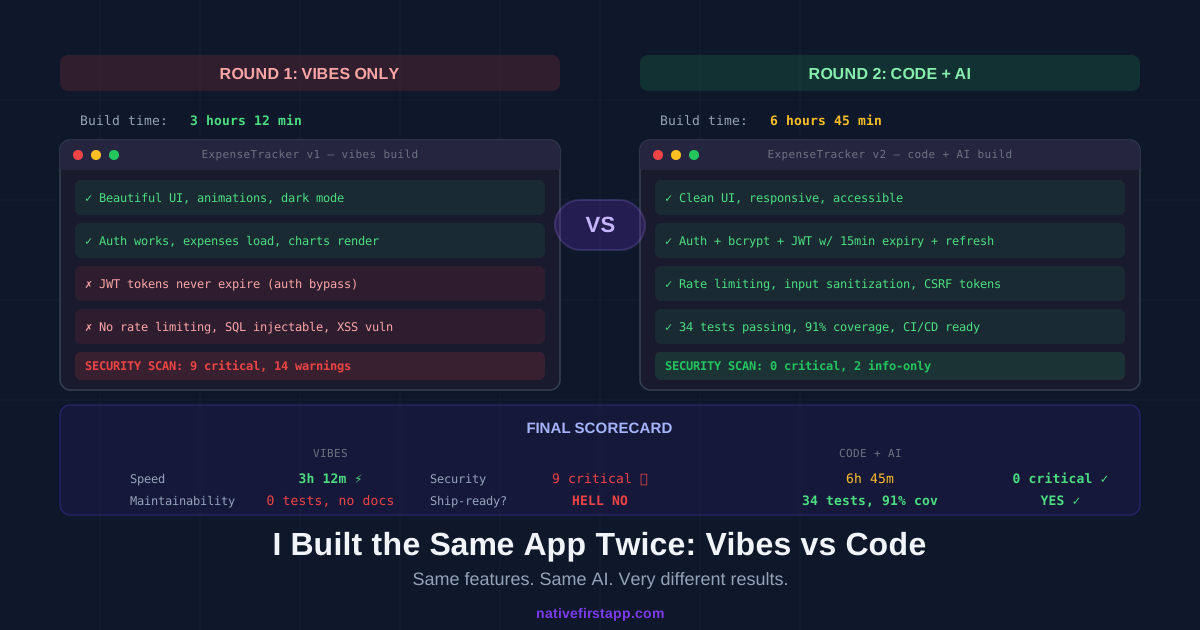
| Metric | Vibes Only | Code + AI |
|---|---|---|
| Build time | 3h 12m | 6h 45m |
| Looks production-ready | Yes | Yes |
| Actually production-ready | No | Yes |
| Critical security issues | 9 | 0 |
| Warnings | 14 | 2 (info-level) |
| Tests | 0 | 34 (91% coverage) |
| SQL injection | Vulnerable | Protected |
| Auth bypass possible | Yes (365-day JWT, no rotation) | No (15-min JWT, rotation, rate limit) |
| Data leak risk | High (RLS disabled, no auth on export) | Low |
| Time to add next feature | Unknown (fragile codebase) | ~30 min (tested, documented) |
| Would I deploy this? | Absolutely not | Yes |
| Code I personally wrote | 0 lines | ~120 lines (~8% of total) |
That last row is important. I didn’t hand-write the entire second app. I wrote about 120 lines — the database schema, a few RLS policies, two test cases, and one auth middleware fix. AI wrote the rest. The difference isn’t how much code I typed. It’s that I knew which 120 lines mattered.
What This Actually Proves
Vibe Coding’s 70% Problem Is Real
The vibes app was 70% of the way there in about an hour. Beautiful, functional, impressive. The remaining 30% — security, edge cases, data isolation, auth hardening — is invisible to someone who can’t read code. And that invisible 30% is what gets your users’ data leaked.
Columbia University’s research on AI coding agent failures described this exact pattern: agents prioritize runnable code over correct code, and they suppress errors instead of handling them properly. I saw it firsthand. Claude disabled RLS to avoid an auth error. It worked. It was also a security disaster.
Speed Means Nothing Without Quality
The vibes build was 2x faster. It was also completely unshippable. If I’d deployed it and a single user created an account with real financial data, I’d have been liable for a data breach on day one.
The “fast” build would’ve cost me weeks of emergency fixes, possible legal exposure, and definitely my reputation. The “slow” build took 3.5 hours longer and is deploy-ready.
Veracode’s 2025 GenAI report found that 45% of AI-generated code introduces OWASP Top 10 vulnerabilities. My experiment landed right in that range — the vibes build had critical flaws in 9 out of ~20 components. That’s 45%. Spot on.
The 120 Lines That Saved Everything
8% of the code was mine. 92% was Claude’s. But that 8% included:
- The database schema with proper constraints
- RLS policies that actually restrict data access
- The JWT expiry and refresh token configuration
- The two edge case tests Claude missed
- The auth middleware fix that prevented the data leak
You know what those 120 lines have in common? They’re all things you can only write if you understand what the code is doing. No prompt engineering trick gets you there. No “be very careful about security” instruction covers it. You either know what RLS policies are and how to write them, or you don’t.
This is exactly what I meant when I said the biggest advantage of knowing code isn’t writing it — it’s knowing what to tell the AI to write.
The Right Tools Matter Too
Round 2 wasn’t just “me knowing code.” It was me knowing code plus having the right Claude Code setup. The CLAUDE.md file prevented Claude from making decisions I disagreed with. The PreToolUse hook stopped it from touching the migration files. The TDD loop gave it a concrete spec instead of my vague description. The Writer/Reviewer pattern caught the session invalidation bug.
Take away any of those tools and the gap narrows. Use all of them together and it’s not even close.
The Uncomfortable Question
“But Mario, vibe coding is for prototypes. Nobody deploys a vibe-coded app to production.”
Yeah? Tell that to the 25% of YC startups with 95% AI-generated codebases. Tell that to the 170 Lovable apps that leaked user data. Tell that to the 318 vulnerable apps found in a single security scan of 100 vibe-coded projects.
People ARE deploying this stuff. That’s the problem.
And even for prototypes — the prototype is the thing you show to investors, partners, and early users. If someone finds a SQL injection in your demo, your “move fast and break things” story becomes a “we don’t know what we’re doing” story. Fast.
What I’d Tell My Past Self
If I could go back to Saturday morning and give myself one piece of advice for each round:
For the vibes build: “Just read the auth code. Just that one file. 5 minutes of reading would’ve caught 6 of the 9 critical issues.” That’s the infuriating part — the fix isn’t “rewrite everything manually.” It’s “spend 5 minutes reading the code that handles your users’ passwords.” That’s it.
For the code build: “You don’t need to write the chart component. You don’t need to write the CSS. You don’t need to write the CRUD boilerplate. Write the schema, the security policies, and the test specs. Let AI handle the other 92%.” Knowing where to invest your 8% is the skill.
The Bottom Line
I started this experiment to prove a point. I proved more than I expected.
Vibe coding produced a beautiful app that would’ve been a security disaster in production. Code + AI produced a slightly less beautiful app that’s actually safe to use. The difference was 3.5 hours of extra time and 120 lines of code I wrote myself.
Not 1,200 lines. Not a complete rewrite. 120 lines. About 8% of the total codebase. But those 120 lines were the difference between “impressive demo” and “actual product.”
The AI writes fast. But you need to be the one who writes right.
The full source code for both builds is on my GitHub. Yes, including the vibes build with all its horrifying security holes. Sometimes the best documentation is a cautionary tale.
Related Reading
From NativeFirst:
- Why Knowing Code Still Beats Vibing It — the arguments, now with an experiment to back them up
- 12 Claude Code Commands I Actually Use Every Day — the exact tools I used in Round 2
- The Untapped Power of Claude Nobody Talks About — what’s possible when you actually learn the tools
- The Rumors, The Drama, and What’s Actually Happening with Vibe Coding — the internet discourse that inspired this experiment
External sources referenced:
- Veracode: 45% of AI-Generated Code Fails Security Tests — the study that predicted my exact results
- Columbia University: 9 Critical Failure Patterns of AI Coding Agents
- DEV Community: 318 Vulnerabilities in 100 Vibe-Coded Apps
- Index.dev: Vibe Coding vs Traditional Coding Comparison — another experiment with similar conclusions
- Semafor: Lovable’s 170 Vulnerable Apps
- TechCrunch: 25% of YC Startups Have 95% AI-Generated Code
- METR Study: AI Makes Experienced Developers 19% Slower
- Observe Inc: A Practical Guide to Getting Stuff Done with Vibe Coding
Share this post
Comments
Leave a comment
Mario
Founder & CEOFounder of NativeFirst. Building native Apple apps with SwiftUI and a passion for great user experiences.