
Why We Built Invoize — And What's Coming Next
If you are a freelancer, a consultant, or running a small business, you know the feeling. You just finished a project. The work is done. Now you need to send an invoice.
So you open whatever tool you have been using — maybe a spreadsheet, maybe a web app that wants $30 a month, maybe a Word template you found online three years ago — and spend the next twenty minutes fiddling with formatting, double-checking tax calculations, and exporting a PDF that looks… fine. Not great. Fine.
This is the part of your work that makes no money, creates no value, and drains your energy. Invoicing should take seconds, not sessions.
That is why we built Invoize.
The Problem Nobody Talks About
There are hundreds of invoicing tools out there. Most of them are web apps. Most of them charge a monthly subscription. And most of them are designed for companies with accounting departments, not for a designer who needs to send three invoices a month.
Here is what we kept hearing from freelancers and small business owners:
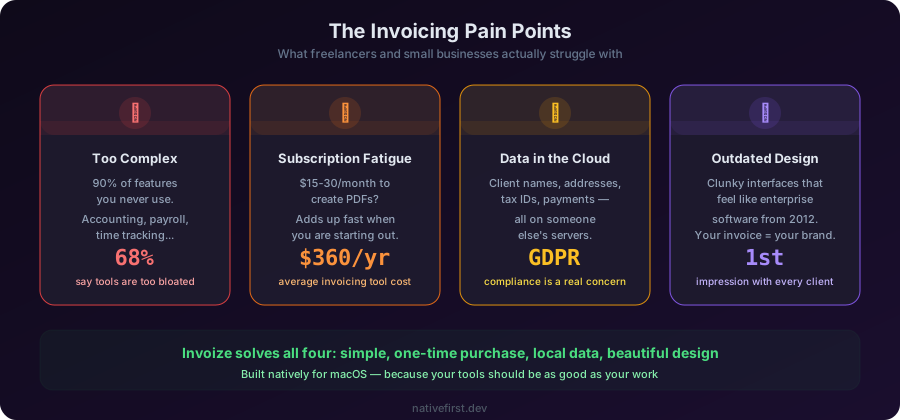
“I do not need an accounting suite. I need to create an invoice and send it.” Most tools try to be everything — accounting, expense tracking, project management, time tracking, payroll. If all you need is to generate a clean invoice and get paid, 90% of those features are noise.
“Why am I paying a subscription to create PDFs?” This one hit hard. Subscription fatigue is real. Paying $15-30 per month to generate a document that is essentially a structured piece of text with some math feels wrong. Especially when you are just starting out and every euro counts.
“I do not want my financial data in someone else’s cloud.” Your invoices contain your clients’ names, addresses, tax IDs, and payment details. Every cloud-based invoicing tool stores that data on their servers. For many freelancers, especially in Europe with GDPR, that is a real concern.
“The app looks like it was built in 2012.” A lot of invoicing tools — even popular ones — have clunky interfaces. They feel like enterprise software that got a thin coat of consumer paint. When your invoice is the last thing a client sees before they pay you, presentation matters.
What Invoize Actually Does
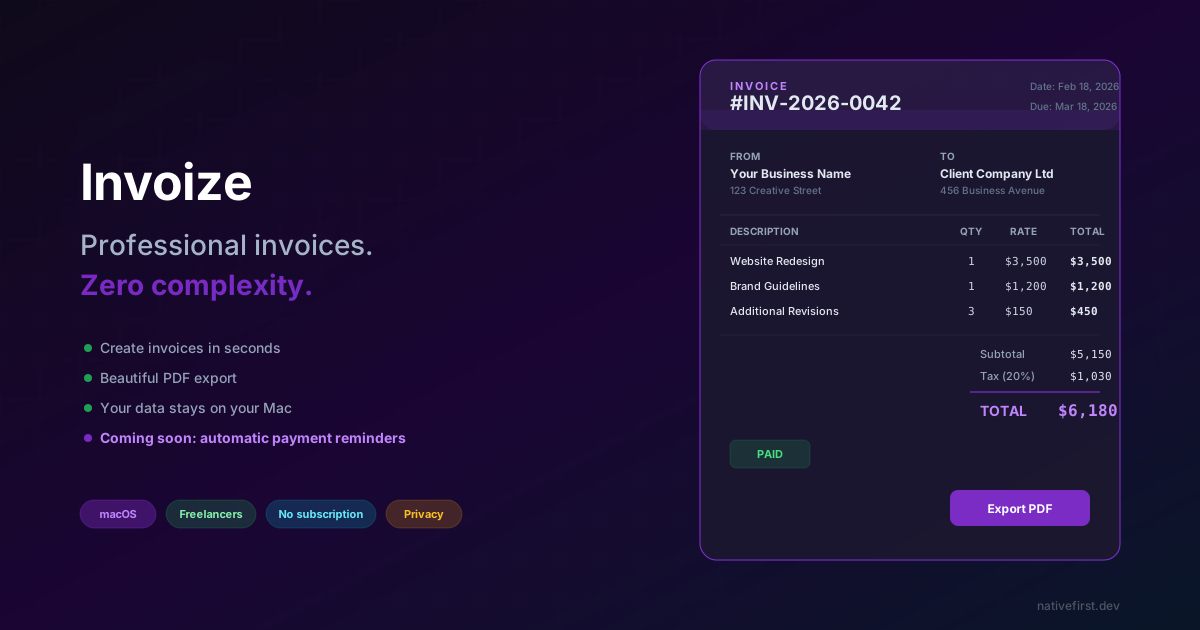
Invoize is a native macOS app that does one thing exceptionally well: it lets you create beautiful, professional invoices in seconds.
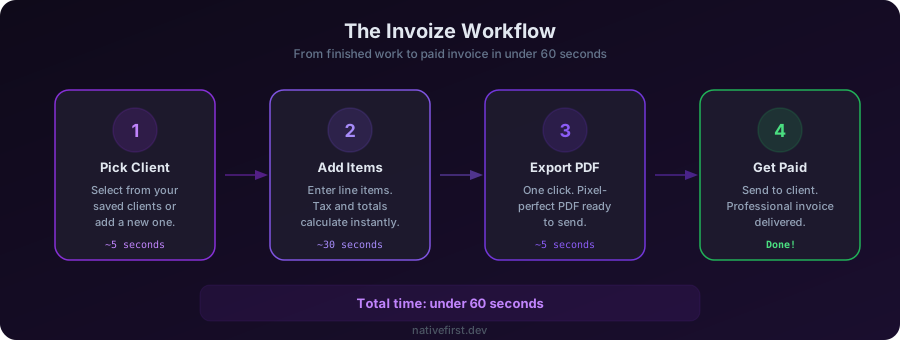
No sign-ups. No subscriptions. No cloud. You open the app, you create an invoice, you export a pixel-perfect PDF, you send it to your client. Done.
Here is what that looks like in practice:
Create Invoices Fast
The entire interface is designed around speed. You fill in the essentials — client, line items, dates — and Invoize handles the rest. Tax calculations happen automatically. Totals update in real time. There are no unnecessary steps, no wizard screens, no “save as draft” then “finalize” then “approve” workflows.
If you have invoiced the same client before, their details are already there. Add your line items, hit export, and you have a professional PDF in under a minute.
Beautiful PDF Export
Your invoice is a reflection of your business. When a client opens your PDF, it should look professional, clean, and polished. Invoize generates pixel-perfect PDFs that you would be proud to send to any client — from a local coffee shop to a multinational corporation.
No fiddling with margins. No broken formatting. No “why does this look different when I open it on Windows” moments. Every PDF comes out exactly the way you designed it.
Client Management
Over time, you build up a roster of clients. Invoize keeps them organized in one place — names, addresses, tax IDs, payment terms. When you create a new invoice, you pick the client from your list, and their details populate automatically.
This is not a CRM. It is not trying to be. It is a simple, clean client directory that exists to make invoicing faster.
Tax Calculations That Just Work
Different clients, different tax rates. Domestic versus international. VAT, sales tax, withholding tax. Invoize handles the calculations automatically so you never have to pull out a calculator or wonder if you got the math right.
You set up your tax rates once, apply them to line items, and the app does the rest. Subtotals, tax amounts, and grand totals are always correct.
Multiple Currencies
If you work with international clients — and in 2026, who does not — you need to invoice in different currencies. Invoize supports multiple currencies out of the box. Bill a client in USD, another in EUR, another in GBP. Each invoice shows the correct currency symbol and formatting.
Invoice Status Tracking
Every invoice in Invoize has a clear status — draft, sent, paid, or overdue. At a glance, you can see exactly where your money is. How many invoices are outstanding, the total amount waiting to be paid, which clients are overdue, and your revenue for the month, quarter, or year.
No more digging through emails or spreadsheets to figure out who has paid and who has not. Invoize gives you a clear financial picture without needing a separate accounting tool.
Export and Reporting
Tax season should not be a nightmare. Invoize lets you export your invoice data into organized reports — by client, by date range, by tax category. Pull it into CSV or PDF, hand it to your accountant, and be done with it.
You have full control over your data at all times. Need to find every invoice you sent to a specific client in Q3? Two clicks. Need a summary of all tax collected this year? Done.
Your Data Stays on Your Mac
This is not a marketing bullet point. It is a core design decision.
Invoize stores everything locally on your Mac. Your client data, your invoice history, your financial information — none of it leaves your machine. There is no account to create, no server to trust, no terms of service that grant a company rights to your data.
For freelancers handling sensitive client information, this is not a feature. It is a requirement.
Who Is Invoize For?
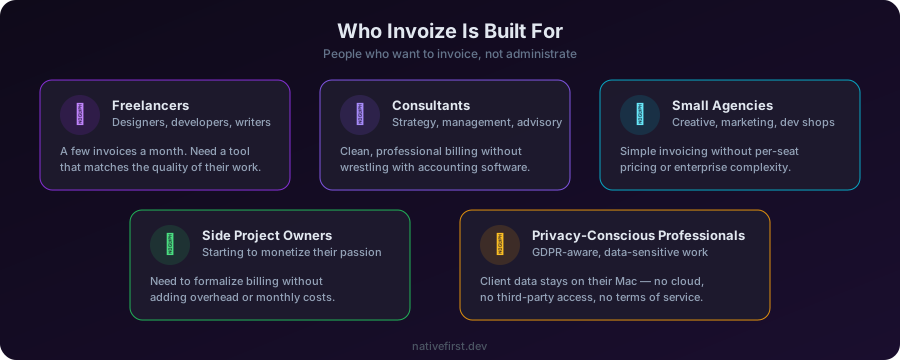
We did not build Invoize for enterprise finance departments. We built it for people like us:
Freelance designers and developers who send a handful of invoices each month and want a tool that matches the quality of their work.
Consultants who need to bill clients cleanly and professionally without wrestling with accounting software.
Small agencies with a few team members who need simple, reliable invoicing without per-seat pricing.
Side project owners who are starting to make money and need to formalize their billing.
Anyone who values their time and does not want to spend it fighting with invoicing tools that were designed for someone else.
What’s Coming Next
Invoize already covers the essentials — fast invoice creation, beautiful PDFs, status tracking, export and reporting, all with your data stored locally. But we are not stopping there. Here is what we are working on:
Automatic Payment Reminders
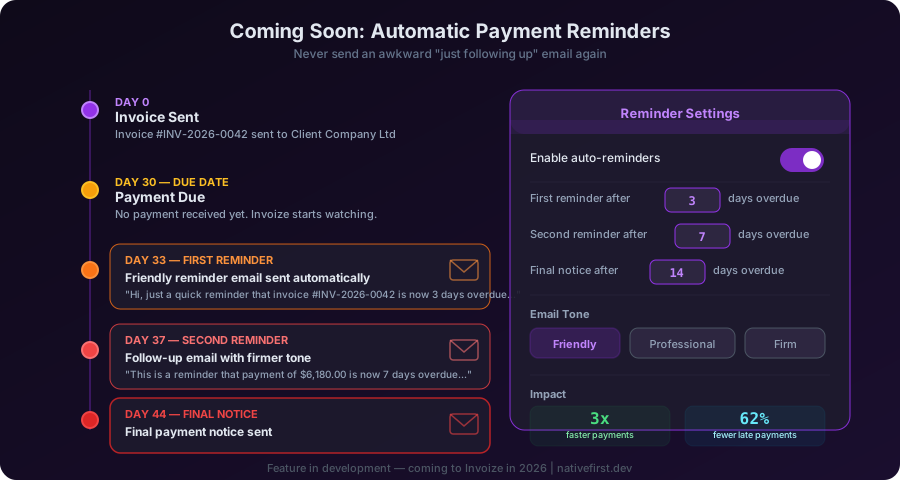
This is the feature we are most excited about. Late payments are the bane of every freelancer’s existence. You send an invoice, the due date passes, and then you have to send an awkward “just following up” email. Some people avoid it entirely and just wait, losing money in the process.
Invoize will handle this for you. You will be able to set up automatic reminders directly in the app. When an invoice is overdue, Invoize will generate and send a polite, professional reminder email to your client — on your behalf, from your email address.
You configure the rules: send a reminder 3 days after the due date, then another at 7 days, then a final notice at 14 days. Customize the tone and wording. Invoize does the rest.
No more awkward follow-ups. No more forgotten invoices collecting dust. Your cash flow improves without you having to be the bad guy.
Recurring Invoices
If you have clients on retainer or monthly contracts, you should not have to create the same invoice every month. Recurring invoices will let you set up a template, define the schedule (weekly, monthly, quarterly), and Invoize will generate the invoice automatically when it is time.
Invoice Templates and Branding
Your invoices should look like your business. We are building a template system that lets you customize colors, add your logo, choose layouts, and save branded templates. Create one template for your design agency, another for your consulting work — each with its own visual identity.
Smart Invoice Analytics
We are exploring deeper analytics that go beyond simple reporting — insights like average payment time per client, seasonal revenue trends, and predictions for your monthly cash flow. The kind of data that helps you make better business decisions without needing an MBA.
Why Native, Why Mac
We get asked this a lot. Why build a Mac-only app when you could build a web app that runs everywhere?
The answer is the same philosophy that drives everything we do at NativeFirst: native apps are better apps.
Invoize launches instantly. It responds to every click without lag. It respects your system settings — dark mode, accent colors, font sizes. It integrates with macOS features like Quick Look, Spotlight, and the share sheet. It does not need an internet connection to work.
A web-based invoicing tool can do most of what Invoize does. But it will never feel the way Invoize feels. That difference — the smoothness, the speed, the sense that the app belongs on your Mac — is what makes people stick with a tool long-term.
We are also exploring bringing Invoize to iPhone and iPad in the future. Imagine creating an invoice on your phone right after a meeting, while the details are still fresh. With SwiftUI and Apple’s ecosystem, the path from Mac to iPhone is natural.
The Bottom Line
Invoicing is a solved problem in theory. In practice, most solutions are either too complex, too expensive, too ugly, or too invasive with your data.
Invoize is our answer: a fast, beautiful, private invoicing tool that respects your time and your data. And with automatic payment reminders, recurring invoices, custom branding, and smart analytics on the way, it is only going to get better.
If you are a freelancer or small business owner who wants invoicing that just works, check out Invoize. It is available now on macOS.
And if you have ideas for features you would love to see, we would love to hear from you. We are building this for people like you, and your input shapes what comes next.
Share this post
Comments
Leave a comment
Mario
Founder & CEOFounder of NativeFirst. Building native Apple apps with SwiftUI and a passion for great user experiences.