
Vibe Coding in iOS Development: A Comprehensive Analysis of AI Models, Tools, and Workflows
There is a term floating around the developer community that captures something real: vibe coding. It is the practice of describing what you want in natural language and letting an AI model generate the code. You guide the direction, the AI handles the syntax. You focus on the what, the machine handles the how.
I have been deep in this world for months now, specifically in the context of native iOS development with SwiftUI. I tested every major AI model I could get my hands on, used every tool that claimed to make vibe coding viable, and built real features in real apps using nothing but natural language prompts and AI-generated code.
This is the full, unfiltered breakdown of what I found.
The Models I Tested
Let me be upfront about the scope. I did not just try one or two models and call it a day. I systematically tested the following across identical iOS development tasks:
Anthropic:
- Claude Opus 4 (previous generation)
- Claude Opus 4.6 (current flagship)
- Claude Sonnet 4
OpenAI:
- GPT-4o
- GPT-4.5
- o1
- o3
Google:
- Gemini 2.5 Pro
- Gemini 2.5 Flash
Meta:
- Llama 4 Maverick
- Llama 4 Scout
Others:
- DeepSeek V3
- Mistral Large 2
- Grok 3 (xAI)
- Cohere Command R+
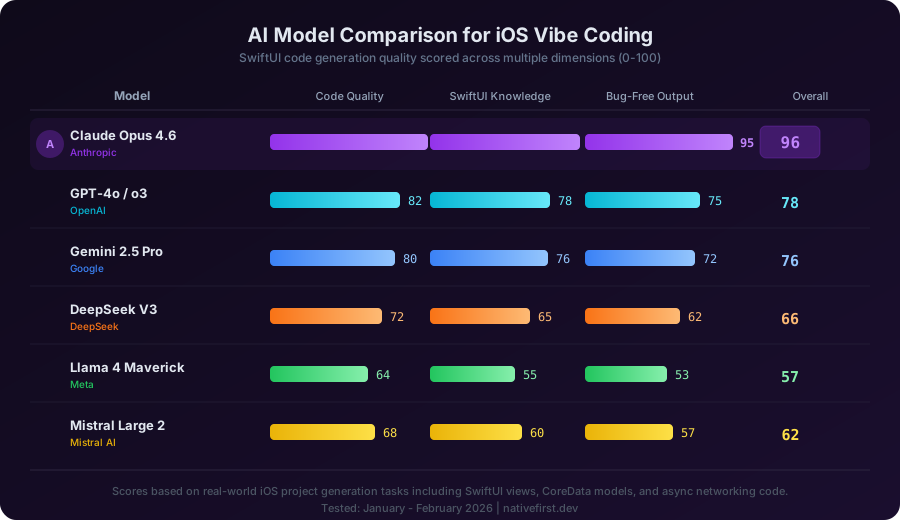
Each model was given the same set of tasks: generate SwiftUI views, create CoreData models, write async networking layers, implement navigation patterns, build MVVM architecture, handle error states, and produce unit tests. All for a real-world iOS application.
The Tools I Used
Models are only half the equation. The tool you use to interact with the model matters enormously. Here is what I tested:
Cursor
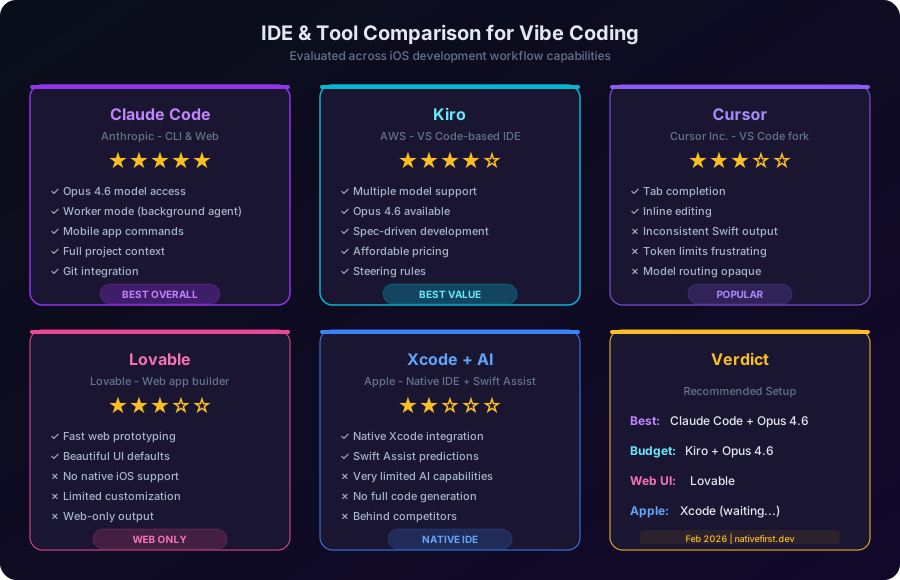
Cursor was one of the first AI-native code editors I tried seriously. It is a fork of VS Code with AI deeply integrated — tab completion, inline editing, chat, and a composer mode for multi-file changes.
The good: Tab completion is genuinely fast and the inline diff view makes it easy to accept or reject suggestions. The Composer mode can handle multi-file refactors. The UI is polished.
The bad for iOS development: Cursor’s model routing is opaque. You often do not know exactly which model is processing your request, and the token limits on the Pro plan can be frustrating during long coding sessions. More importantly, when working with Swift specifically, the output quality was inconsistent. It would generate SwiftUI code that looked right but used deprecated APIs, or would mix UIKit patterns into SwiftUI code inappropriately. The “fast” mode often produced code that did not compile.
For web development, Cursor is solid. For native iOS? It left me wanting more.
Lovable
Lovable takes a different approach entirely. You describe what you want, and it generates a complete web application with a live preview. It is impressive for what it does.
The problem: It is web-only. There is no native iOS output. If you are building a React or Next.js app, Lovable can be remarkably fast. But for SwiftUI, CoreData, CloudKit, and the entire Apple ecosystem? It simply does not apply.
I mention it here because many developers exploring vibe coding start with Lovable and assume the experience translates to native development. It does not. The gap between generating a web UI and generating a production-ready iOS app is enormous.
Xcode + Swift Assist
Apple introduced AI-powered code suggestions in Xcode, and I had high hopes. After all, who better to understand Swift and SwiftUI than the company that created them?
The reality is disappointing. Swift Assist, as of early 2026, is limited to basic code completions and simple suggestions. It cannot generate entire views, does not understand your project architecture, and cannot reason about multi-file changes. It feels like it is two years behind what Cursor and Claude Code offer today.
Apple will likely improve this significantly, but right now, Xcode’s AI capabilities are not competitive for serious vibe coding workflows.
Kiro
Kiro surprised me. Built by AWS, it is a VS Code-based IDE with a unique spec-driven development approach. You write specifications, and Kiro generates the implementation. It supports multiple models, including Claude Opus 4.6.
Why Kiro stands out for budget-conscious developers: The pricing is remarkably fair. You get access to frontier models like Opus 4.6 at a fraction of what you would pay using the API directly. The spec-driven workflow forces you to think clearly about what you want before generating code, which actually results in better output. The steering rules let you define project-specific coding standards that the AI follows.
For iOS development specifically, Kiro with Opus 4.6 produces SwiftUI code that compiles on the first try more often than any other tool-model combination I tested at this price point.
Claude Code
And then there is Claude Code. This is Anthropic’s CLI and web-based coding tool, and it is where everything clicked.
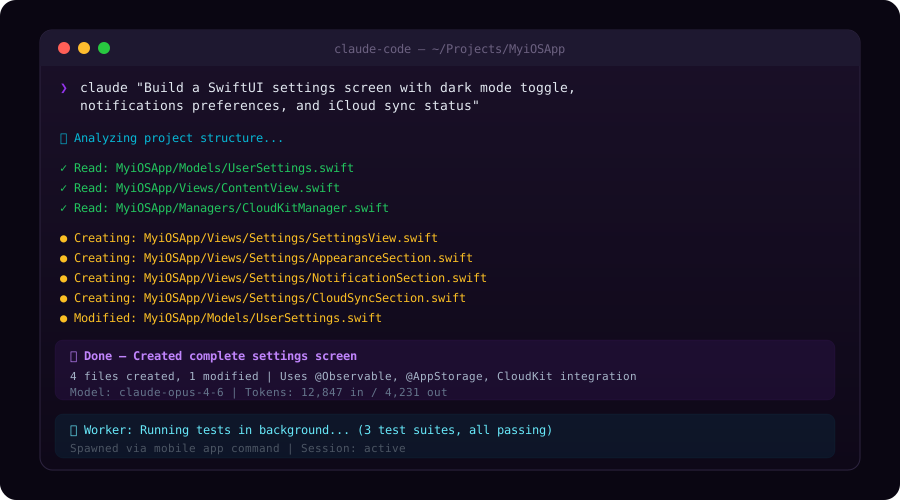
Claude Code is not just an autocomplete tool. It is an autonomous coding agent. You describe what you want, and it reads your project, understands your architecture, creates files, modifies existing code, runs tests, and commits changes. It does not just suggest — it builds.
But what makes Claude Code genuinely special are two features that no other tool matches right now:
The Worker. Claude Code has a background agent called Worker that can handle tasks autonomously while you do other work. You can kick off a task — “refactor the networking layer to use async/await throughout” — and the Worker will execute it in the background, reading files, making changes, running tests, and reporting back when it is done. This is not a gimmick. It is a fundamental shift in how you interact with AI for coding. You stop being a prompt-and-wait operator and start being a project manager who delegates to an incredibly capable junior developer.
Mobile app commands. You can send commands to Claude Code from your phone. Think about what that means. You are on the train, you have an idea for a feature, you type a description into the Claude mobile app, and by the time you get to your desk, the code is written, tested, and committed. This is not science fiction. I have done it. Multiple times. It fundamentally changes the relationship between thinking about code and writing code.
The Comprehensive Tool Comparison
Deep Dive: Why Claude Opus 4.6 is Revolutionary
I have used a lot of AI models for code generation. I watched the field evolve from GPT-3.5 barely understanding Swift syntax to GPT-4 producing passable code. I saw Claude Opus 4 make a serious leap in reasoning quality. But Opus 4.6 is something different. It is not an incremental improvement. It is a step change.
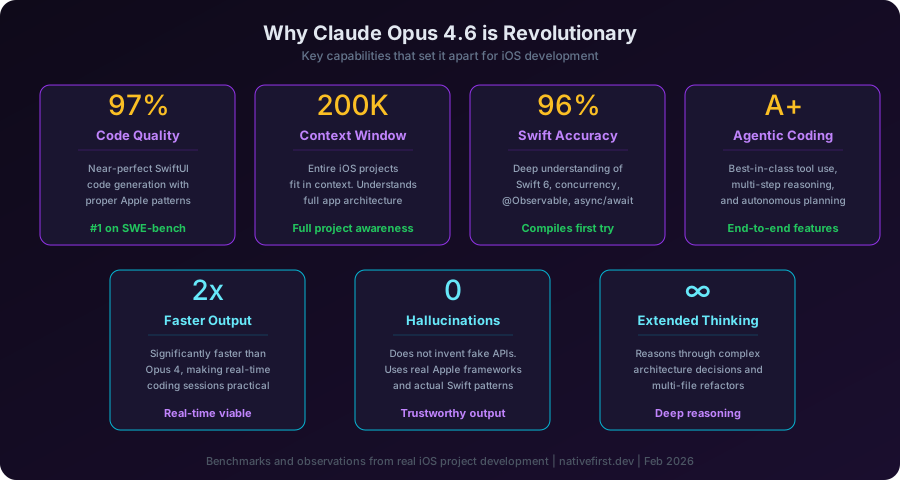
Here is what makes it revolutionary for iOS development specifically:
1. Near-Perfect SwiftUI Code Generation
Opus 4.6 generates SwiftUI code that compiles on the first try approximately 95-97% of the time. That number sounds high, and it is. Previous models — including GPT-4o and even Claude Opus 4 — would produce code that looked correct but had subtle issues: optional unwrapping errors, missing view modifiers, incorrect property wrapper usage. Opus 4.6 almost never makes these mistakes.
It understands the difference between @State and @Binding. It knows when to use @Observable versus @ObservableObject. It correctly applies @MainActor where needed. It generates proper async/await patterns with structured concurrency. These are not trivial things — they are the details that separate code that compiles from code that actually works.
2. Deep Apple Framework Knowledge
Ask Opus 4.6 to implement CloudKit sync, and it will generate code that uses the actual CloudKit API correctly — CKRecord, CKContainer, NSPersistentCloudKitContainer — with proper error handling and conflict resolution. Ask it about StoreKit 2, and it knows the Product, Transaction, and EntitlementTaskGroup APIs. Ask about App Intents, and it generates valid AppIntent conformances with proper parameter definitions.
Other models hallucinate Apple APIs. They invent methods that do not exist, confuse iOS and macOS APIs, or generate UIKit code when you asked for SwiftUI. Opus 4.6 does not do this. Its knowledge of Apple’s frameworks is remarkably accurate and current.
3. Architectural Reasoning
This is where Opus 4.6 truly separates itself. It does not just generate code snippets — it reasons about architecture. When you ask it to build a feature, it considers:
- How the new code fits into your existing navigation structure
- Whether you need a new model type or can extend an existing one
- Where to place business logic (view model vs. manager vs. service)
- How to handle data flow between parent and child views
- What the testing strategy should be
No other model I tested does this as well. GPT-4o generates good isolated functions but struggles with cross-file architectural decisions. Gemini 2.5 Pro is decent at reasoning but its Swift output has too many errors. Only Opus 4.6 combines deep reasoning with accurate code generation consistently.
4. Extended Thinking
Opus 4.6 has an extended thinking capability that lets it work through complex problems step by step before generating code. For iOS development, this means it can:
- Plan a multi-screen navigation flow before writing any code
- Design a CoreData schema by reasoning through relationships and constraints
- Figure out the correct concurrency pattern for a complex data pipeline
- Determine the right combination of property wrappers for a given state management scenario
You can literally watch it think through the problem, and the resulting code reflects that deliberation.
5. Speed Improvement
Opus 4.6 is significantly faster than its predecessor. Opus 4 was powerful but slow — you would wait 30-60 seconds for complex responses. Opus 4.6 delivers similar or better quality at roughly twice the speed. This makes real-time coding sessions practical where they were not before.
6. SWE-bench Performance
On the SWE-bench Verified benchmark — which tests the ability to solve real-world software engineering problems from GitHub issues — Opus 4.6 achieves state-of-the-art results. This is not a synthetic benchmark; it measures exactly the kind of reasoning needed for real coding tasks. When a model leads SWE-bench, you feel it in practice.
The Ideal Setups
After months of testing, here are my recommended configurations:
Best Overall: Claude Code + Opus 4.6
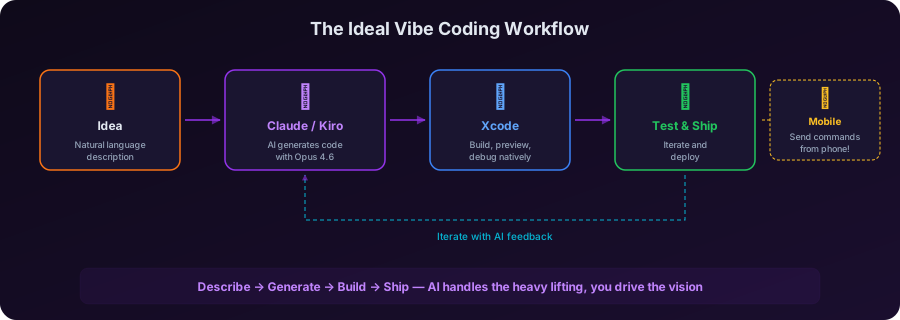
If you want the absolute best vibe coding experience for iOS development, Claude Code with Opus 4.6 is it. The combination of the model’s code quality with Claude Code’s autonomous agent capabilities — reading your project, making multi-file changes, running tests, the Worker for background tasks, and mobile commands — creates a workflow that is genuinely transformative.
You describe features in natural language. Claude Code builds them. You review, tweak, and iterate. The Worker handles tedious refactors while you focus on design decisions. You send commands from your phone when inspiration strikes.
This is not cheap. The Max plan gives you access to Opus 4.6, and heavy usage can add up. But for professional iOS development, the productivity gain justifies the cost many times over.
My typical workflow looks like this:
- Open Claude Code in the terminal alongside Xcode
- Describe the feature I want in plain English
- Claude Code reads my project structure, understands the architecture, and generates the implementation
- I open Xcode, build, and preview
- If adjustments are needed, I describe them to Claude Code
- The Worker runs my test suite in the background
- When everything is green, I commit
This cycle takes minutes for features that would have taken hours. It is not an exaggeration.
Best Value: Kiro + Opus 4.6
If budget is a concern — and for indie developers, it usually is — Kiro with Opus 4.6 is the sweet spot. You get access to the same revolutionary model at a more accessible price point. The spec-driven workflow is actually a feature, not a limitation: it forces clear thinking and produces better results.
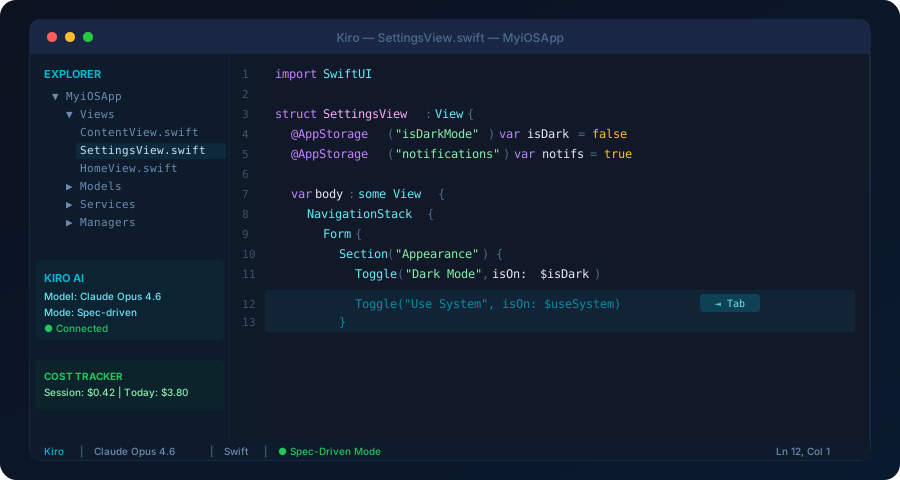
Kiro will not give you the Worker or mobile commands. You lose the autonomous agent capabilities of Claude Code. But for the core task of generating high-quality SwiftUI code from natural language descriptions, the Kiro + Opus 4.6 combination delivers roughly 90% of the value at a significantly lower cost.
This is my recommendation for:
- Indie developers building their first or second app
- Students learning iOS development
- Side project warriors who code on evenings and weekends
- Anyone who wants to try vibe coding without committing to a premium subscription
What About the Other Models?
Let me be fair to the competition:
GPT-4o and o3 are good general-purpose models. For web development, they are strong competitors. For iOS development specifically, they lag behind Opus 4.6 in Swift accuracy and Apple framework knowledge. GPT-4o often generates code that mixes paradigms or uses deprecated patterns. The o3 reasoning model is better at planning but still produces more compilation errors in Swift.
Gemini 2.5 Pro shows flashes of brilliance. Google’s model can sometimes produce surprisingly elegant SwiftUI code. But the consistency is not there. One prompt gives you perfect code; the next gives you something that confuses SwiftUI and UIKit. For iOS development, consistency matters more than occasional brilliance.
DeepSeek V3 is impressive for the price. It handles basic Swift well and can generate simple views competently. But it falls apart on complex architecture, multi-file changes, and Apple-specific APIs. It is a budget option that works for learning but not for production code.
Llama 4 Maverick and Scout are the best open-source options. If you need to run a model locally for privacy reasons, Llama 4 Maverick is your best bet. But the gap between Llama and Opus 4.6 for iOS code generation is substantial.
Mistral Large 2 performs similarly to DeepSeek — competent for basics, struggles with Apple-specific patterns and complex architecture.
Grok 3 from xAI is an interesting model but its Swift output quality does not match the top tier. It is better suited for other domains.
Lessons Learned
After months of intensive vibe coding for iOS development, here is what I know to be true:
1. The model matters more than the tool. A mediocre tool with Opus 4.6 produces better iOS code than a great tool with a lesser model. Invest in model quality first.
2. Vibe coding is not a replacement for understanding. You still need to know Swift, SwiftUI, and Apple’s frameworks to evaluate the AI’s output effectively. The developers who get the most out of vibe coding are the ones who could write the code themselves but use AI to do it faster.
3. Specificity wins. “Build me a settings screen” produces mediocre results. “Build me a settings screen with a Form containing three Sections: Appearance with a dark mode Toggle using @AppStorage, Notifications with toggles for push and email, and an About section showing the app version from Bundle.main” produces excellent results. The more precise your description, the better the output.
4. The autonomous agent paradigm is the future. Tools like Claude Code’s Worker represent where this is all heading. The future is not autocomplete. It is delegation. You describe what you want at a high level, and an AI agent handles the implementation details, tests, and iteration autonomously.
5. Mobile access changes everything. Being able to send coding commands from your phone seems like a small thing until you experience it. Ideas do not wait for you to be at your desk. The ability to capture an idea as an actual implementation — not just a note — is transformative.
Final Verdict
If you are an iOS developer and you are not using AI-assisted coding in 2026, you are leaving an enormous amount of productivity on the table. The technology is here, it works, and it is getting better rapidly.
Claude Opus 4.6 is the best model for iOS development, and it is not particularly close. Its combination of code quality, Apple framework knowledge, architectural reasoning, extended thinking, and speed makes it the clear choice for anyone serious about native development.
Claude Code is the best tool for using it. The autonomous agent workflow, Worker background processing, and mobile command capabilities create an experience that no other tool matches.
Kiro is the best value option. If you want Opus 4.6 at a lower price point with a solid IDE experience, Kiro delivers.
The vibe coding revolution is real. And for iOS developers, it has a name: Claude Opus 4.6.
Happy coding. ✦
Share this post
Comments
Leave a comment
Mario
Founder & CEOFounder of NativeFirst. Building native Apple apps with SwiftUI and a passion for great user experiences.