
Apple Gave iOS a Makeover Nobody Asked For. Now Everyone Has to Live With It.
You know that scene in every home renovation show where the designer rips out the homeowner’s perfectly fine kitchen, replaces it with something “bold” and “modern,” and then stands there beaming while the homeowner stares at their house like they’ve been robbed?
That’s what Apple did to iOS. Except the homeowner is every developer who’s built apps for the past fifteen years, the kitchen is the entire UI framework, and the designer just announced that no, you cannot put your old cabinets back.
What Even Is Liquid Glass?
If you’ve somehow avoided this conversation for the past ten months, here’s the short version.
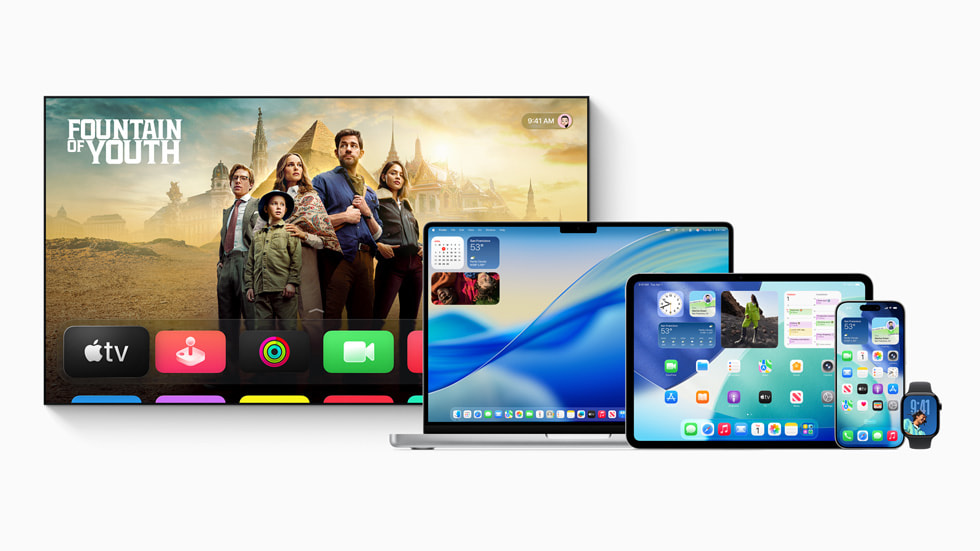
At WWDC 2025, Apple unveiled Liquid Glass — a system-wide design language that makes everything translucent, frosted, and floaty. Buttons shimmer. Toolbars glow. Navigation bars look like someone breathed on a cold window. It’s everywhere: iOS, iPadOS, macOS, watchOS, visionOS. There is no escape.
Apple called it “delightful and elegant.” Developers called it something else.
The idea isn’t terrible in theory. Glass-like surfaces that let background content bleed through, creating a sense of depth and continuity. Sounds nice in a press release. In practice? It means your carefully designed app now looks like it’s being viewed through a shower door.
The Developer Revolt That Wasn’t
Here’s what makes the Liquid Glass situation uniquely frustrating: developers didn’t just dislike it. They lost tools.
Before Liquid Glass, SwiftUI gave you a reasonable set of knobs to turn. You could customize tab bars, navigation bars, toolbars — the fundamental building blocks of any iOS app. You had sub-elements, configurable properties, and the ability to make your app feel like your app while still looking like it belonged on iOS.
Liquid Glass took those knobs away. Not all of them, but enough that developers noticed. The new components are beautiful — in the specific way Apple wants them to be beautiful. If your app’s design vision aligns with Apple’s, great. If it doesn’t? Too bad. The range of acceptable design just got narrower.
One developer at a recent Apple workshop described it as going from a toolbox to a sticker book. You can place things where Apple says they go. You can use the colors Apple says you can use. And if you want something else — well, you can file a feedback report.
Users Aren’t Exactly Thrilled Either
It’s not just developers grumbling in Slack channels. Actual humans who use iPhones every day have opinions too, and those opinions are… strong.
Readability. When everything is translucent, text gets harder to read. The contrast between foreground and background becomes a guessing game depending on your wallpaper, the time of day, and apparently what mood your phone is in. People with visual impairments have been particularly vocal. An interface that looks gorgeous in Apple’s marketing shots can be genuinely unusable in bright sunlight.
Battery drain. All those real-time blur effects and transparency calculations aren’t free. Users on older devices — and even some newer ones — report measurably worse battery life. Those constant compositing layers add up.
The animations. Everything bounces, slides, glows, and shimmers. It’s like iOS ate a bag of Skittles and can’t sit still. For the first hour, it feels fresh. By day three, you just want your Settings app to stop doing a little dance every time you open it.
Apple’s Response: “We Hear You. The Answer Is No.”
This is the part that turns frustration into resignation.
In March 2026, Apple held a developer workshop where, according to multiple attendees, they made their position emphatically clear: Liquid Glass is not a phase. It’s not a beta experiment. It’s not going away. It’s expanding.
Michael Tsai, a longtime Apple developer blogger, summarized the mood with a post titled “Liquid Glass Is Permanent.” That title tells you everything. No hedging. No “we’re considering feedback.” It’s permanent.
And it gets better. According to AppleInsider, Liquid Glass will be mandatory in iOS 27. Developers who were holding out hope for an opt-out mechanism can stop holding their breath. When iOS 27 ships this fall, your app will be glass whether you like it or not. The April 28 deadline for apps to be built with the iOS 26 SDK is just the beginning.
The Alan Dye Footnote
Here’s a detail that says more than any blog post could.
Alan Dye, Apple’s VP of Human Interface Design — the guy who oversaw how iOS looks and feels — left Apple for Meta in December 2025. The timing was… convenient. Liquid Glass had launched six months earlier to a wave of criticism, and the man responsible for Apple’s design taste for over a decade quietly packed his desk.
Was it because of Liquid Glass specifically? Nobody’s saying that on the record. But the Apple design community noticed. When the person in charge of “does this look right” leaves right after the most controversial design decision in iOS history, people read between the lines.
What This Means for Indie Developers
If you’re building indie apps — and I mean this genuinely — the next six months are going to be annoying.
When we updated ThinkBud for the new design language, what should have been a weekend of polish turned into two weeks of fighting with translucency layers, testing against every wallpaper combination, and accepting that some things we loved about our custom UI just weren’t possible anymore. Multiply that by every indie app on the App Store.
The tricky part isn’t adopting Liquid Glass. The tricky part is adopting it without losing what makes your app recognizable. When every app uses the same frosted glass components with the same limited customization, differentiation moves from design to content. Your app’s personality has to come from what it does, not how it looks — because how it looks is increasingly Apple’s call, not yours.
For developers using PromptKit or similar tools to prototype quickly, this actually creates an interesting dynamic: the prototyping-to-production gap just got smaller, because there’s less custom UI work to do. Whether that’s good or bad depends on how you feel about everyone’s apps looking like siblings.
The Snow Leopard Theory
There’s an interesting counter-narrative worth mentioning.
Reports from November 2025 compared iOS 27 to macOS Snow Leopard — the legendary 2009 update that added almost no new features but fixed a thousand annoying things. The argument goes: iOS 26 was the big flashy redesign. iOS 27 is the stability pass. Fix the bugs. Optimize the blur effects. Make the battery drain less painful. Stop the Settings app from doing jazz hands.
If that’s true, iOS 27 might actually earn some goodwill. Not by fixing the fundamental disagreement about whether Liquid Glass was a good idea, but by at least making it work well. There’s a difference between “I hate this design” and “I hate this design and it crashes my phone.” Apple can’t fix the first one without admitting a mistake. But they can definitely fix the second.
WWDC 2026: The Next Chapter
WWDC 2026 runs June 8-12, and every iOS developer will be watching to see how Apple evolves Liquid Glass. The rumor mill suggests new SwiftUI APIs, better customization options, and — critically — support for the iPhone Ultra (the foldable iPhone expected this September).
The foldable angle is actually fascinating. When iOS runs on a 7.6-inch unfolded display with iPad-like layouts, Liquid Glass will need to work in contexts Apple hasn’t fully tested yet. Sidebars. Split views. Apps that transform from phone layout to tablet layout mid-use. That’s a lot of frosted glass to render simultaneously.
If you’re a developer thinking about the iPhone Ultra, start thinking now. The last time Apple introduced a dramatically different screen size (iPhone 6 Plus in 2014), apps that adapted early got a real competitive advantage. The ones that didn’t… well, they got ugly letterboxing.
The Uncomfortable Truth
Here’s what nobody at Apple will say out loud, but what everyone in the developer community already knows: Liquid Glass exists because Apple decided it exists. Not because users asked for it. Not because developers wanted it. Not because usability research demanded it. Apple made an aesthetic choice, and the entire platform follows that choice. That’s how Apple has always worked.
Sometimes that approach gives us the original iPhone. Sometimes it gives us the butterfly keyboard. Liquid Glass is somewhere in between — not bad enough to be a disaster, not good enough to feel inevitable. It’s a design choice wearing a tuxedo, insisting it belongs at the party.
The question isn’t whether Liquid Glass will survive. It will. Apple has made that very clear. The question is whether, two years from now, we’ll look back and think “actually, they were right” — or whether we’ll still be squinting at our screens wondering who turned on the fog machine.
I’m betting on the fog machine. But I’ve been wrong about Apple before.
What You Can Do Right Now
If you’re an iOS developer staring down the April 28 SDK deadline:
- Test your app against multiple wallpapers. Seriously. What looks fine against a dark wallpaper might be unreadable against a light one. Liquid Glass doesn’t care about your color scheme.
- Embrace the limited palette. Instead of fighting the reduced customization, lean into it. Find what you can control and make it count.
- File Radars. Apple says they read feedback reports. Whether they act on them is debatable, but the developer community’s collective voice has moved Apple before. Maybe not on the big decisions. But on the details? Sometimes.
- Start thinking about the fold. The iPhone Ultra is coming. Your app will need to work at two screen sizes simultaneously. The time to prototype is now.
The makeover is done. The old kitchen isn’t coming back. But at least we get to pick the curtains — for now.
Share this post
Comments
Leave a comment
NativeFirst Team
EditorialThe NativeFirst team — engineers and designers building native Apple apps and writing the courses we wish we had when we started.