
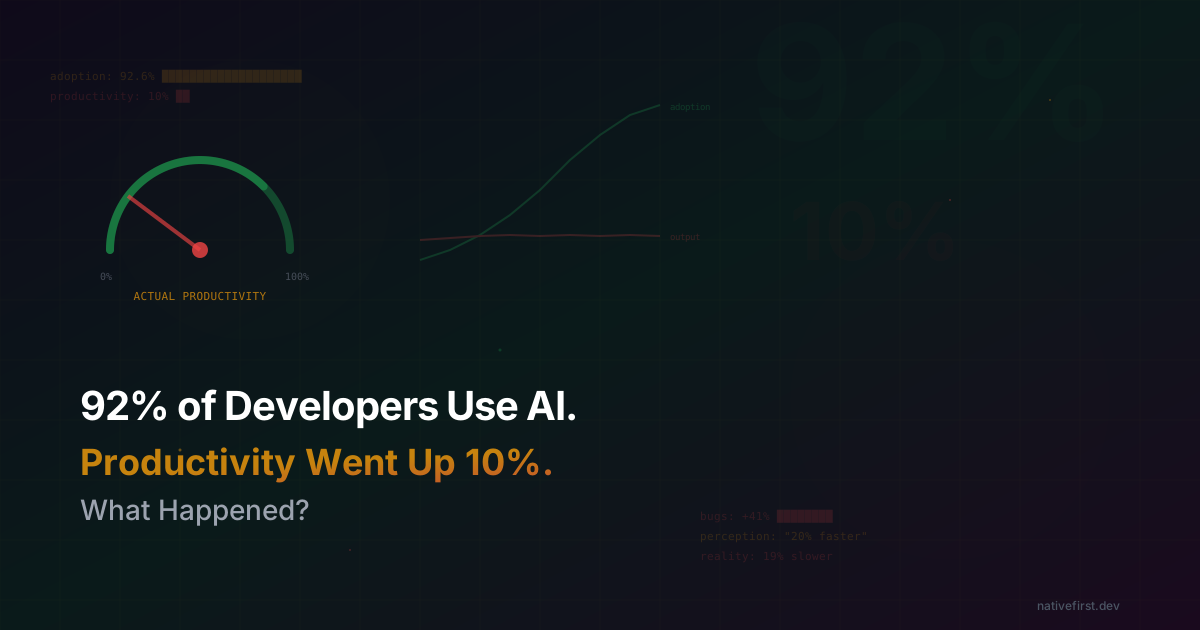
92% of Developers Use AI Tools. Productivity Went Up 10%. What Happened?
I was on a call last week with a CTO who was genuinely confused. His company had rolled out AI coding tools across every engineering team. Cursor licenses for everyone. GitHub Copilot on every machine. Internal prompt libraries. Training sessions. The whole playbook.
Adoption? Through the roof. His developers loved it. Survey scores were glowing. Everyone felt faster.
But when he pulled the quarterly numbers — features shipped, bugs resolved, cycle time, developer productivity — the line was flat. Not up. Not dramatically down. Just… flat. “We spent six figures on AI tooling,” he said, “and our output looks exactly the same.”
He’s not alone. And the data backing up his confusion is brutal.
AI Coding Tool Adoption vs Actual Developer Productivity
A recent analysis of 4.2 million developers across 450+ companies found that 92.6% of developers now use an AI coding assistant at least once a month. Three-quarters use one weekly. AI isn’t a niche tool anymore. It’s everywhere. It’s the new Stack Overflow, the new Google, the new “let me think about this for a second.”
And 26.9% of all production code is now AI-generated. Up from 22% last quarter. For daily AI users, nearly a third of merged code was written by a machine. That’s not a rounding error. That’s a structural shift in how software gets made.
So productivity must be booming, right?
It went up about 10%. And then it stayed there.
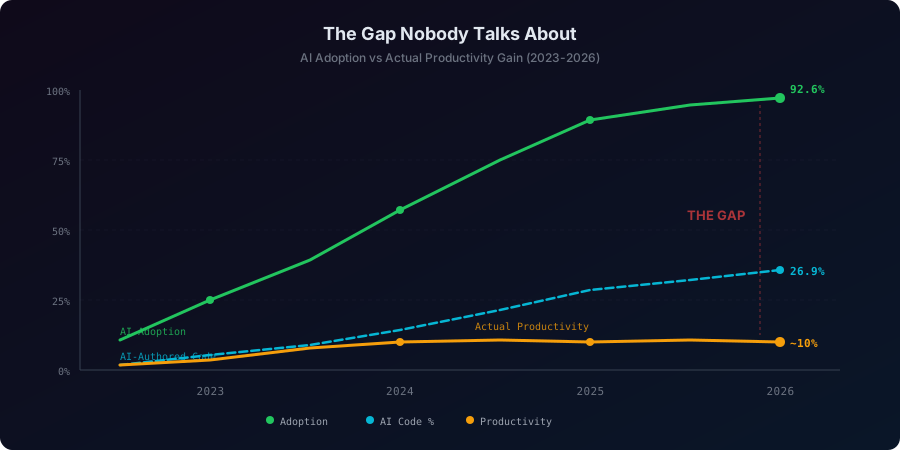
That 10% bump happened when AI tools first rolled out. Since then, despite adoption nearly doubling and AI-authored code growing quarter over quarter, productivity has flatlined. Developers report saving about 3.6 to 4 hours per week — roughly the same as a year ago.
The tools got better. The adoption got higher. The AI-authored percentage climbed. And the output… didn’t.
If you’re thinking “that can’t be right,” congratulations, you’re experiencing what 92% of developers experience every day. It feels wrong because the vibes are so good. Which brings us to the study that should be required reading for every engineering leader on the planet.
The METR Study: AI Made Developers 19% Slower
In July 2025, METR — a well-respected AI evaluation organization — published a randomized controlled trial that I’ve been thinking about approximately every 45 minutes since.
They tracked 16 experienced open-source developers doing 246 real-world tasks on repositories they’d worked on for an average of 5 years. These weren’t toy projects. Average repo had 22,000+ stars and over a million lines of code. Real codebases, real tasks, real developers who knew their code intimately.
Before the study, developers predicted AI would make them 24% faster.
The actual result: they were 19% slower.
Not faster. Not the same. Slower. With AI. On their own code.
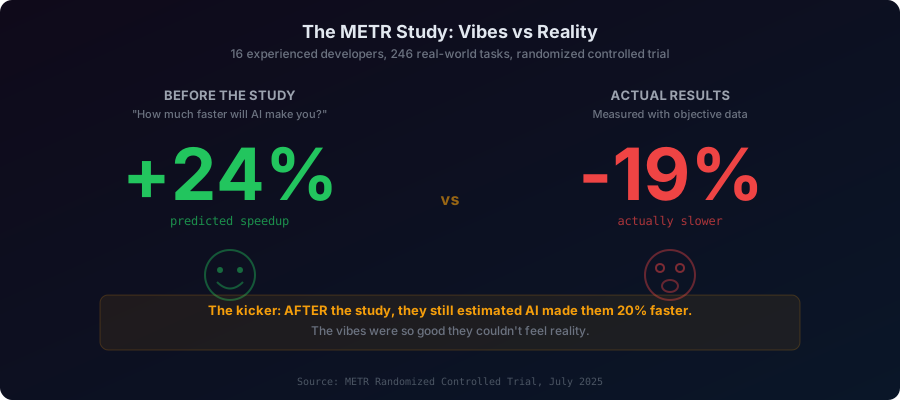
But here’s the part that genuinely kept me up at night. After the study — after being measurably, provably, objectively slower — the developers estimated AI had made them 20% faster. They still felt like it helped. The vibes were immaculate. The numbers were terrible.
METR’s researchers, with what I imagine was a mixture of scientific restraint and existential horror, wrote: “When people report that AI has accelerated their work, they might be wrong.”
The researchers found that developers accepted less than 44% of AI suggestions. The rest of the time they were reading, evaluating, fixing, and second-guessing generated code. The cognitive overhead of being an AI reviewer ate the productivity gains of being an AI user. It’s like hiring an intern who types really fast but whose code you have to review line by line. Sure, the typing is faster. But your job just got harder.
And it wasn’t just METR. Developer Mike Judge ran his own 6-week experiment — coin flip each day, AI or no AI — and found AI slowed him down by a median of 21%. Independently. On his own code.
The kicker? Despite being measurably slower, 69% of METR participants continued using Cursor after the experiment. Because it felt good. It felt productive. The vibes don’t care about your cycle time.
GitHub Copilot’s 55% Faster Claim vs Independent Research
Yeah, about that.
GitHub’s headline study found developers completed tasks 55% faster with Copilot. It got quoted in every pitch deck, every blog post, every “AI will eat the world” keynote for two years straight.
Here’s what they actually measured: relatively inexperienced developers implementing an HTTP server in JavaScript. One task. One language. One skill level. In a controlled environment that looked nothing like a real codebase.
Here’s what independent researchers found when they measured real-world software development:
Uplevel studied nearly 800 developers at enterprise engineering teams. Copilot users showed no improvement in PR cycle time or throughput. But they did introduce 41% more bugs. And their burnout risk reduction was nearly half that of non-Copilot users (17% vs 28%).
Google’s DORA report surveyed 3,000 respondents and found that for every 25% increase in AI adoption, delivery throughput dropped 1.5% and system stability dropped 7.2%. But perceived productivity went up 2.1%. The vibes again.
GitClear analyzed 211 million changed lines of code from 2020 to 2024. Code blocks with 5+ duplicated lines increased 8x. Copy-pasted lines surged from 8.3% to 12.3%. And refactored code — the kind where developers actually improve existing code rather than generating new slop — collapsed from 24.1% to 9.5%.
We’re not writing better code. We’re writing more code. Worse code. Faster. And then spending longer cleaning it up.
The Bug Tax: AI-Generated Code Quality in 2026
Let’s talk about what “faster” actually costs.
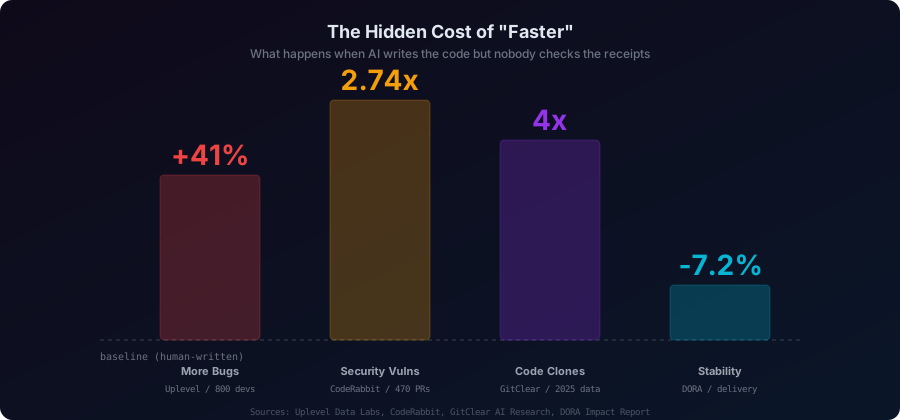
CodeRabbit analyzed 470 real-world pull requests — 320 AI-coauthored, 150 human-only. The AI-coauthored PRs had 10.83 issues each compared to 6.45 for human PRs. That’s 1.7x more issues overall.
But the security numbers are where it gets scary:
- 2.74x more likely to introduce XSS vulnerabilities
- 1.91x more insecure object references
- 1.88x more improper password handling
- 1.82x more insecure deserialization
Logic and correctness issues rose 75%. Code readability problems tripled. Performance inefficiencies — excessive I/O, unnecessary computations — appeared nearly 8x more often.
There was one stat that made me laugh, though: spelling errors were 1.76x more common in human PRs. So if your bar for code quality is “spelled correctly,” AI wins.
The Stack Overflow 2025 Developer Survey of 49,000 developers put a number on the frustration: 45% said their biggest problem with AI is solutions that are “almost right, but not quite.” And 66% said they spend more time fixing “almost-right” AI-generated code than they’d spend writing it from scratch.
“Almost right” is the most dangerous kind of wrong. Obviously wrong code gets caught. “Almost right” code passes review. It ships. It works in testing. And then it breaks in production at 3 AM on a Saturday because the AI didn’t understand an edge case that any human who’s been on the project for six months would’ve caught.
The Klarna AI Replacement Disaster
If you want a case study in what happens when you let AI productivity vibes drive business decisions, look at Klarna.
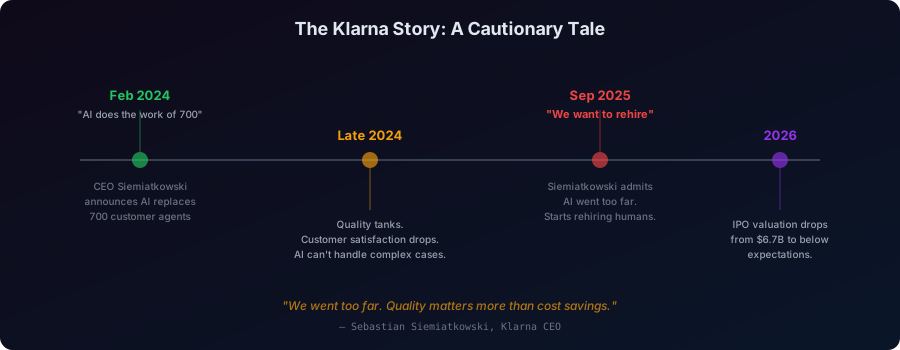
February 2024. Klarna CEO Sebastian Siemiatkowski announces, with the confidence of a man who has just discovered a cheat code, that their AI chatbot is doing the work of 700 customer service agents. Headlines everywhere. “Klarna replaces 700 employees with AI.” Tech Twitter goes wild. VCs start furiously updating their pitch decks.
The company cut headcount from 5,527 to 3,422. They celebrated $10 million in savings. They stopped hiring. The AI handled two-thirds to three-quarters of all customer interactions. It was the poster child for AI-driven efficiency.
Then reality called. Left a voicemail. Klarna didn’t pick up.
Customer satisfaction fell. Hard. The AI could handle “where’s my package” and “how do I return this.” It could not handle “I’ve been charged three times for something I returned two months ago and nobody is helping me and I want to scream.” Complex cases. Emotional cases. Cases that require a human being to say “yeah, that’s messed up, let me fix it” and actually mean it.
By September 2025, Siemiatkowski publicly admitted: “We focused too much on efficiency and cost. The result was lower quality, and that’s not sustainable.”
Klarna started rehiring humans.
The savings were real. The damage was also real. And it turns out customers don’t care about your cost structure — they care about whether someone actually solves their problem.
This isn’t just a Klarna story. 55% of companies that rushed to replace humans with AI now regret it, according to Forrester. Only 1 in 4 AI projects delivers on promised ROI. And only 1% of organizations consider themselves “mature” in AI deployment. But sure, let’s replace half the engineering team with Copilot.
Developer Trust in AI Code Is Collapsing
Here’s the thing that I keep coming back to.
The Stack Overflow 2025 survey found that trust in AI accuracy dropped from 40% to 29% in one year. Only 3% of developers report high trust in AI output. Meanwhile, 46% actively distrust it — up from 31% the year before.
And the most experienced developers are the most skeptical. Senior devs had the lowest “highly trust” rate (2.6%) and the highest “highly distrust” rate (20%). The people who’ve been doing this the longest trust AI the least.
So we have a technology that 92% of developers use, that 46% actively distrust, that measurably introduces more bugs, and that makes experienced developers slower. And everyone keeps using it.
Why?
Because it feels productive. Because typing less feels like doing more. Because getting a suggestion instantly feels faster than thinking for five minutes. Because watching code appear on your screen is viscerally satisfying in a way that staring at a blank editor isn’t.
The vibes are real. The productivity isn’t. And that gap — between what we feel and what the data shows — is where billions of dollars of enterprise spending currently lives.
Where AI Coding Tools Actually Help (and Where They Don’t)
No, we’re not screwed. But we need to stop lying to ourselves about what AI coding tools actually do well and what they don’t.
Where AI genuinely helps:
- Boilerplate and repetitive code. Writing the fourteenth API endpoint that follows the same pattern as the other thirteen? Let AI do it. This is where the real 10% productivity gain lives.
- Learning unfamiliar codebases. New to a project? AI can explain patterns, suggest approaches, and get you up to speed faster. Onboarding time gets cut roughly in half.
- First drafts and exploration. When you need to try three different approaches and pick the best one, AI can generate those drafts in minutes instead of hours.
- Tedious documentation and tests. Nobody loves writing boilerplate test cases. AI is good enough at this to free you for the interesting parts.
Where AI actively hurts:
- Complex architectural decisions in mature codebases. This is exactly where METR showed developers getting slower. AI doesn’t know your unwritten conventions, your team’s history, or why that weird workaround exists.
- Security-sensitive code. 2.74x more XSS vulnerabilities isn’t a rounding error. It’s a liability.
- Code that needs to be maintained long-term. AI generates code that looks clean but creates maintenance nightmares — duplicated logic, inconsistent patterns, zero consideration for how the next developer will understand it.
- Anything requiring judgment. AI can write code. It can’t decide whether to write code. Sometimes the right answer is “don’t build this feature.” AI will never tell you that.
How I Changed My AI Coding Workflow After the Data
I use AI coding tools every day. I’ve written extensively on this blog about Claude Code, Opus 4.6, and vibe coding workflows. I meant every word. AI is the most significant shift in how we write software since the IDE.
But after spending three weeks drowning in these studies, I changed some things.
I stopped accepting AI suggestions on autopilot. I used to tab-accept Copilot suggestions almost reflexively. Now I read them first. Actually read them. It’s slower. It’s also why I’ve caught three security issues in the last month that would’ve shipped otherwise.
I stopped using AI for code I need to deeply understand. If it’s a critical path, if it’s a security boundary, if it’s something that’ll haunt me at 3 AM — I write it myself. I use AI for the scaffolding, the boilerplate, the “I know what this should look like” code. Not for the “I need to think hard about this” code.
I started tracking my actual output, not my vibes. Number of features shipped. Bugs introduced. Time to completion. Not “how productive do I feel today?” Because apparently my feelings are a liar.
I stopped pretending AI replaces understanding. Vibe coding is powerful when you understand what you’re building. It’s dangerous when you don’t. The METR study showed this clearly: AI helps the least when you’re working on something you know deeply. Which means AI is most useful precisely when you know enough to evaluate its output — not as a replacement for knowing things, but as a force multiplier for knowledge you already have.
The AI Productivity Paradox: What the Data Actually Says
The AI productivity boom is real. It’s just smaller than we thought, and the costs are larger than we admitted.
92.6% of developers use AI. Productivity went up 10%. Bugs went up 41%. Security vulnerabilities nearly tripled. Code duplication increased 8x. Trust in AI output dropped to 29%. And experienced developers — the ones building the stuff that actually matters — are measurably slower with AI than without.
The tools are incredible. I’m not being sarcastic. Claude Code genuinely changed how I work. But the narrative that AI makes everything faster, better, and cheaper? That narrative is a sales pitch. The data tells a more complicated story. A story about vibes that feel productive and code that isn’t. About savings that create costs. About speed that introduces bugs. About automation that requires more human attention, not less.
We’re not in the “AI makes everything better” era. We’re in the “we need to figure out exactly where AI helps and where it hurts” era. And the sooner we stop vibing and start measuring, the sooner we’ll actually get the productivity gains everyone’s been promising.
If you want to see how vibe coding is affecting open source, that’s a whole other story. And if you’re interested in how we actually use AI tools effectively for iOS development with Claude Code, we’ve got you covered there too.
The vibes are great. The data is sobering. Choose your guide carefully.
Happy coding. ✦
Share this post
Comments
Leave a comment
Mario
Founder & CEOFounder of NativeFirst. Building native Apple apps with SwiftUI and a passion for great user experiences.